
修改SpringBoot的配置文件application.yaml后启动失败
经常碰到修改application.yaml文件之后,SpringBoot项目启动失败的,报错信息如下
Connected to the target VM, address: '127.0.0.1:7105', transport: 'socket'

21:12:59.122 [main] DEBUG org.springframework.boot.context.logging.ClasspathLoggingApplicationListener - Application failed to start with classpath: unknown

21:12:59.125 [main] ERROR org.springframework.boot.SpringApplication - Application run failed

java.lang.IllegalStateException: Failed to load property source from 'file:/G:/Program/JAVA_WorkSpace/project1/Cloud/redis-demo/target/classes/application.yaml' (classpath:/application.yaml)

	at org.springframework.boot.context.config.ConfigFileApplicationListener$Loader.load(ConfigFileApplicationListener.java:564)

	at org.springframework.boot.context.config.ConfigFileApplicationListener$Loader.loadForFileExtension(ConfigFileApplicationListener.java:501)

	at org.springframework.boot.context.config.ConfigFileApplicationListener$Loader.load(ConfigFileApplicationListener.java:471)

	at org.springframework.boot.context.config.ConfigFileApplicationListener$Loader.lambda$null$7(ConfigFileApplicationListener.java:450)

	at java.base/java.lang.Iterable.forEach(Iterable.java:75)

	at org.springframework.boot.context.config.ConfigFileApplicationListener$Loader.lambda$load$8(ConfigFileApplicationListener.java:450)

	at java.base/java.lang.Iterable.forEach(Iterable.java:75)

	at org.springframework.boot.context.config.ConfigFileApplicationListener$Loader.load(ConfigFileApplicationListener.java:447)

	at org.springframework.boot.context.config.ConfigFileApplicationListener$Loader.lambda$load$0(ConfigFileApplicationListener.java:350)

	at org.springframework.boot.context.config.FilteredPropertySource.apply(FilteredPropertySource.java:54)

	at org.springframework.boot.context.config.ConfigFileApplicationListener$Loader.load(ConfigFileApplicationListener.java:338)

	at org.springframework.boot.context.config.ConfigFileApplicationListener.addPropertySources(ConfigFileApplicationListener.java:229)

	at org.springframework.boot.context.config.ConfigFileApplicationListener.postProcessEnvironment(ConfigFileApplicationListener.java:213)

	at org.springframework.boot.context.config.ConfigFileApplicationListener.onApplicationEnvironmentPreparedEvent(ConfigFileApplicationListener.java:203)

	at org.springframework.boot.context.config.ConfigFileApplicationListener.onApplicationEvent(ConfigFileApplicationListener.java:191)

	at org.springframework.context.event.SimpleApplicationEventMulticaster.doInvokeListener(SimpleApplicationEventMulticaster.java:172)

	at org.springframework.context.event.SimpleApplicationEventMulticaster.invokeListener(SimpleApplicationEventMulticaster.java:165)

	at org.springframework.context.event.SimpleApplicationEventMulticaster.multicastEvent(SimpleApplicationEventMulticaster.java:139)

	at org.springframework.context.event.SimpleApplicationEventMulticaster.multicastEvent(SimpleApplicationEventMulticaster.java:127)

	at org.springframework.boot.context.event.EventPublishingRunListener.environmentPrepared(EventPublishingRunListener.java:80)

	at org.springframework.boot.SpringApplicationRunListeners.environmentPrepared(SpringApplicationRunListeners.java:53)

	at org.springframework.boot.SpringApplication.prepareEnvironment(SpringApplication.java:345)

	at org.springframework.boot.SpringApplication.run(SpringApplication.java:308)

	at org.springframework.boot.SpringApplication.run(SpringApplication.java:1237)

	at org.springframework.boot.SpringApplication.run(SpringApplication.java:1226)

	at cn.itcast.redisdemo.RedisDemoApplication.main(RedisDemoApplication.java:14)

Caused by: org.yaml.snakeyaml.error.YAMLException: java.nio.charset.MalformedInputException: Input length = 2

	at org.yaml.snakeyaml.reader.StreamReader.update(StreamReader.java:218)

	at org.yaml.snakeyaml.reader.StreamReader.ensureEnoughData(StreamReader.java:176)

	at org.yaml.snakeyaml.reader.StreamReader.ensureEnoughData(StreamReader.java:171)

	at org.yaml.snakeyaml.reader.StreamReader.peek(StreamReader.java:126)

	at org.yaml.snakeyaml.scanner.ScannerImpl.scanToNextToken(ScannerImpl.java:1177)

	at org.yaml.snakeyaml.scanner.ScannerImpl.fetchMoreTokens(ScannerImpl.java:287)

	at org.yaml.snakeyaml.scanner.ScannerImpl.checkToken(ScannerImpl.java:227)

	at org.yaml.snakeyaml.parser.ParserImpl$ParseImplicitDocumentStart.produce(ParserImpl.java:195)

	at org.yaml.snakeyaml.parser.ParserImpl.peekEvent(ParserImpl.java:158)

	at org.yaml.snakeyaml.parser.ParserImpl.checkEvent(ParserImpl.java:148)

	at org.yaml.snakeyaml.composer.Composer.checkNode(Composer.java:82)

	at org.yaml.snakeyaml.constructor.BaseConstructor.checkData(BaseConstructor.java:123)

	at org.yaml.snakeyaml.Yaml$1.hasNext(Yaml.java:489)

	at org.springframework.beans.factory.config.YamlProcessor.process(YamlProcessor.java:200)

	at org.springframework.beans.factory.config.YamlProcessor.process(YamlProcessor.java:164)

	at org.springframework.boot.env.OriginTrackedYamlLoader.load(OriginTrackedYamlLoader.java:82)

	at org.springframework.boot.env.YamlPropertySourceLoader.load(YamlPropertySourceLoader.java:50)

	at org.springframework.boot.context.config.ConfigFileApplicationListener$Loader.loadDocuments(ConfigFileApplicationListener.java:632)

	at org.springframework.boot.context.config.ConfigFileApplicationListener$Loader.load(ConfigFileApplicationListener.java:534)

	... 25 common frames omitted

Caused by: java.nio.charset.MalformedInputException: Input length = 2

	at java.base/java.nio.charset.CoderResult.throwException(CoderResult.java:274)

	at java.base/sun.nio.cs.StreamDecoder.implRead(StreamDecoder.java:326)

	at java.base/sun.nio.cs.StreamDecoder.read(StreamDecoder.java:188)

	at java.base/java.io.InputStreamReader.read(InputStreamReader.java:177)

	at org.yaml.snakeyaml.reader.UnicodeReader.read(UnicodeReader.java:125)

	at org.yaml.snakeyaml.reader.StreamReader.update(StreamReader.java:183)

	... 43 common frames omitted

Disconnected from the target VM, address: '127.0.0.1:7105', transport: 'socket'

Process finished with exit code 1
从【java.lang.IllegalStateException: Failed to load property source from 'file:/G:/Program/JAVA_WorkSpace/project1/Cloud/redis-demo/target/classes/application.yaml'】可以看出来是配置文件的问题,这个问题一般是配置文件编码格式不对。一般都是改了配置,加了一些中文注释之类的导致项目无法启动。
解决方案:
方案1:
删除非英文部分的字符
方案2:
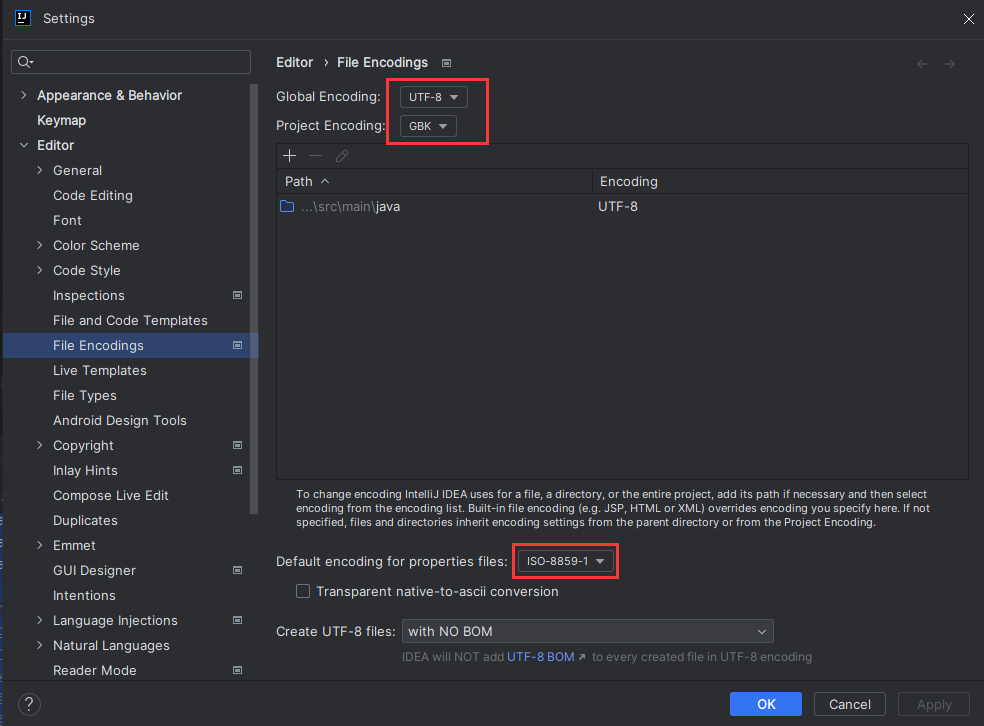
以IDEA为例,把圈起来的地方全都设置为UTF-8,然后重新启动。
修改SpringBoot的配置文件application.yaml后启动失败的更多相关文章
- xmind 8 安装后启动失败(未提示错误信息)
xmind 8 安装后启动失败 前言 家里的计算机也安装了xmind,启动之后界面显示xmind的启动图标,几秒之后启动图标消失(闪退了),然后留我一脸懵逼.想着卸载了安装一个新的应该没有问题 ...
- SpringBoot2配置文件application.yaml
源码基于SpringBoot 2.4.4 1.认识配置文件 1.1 配置文件的加载 创建SpringBoot项目的时候,会自动创建一个application.properties文件,该文件是Spri ...
- springboot中配置文件application.properties的理解
前言 Spring Boot使用"习惯优于配置"(项目中存在大量的配置,此外还内置了一个习惯性的配置,让你无需手动进行配置)的理念让你的项目快速运行起来.所以,我们要想把Sprin ...
- springboot中配置文件application.properties的配置详情,数据源配置
pring Boot使用了一个全局的配置文件application.properties,放在src/main/resources目录下或者类路径的/config下.Sping Boot的全局配置文件 ...
- SpringBoot(二) SpringBoot核心配置文件application.yml/properties
我们都知道在Spring中有着application.xml文件对Spring进行相关配置,通过web.xml中的contextConfigLocation指定application.xml文件所在位 ...
- SpringBoot 之 配置文件、yaml语法、配置注入、松散绑定
配置文件 SpringBoot 有两种配置文件格式,二选一即可,官方推荐 yaml: application.properties key=value的格式 application.yaml key: ...
- Elasticsearch修改network后启动失败
修改 /config/elasticsearch.yml(我的安装目录是:/var/www/elasticsearch-6.4.2/elasticsearch-6.4.2), network.host ...
- SpringBoot笔记--配置文件分类+yaml相关知识+读取配置文件内容
配置文件 要是需要使用自己的配置替换默认配置时,需要使用后缀名为application.properties或者application.yml(application.yaml)进行配置 当然,几个文 ...
- 修改 Docker 的 daemon.json后启动失败
创建Harbor要把register 换成Harbor地址 vim /etc/docker/daemon.json添加{ "insecure-registries":[" ...
- wampserver 安装后 启动失败的解决方法
安装后启动, 显示 发生未知的异常 wampmanager.exe .... 解决方法 === 其实下载页面说了,先下载 vc的运行库,页面上有链接, 他给的是vc10的,我按照做,失败 查了无数资 ...
随机推荐
- IntellJ Idea遇到Errors occurred while compiling module的解决方法
问题描述 Information:java: Errors occurred while compiling module '0-common' Information:javac 11 was us ...
- Spring(注解方式)简单入门
环境准备 maven jdk Spring Eclipse 项目创建 pom.xml <project xmlns="http://maven.apache.org/POM/4.0.0 ...
- [oeasy]python0085_ASCII之父_Bemer_COBOL_数据交换网络
编码进化 回忆上次内容 上次 回顾了 字符编码的 进化过程 IBM 在数字化过程中 作用 非常大 IBM 的 BCDIC 有 黑历史 6-bit的 BCDIC 直接进化成 8-bit的 EBCDIC ...
- oeasy教您玩转vim - 43 - # 替换模式
替换模式 回忆上节课内容 上次我们学到的最有用的就是c 他和d的区别就是删除之后进入到插入模式 c可以配合motion 可以用ciw来快速删除当前光标所在的单词 可i和a 配合的文字块 w wor ...
- 个人使用 sudo 方法
sudo 作用:允许 系统管理员 授予某些用户或用户组以 其他用户身份 运行某些或所有命令的权限 su 用于变更为其他使用者的身份的命令,一般需要键入该使用者的密码 sudo 则是对 su 使用的简化 ...
- python中基于tcp协议与udp的通信
python中基于tcp协议与udp的通信(数据传输) 一.TCP协议介绍 流式协议(以数据流的形式通信传输) 安全协议(收发信息都需收到确认信息才能完成收发,是一种双向通道的通信) tcp协议在 ...
- AI/机器学习(计算机视觉/NLP)方向面试复习1
1. 判断满二叉树 所有节点的度要么为0,要么为2,且所有的叶子节点都在最后一层. #include <iostream> using namespace std; class TreeN ...
- Jmeter函数助手36-P
P函数用于获取jmeter属性值.类似property函数 属性名称:填入jmeter的属性名称 默认值:缺省值,当获取属性值为空时则返回该值 1.填入属性名称获取属性值${__P(language, ...
- 【MongoDB】Re02 文档CRUD
三.文档操作(行记录) 不管comment集合是否存在,直接在comment集合中创建一份文档 > db.comment.insert({"articleid":" ...
- Parallel and Sequential Data Structures and Algorithms
并串行 从零开始考前突击并串行数据结构与算法 强烈建议和原教材参照着看 Introduction 本书的要点 定义问题 不同的算法解决 设计抽象数据类型和相应的数据结构实现 分析比较算法和数据类型的代 ...