
Netty学习摘记 —— 初识编解码器
本文参考
本篇文章是对《Netty In Action》一书第十章"编解码器框架"的学习摘记,主要内容为解码器和编码器
编解码器实际上是一种特殊的ChannelHandler,并被加入到ChannelPipline中
解码器ByteToMessageDecoder
decodes bytes in a stream-like fashion from one ByteBuf to an other Message type
抽象基类ByteToMessageDecoder将字节解码为消息(或者另一个字节序列),由于不知道远程节点是否会一次性地发送一个完整的消息,所以这个类会对入站数据进行缓冲,直到它准备好处理
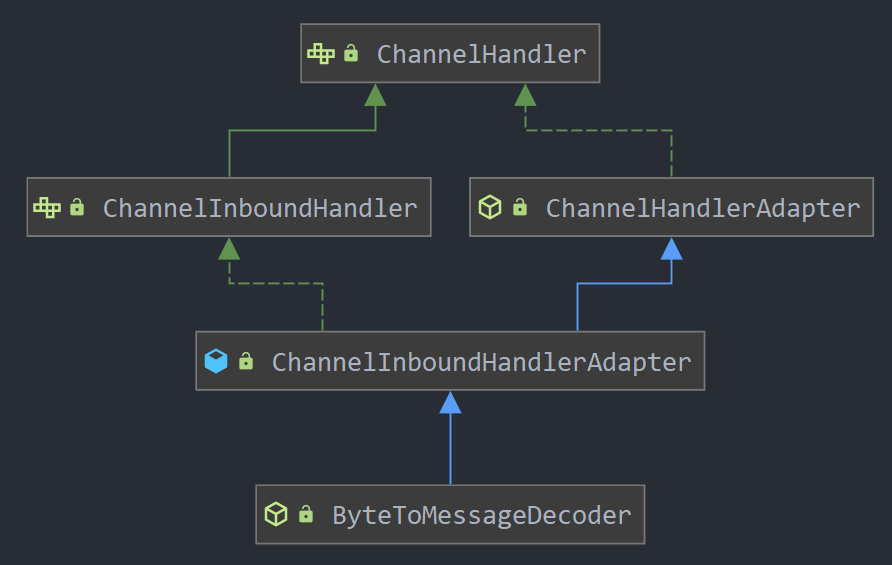
该抽象基类的继承关系如下图所示,其它解码器的继承关系也十分相似,例如下面会提到的另一个解码器抽象基类MessageToMessageDecoder
可见,解码器也能够像ChannelHandler一样注册到ChannelPipeline中,并且实现了自己的Channel和ChannelHandler生命周期事件,我们可以将多个解码器链接在一起,以实现任意复杂的转换逻辑
继承ByteToMessageDecoder必须实现decode()方法
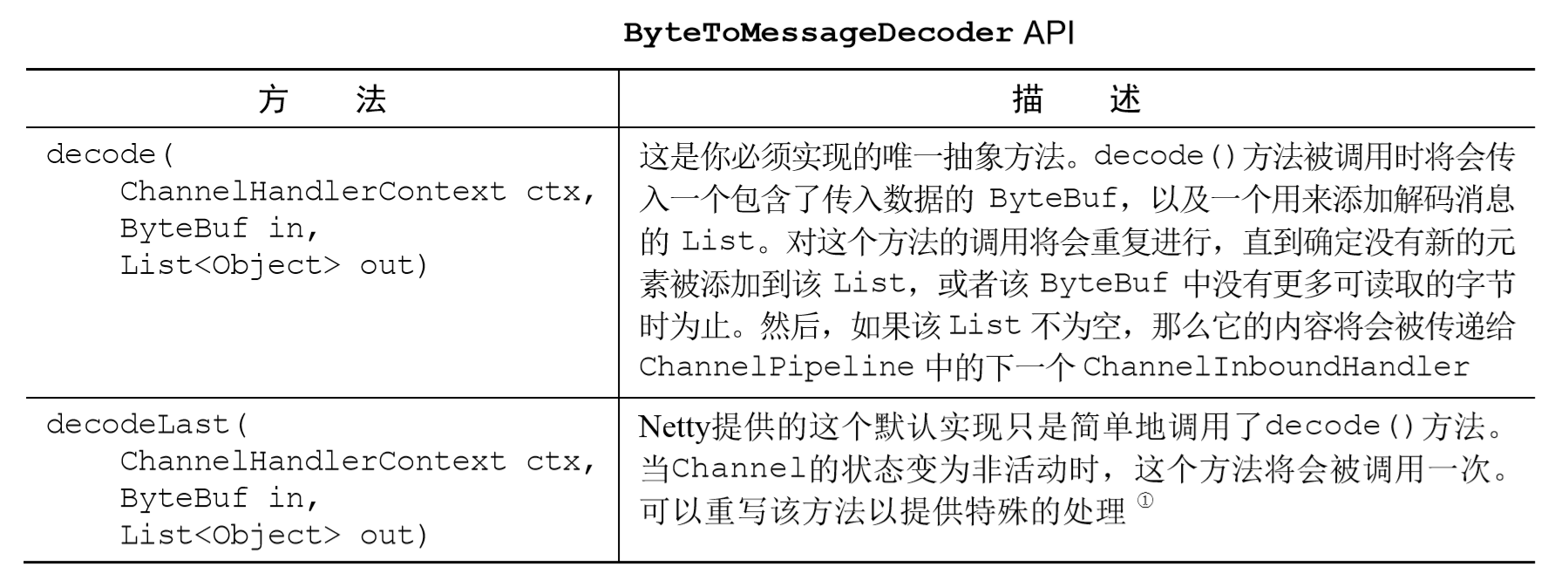
此处有一个特殊的docodeLast()方法,是其他编解码器所不具备的,当Channel的生命周期事件inactive被触发时调用
Is called one last time when the ChannelHandlerContext goes in-active. Which means the channelInactive(ChannelHandlerContext) was triggered. By default this will just call decode(ChannelHandlerContext, ByteBuf, List) but sub-classes may override this for some special cleanup operation.
我们在上一篇文章"单元测试"中已经应用过这个抽象基类,实现了当接收到可读字节数大于3时添加到解码消息队列的功能,并且每次读取3个字节进行单元测试。下面我们再给出一个每次从入站ByteBuf中读取 4 字节,将其解码为一个int,然后将它添加到一个List中的例子
//扩展ByteToMessageDecoder类,以将字节解码为特定的格式
public class ToIntegerDecoder extends ByteToMessageDecoder {
@Override
public void decode(ChannelHandlerContext ctx, ByteBuf in, List<Object> out)
throws Exception {
//检查是否至少有 4 字节可读(一个 int 的字节长度)
if (in.readableBytes() >= 4) {
//从入站 ByteBuf 中读取一个 int,并将其添加到解码消息的 List 中
out.add(in.readInt());
}
}
}
它的实现过程示意图如下
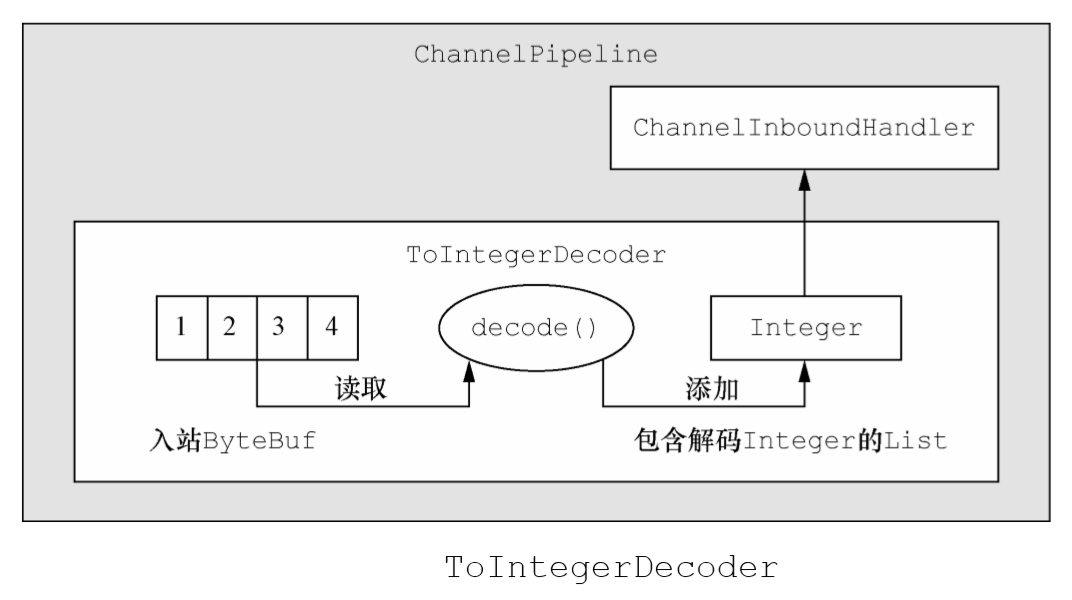
注意:
- 当帧长度不足时,不要移动readerIndex,防止下一次读取时仍然帧长不足
If a custom frame decoder is required, then one needs to be careful when implementing one with ByteToMessageDecoder. Ensure there are enough bytes in the buffer for a complete frame by checking ByteBuf.readableBytes(). If there are not enough bytes for a complete frame, return without modifying the reader index to allow more bytes to arrive.
- 原子类型的int在被添加到List中时,会被自动装箱为Integer
- 一旦消息被编码或者解码,它就会被ReferenceCountUtil.release(message)调用自动释放。如果你需要保留引用以便稍后使用,那么你可以调用ReferenceCountUtil.retain(message) 方法。这将会增加该引用计数,从而防止该消息被释放
Be aware that you need to call ReferenceCounted.retain() on messages that are just passed through if they are of type ReferenceCounted. This is needed as the MessageToMessageDecoder / MessageToMessageEncoder will call ReferenceCounted.release() on decoded / encoded messages.
- ByteToMessage抽象类不可被标记为@Sharable
- 为了防止消息没有被自动释放而造成内存泄漏,尽量从原消息创建派生缓冲区并调用retain()方法,增加原消息的ReferenceCount,如buf. duplicate().retain(),这在下面的MessageToMessageCodec代码示例中有体现
Be aware that sub-classes of ByteToMessageDecoder MUST NOT annotated with @Sharable.
Some methods such as ByteBuf.readBytes(int) will cause a memory leak if the returned buffer is not released or added to the out List. Use derived buffers like ByteBuf.readSlice(int) to avoid leaking memory.
解码器ReplayingDecoder
A specialized variation of ByteToMessageDecoder which enables implementation of a non-blocking decoder in the blocking I/O paradigm.
The biggest difference between ReplayingDecoder and ByteToMessageDecoder is that ReplayingDecoder allows you to implement the decode() and decodeLast() methods just like all required bytes were received already, rather than checking the availability of the required bytes.
通过ReplayingDecoder抽象基类可以简化上面的ByteToMessageDecoder示例代码
//扩展 ReplayingDecoder<Void> 以将字节解码为消息
public class ToIntegerDecoder2 extends ReplayingDecoder<Void> {
//传入的 ByteBuf 是 ReplayingDecoderByteBuf
@Override
public void decode(ChannelHandlerContext ctx, ByteBuf in, List<Object> out)
throws Exception {
//从入站 ByteBuf 中读取 一个 int,并将其添加到解码消息的 List 中
out.add(in.readInt());
}
}
这种简化得益于ReplayingDecoder自定义的ByteBuf实现 —— ReplayingDecoderByteBuf,如果没有足够的字节可用,这个readInt()方法的实现将会抛出一个特殊的Error —— Signal,在ReplayingDecoder中被捕获和处理,readerIndex将会被重置回Buffer的起始位置(除非使用checkpoint检查点机制),当有更多的数据可供读取时,decode()方法将会被再次调用
ReplayingDecoder passes a specialized ByteBuf implementation which throws an Error of certain type when there's not enough data in the buffer. In the ToIntegerDecoder above, you just assumed that there will be 4 or more bytes in the buffer when you call buf.readInt(). If there's really 4 bytes in the buffer, it will return the integer header as you expected. Otherwise, the Error will be raised and the control will be returned to ReplayingDecoder. If ReplayingDecoder catches the Error, then it will rewind the readerIndex of the buffer back to the 'initial' position (i.e. the beginning of the buffer) and call the decode(..) method again when more data is received into the buffer.
Please note that ReplayingDecoder always throws the same cached Error instance to avoid the overhead of creating a new Error and filling its stack trace for every throw.
注意:
- 并不是所有的 ByteBuf 操作都被支持,如果调用了一个不被支持的方法,将会抛出一个UnsupportedOperationException
Some buffer operations are prohibited.
- 尽管ReplayingDecoder每次抛出的都是同一个异常实例来减少开销,但是因为循环调用decode()方法,所以处理速度仍然稍慢于ByteToMessageDecoder
Performance can be worse if the network is slow and the message format is complicated unlike the example above. In this case, your decoder might have to decode the same part of the message over and over again.
解码器MessageToMessageDecoder
它和ByteToMessageDecoder的区别可从类名上直观地感受出来,用于实现两个消息格式之间的转换
继承MessageToMessageDecoder必须实现decode()方法
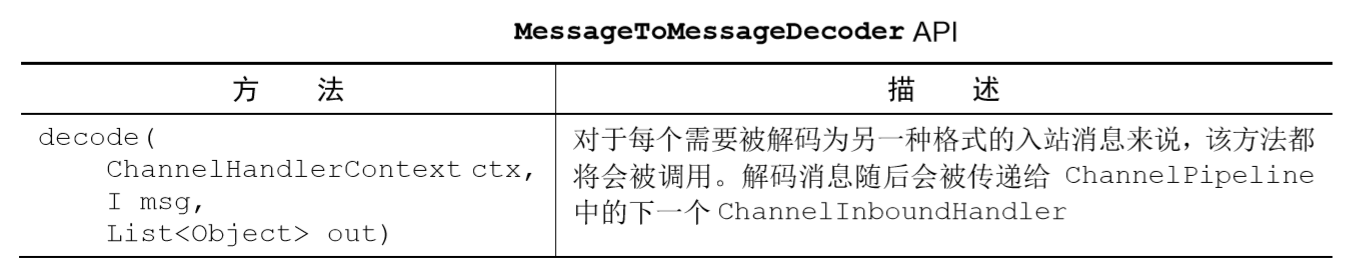
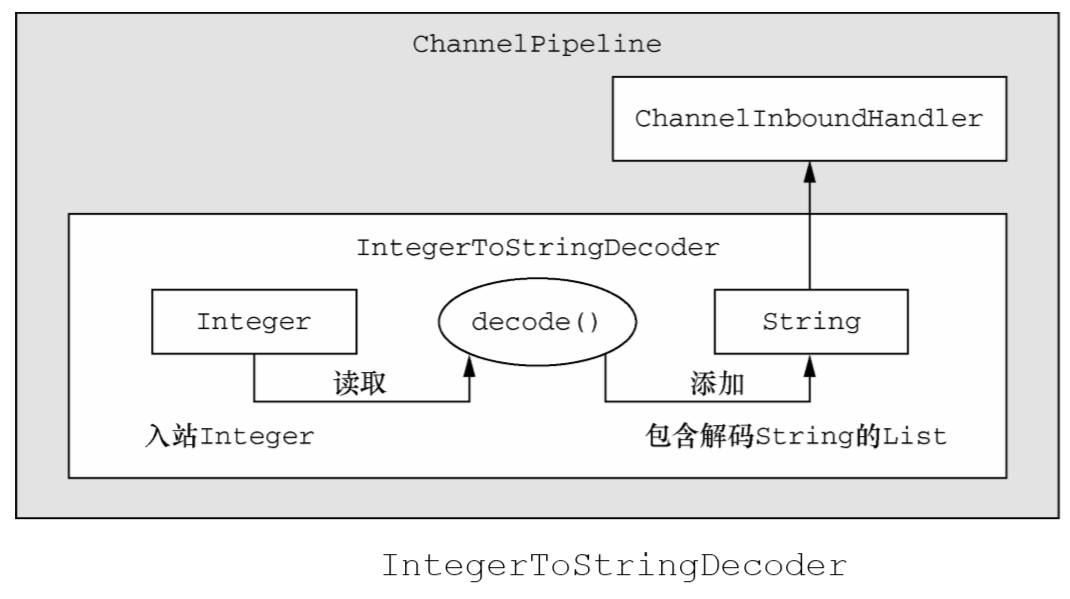
这里也给出一个简单的示例
//扩展了MessageToMessageDecoder<Integer>
public class IntegerToStringDecoder extends MessageToMessageDecoder<Integer> {
@Override
public void decode(ChannelHandlerContext ctx, Integer msg,
List<Object> out) throws Exception {
//将 Integer 消息转换为它的 String 表示,并将其添加到输出的 List 中
out.add(String.valueOf(msg));
}
}
它的实现过程和ByteToMessageDecoder类似
异常TooLongFrameException类
An DecoderException which is thrown when the length of the frame decoded is greater than the allowed maximum.
TooLongFrameException类将在帧超出指定的大小限制时抛出,防止解码器缓冲大量的数据以至于耗尽可用的内存
抛出的异常将在某个ChannelHandler的exceptionCaught()方法被捕获和处理,可以选择关闭该抛出异常的连接或者返回一个特殊的响应
//扩展 ByteToMessageDecoder 以将字节解码为消息
public class SafeByteToMessageDecoder extends ByteToMessageDecoder {
private static final int MAX_FRAME_SIZE = 1024;
@Override
public void decode(ChannelHandlerContext ctx, ByteBuf in,
List<Object> out) throws Exception {
int readable = in.readableBytes();
//检查缓冲区中是否有超过 MAX_FRAME_SIZE 个字节
if (readable > MAX_FRAME_SIZE) {
//跳过所有的可读字节,抛出 TooLongFrameException 并通知 ChannelHandler
in.skipBytes(readable);
throw new TooLongFrameException("Frame too big!");
}
// do something
// ...
}
}
编码器MessageToByteEncoder
MessageToByteEncoder继承了ChannelOutboundHandlerAdapter类。用于将字节转换为消息
继承ByteToMessageDecoder必须实现decode()方法
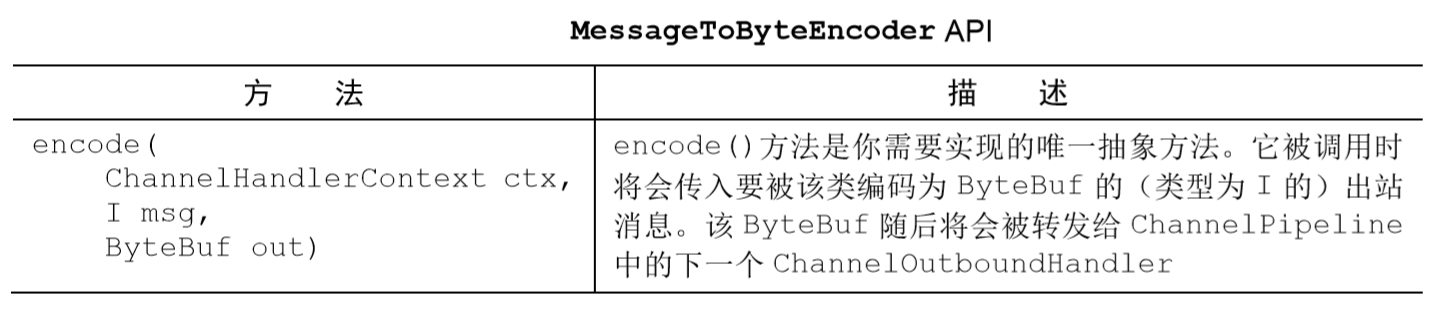
这个类只有一个方法,而解码器有两个。原因是解码器通常需要在 Channel 关闭之后产生最后一个消息(因此也就有了 decodeLast()方法)。这显然不适用于编码器的场景——在连接被关闭之后仍然产生一个消息是毫无意义的
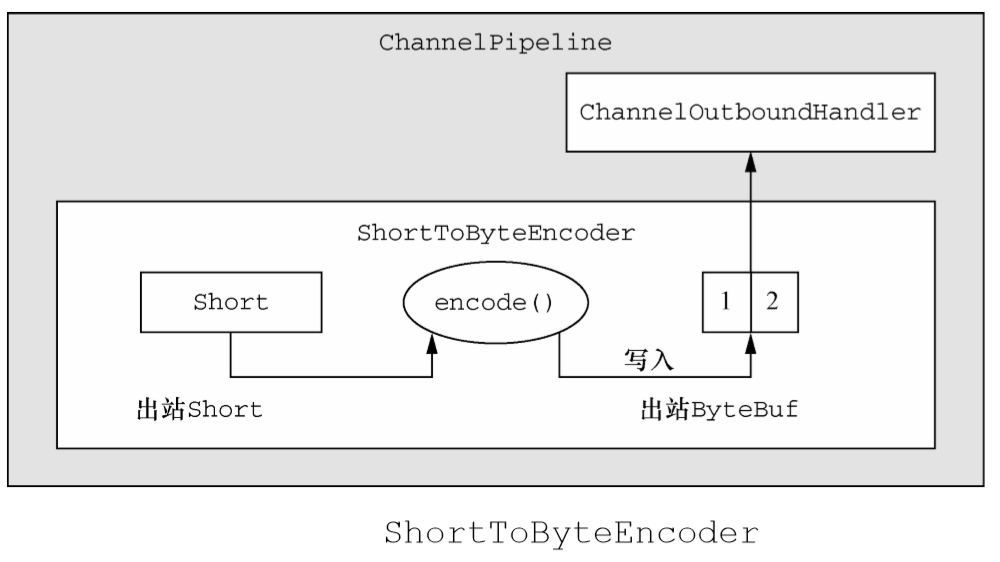
下面是一个简单的示例代码
//扩展了MessageToByteEncoder
public class ShortToByteEncoder extends MessageToByteEncoder<Short> {
@Override
public void encode(ChannelHandlerContext ctx, Short msg, ByteBuf out)
throws Exception {
//将 Short 写入 ByteBuf 中
out.writeShort(msg);
}
}
它的实现过程和decode类似
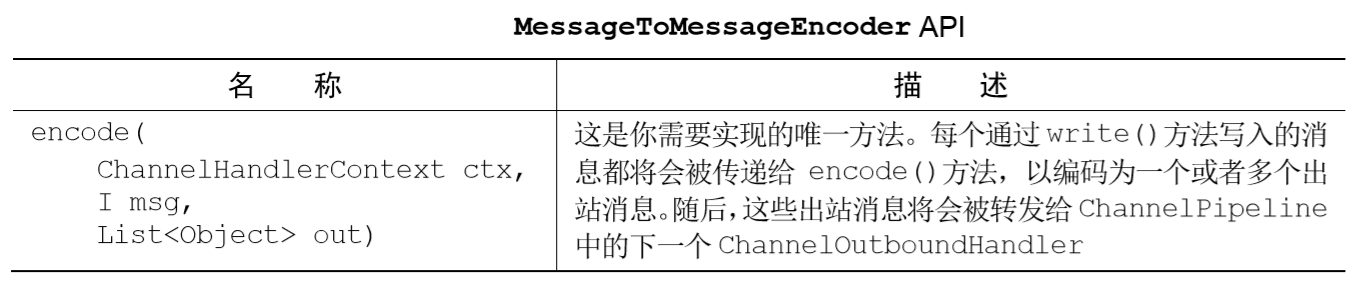
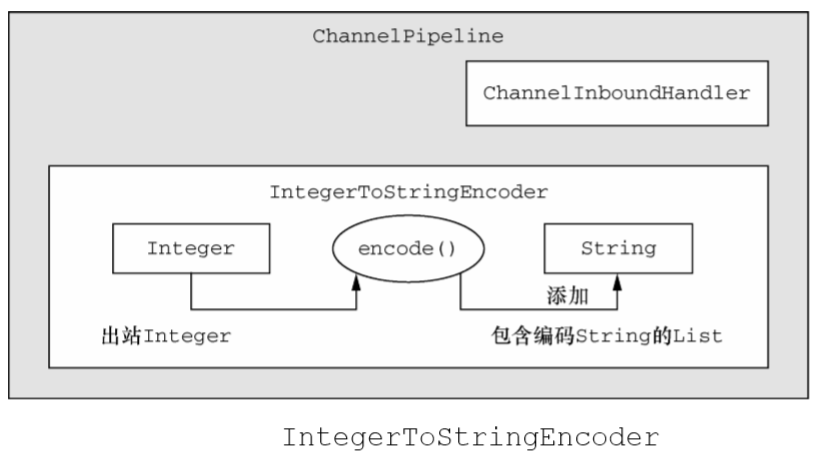
解码器MessageToMessageEncoder
同样,继承ByteToMessageDecoder必须实现decode()方法
下面是一个简单的代码示例
//扩展了 MessageToMessageEncoder
public class IntegerToStringEncoder extends MessageToMessageEncoder<Integer> {
@Override
public void encode(ChannelHandlerContext ctx, Integer msg,
List<Object> out) throws Exception {
//将 Integer 转换为 String,并将其添加到 List 中
out.add(String.valueOf(msg));
}
}
它的实现过程如下
编解码器ByteToMessageCodec
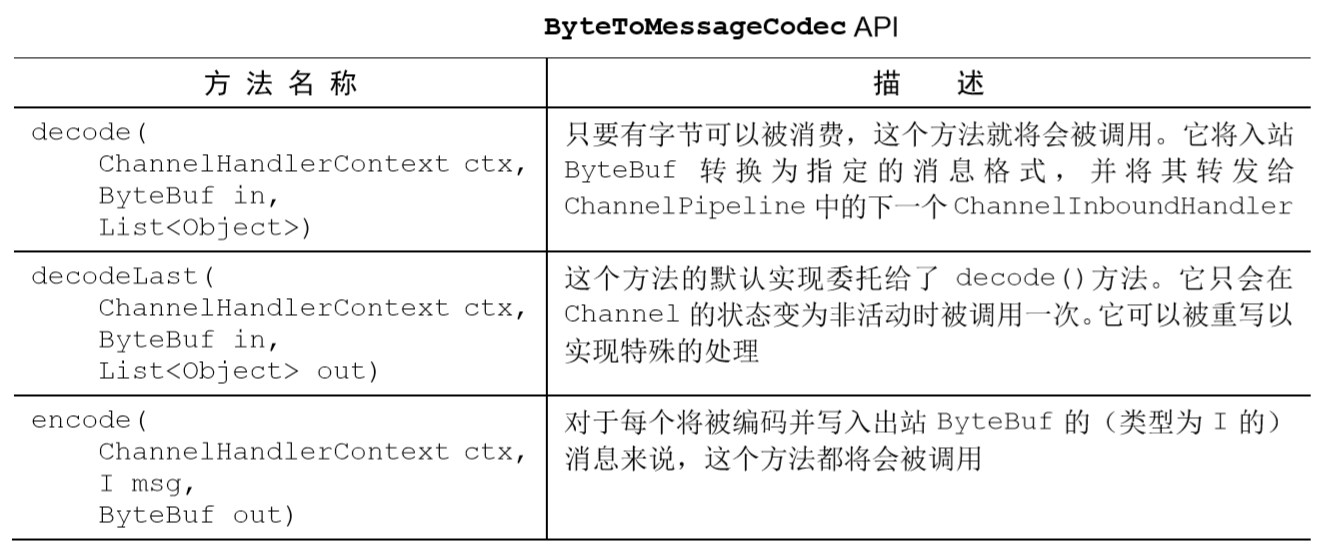
A Codec for on-the-fly encoding/decoding of bytes to messages and vise-versa. This can be thought of as a combination of ByteToMessageDecoder and MessageToByteEncoder.
可以看作是ByteToMessageDecoder和MessageToByteEncoder二者的结合,例如有下面一种实际应用场景:在某个 SMTP的实现中,编解码器将读取传入字节,并将它们解码为一个自定义的消息类型,如 SmtpRequest,而在接收端,当一个响应被创建时,将会产生一个SmtpResponse,被编码回字节以便进行传输
它的主要api也可看作是ByteToMessageDecoder和MessageToByteEncoder二者之和
编解码器MessageToMessageCodec
A Codec for on-the-fly encoding/decoding of message. This can be thought of as a combination of MessageToMessageDecoder and MessageToMessageEncoder.
可以看作是MessageToMessageDecoder和MessageToMessageEncoder二者的结合
它的主要api也可看作是MessageToMessageDecoder和MessageToMessageEncoder二者之和
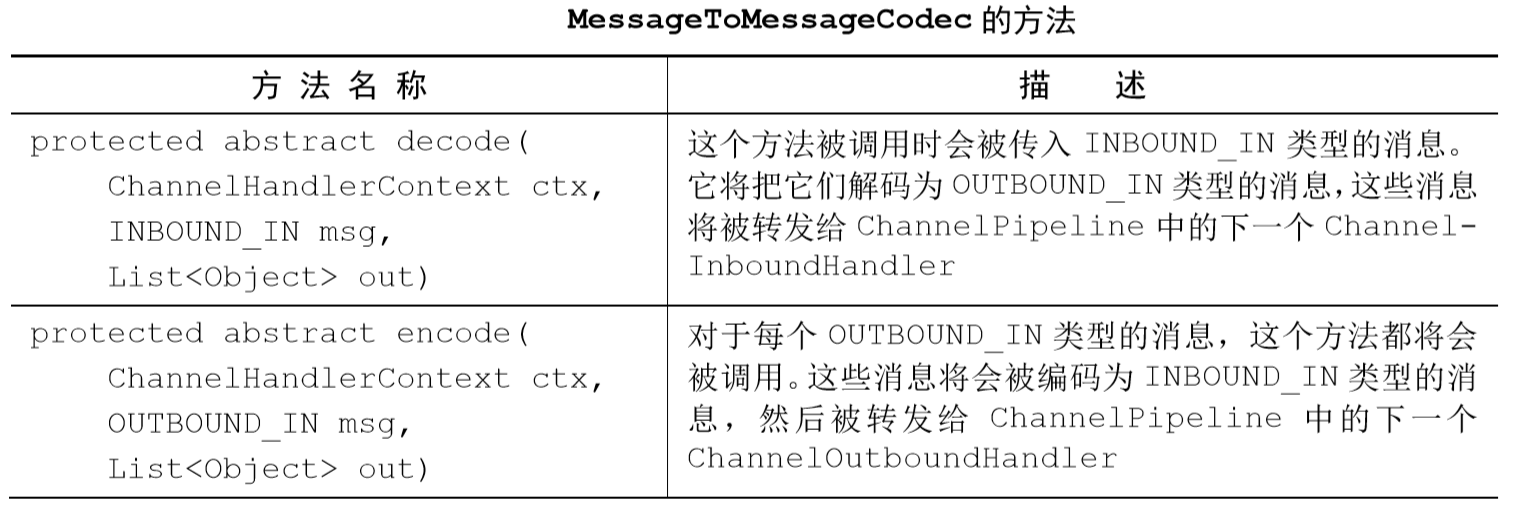
decode()方法是将INBOUND_IN类型的消息转换为OUTBOUND_IN类型的消息,而 encode()方法则进行它的逆向操作。将INBOUND_IN类型的消息看作是通过网络发送的类型, 而将OUTBOUND_IN类型的消息看作是应用程序所处理的类型
下面是一个WebSocket的代码示例
@Sharable
public class WebSocketConvertHandler extends
MessageToMessageCodec<WebSocketFrame,
WebSocketConvertHandler.MyWebSocketFrame> {
@Override
//将 MyWebSocketFrame 编码为指定的 WebSocketFrame 子类型
protected void encode(ChannelHandlerContext ctx,
WebSocketConvertHandler.MyWebSocketFrame msg,
List<Object> out) throws Exception {
ByteBuf payload = msg.getData().duplicate().retain();
//实例化一个指定子类型的 WebSocketFrame
switch (msg.getType()) {
case BINARY:
out.add(new BinaryWebSocketFrame(payload));
break;
case TEXT:
out.add(new TextWebSocketFrame(payload));
break;
case CLOSE:
out.add(new CloseWebSocketFrame(true, 0, payload));
break;
case CONTINUATION:
out.add(new ContinuationWebSocketFrame(payload));
break;
case PONG:
out.add(new PongWebSocketFrame(payload));
break;
case PING:
out.add(new PingWebSocketFrame(payload));
break;
default:
throw new IllegalStateException("Unsupported websocket msg " + msg);
}
}
@Override
//将 WebSocketFrame 解码为 MyWebSocketFrame,并设置 FrameType
protected void decode(ChannelHandlerContext ctx, WebSocketFrame msg,
List<Object> out) throws Exception {
ByteBuf payload = msg.content().duplicate().retain();
if (msg instanceof BinaryWebSocketFrame) {
out.add(new MyWebSocketFrame(
MyWebSocketFrame.FrameType.BINARY, payload));
} else
if (msg instanceof CloseWebSocketFrame) {
out.add(new MyWebSocketFrame (
MyWebSocketFrame.FrameType.CLOSE, payload));
} else
if (msg instanceof PingWebSocketFrame) {
out.add(new MyWebSocketFrame (
MyWebSocketFrame.FrameType.PING, payload));
} else
if (msg instanceof PongWebSocketFrame) {
out.add(new MyWebSocketFrame (
MyWebSocketFrame.FrameType.PONG, payload));
} else
if (msg instanceof TextWebSocketFrame) {
out.add(new MyWebSocketFrame (
MyWebSocketFrame.FrameType.TEXT, payload));
} else
if (msg instanceof ContinuationWebSocketFrame) {
out.add(new MyWebSocketFrame (
MyWebSocketFrame.FrameType.CONTINUATION, payload));
} else {
throw new IllegalStateException("Unsupported websocket msg " + msg);
}
}
//声明 WebSocketConvertHandler 所使用的 OUTBOUND_IN 类型
public static final class MyWebSocketFrame {
//定义拥有被包装的有效负载的 WebSocketFrame 的类型
public enum FrameType {
BINARY,
CLOSE,
PING,
PONG,
TEXT,
CONTINUATION
}
private final FrameType type;
private final ByteBuf data;
public MyWebSocketFrame(FrameType type, ByteBuf data) {
this.type = type;
this.data = data;
}
public FrameType getType() {
return type;
}
public ByteBuf getData() {
return data;
}
}
}
编解码器CombinedChannelDuplexHandler
Combines a ChannelInboundHandler and a ChannelOutboundHandler into one ChannelHandler.
结合一个解码器和编码器可能会对可重用性造成影响,因此CombinedChannelDuplexHandler能够将一个独立的编码器和一个独立的解码器组合起来构成一个自己的编解码器
public class ByteToCharDecoder extends ByteToMessageDecoder {
@Override
public void decode(ChannelHandlerContext ctx, ByteBuf in,
List<Object> out) throws Exception {
if (in.readableBytes() >= 2) {
//将一个或者多个 Character 对象添加到传出的 List 中
out.add(in.readChar());
}
}
}
public class CharToByteEncoder extends MessageToByteEncoder<Character> {
@Override
public void encode(ChannelHandlerContext ctx, Character msg,
ByteBuf out) throws Exception {
//将 Character 解码为 char,并将其写入到出站 ByteBuf 中
out.writeChar(msg);
}
}
public class CombinedByteCharCodec extends
CombinedChannelDuplexHandler<ByteToCharDecoder, CharToByteEncoder> {
public CombinedByteCharCodec() {
//将委托实例传递给父类
super(new ByteToCharDecoder(), new CharToByteEncoder());
}
}
Netty学习摘记 —— 初识编解码器的更多相关文章
- Netty学习摘记 —— 初步认识Netty核心组件
本文参考 我在博客内关于"Netty学习摘记"的系列文章主要是对<Netty in action>一书的学习摘记,文章中的代码也大多来自此书的github仓库,加上了一 ...
- Netty学习摘记 —— 预置SSL / HTTP / WebSocket编解码器
本文参考 本篇文章是对<Netty In Action>一书第十一章"预置的ChannelHandler和编解码器"的学习摘记,主要内容为通过 SSL/TLS 保护 N ...
- Netty学习摘记 —— 心跳机制 / 基于分隔符和长度的协议
本文参考 本篇文章是对<Netty In Action>一书第十一章"预置的ChannelHandler和编解码器"的学习摘记,主要内容为通过 SSL/TLS 保护 N ...
- Netty学习摘记 —— 深入了解Netty核心组件
本文参考 本篇文章是对<Netty In Action>一书第三章"Netty的组件和设计"的学习摘记,主要内容为Channel.EventLoop.ChannelFu ...
- Netty学习摘记 —— UDP广播事件
本文参考 本篇文章是对<Netty In Action>一书第十三章"使用UDP广播事件"的学习摘记,主要内容为广播应用程序的开发 消息POJO 我们将日志信息封装成名 ...
- Netty学习摘记 —— 简单WEB聊天室开发
本文参考 本篇文章是对<Netty In Action>一书第十二章"WebSocket"的学习摘记,主要内容为开发一个基于广播的WEB聊天室 聊天室工作过程 请求的 ...
- Netty学习摘记 —— 单元测试
本文参考 本篇文章是对<Netty In Action>一书第九章"单元测试"的学习摘记,主要内容为使用特殊的 Channel 实现--EmbeddedChannel来 ...
- Netty学习摘记 —— 再谈引导
本文参考 本篇文章是对<Netty In Action>一书第八章"引导"的学习摘记,主要内容为引导客户端和服务端.从channel内引导客户端.添加ChannelHa ...
- Netty学习摘记 —— 再谈EventLoop 和线程模型
本文参考 本篇文章是对<Netty In Action>一书第七章"EventLoop和线程模型"的学习摘记,主要内容为线程模型的概述.事件循环的概念和实现.任务调度和 ...
随机推荐
- linux设置 自定义脚本开机启动
本文原创,转载请标明出处 https://blog.csdn.net/qq2531246791/article/details/89036084 一. 赋予可执行权限 chmod +x /etc/rc ...
- oj教程--向量容器
vector向量容器不但像数组一样对元素进行随机访问,还能在尾部插入元素,是一个简单.高效的容器, 完全可以替代数组.vector具有内存自动管理的功能,对于元素的插入和删除,可动态调整所占用的内存空 ...
- js识别手机型号做业务判断
navigator为Window对象的一个属性,指向了一个包含浏览器相关信息的对象. navigatot中包含了一些常用到的属性,如: navigator.appVersion 浏览器的版本号 nav ...
- Vue 源码解读(12)—— patch
前言 前面我们说到,当组件更新时,实例化渲染 watcher 时传递的 updateComponent 方法会被执行: const updateComponent = () => { // 执行 ...
- 在矩池云上复现 CVPR 2018 LearningToCompare_FSL 环境
这是 CVPR 2018 的一篇少样本学习论文:Learning to Compare: Relation Network for Few-Shot Learning 源码地址:https://git ...
- 在java的继承中你是否有这样的疑惑?
一.问题 最近在写代码,有两个属性很相近的类,其中80%的属性(字段)都是一样的,剩下的才是各自不一样的,在设计的时候,采用了继承的方式,抽象除了一个父类,大概如下, 有FirstChild和Seco ...
- think php 7天免登录
<!DOCTYPE html> <html lang="en"> <head> <meta charset="UTF-8&quo ...
- 同步a表的数据到 b表
//同步a表的数据到 b表UPDATE a t1 JOIN b t2 ON t1.finance_id = t2.idSET t1.a_id = t2.a_id,t1.b_name = t2.b_na ...
- HBase海量数据高效入仓解决方案
一.方案背景 现阶段部分业务数据存储在HBase中,这部分数据体量较大,达到数十亿.大数据需要增量同步这部分业务数据到数据仓库中,进行离线分析,目前主要的同步方式是通过HBase的hive映射表来实现 ...
- 《手把手教你》系列基础篇(七十六)-java+ selenium自动化测试-框架设计基础-TestNG实现DDT - 下篇(详解教程)
1.简介 今天这一篇宏哥主要是结合实际工作中将遇到的测试场景和前边两篇学习的知识结合起来给大家讲解和分享一下,希望以后大家在以后遇到其他的测试场景也可以将自己的所学的知识应用到测试场景中. 2.测试场 ...