
C#自定义控件开发(2)—LED指示灯
下面来开发一个LED指示灯控件,如下:

设计属性包括:
外环宽度,外环间隙,内环间隙,颜色【五种】,当前值。
由于该LED指示灯基本是完全独立设计的,并不是在某个控件的基础上进行的开发,因此,这里使
用用户控件的方式进行开发。通过GDI+方式对控件进行绘制。GDI的坐标系如下:
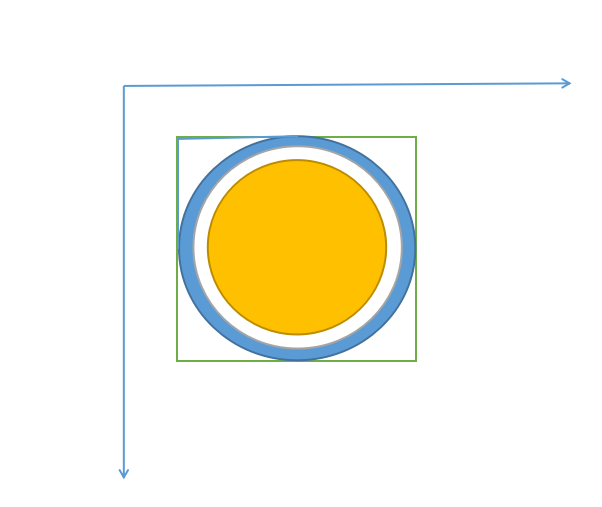
首先绘制外环,然后绘制内圆。
using System;

using System.Collections.Generic;

using System.ComponentModel;

using System.Data;

using System.Drawing;

using System.Linq;

using System.Text;

using System.Windows.Forms;

namespace JSControl

{

    public partial class LedControl : UserControl

    {

        public LedControl()

        {

            InitializeComponent();

            this.Size = new Size(40,40);//初始化控件大小

        }

        #region Filed

        private float outWidth = 4.0f;

        [Browsable(true)]

        [Category("自定义属性")]

        [Description("外环宽度")]

        public float OutWidth

        {

            get { return outWidth; }

            set

            {

                if (value <= 0 || value > 0.1f * this.Width)

                {

                    return;

                }

                outWidth = value;

                this.Invalidate();

            }

        }

        private float outGap = 3.0f;

        [Browsable(true)]

        [Category("自定义属性")]

        [Description("外环间隙")]

        public float OutGap

        {

            get { return outGap; }

            set

            {

                if (value <= 0 || value > 0.1f * this.Width || inGap <= value)

                {

                    return;

                }

                outGap = value;

                this.Invalidate();

            }

        }

        private float inGap = 8.0f;

        [Browsable(true)]

        [Category("自定义属性")]

        [Description("内环间隙")]

        public float InGap

        {

            get { return inGap; }

            set

            {

                if (value <= 0 || value <= outGap)

                {

                    return;

                }

                inGap = value;

                this.Invalidate();

            }

        }

        private Color color1 = Color.Gray;

        [Browsable(true)]

        [Category("自定义属性")]

        [Description("指示灯颜色")]

        public Color Color1

        {

            get { return color1; }

            set

            {

                color1 = value;

                this.Invalidate();

            }

        }

        private Color color2 = Color.LimeGreen;

        [Browsable(true)]

        [Category("自定义属性")]

        [Description("LimeGreen")]

        public Color Color2

        {

            get { return color2; }

            set

            {

                color2 = value;

                this.Invalidate();

            }

        }

        private Color color3 = Color.Red;

        [Browsable(true)]

        [Category("自定义属性")]

        [Description("Red")]

        public Color Color3

        {

            get { return color3; }

            set

            {

                color3 = value;

                this.Invalidate();

            }

        }

        private Color color4 = Color.DarkGoldenrod;

        [Browsable(true)]

        [Category("自定义属性")]

        [Description("DarkGoldenrod")]

        public Color Color4

        {

            get { return color4; }

            set

            {

                color4 = value;

                this.Invalidate();

            }

        }

        private Color color5 = Color.Blue;

        [Browsable(true)]

        [Category("自定义属性")]

        [Description("Blue")]

        public Color Color5

        {

            get { return color5; }

            set

            {

                color5 = value;

                this.Invalidate();

            }

        }

        //指示灯颜色索引

        private int currentValue = 0;

        [Browsable(true)]

        [Category("自定义属性")]

        [Description("当前值")]

        public int CurrentValue

        {

            get { return currentValue; }

            set

            {

                if (value > 4 || value < 0)

                {

                    return;

                }

                currentValue = value;

                this.Invalidate();

            }

        }

        #endregion

        #region verride

        private Graphics g;

        private Pen p;//画笔

        private SolidBrush sb;//画刷

        private int width;//控件宽度

        private int height;//控件高度

        protected override void OnPaint(PaintEventArgs e)

        {

            base.OnPaint(e);

            g = e.Graphics;

            width = this.Width;

            height = this.Height;

            //这里是为了设置渲染效果,消除锯齿,高效果显示

            g.TextRenderingHint = System.Drawing.Text.TextRenderingHint.ClearTypeGridFit;

            g.SmoothingMode = System.Drawing.Drawing2D.SmoothingMode.AntiAlias;

            g.SmoothingMode = System.Drawing.Drawing2D.SmoothingMode.HighQuality;

            if (inGap>0.5f*this.Height||inGap>0.5f*this.Width)

            {

                return;

            }

            Color CurrentColor = GetCurrentColor(this.currentValue);

            //设置画笔的宽度

            p = new Pen(CurrentColor, outWidth);

            //先绘制外环

            RectangleF rec = new RectangleF(outGap, outGap, this.width - 2 * outGap, this.height - 2 * outGap);

            g.DrawEllipse(p, rec);

            sb = new SolidBrush(CurrentColor);

            //再绘制内圆

            rec = new RectangleF(inGap, inGap, this.width - 2 * inGap, this.height - 2 * inGap);

            g.FillEllipse(sb, rec);

        }

        #endregion

        #region Private Methods

        /// <summary>

        /// 设置控件颜色

        /// </summary>

        /// <returns></returns>

        private Color GetCurrentColor(int currentColor)

        {

            List<Color> ColorList = new List<Color>();

            ColorList.Add(color1);

            ColorList.Add(color2);

            ColorList.Add(color3);

            ColorList.Add(color4);

            ColorList.Add(color5);

            return ColorList[currentValue];

        }

        #endregion

    }

}
this.Invalidate()表示进行重绘,调用它后将会执行
protected override void OnPaint(PaintEventArgs e){}中的代码进行重绘。
生成后,将和其他控件一样可以看到其属性。
C#自定义控件开发(2)—LED指示灯的更多相关文章
- newifi mini将led指示灯引出当gpio使用
之前买了个newifi mini的路由器,CPU是mt7620a的,有7个led指示灯.现在想要把控制led灯的gpio引出来,方便其他驱动或应用的开发. 一.硬件部分 1.联想路由 现在想要把USB ...
- iOS 自定义控件开发(中)
<iOS 自定义控件开发(上)> <iOS 自定义控件开发(中)> 接上篇iOS自定义控件开发之后,我们尝试另外一种. 在Xcode的右边,会看到如下的图 其中,上面有一个:C ...
- iOS 自定义控件开发(上)
工作需要,最近在进行iOS方面的图表工作.找了很多第三方库都无法实现效果,所以决定自己写一个控件. <iOS 自定义控件开发(上)> <iOS 自定义控件开发(中)> #0 目 ...
- C#自定义控件开发
自定义控件开发 一般而言,Visual Studio 2005中自带的几十种控件已经足够我们使用了,但是,在一些特殊的需求中,可能需要一些特殊的控件来与用户进行交互,这时,就需要我们自己开发新的.满足 ...
- led指示灯电路图大全(八款led指示灯电路设计原理图详解)
led指示灯电路图大全(八款led指示灯电路设计原理图详解) led指示灯电路图(一) 图1所示电路中只有两个元件,R选用1/6--1/8W碳膜电阻或金属膜电阻,阻值在1--300K之间. Ne为氖泡 ...
- 自定义控件开发的调试及DesignMode的状态处理
在开发Winform程序的时候,我们往往需要根据需要做一些自定义的控件模块,这样可以给系统模块重复利用,或者实现更好的效果等功能.但在使用的时候,我们又往往设计时刻发现一些莫名其妙的错误,那么我们该如 ...
- ZLComboBox自定义控件开发详解
[引言]距离上一回写博客已经有一些时日了,之前的爱莲iLinkIT系列主要是讲解了如何用NodeJS来实现一个简单的“文件传送”软件,属于JavaScript中在服务器端的应用. 今天,我们就回归到J ...
- .net的自定义JS控件,运用了 面向对象的思想 封装 了 控件(.net自定义控件开发的第一天)
大家好!我叫刘晶,很高兴你能看到我分享的文章!希望能对你有帮助! 首先我们来看下几个例子 ,就能看到 如何 自定义控件! 业务需求: 制作 一个 属于 自己的 按钮 对象 ,然后 像 ...
- s3c6410开发板LED驱动程序设计详细…
2 下面来看看tiny6410关于LED的原理图如图(1)所示: 图1 LED原理图 3 LED实例,代码如下所示:(代码摘自\光盘4\实验代码\3-3-1\src\main.c) main.c ...
随机推荐
- OpenJudge 1.5.28 分离整数的各个数位
28:分离整数的各个数位 总时间限制: 1000ms 内存限制: 65536kB 描述 给定一个整数,要求从个位开始分离出它的每一位数字. 输入 输入一个整数,整数在1到100000000之间. 输出 ...
- Electron学习(四)之应用程序打包
highlight: a11y-dark 写在前面 人真的是会变得越来越懒的,也正是人的惰性吧,真的是很讽刺. 关于这个应用程序的开发,断更了很久,但是代码部分还算没落下吧,终于在周一.周二终把这个应 ...
- 安卓平台RTMP推流或轻量级RTSP服务(摄像头或同屏)编码前数据接入类型总结
很多开发者在做Android平台RTMP推流或轻量级RTSP服务(摄像头或同屏)时,总感觉接口不够用,以大牛直播SDK为例 (Github) 我们来总结下,我们常规需要支持的编码前音视频数据有哪些类型 ...
- KingbaseES R3集群在线删除数据节点案例
案例说明: kingbaseES R3集群一主多从的架构,一般有两个节点是集群的管理节点,所有的节点都可以为数据节点:对于非管理节点的数据节点可以在线删除:但是对于管理节点,无法在线删除,如果删除管理 ...
- mysql_阻塞和死锁
什么是阻塞 由于不同锁之间的兼容关系,造成一个事务需要等待另一个事务释放其所占用的资源的现象 称为 阻塞 如何发现阻塞 mysql_8.0 SELECT waiting_pid as '被阻塞的线程' ...
- 若依代码生成的一个大坑 You have an error in your SQL syntax; check the manual that corresponds to your MySQL s
报错如下所示:显示我的xml文件的SQL语句有错 ### Error querying database. Cause: java.sql.SQLSyntaxErrorException: You h ...
- [Python]-sklearn.model_selection模块-处理数据集
拆分数据集train&test from sklearn.model_selection import train_test_split 可以按比例拆分数据集,分为train和test x_t ...
- CAP 6.2 版本发布通告
前言 今天,我们很高兴宣布 CAP 发布 6.2 版本正式版,在这个版本中我们主要做了一些功能优化,以及针对目前已经发现的几个 BUG 进行了修复了. 那么,接下来我们具体看一下吧. 总览 可能有些人 ...
- java多线程实例程序实现与思想
写程序之前要了解两个概念 1.什么是进程 2.什么是线程 搞清楚这两个概念之后 才能写好一个合适而不会太抽象的程序 对进程和线程的理解见链接: https://blog.csdn.net/new_te ...
- DevOps图示