
FastReport报表金额数字转大写问题
在使用FastReport报表打印的时候涉及到财务结算金额时,会用到大写,系统保存的都为数字,将数字转换为大写没有默认的系统内置函数,经过查阅资料,可通过对FastReport的页面设计代码修改实现:c#代码
using System;
using System.Collections;
using System.Collections.Generic;
using System.ComponentModel;
using System.Windows.Forms;
using System.Drawing;
using System.Data;
using FastReport;
using FastReport.Data;
using FastReport.Dialog;
using FastReport.Barcode;
using FastReport.Table;
using FastReport.Utils;
using System.Text.RegularExpressions; //首先引入命名空间
namespace FastReport
{
public class ReportScript
{
private string DaXie(decimal money)
{
string s =money.ToString("#L#E#D#C#K#E#D#C#J#E#D#C#I#E#D#C#H#E#D#C#G#E#D#C#F#E#D#C#.0B0A");
string d =Regex.Replace(s,@"((?<=-|^)[^1-9]*)|((?'z'0)[0A-E]*((?=[1-9])|(?'-z'(?=[F-L\.]|$))))|((?'b'[F-L])(?'z'0)[0A-L]*((?=[1-9])|(?'-z'(?=[\.]|$))))","${b}${z}");
return Regex.Replace(d,".",delegate(Match m){return"负元空零壹贰叁肆伍陆柒捌玖空空空空空空空分角拾佰仟万億兆京垓秭穰"[m.Value[0]-'-'].ToString();});
}
}
}
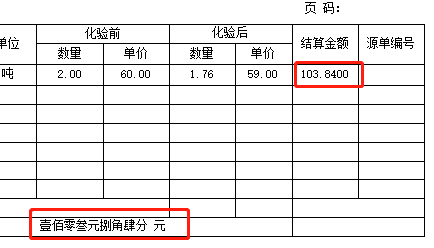
在使用的时候,报表绑定数据时 类似用 [DaXie([VW_TB_JieSuanDan.JieSuanMoney])] 元
效果如下:
FastReport报表金额数字转大写问题的更多相关文章
- 将金额数字转换为大写汉字的js函数
//将金额数字转换为大写汉字的函数 function convertCurrency(money) { //汉字的数字 var cnNums = new Array('零', '壹', '贰', '叁 ...
- java 金额数字转换大写算法
根据人民币大写金额规范,转换有几点要注意的: 阿拉伯数字中间有"0"时,中文大写金额中间可以只写一个"零"字.如¥1,409.50,应写成人民币壹仟肆佰零玖圆伍 ...
- C# 金额数字转中文的方法
/// <summary> /// 金额数字转大写(带小数点) /// </summary> public static string PriceToCn(decimal pr ...
- C#小写数字金额转换成大写人民币金额的算法
C#小写数字金额转换成大写人民币金额的算法 第一种方法: using System.Text.RegularExpressions;//首先引入命名空间 private string DaXie(st ...
- 【PHP】金额数字转换成大写形式
<?php /*将数字金额转成大写*/ function num_to_upper($num) { $d = array('零','壹','贰','叁','肆','伍','陆','柒','捌', ...
- 用python实现把数字人民币金额转换成大写的脚本程序
# -*- coding: utf-8 -*- def Num2MoneyFormat( change_number ): """ .转换数字为大写货币格式( forma ...
- FastReport报表控件使用技巧总结
FastReport报表控件使用技巧总结 1.FastReport中如何访问报表中的对象? 可以使用FindObject方法. TfrxMemoView(frxReport1.FindObject(' ...
- Delphi FastReport报表常用方法
Delphi FastReport报表常用方法 作者及来源: EasyPass - 博客园 收藏到→_→: 摘要: Delphi FastReport报表常用方法 点击这里! ...
- FastReport报表设计(仔细看)
FastReport报表设计 2011-06-16 16:56:19| 分类: 系统开发|举报|字号 订阅 下载LOFTER我的照片书 | 目录 5.1 前言 5.2 基本概念及操 ...
- FastReport报表设计
[转载]FastReport报表设计 (2012-10-24 20:37:26) 转载▼ 标签: 转载 原文地址:FastReport报表设计作者:小黑 FastReport报表设计 目录 5.1 ...
随机推荐
- 解决Fiddler设置的代理总是被自动关闭,The system proxy was changed
火绒剑过滤路径ProxyOverride 停用服务SangforSP https://www.cnblogs.com/jspider/p/15896503.html
- uni-app学习笔记之----目录认识
新建了一个项目之后,先简单认识目录结构 1.pages 存放项目的所有页面 2.static 存放静态资源 3.unpackage 存放项目打包之后生成的文件 4.App.vue 项目的根组 ...
- (03-14) synopsys中工具介绍,VCS,DC,PT等
https://blog.csdn.net/fangxiangeng/article/details/80981536 (1)Nlint 检查,spyglass (2)PT 静态时序检查 (3)Icc ...
- json 解析,JSON数组
public class resuleobj { public int returncode { get; set; } public string message { get; set; } pub ...
- Django的urls的配置
在一个请求到达的时候,最先达到的就是视图层,然后根据url映射到视图函数.这一部分我们来说明url的配置. 概述 为了给一个应用设计URL,你需要创建一个Python 模块,通常称为URLconf(U ...
- ABC 171 F - Strivore 【容斥】
https://atcoder.jp/contests/abc171/tasks/abc171_f 题意 给你一个数 \(k\) ,一个字符串 \(s\) (只包含小写字母) 定义一次操作:把任意小写 ...
- py13函数迭代器与生成器
"""什么是迭代器 迭代:更新换代(重复)的过程,每次的迭代都必须基于上一次的结果 迭代器:迭代取值的工具 为什么要用 迭代器给你提供了一种不依赖于索引取值的方式 如何用 ...
- win10休眠后自动开机解决方案
工作时候打开的文件挺多的,所以就懒得关机了,因为再开机还要再次打开这么多的工具文档之类 windows还有两项就是睡眠和休眠 睡眠会把所有内容保存到内存里面,但要维持这些内容不丢失就要一直给内存供电, ...
- Xmind 8 pro 破解版详细安装教程
写在前面的废话: 本来网上就有很多破解版的Xmind,也有安装教程,为什么我还要多此一举做这个教程呢? 因为实际安装后,使用起来总会有各种小瑕疵,最烦人的问题就是,xmind文件和软件无法关联,双击x ...
- nmap扫描结果保存 xml to html for windows
首先 Nmap扫描443端口并保存为xml报告输出 nmap -T5 -Pn -p 443 -iL C:\Users\loki\Desktop\443_Scan.txt -oX C:\Users\lo ...