
jquery-leonaScroll-1.2-自定义滚动条插件
leonaScroll-1.2.js
下载链接地址:http://share.weiyun.com/bb531dd6b1916c0023c176897182dc15 (密码:iZck)【内含压缩版】
介绍:是一款基于jquery框架,结合mousewheel插件实现的自定义竖向滚动条。
1、从js里将滚动条的背景、图片、颜色等样式提取出来,以方便用户自定义喜欢的样式
2、修复了滚动条同一页面二次加载时的错误
3、将其所有属性值变更为可选,简化了使用方法
使用方法:
一、建立好您的Html,引用jquery框架、mousewheel插件、leonaScroll-1.2.js插件
<script src="js/jquery-1.10.2.js" type="text/javascript"></script>
<script src="js/mousewheel.js" type="text/javascript"></script>
<script src="js/leonaScroll-source-1.2.js"></script>
二、使用$("").LeonaScroll()调用插件
三、属性使用说明:
多个属性之间用“ , ”分隔
属性值需要“{ }”括起来
属性默认有值,全部为可选,可根据需求设置合适的属性,以符合您的页面需求
(超出可显示文本区域时,自动显示滚动条)
leonaScroll-1.2.js——属性
- 类型:可选
- 默认:该方法选中元素的第一个子元素,并默认给其添加一个名为“scroll_text”class类名
- 解释:滚动文本类名,规则和css一样,如.class或#id或li
- 用法:$("Element").LeonaScroll({scroll_text :'.class'})
- 类型:可选
- 默认:20px
- 解释:滚动速度,数字越大速度越快
- 用法:$("Element").LeonaScroll({speed:50})
- 类型:可选
- 默认:14px
- 解释:滚动条整体宽度
- 用法:$("Element").LeonaScroll({sWidth :14})
- 类型:必须
- 默认:无
- 解释:上下微调按钮高度
- 用法:$("Element").LeonaScroll({updownH :20})
- 类型:可选
- 默认:调用方法选中元素宽-滚动条宽
- 解释:需要滚动区域的文本内容的宽度
- 用法:$("Element").LeonaScroll({text_width :false})
- 类型:可选
- 默认:true
- 解释:文本内容未超出时是否显示滚动条,显示为false,不显示为true
- 用法:$("Element").LeonaScroll({scrollbar :20})
- 类型:可选
- 默认:0px
- 解释:文本内容实际高度增加(加高),此属性是为了解决部分因动态数据加载慢于滚动条插件加载时,导致插件无法获取到准确的可显示文本高度,从而造成显示文本内容丢失。该属性可以硬性给可显示文本增加高度。
- 用法:$("Element").LeonaScroll({addHeight :40})
- 类型:可选
- 默认:true
- 解释:是否需要默认的美化样式,需要为true,不需要为false,如不需要则需要自定义美化样式,因此,该属性要和样式属性搭配使用,不能单独使用,否则会出现乱码,小白慎用,大神随意
- 用法:$("Element").LeonaScroll({autoStyle :false})
- 类型:autoStyle属性值为true是需要,为false则是必须
- 默认:黑色样式,如图:
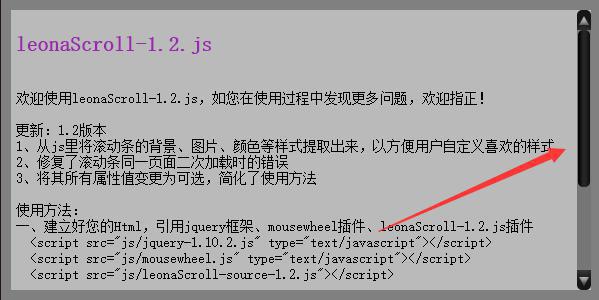
- 属性说明:
- scroll_UDCss:滚动条的上下微调按钮样式
- scroll_upCss:滚动条的上微调按钮样式
- scroll_upCssHover:滚动条的上微调按钮鼠标悬停样式
- scroll_downCss:滚动条的下微调按钮样式
- scroll_downCssHover:滚动条的下微调按钮鼠标悬停样式
- scroll_cenCss:滚动条中间轨道样式
- scroll_cenButtonCss:滚动条中间滑动按钮样式
- 图示说明:

附代码:
 $.fn.extend({

     LeonaScroll: function (parameter) {

         parameter = parameter === undefined ? {} : parameter;

         var Sname = $(this).selector;

         var allar = this;

         return this.each(function () {

             var havedefsrolltext = $(this).find(parameter.scroll_text).length;

             if (!havedefsrolltext) {

                 parameter.scroll_text = ".scroll_text";

                 $($(this).children().get(0)).addClass("scroll_text");

             }

             var elem = $(this),

                 celem = $(this).find(parameter.scroll_text),

                 index = Sname.replace(".", "").toUpperCase() + $(Sname).index($(this)),

                 text_hidden = $(elem).height(),

                 con_width = $(elem).width();

             $(elem).unbind();

             //添加滚动条Html

             var cansc = $(".leonaup" + index + "").length;

             if (!cansc) {

                 var scrollHTML = "";

                 scrollHTML += "<div class='scroll_up leonaup" + index + "'></div>";

                 scrollHTML += "<div class='scroll_cen leonacen" + index + "'><div class='scroll_button leonabutton" + index + "'></div></div>";

                 scrollHTML += "<div class='scroll_down leonadown" + index + "'></div>";

                 $(elem).append("<div class='scroll leonas" + index + "'> " + scrollHTML + "</div>");

             }

             //滚动条CSS--必要

             var sW = parameter.sWidth === undefined ? 14 : parameter.sWidth;

             var scrollStyle = Sname + "{ position: relative; overflow-y: hidden; clear:none;-moz-user-select: none; /*火狐*/ -webkit-user-select: none; /*webkit浏览器*/ -ms-user-select: none; /*IE10*/ -khtml-user-select: none; /*早期浏览器*/ user-select: none; }\r\n";

             scrollStyle += Sname + " " + parameter.scroll_text + "{width:" + (parameter.text_width === undefined ? (con_width - sW) : parameter.text_width) + "px; word-break: break-word; position: absolute; left: 0; top: 0; clear:both; }\r\n";

             scrollStyle += Sname + " .scroll { height:" + text_hidden + "px; float:right; }\r\n";

             scrollStyle += Sname + " .scroll," + Sname + " .scroll .scroll_cen, " + Sname + " .scroll .scroll_up, " + Sname + " .scroll .scroll_down { width:" + sW + "px; }\r\n";

             scrollStyle += Sname + " .scroll .scroll_up," + Sname + " .scroll .scroll_down {height:" + (parameter.updownH === undefined ? 20 : parameter.updownH) + "px; cursor: pointer;}\r\n";

             scrollStyle += Sname + " .scroll .scroll_cen { height:" + (text_hidden - (parameter.updownH === undefined ? 20 : parameter.updownH) * 2) + "px; position: relative; }\r\n";

             scrollStyle += Sname + " .scroll .scroll_cen .scroll_button { width:" + (sW - 2) + "px;  margin: 0px 1px;  position: absolute; cursor: pointer; }\r\n";

             //滚动条美化CSS--默认

             var needAutoStyle = parameter.autoStyle === undefined ? true : parameter.autoStyle;

             if (needAutoStyle == true) {

                 scrollStyle += Sname + " .scroll .scroll_up, .scroll .scroll_down { background-image: url(img/bw.png); background-color: #161515; background-repeat: no-repeat; }\r\n";

                 scrollStyle += Sname + " .scroll .scroll_up {  background-position: center 6px; border-radius: 5px 5px 0 0;} \r\n ";

                 scrollStyle += Sname + " .scroll .scroll_up:hover { background-position: center -11px;} \r\n";

                 scrollStyle += Sname + " .scroll .scroll_down { background-position: center -49px; border-radius: 0 0 5px 5px;} \r\n";

                 scrollStyle += Sname + " .scroll .scroll_down:hover { background-position: center -31px;}\r\n ";

                 scrollStyle += Sname + " .scroll .scroll_cen {  background-color: #777676;}\r\n ";

                 scrollStyle += Sname + " .scroll .scroll_cen .scroll_button {  background: url(img/tiao.jpg) repeat-y 0 0; border-radius: 5px;}\r\n ";

             } else {

                 scrollStyle += Sname + " .scroll .scroll_up, .scroll .scroll_down {" + parameter.scroll_UDCss + "}\r\n";

                 scrollStyle += Sname + " .scroll .scroll_up {" + parameter.scroll_upCss + "}\r\n ";

                 scrollStyle += Sname + " .scroll .scroll_up:hover {" + parameter.scroll_upCssHover + "}\r\n";

                 scrollStyle += Sname + " .scroll .scroll_down { " + parameter.scroll_downCss + "}\r\n";

                 scrollStyle += Sname + " .scroll .scroll_down:hover {" + parameter.scroll_downCssHover + "}\r\n ";

                 scrollStyle += Sname + " .scroll .scroll_cen {" + parameter.scroll_cenCss + "}\r\n ";

                 scrollStyle += Sname + " .scroll .scroll_cen .scroll_button { " + parameter.scroll_cenButtonCss + "}\r\n ";

             }

             if ($("#leonascrollStyle").length) {

                 $("#leonascrollStyle").html($("#leonascrollStyle").html() + scrollStyle);

             } else {

                 $("head").append("<style type='text/css' id='leonascrollStyle'>" + scrollStyle + "</style>");

             }

             var text_show = parameter.addHeight === undefined ? $(celem).height() : $(celem).height() + parameter.addHeight,

             scroll_b = $(".leonabutton" + index + ""),

             text_p = text_hidden / text_show,

             bH_max = $(".leonas" + index + " .leonacen" + index + "").height(),

             bH = text_p * bH_max;

             if (parameter.scrollbar == true || parameter.scrollbar === undefined) {

                 if (text_p >= 1) { $(".leonas" + index + "").css("display", "none"); } else { $(".leonas" + index + "").css("display", "block"); scroll_b.css("height", bH + "px"); }

             }

             //鼠标拖动div事件

             var needMove = false, mouseY = 0;

             scroll_b.mousedown(function (event) { needMove = true; var bH_Top = scroll_b.position().top; mouseY = event.pageY - bH_Top; });

             $(document).mouseup(function (event) { needMove = false; });

             $(document).mousemove(function (event) {

                 if (needMove) {

                     var sMouseY = event.pageY, bH_Top = sMouseY - mouseY, textY = bH_Top / bH_max * text_show;

                     if (bH_Top <= 0) {

                         scroll_b.css("top", 0);

                         $(celem).css("top", 0);

                         return;

                     }

                     if (bH_Top >= bH_max - bH) {

                         scroll_b.css("top", bH_max - bH);

                         $(celem).css("top", text_hidden - text_show);

                         return;

                     }

                     scroll_b.css("top", bH_Top); $(celem).css("top", -textY);

                 }

                 return;

             });

             //定义上下滚动规则

             function goGun(direction, timer) {

                 bH_Top = scroll_b.position().top;

                 var h = 0; h += (parameter.speed === undefined ? 20 : parameter.speed);

                 if (direction == 1) {

                     var Toping = bH_Top - h;

                     if (bH_Top <= 0 || Toping <= 0) {

                         scroll_b.css("top", 0);

                         $(celem).css("top", 0);

                         if (timer == 2) clearInterval(goThread);

                         return;

                     }

                     scroll_b.css("top", bH_Top - h);

                 }

                 if (direction == -1) {

                     var Downing = bH_Top + h;

                     if (bH_Top >= bH_max - bH || Downing >= bH_max - bH) {

                         scroll_b.css("top", bH_max - bH);

                         $(celem).css("top", text_hidden - text_show);

                         if (timer == 2) clearInterval(goThread);

                         return;

                     }

                     scroll_b.css("top", bH_Top + h);

                 }

                 var textY = bH_Top / bH_max * text_show;

                 $(celem).css("top", -textY);

             }

             //上下微调按钮事件

             function minTiao(minTB, d, t) {

                 var goThread = "";

                 minTB.mouseup(function () { clearInterval(goThread); });

                 minTB.mousedown(function () {

                     clearInterval(goThread);

                     goThread = setInterval(function () { goGun(d, t); }, 300);

                 });

                 minTB.click(function () { goGun(d); });

             }

             minTiao($(".leonaup" + index + ""), 1, 2);

             minTiao($(".leonadown" + index + ""), -1, 2);

             //滚轮事件

             if (text_p < 1) {

                 $(elem).bind("mousewheel", function (event, delta, deltaX, deltaY) {

                     if (cansc <= 1) {

                         if (delta == 1) {

                             goGun(1, 0);

                             if (scroll_b.position().top != 0)

                                 return false;

                         } if (delta == -1) {

                             goGun(-1, 0);

                             if (Math.ceil(scroll_b.position().top) != Math.ceil(bH_max - bH))

                                 return false;

                         }

                     }

                 });

             };

         });

     }

 });
作者:leona
jquery-leonaScroll-1.2-自定义滚动条插件的更多相关文章
- javascript自定义滚动条插件,几行代码的事儿
在实际项目中,经常由于浏览器自带的滚动条样式太戳,而且在各个浏览器中显示不一样,所以我们不得不去实现自定义的滚动条,今天我就用最少的代码实现了一个自定义滚动条,代码量区区只有几十行,使用起来也非常方便 ...
- Jquery自定义滚动条插件
下载地址:http://files.cnblogs.com/files/LoveOrHate/jquery.nicescroll.min.js <script src="jquery. ...
- JavaScript学习笔记- 自定义滚动条插件
此滚动条仅支持竖向(Y轴) 一.Css /*这里是让用户鼠标在里面不能选中文字,避免拖动的时候出错*/ body { -moz-user-select: none; /*火狐*/ -webkit-us ...
- JavaScript-JQ实现自定义滚动条插件1.0
此滚动条仅支持竖向(Y轴) 一.Css /*这里是让用户鼠标在里面不能选中文字,避免拖动的时候出错*/ body { -moz-user-select: none; /*火狐*/ -webkit-us ...
- 自定义滚动条插件 mCustomScrollbar 使用介绍
引用有心的学士笔记 http://www.wufangbo.com/mcustomscrollbar/ http://www.jianshu.com/p/550466260856 官网地址 http: ...
- jQuery自定义滚动条样式插件mCustomScrollbar
如果你构建一个很有特色和创意的网页,那么肯定希望定义网页中的滚动条样式,这方面的 jQuery 插件比较不错的,有两个:jScrollPane 和 mCustomScrollbar. 关于 jScro ...
- jquery自定义滚动条 鼠标移入或滚轮时显示 鼠标离开或悬停超时时隐藏
一.需求: 我需要做一个多媒体播放页面,左侧为播放列表,右侧为播放器.为了避免系统滚动条把列表和播放器隔断开,左侧列表的滚动条需要自定义,并且滚动停止和鼠标离开时要隐藏掉. 二.他山之石: 案例来自h ...
- 自定义滚动条 - mCustomScrollbar
项目中需要使用自定义滚动条,但是试用了很多都功能不够全,今天发现一个比较全而且用法很简单的 -- mCustomScrollbar http://manos.malihu.gr/jquery-cust ...
- 自定义滚动条mCustomScrollbar
mCustomScrollbar 是个基于 jQuery UI 的自定义滚动条插件,它可以让你灵活的通过 CSS 定义网页的滚动条,并且垂直和水平两个方向的滚动条都可以定义,它通过 Brandon A ...
- 自定义滚动条样式(jQuery插件、Webkit、IE)
-------------jQuery滚动条插件------------- http://manos.malihu.gr/tuts/jquery_custom_scrollbar.html http: ...
随机推荐
- .html(),.text()和.val()的差异总结
.html(),.text(),.val()三种方法都是用来读取选定元素的内容:只不过.html()是用来读取元素的html内容(包括html标签),.text()用来读取元素的纯文本内容,包括其后代 ...
- SU54 新建视图簇 维护数据表
由于一些数据表的数据比较重要,不允许直接查看数据表中的数据或者通过SM30进行维护, 故可以通过新建一个视图簇的方式来实现,然后通过程序调用这个视图簇,来进行数据的维护. 运行事务码SE54 最后通过 ...
- UITextField的代理方法:textField:shouldChangeCharactersInRange:replacementString
原文链接:http://www.cnblogs.com/zhanggui/p/6101813.html 这个我在开发的过程中用到的次数最多,因此这里就简单对其进行分析.先看看Command+点击 弹出 ...
- Native与H5交互的一些解决方法
一. 原生代码中直接加载页面 1. 具体案例 加载本地/网络HTML5作为功能介绍页 2. 代码示例 //本地 -(void)loadLocalPage:(UIWebView*)webVi ...
- Vs2013 html5开发WP8.1 APP之jquery
仿安卓原生界面,先使用JQM,最新的JQM使用了JQ1.8.5 然后在WP8以上就会遇到动态创建控件的安全性问题 换成JQ2.X即可,但在WP8.1中一定不要删除了 <script src=&q ...
- scrollWidth,clientWidth,offsetWidth的区别
通过一个demo测试这三个属性的差别. 说明: scrollWidth:对象的实际内容的宽度,不包边线宽度,会随对象中内容超过可视区后而变大. clientWidth:对象内容的可视区的宽度,不包 ...
- TOP命令各个参数代表意义详解
Top命令是Linux下常用的系统性能分析工具,能实时查看系统中各个进程资源占用情况. top - 16:24:25 up 284 days, 4:59, 1 user, load average: ...
- kattle 发送post请求
一.简介 kattle是一款国外开源的ETL工具,纯java编写,可以在Window.Linux.Unix上运行,数据抽取高效稳定.它允许你管理来自不同数据库的数据,通过提供一个图形化的用户环境来描述 ...
- 【转】SpringMVC中DispatcherServlet配置中url-pattern 配置/*和/的区别
原文地址:http://m.blog.csdn.net/blog/liuxiao723846/43733287 在使用springmvc时,都会在web.xml中配置一个dispatchservlet ...
- 在macOS Sierra 10.12搭建PHP开发环境
macOS Sierra 11.12 已经帮我们预装了 Ruby.PHP(5.6).Perl.Python 等常用的脚本语言,以及 Apache HTTP 服务器.由于 nginx 既能作为 HTTP ...