
屎上最全vue-pdf+Springboot与aspose-words整合,开箱即用
前言
⏲️本文阅读时长:约10分钟
主要目标:
1.实现Springboot与aspose-words整合,填充word模板并转化PDF;
2.前端vue整合vue-pdf实现PDF预览及下载
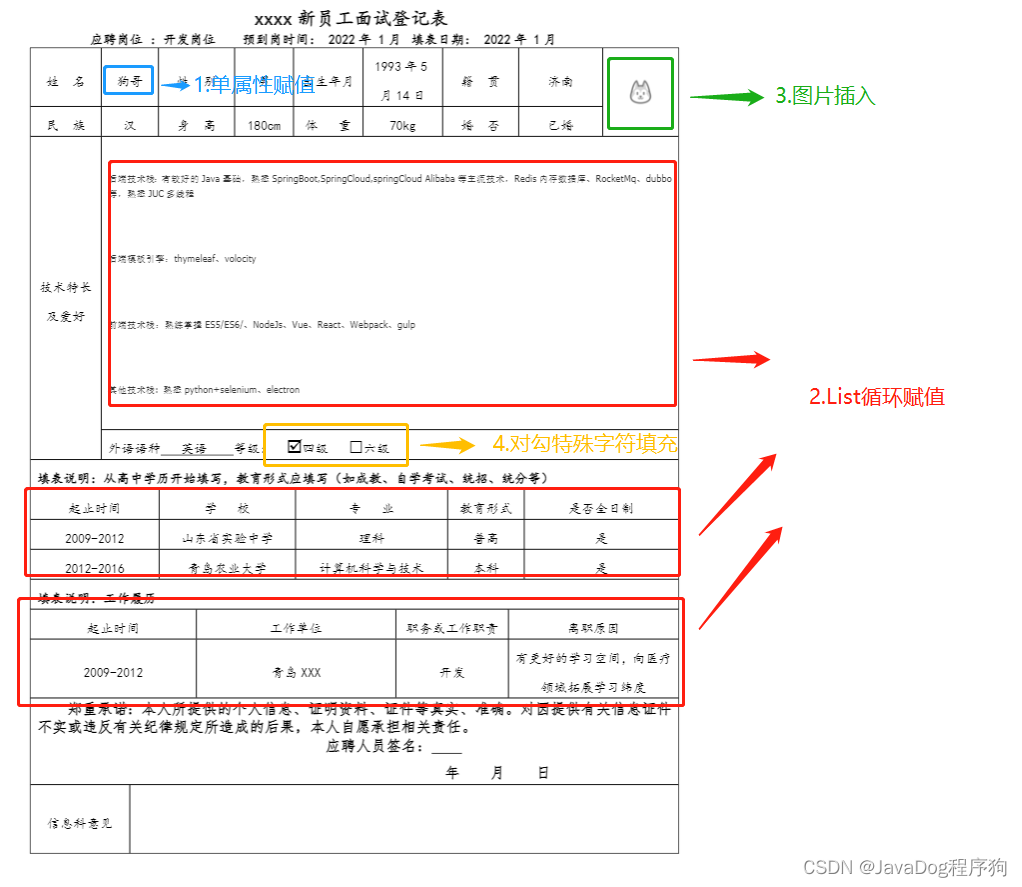
word模板重点(详见图示)
1.单属性赋值
2.List循环赋值
3.图片插入
4.对勾特殊符号插入
干货代码
源码
https://gitee.com/javadog-net/boot-apose.git
| 文件夹 | 描述 |
|---|---|
| boot-apose | java后台 |
| vue-apose | 前端vue |
对应工具下载
| 工具 | 描述| 地址|
| ----- | ----- |
| aspose-words-19.1| word三方库|https://download.csdn.net/download/baidu_25986059/85390408 |
| javadog-vue-pdf| 因原版vue-pdf有兼容错误,此版本为本人修订自用版| https://www.npmjs.com/package/javadog-vue-pdf|
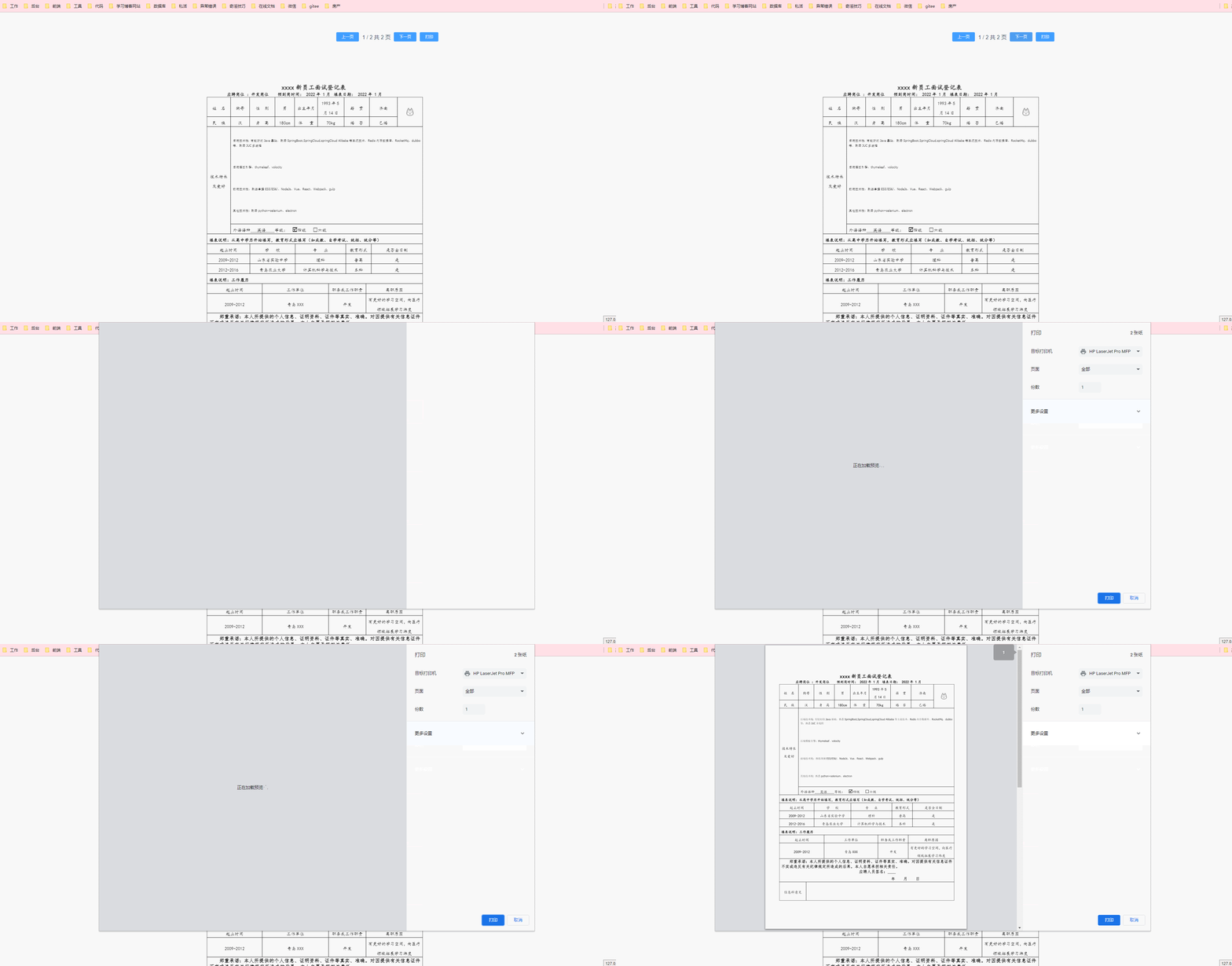
结果预览
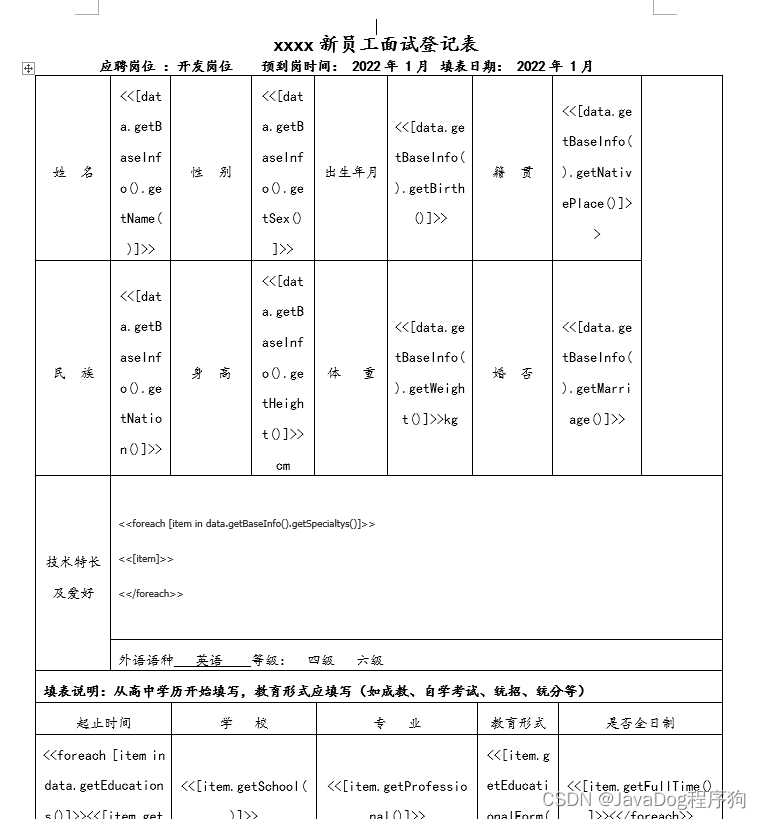
模板填充前空word模板

代码填充后word模板
web端vue预览的html的pdf

最终填充后下载的pdf

技术涉及
♂️后端框架
| 技术 | 名称 | 参考网站 |
|---|---|---|
| Spring Boot | MVC框架 | https://spring.io/projects/spring-boot |
| Maven | 项目构建 | http://maven.apache.org |
| aspose-words | 本地依赖word工具包 | https://download.csdn.net/download/baidu_25986059/85390408 |
| lombok | Java库 | https://projectlombok.org/ |
| hutool | 工具类 | http://hutool.mydoc.io |
♀️前端框架
| 技术 | 名称 | 参考网站 |
| ----- | ----- |
| VUE| MVVM框架 | https://cn.vuejs.org// |
| Element UI| UI库 | https://element.eleme.cn/2.0/#/zh-CN |
| javadog-vue-pdf| PDF文件在线预览库(个人修复兼容版) | https://www.npmjs.com/package/javadog-vue-pdf |
| axios| 基于promise网络请求库 | http://www.axios-js.com/ |
正文
虽然浪费的时间有点多,不过磨刀不误砍柴工
前置条件
- 后台springboot基础项目
- vue基础项目
如没有基础代码可以直接下载狗哥Gitee源码
步骤解析
后台
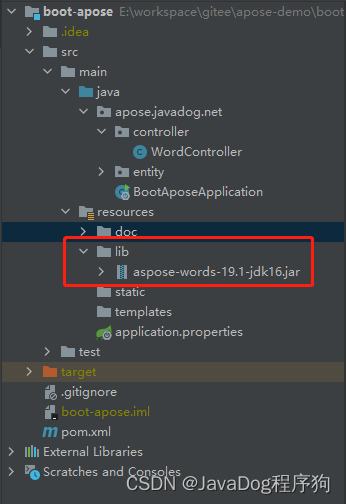
1.下载对应的aspose-words-19.1-jdk16.jar,加入POM本地依赖
因原版收费且会有水印等不确定因素,直接下载jar包本地依赖或者上传私服
 <!-- 本地依赖 aspose-words-->

        <dependency>

            <groupId>com.aspose</groupId>

            <artifactId>aspose-words</artifactId>

            <classifier>jdk16</classifier>

            <scope>system</scope>

            <version>1.0</version>

            <systemPath>${project.basedir}/src/main/resources/lib/aspose-words-19.1-jdk16.jar</systemPath>

        </dependency>
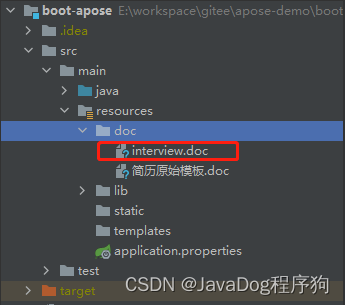
2.放置模板文件到资源路径下
3.controller读取模板文件并填充数据
- 读取模板并将输入流转为doc,并设置文件名及返回类型
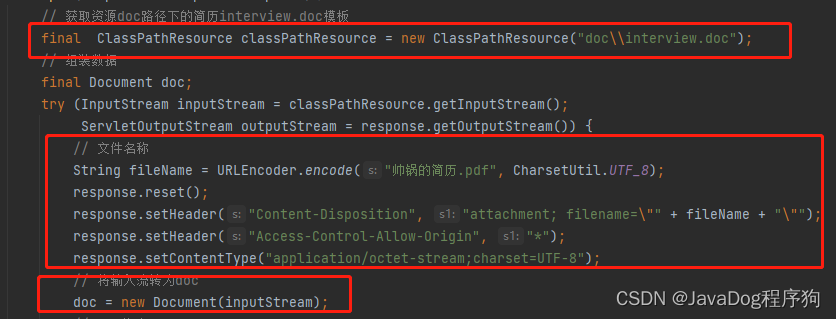
- 定位【照片】书签位置,插入图片

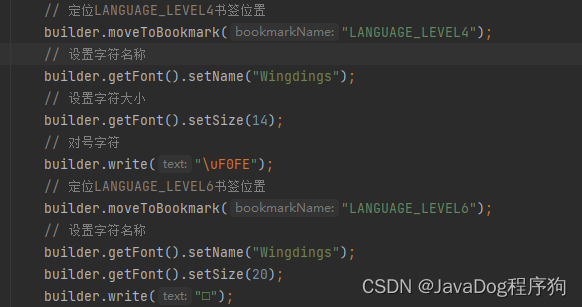
- 定位【等级】书签位置,插入对应字符
书签插入参考如下
找到需要插入的图片的地方,鼠标焦点聚焦
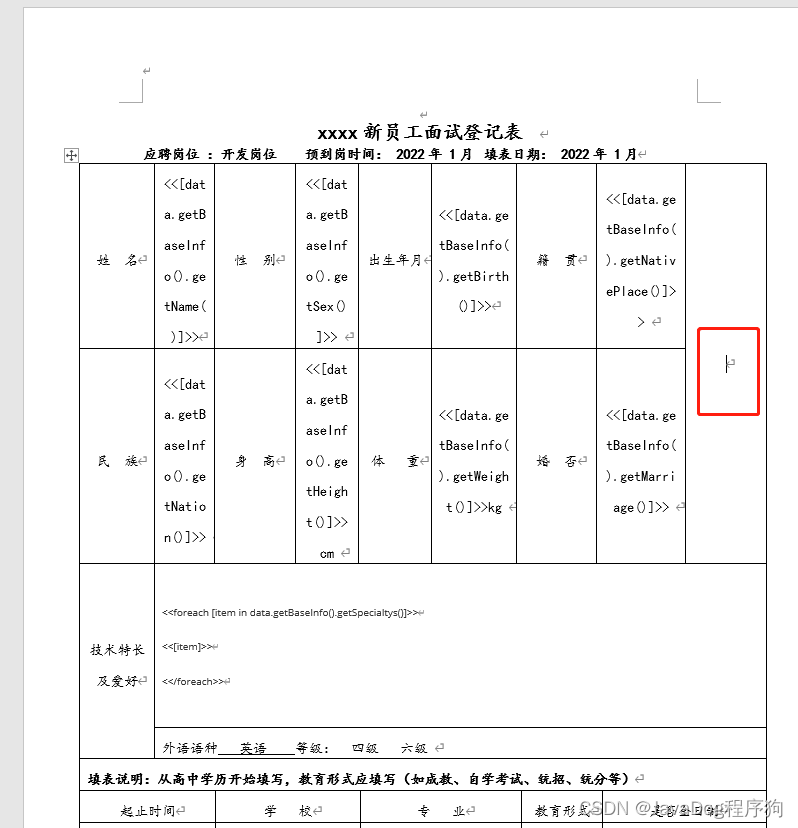
点击【插入】找到书签并点击,然后录入书签名,并点击添加
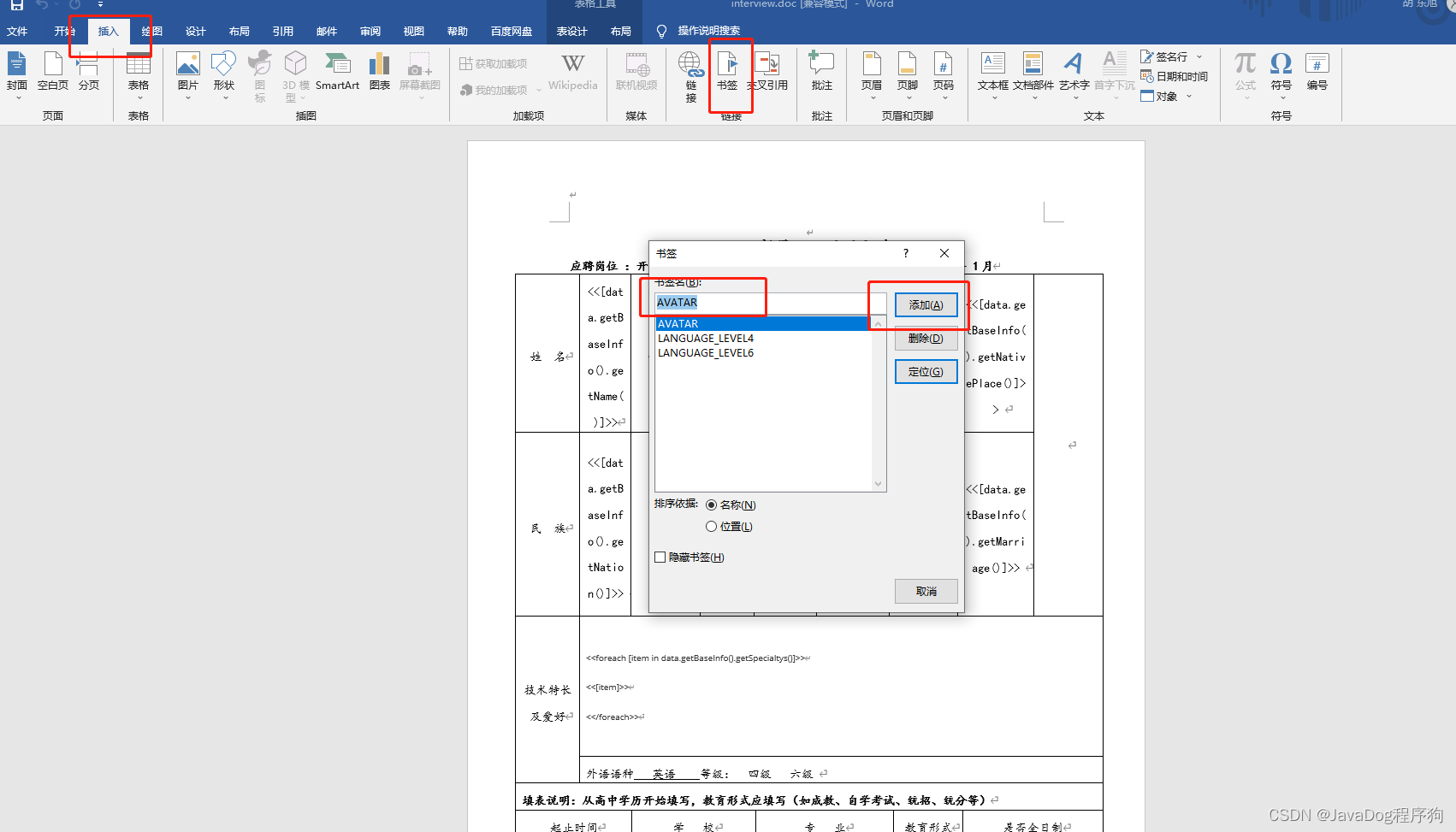
检查书签是否添加成功
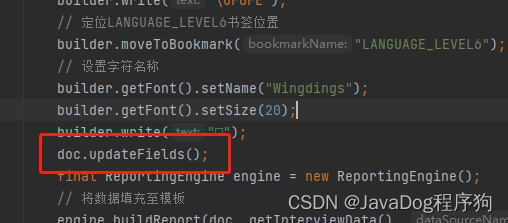
更新doc
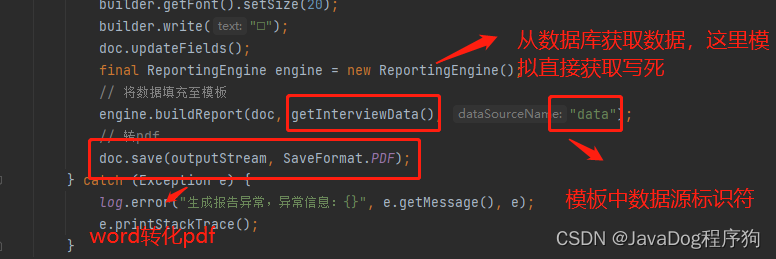
将基础数据填充后并转为PDF
详见如下代码
package apose.javadog.net.controller;

import apose.javadog.net.entity.BaseInfo;

import apose.javadog.net.entity.Education;

import apose.javadog.net.entity.Interview;

import apose.javadog.net.entity.WorkExperience;

import cn.hutool.core.util.CharsetUtil;

import com.aspose.words.Document;

import com.aspose.words.DocumentBuilder;

import com.aspose.words.ReportingEngine;

import com.aspose.words.SaveFormat;

import lombok.extern.slf4j.Slf4j;

import org.springframework.core.io.ClassPathResource;

import org.springframework.web.bind.annotation.GetMapping;

import org.springframework.web.bind.annotation.RequestMapping;

import org.springframework.web.bind.annotation.RestController;

import javax.servlet.ServletOutputStream;

import javax.servlet.http.HttpServletResponse;

import java.io.InputStream;

import java.net.URLEncoder;

import java.util.ArrayList;

import java.util.List;

@RestController

@RequestMapping("/word")

@Slf4j

public class WordController {

    @GetMapping("/pdf")

    void pdf(HttpServletResponse response){

        // 获取资源doc路径下的简历interview.doc模板

        final  ClassPathResource classPathResource = new ClassPathResource("doc\\interview.doc");

        // 组装数据

        final Document doc;

        try (InputStream inputStream = classPathResource.getInputStream();

             ServletOutputStream outputStream = response.getOutputStream()) {

            // 文件名称

            String fileName = URLEncoder.encode("帅锅的简历.pdf", CharsetUtil.UTF_8);

            response.reset();

            response.setHeader("Content-Disposition", "attachment; filename=\"" + fileName + "\"");

            response.setHeader("Access-Control-Allow-Origin", "*");

            response.setContentType("application/octet-stream;charset=UTF-8");

            // 将输入流转为doc

            doc = new Document(inputStream);

            // doc构建

            DocumentBuilder builder = new DocumentBuilder(doc);

            // 定位书签位置

            builder.moveToBookmark("AVATAR");

            // 插入图片

            builder.insertImage("https://portrait.gitee.com/uploads/avatars/user/491/1474070_javadog-net_1616995139.png!avatar30");

            // 定位LANGUAGE_LEVEL4书签位置

            builder.moveToBookmark("LANGUAGE_LEVEL4");

            // 设置字符名称

            builder.getFont().setName("Wingdings");

            // 设置字符大小

            builder.getFont().setSize(14);

            // 对号字符

            builder.write("\uF0FE");

            // 定位LANGUAGE_LEVEL6书签位置

            builder.moveToBookmark("LANGUAGE_LEVEL6");

            // 设置字符名称

            builder.getFont().setName("Wingdings");

            builder.getFont().setSize(20);

            builder.write("□");

            doc.updateFields();

            final ReportingEngine engine = new ReportingEngine();

            // 将数据填充至模板

            engine.buildReport(doc, getInterviewData(), "data");

            // 转pdf

            doc.save(outputStream, SaveFormat.PDF);

        } catch (Exception e) {

            log.error("生成报告异常,异常信息:{}", e.getMessage(), e);

            e.printStackTrace();

        }

    }

    private Interview getInterviewData(){

        Interview interview = new Interview();

        this.getBaseInfo(interview);

        this.getEducations(interview);

        this.getWorkExperiences(interview);

        return interview;

    }

    /**

     * @Description: 组装基本数据

     * @Param: [interview]

     * @return: [apose.javadog.net.entity.Interview]

     * @Author: hdx

     * @Date: 2022/5/10 15:39

     */

    private void getBaseInfo(Interview interview){

        // 基本数据

        BaseInfo baseInfo = new BaseInfo();

        List<String> listStr = new ArrayList<>();

        listStr.add("后端技术栈:有较好的Java基础,熟悉SpringBoot,SpringCloud,springCloud Alibaba等主流技术,Redis内存数据库、RocketMq、dubbo等,熟悉JUC多线程");

        listStr.add("后端模板引擎:thymeleaf、volocity");

        listStr.add("前端技术栈:熟练掌握ES5/ES6/、NodeJs、Vue、React、Webpack、gulp");

        listStr.add("其他技术栈: 熟悉python+selenium、electron");

        baseInfo.setName("狗哥")

                .setBirth("1993年5月14日")

                .setHeight("180")

                .setWeight("70")

                .setNation("汉")

                .setSex("男")

                .setNativePlace("济南")

                .setMarriage("已婚")

                .setSpecialtys(listStr);

        interview.setBaseInfo(baseInfo);

    }

    /**

     * @Description: 组装教育经历

     * @Param: [interview]

     * @return: [apose.javadog.net.entity.Interview]

     * @Author: hdx

     * @Date: 2022/5/10 15:40

     */

    private void getEducations(Interview interview){

        // 高中

        List<Education> educations = new ArrayList<>();

        Education education = new Education();

        education.setStartEndTime("2009-2012")

                .setSchool("山东省实验中学")

                .setFullTime("是")

                .setProfessional("理科")

                .setEducationalForm("普高");

        educations.add(education);

        // 大学

        Education educationUniversity = new Education();

        educationUniversity.setStartEndTime("2012-2016")

                .setSchool("青岛农业大学")

                .setFullTime("是")

                .setProfessional("计算机科学与技术")

                .setEducationalForm("本科");

        educations.add(educationUniversity);

        interview.setEducations(educations);

    }

    /**

     * @Description: 组装工作经历

     * @Param: [interview]

     * @return: [apose.javadog.net.entity.Interview]

     * @Author: hdx

     * @Date: 2022/5/10 15:40

     */

    private void getWorkExperiences(Interview interview){

        // 工作记录

        List<WorkExperience> workExperiences = new ArrayList<>();

        WorkExperience workExperience = new WorkExperience();

        workExperience.setStartEndTime("2009-2012")

                .setWorkUnit("青岛XXX")

                .setPosition("开发")

                .setResignation("有更好的学习空间,向医疗领域拓展学习纬度");

        workExperiences.add(workExperience);

        interview.setWorkExperiences(workExperiences);

    }

}
前端
1.下载对应的依赖包
npm install
2.在vue.config.js中配置代理
const { defineConfig } = require('@vue/cli-service')

module.exports = defineConfig({

  devServer: {

    port: 1026,

    proxy: {

      '/': {

        target: 'http://localhost:8082', //请求本地 需要ipps-boot后台项目

        ws: false,

        changeOrigin: true

      }

    }

  }

})
npm install
3.在main.js引入所需插件
import Vue from 'vue'

import App from './App.vue'

Vue.config.productionTip = false

import axios from 'axios'

Vue.prototype.$http = axios

import ElementUI from 'element-ui';

import 'element-ui/lib/theme-chalk/index.css';

Vue.use(ElementUI);

new Vue({

  render: h => h(App),

}).$mount('#app')
4.页面引入vue-pdf组件
  <pdf v-if="showPdf" ref="pdf" :src="pdfUrl" :page="currentPage" @num-pages="pageCount=$event"

               @page-loaded="currentPage=$event" @loaded="loadPdfHandler">

   </pdf>
5.页面中使用axios调取接口获取数据
注意responseType类型为blob
this.$http({

      method: 'get',

      url: `/word/pdf`,

      responseType: 'blob'

    }).then(res=>{

      console.log(res)

      this.pdfUrl = this.getObjectURL(res.data)

      console.log(this.pdfUrl)

      const loadingTask = pdf.createLoadingTask(this.pdfUrl)

      // // 注意这里一定要这样写

      loadingTask.promise.then(load => {

        this.numberPage = load.numPages

      }).catch(err => {

        console.log(err)

      })

      this.loading = false;

    })
页面完整代码如下
<template>

  <div class="pdf_wrap">

    <template>

      <el-form ref="form" label-width="80px">

        <div style='text-align: center;margin: 30px;' v-if="loading">

          数据加载中...

        </div>

        <div v-if="loading==false" style="display: flex;align-items: center;">

          <div style="flex: 1;"></div>

          <el-button size="mini" @click="changePdfPage(0)" type="primary">上一页</el-button>

          <div style="position: relative; margin: 0px 10px; top: -10px;">

            {{currentPage}} / {{pageCount}}  共 {{numberPage}} 页

          </div>

          <el-button size="mini" @click="changePdfPage(1)" type="primary">下一页</el-button>

          <el-button size="mini" @click='print' type="primary">打印</el-button>

        </div>

        <div v-show="loading==false">

          <pdf v-if="showPdf" ref="pdf" :src="pdfUrl" :page="currentPage" @num-pages="pageCount=$event"

               @page-loaded="currentPage=$event" @loaded="loadPdfHandler">

          </pdf>

        </div>

      </el-form>

    </template>

  </div>

</template>

<script>

import pdf from 'javadog-vue-pdf'

export default {

  components: {

    pdf

  },

  data () {

    return {

      loading: true,

      showPdf: false,

      currentPage: 1, // pdf文件页码

      pageCount: 1, // pdf文件总页数

      fileType: 'pdf', // 文件类型

      pdfUrl: '',

      numberPage:1

    }

  },

  mounted () {

    this.showPdf = true;

    this.$http({

      method: 'get',

      url: `/word/pdf`,

      responseType: 'blob'

    }).then(res=>{

      console.log(res)

      this.pdfUrl = this.getObjectURL(res.data)

      console.log(this.pdfUrl)

      const loadingTask = pdf.createLoadingTask(this.pdfUrl)

      // // 注意这里一定要这样写

      loadingTask.promise.then(load => {

        this.numberPage = load.numPages

      }).catch(err => {

        console.log(err)

      })

      this.loading = false;

    })

  },

  methods: {

    print(){

      this.$refs.pdf.print(600)

    },

    getObjectURL(file) {

      let url = null

      if (window.createObjectURL !== undefined) { // basic

        url = window.createObjectURL(file)

      } else if (window.webkitURL !== undefined) { // webkit or chrome

        // try {

        let blob = new Blob([file], {

          type: "application/pdf"

        });

        url = window.URL.createObjectURL(blob)

        console.log(url)

      } else if (window.URL !== undefined) { // mozilla(firefox)

        try {

          url = window.URL.createObjectURL(file)

        } catch (error) {

          console.log(error)

        }

      }

      return url

    },

    changePdfPage(val) {

      console.log(val)

      if (val === 0 && this.currentPage > 1) {

        this.currentPage--

        // console.log(this.currentPage)

      }

      if (val === 1 && this.currentPage < this.pageCount) {

        this.currentPage++

        // console.log(this.currentPage)

      }

    },

    // pdf加载时

    loadPdfHandler() {

      console.log('jiazai')

      this.currentPage = 1 // 加载的时候先加载第一页

      this.loading = false;

    }

  }

}

</script>

<style scoped>

.pdf_wrap {

  background: #fff;

  height: 100vh;

  width: 80vh;

  margin: 0 auto;

}

.pdf_list {

  height: 80vh;

  overflow: scroll;

}

button {

  margin-bottom: 20px;

}

</style>
异常情况
1.vue-pdf原版与webpack版本问题,会启动不起来,所以本狗才偷梁换柱,改了一下并自用
2.aspose-words-19.1-jdk16.jar 如果采用官网的maven依赖,可能需要自助破解或交费使用
成果展示

屎上最全vue-pdf+Springboot与aspose-words整合,开箱即用的更多相关文章
- 史上最全java pdf精品书籍整理
算法,多线程,spring,数据库,大数据,面试题等等.喜欢的小伙伴加群获取 QQ群号825199617 (非广告培训技术群,纯java知识交流,请自重)
- 史上最全面的Spring Boot Cache使用与整合
一:Spring缓存抽象 Spring从3.1开始定义了org.springframework.cache.Cache和org.springframework.cache.CacheManager接口 ...
- 史上最全的Spring Boot Cache使用与整合
一:Spring缓存抽象# Spring从3.1开始定义了org.springframework.cache.Cache和org.springframework.cache.CacheManager接 ...
- Vue开源项目汇总(史上最全)(转)
目录 UI组件 开发框架 实用库 服务端 辅助工具 应用实例 Demo示例 UI组件 element ★13489 - 饿了么出品的Vue2的web UI工具套件 Vux ★8133 - 基于Vue和 ...
- SpringBoot面试题 (史上最全、持续更新、吐血推荐)
文章很长,建议收藏起来,慢慢读! 疯狂创客圈为小伙伴奉上以下珍贵的学习资源: 疯狂创客圈 经典图书 : <Netty Zookeeper Redis 高并发实战> 面试必备 + 大厂必备 ...
- spring + spring mvc + tomcat 面试题(史上最全)
文章很长,而且持续更新,建议收藏起来,慢慢读! 高并发 发烧友社群:疯狂创客圈(总入口) 奉上以下珍贵的学习资源: 疯狂创客圈 经典图书 : 极致经典 + 社群大片好评 < Java 高并发 三 ...
- markdown写ppt (史上最全)
文章很长,建议收藏起来,慢慢读! 疯狂创客圈为小伙伴奉上以下珍贵的学习资源: 疯狂创客圈 经典图书 : <Netty Zookeeper Redis 高并发实战> 面试必备 + 大厂必备 ...
- Vue+ElementUI+Springboot实现前后端分离的一个demo
目录 1.前期准备 2.创建一个vue项目 3.vue前端 4.java后端 5.启动 5.1.启动vue项目 5.2.启动后端 6.效果 7.总结 8.参考资料 vue官方文档:介绍 - Vue.j ...
- github上最全的资源教程-前端涉及的所有知识体系
前面分享了前端入门资源汇总,今天分享下前端所有的知识体系. 个人站长对个人综合素质要求还是比较高的,要想打造多拉斯自媒体网站,不花点心血是很难成功的,学习前端是必不可少的一个环节, 当然你不一定要成为 ...
- GitHub上史上最全的Android开源项目分类汇总 (转)
GitHub上史上最全的Android开源项目分类汇总 标签: github android 开源 | 发表时间:2014-11-23 23:00 | 作者:u013149325 分享到: 出处:ht ...
随机推荐
- 【相关杂项】stdio.h中的sprintf函数/union的作用
1.定义int sprintf(char *str, const char *format, ...) 1.paras:*str:目标字符串首指针 *format:要写入目标字符串的 ...
- vs2015当前不会命中断点,还没有为该文档
经百度,需在项目>项目属性>生成>优化代码的勾去掉>保存>再次F11调试可解决
- c++基础代码练习考试必备(冒泡,求3*3矩阵对角线元素的积,求素数,密码验证)
1.求1-100之间的素数 int j; int i; for (i=2; i <= 100; i++) { for (j=2; j <= i; j++) { if (i%j == 0) ...
- qt的窗口
1.窗口.字部件以及窗口类型(记得不牢固的) (1)#include<QtWidget> Widgets是在Qt中创建用户界面的主要元素. Widgets可以显示数据和状态信息,接收用 ...
- js 获取鼠标位置的两种方法
<!DOCTYPE html> <html lang="en"> <head> <meta charset="UTF-8&quo ...
- ubuntu16.04openssh升级
wget http://zlib.net/zlib-1.2.11.tar.gz tar xf zlib-1.2.11.tar.gz && cd zlib-1.2.11/ ./confi ...
- 获取gps
package com.example.myapplication;import android.Manifest;import android.annotation.SuppressLint;imp ...
- (六).JavaScript的数组(2)
1.10 作用域链 定义: 作用域链:查找变量的过程 作用: 查找变量 查找规则:首先会在自身作用域找变量,找到就用 如果没有,就去上级作用域查找,找到就用 如果没有,一直往上找,直到全局作用域,有就 ...
- 论zzy的苏州话
乘地铁(ceng) - 盛饭(seng) 无法无天 - 12345 掀被子 - 先干嘛,再干嘛 ?待更新
- Linux子系统之【内存管理】
1.内存管理的意义? 内存是进程运行的地方,相当于是战场.完善的机制能让进程多快好省地运行. 2.原始内存管理是怎么样的? 简陋(直接运行在物理内存上).不安全(无隔离,无权限) 缺点:容易出错,进程 ...