
JsonPath 使用
Map<String, String> map ----> $.store.bicycle
String str = $.store.other
List<Map<String, String>> list = $.store.book
{

     "category": "fiction",

     "author": "Evelyn Waugh",

     "title": "Sword of Honour",

     "price": 12.99

  }
Map<String, String> entries = JsonPath.read(str, "$");
JSONPATH Parse JSON array file:
If the object is:
[
[50.4154134372953,-1.28486558931069,"CLASS B",9,205,0,"UK",431500382,3,4],
[50.3058858494047,-0.976070494820637,"CLASS B",9,239,0,"UK",2750350,21,2]
]
Then "$[0]" will return:
[50.4154134372953,-1.28486558931069,"CLASS B",9,205,0,"UK",431500382,3,4]
And "$[1]" will return:
[50.3058858494047,-0.976070494820637,"CLASS B",9,239,0,"UK",2750350,21,2]
You can do it two levels deep as well. "$[0][4]" will return:
205
You can also extract the elements of the array into a list with "$[*]", which will return a list of 2 elements. The first being:
[50.4154134372953,-1.28486558931069,"CLASS B",9,205,0,"UK",431500382,3,4]
and the second being:
[50.3058858494047,-0.976070494820637,"CLASS B",9,239,0,"UK",2750350,21,2]
{

    "store": {

        "book": [

            {

                "category": "reference",

                "author": "Nigel Rees",

                "title": "Sayings of the Century",

                "price": 8.95

            },

            {

                "category": "fiction",

                "author": "Evelyn Waugh",

                "title": "Sword of Honour",

                "price": 12.99

            },

            {

                "category": "fiction",

                "author": "Herman Melville",

                "title": "Moby Dick",

                "isbn": "0-553-21311-3",

                "price": 8.99

            },

            {

                "category": "fiction",

                "author": "J. R. R. Tolkien",

                "title": "The Lord of the Rings",

                "isbn": "0-395-19395-8",

                "price": 22.99

            }

        ],

        "bicycle": {

            "color": "red",

            "price": 19.95

        }        "other":"[{\"filterable\":\"true\",\"dataIndex\":\"DateValue\",\"dataType\":\"date\",\"isInStandardView\":\"true\",\"sortAsConverterFormat\":\"yyyyMMdd\",\"id\":\"DateValue\",\"sortable\":\"true\",\"isVisible\":\"true\"},{\"filterable\":\"true\",\"dataIndex\":\"DateType\",\"dataType\":\"string\",\"isInStandardView\":\"true\",\"sortAsConverterFormat\":null,\"id\":\"DateType\",\"sortable\":\"true\",\"isVisible\":\"true\"}]"

    },

    "expensive": 10

}
{ "store": {

    "book": [

      { "category": "reference",

        "author": "Nigel Rees",

        "title": "Sayings of the Century",

        "price": 8.95

      },

      { "category": "fiction",

        "author": "Evelyn Waugh",

        "title": "Sword of Honour",

        "price": 12.99,

        "isbn": "0-553-21311-3"

      }

    ],

    "bicycle": {

      "color": "red",

      "price": 19.95

    }

  }

}
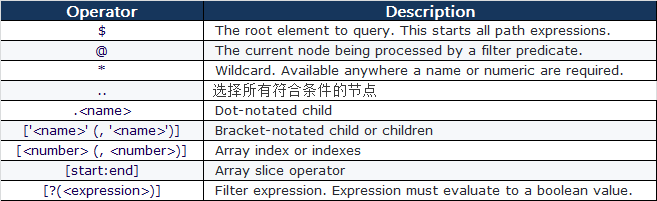
private static void jsonPathTest() {

    JSONObject json = jsonTest();//调用自定义的jsonTest()方法获得json对象,生成上面的json

    //输出book[0]的author值

    String author = JsonPath.read(json, "$.store.book[0].author");

    //输出全部author的值,使用Iterator迭代

    List<String> authors = JsonPath.read(json, "$.store.book[*].author");

    //输出book[*]中category == 'reference'的book

    List<Object> books = JsonPath.read(json, "$.store.book[?(@.category == 'reference')]");

    //输出book[*]中price>10的book

    List<Object> books = JsonPath.read(json, "$.store.book[?(@.price>10)]");

    //输出book[*]中含有isbn元素的book

    List<Object> books = JsonPath.read(json, "$.store.book[?(@.isbn)]");

    //输出该json中所有price的值

    List<Double> prices = JsonPath.read(json, "$..price");

    //可以提前编辑一个路径,并多次使用它

    JsonPath path = JsonPath.compile("$.store.book[*]");

    List<Object> books = path.read(json);

}
JsonPath 使用的更多相关文章
- restassured - JsonPath
https://github.com/rest-assured/rest-assured/blob/master/json-path/src/test/java/io/restassured/path ...
- jsonpath
1. java 类库 jayway/JsonPath maven 使用方法 <dependency> <groupId>com.jayway.jsonpath</grou ...
- 使用jsonpath解析json内容
JsonPath提供的json解析非常强大,它提供了类似正则表达式的语法,基本上可以满足所有你想要获得的json内容.下面我把官网介绍的每个表达式用代码实现,可以更直观的知道该怎么用它. 一.首先需要 ...
- 好用的json-path
$.store.book[?(@.price < 10)].title Here is a complete overview and a side by side comparison of ...
- JsonPath详解
JsonPath is to JSON what XPATH is to XML, a simple way to extract parts of a given document. JsonPat ...
- 一.HttpClient、JsonPath、JsonObject运用
HttpClient详细应用请参考官方api文档:http://hc.apache.org/httpcomponents-client-4.5.x/httpclient/apidocs/index.h ...
- jsonpath读取json数据格式公用方法!!!
import java.util.LinkedHashMap; import com.jayway.jsonpath.JsonPath; import com.jayway.jsonpath.Pred ...
- Python爬虫(十六)_JSON模块与JsonPath
本篇将介绍使用,更多内容请参考:Python学习指南 数据提取之JSON与JsonPATH JSON(JavaScript Object Notation)是一种轻量级的数据交换格式,它是的人们很容易 ...
- JSONPath使用
JSONPath是fastjson在1.2.0之后支持的.JSONPath是一个很强大的功能.关于JSONPath的介绍请查看官方文档 JSONPath. 官方文档上给出了详细的说明以及使用.但是官方 ...
- Python_实现json数据的jsonPath(精简版)定位及增删改操作
基于python实现json数据的jsonPath(精简版)定位及增删改操作 by:授客 QQ:1033553122 实践环境 win7 64 Python 3.4.0 代码 #-*- encod ...
随机推荐
- C# 创建对象的方法
1.实例化方法,也就是new(): //where T:new () 表示T必须有构造函数 public static T Create<T> where T:new () { retur ...
- hello2部分代码解析
/** * Copyright (c) 2014 Oracle and/or its affiliates. All rights reserved.** You may not modify, us ...
- JS调用webservice服务
webservice服务 webservice服务代码 using System; using System.Collections.Generic; using System.Linq; using ...
- [Codeforces441E]Valera and Number
Problem 给定一个数x,有p%的概率乘2,有1-p%的概率加1,问操作k次,其二进制数下末尾零的个数的期望. Solution 每次操作只会影响到最后的8位 我们用dp[i][j]表示i个操作后 ...
- React项目新手指南
对于程序员而言:驼峰和下划线之间是一场宗派战争:大括号是否换行会成为一种党派:逗号写在行尾还是行首的人来自不同星球…… 然而,无规矩不成方圆,任何一个团队,要想有高质量的产出,第一步必须要对一些基本的 ...
- letCode-2
letCode第二题题目如下: 给出两个 非空 的链表用来表示两个非负的整数.其中,它们各自的位数是按照 逆序 的方式存储的,并且它们的每个节点只能存储 一位 数字. 如果,我们将这两个数相加起来,则 ...
- go example
一个简单的博客系统 https://github.com/pingguoxueyuan/gostudy/tree/master/blogger
- pip3 install mysqlclient 报错 “/bin/sh: 1: mysql_config: not found”的解决方法
执行 sudo apt-get install libmysqlclient-dev, 然后执行 pip3 install mysqlclient 成功.
- java mysql数据库链接与资源关闭
/** * Created by Clear on 2018/8/11. * here provide the kind of connections from mysql database,and ...
- OneStopEnglish corpus: A new corpus for automatic readability assessment and text simplification-paper
这篇论文的related work非常详尽地介绍了各种readability的语料 abstract这个paper描述了onestopengilish这个三个level的文本语料的收集和整理,阐述了再 ...