
cytoscape.js在vue项目中的安装及案例
1. 安装:
npm i cytoscape --save
2. 引入:main.js
import cytoscape from 'cytoscape';

Vue.prototype.$cytoscape = cytoscape;
3. demo代码:
<template>

    <div id="MainCy" style="width: 100%;height: 100%;"></div>

</template>

<script>

    export default {

        mounted() {

            var cy = this.$cytoscape({

                container: document.getElementById('MainCy'),

                layout: {

                    name: 'grid',

                    rows: 2,

                    cols: 2

                },

                style: [{

                        selector: 'node',

                        style: {

                            'content': 'data(name)',

                            'background-color': 'magenta',

                            'background-image': 'url(img/shixian.png)',

                        }

                    },

                    {

                        selector: 'edge',

                        style: {

                            'content': 'data(relationship)',

                            'curve-style': 'bezier',

                            'target-arrow-shape': 'triangle',

                            'color': 'red',

                        }

                    },

                    // some style for the extension

                    {

                        selector: '.eh-handle',

                        style: {

                            'background-color': 'red',

                            'width': 12,

                            'height': 12,

                            'shape': 'ellipse',

                            'overlay-opacity': 0,

                            'border-width': 12, // makes the handle easier to hit

                            'border-opacity': 0

                        }

                    },

                    {

                        selector: '.eh-hover',

                        style: {

                            'background-color': 'red'

                        }

                    },

                    {

                        selector: '.eh-source',

                        style: {

                            'border-width': 2,

                            'border-color': 'red'

                        }

                    },

                    {

                        selector: '.eh-target',

                        style: {

                            'border-width': 2,

                            'border-color': 'red'

                        }

                    },

                    {

                        selector: '.eh-preview, .eh-ghost-edge',

                        style: {

                            'background-color': 'red',

                            'line-color': 'red',

                            'target-arrow-color': 'red',

                            'source-arrow-color': 'red'

                        }

                    },

                    {

                        selector: '.eh-ghost-edge.eh-preview-active',

                        style: {

                            'opacity': 0

                        }

                    }

                ],

                elements: {

                    nodes: [{

                            data: {

                                id: 'j',

                                name: 'Jerry'

                            }

                        },

                        {

                            data: {

                                id: 'e',

                                name: 'Elaine'

                            }

                        },

                        {

                            data: {

                                id: 'k',

                                name: 'Kramer'

                            }

                        },

                        {

                            data: {

                                id: 'g',

                                name: 'George'

                            }

                        }

                    ],

                    edges: [{

                            data: {

                                source: 'j',

                                target: 'e'

                            }

                        },

                        {

                            data: {

                                source: 'j',

                                target: 'k'

                            }

                        },

                        {

                            data: {

                                source: 'j',

                                target: 'g'

                            }

                        },

                        {

                            data: {

                                source: 'e',

                                target: 'j'

                            }

                        },

                        {

                            data: {

                                source: 'e',

                                target: 'k',

                                relationship: '1'

                            }

                        },

                        {

                            data: {

                                source: 'k',

                                target: 'j',

                                relationship: '2'

                            }

                        },

                        {

                            data: {

                                source: 'k',

                                target: 'e',

                                relationship: '3'

                            }

                        },

                        {

                            data: {

                                source: 'k',

                                target: 'g',

                                relationship: '4'

                            }

                        },

                        {

                            data: {

                                source: 'g',

                                target: 'j',

                                relationship: '5'

                            }

                        }

                    ]

                }

            });

            cy.nodes().on('click', (evt) => {

                console.log(evt)

            });

            cy.edges().on('click', (evt) => {

                console.log(evt)

            });

        },

    }

</script>
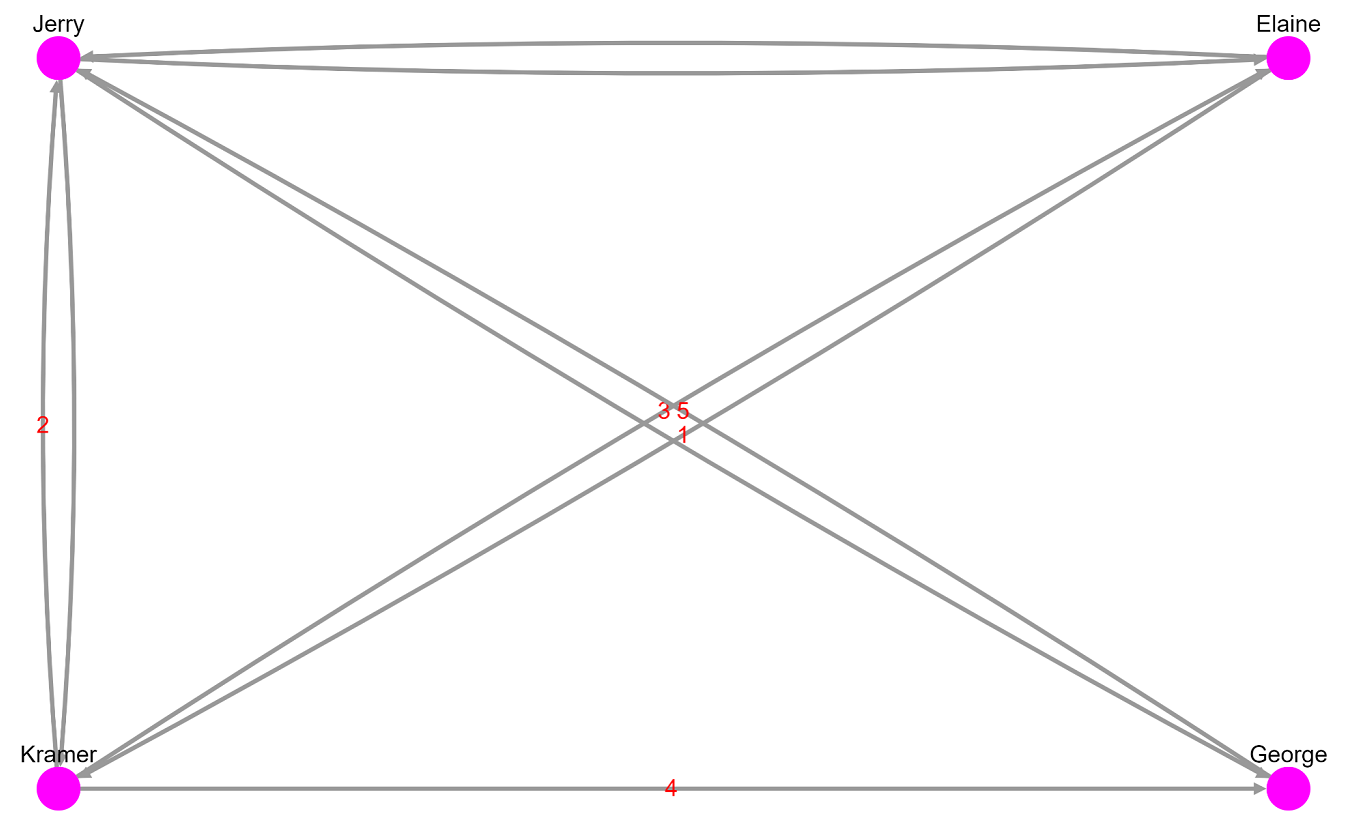
demo效果:
cytoscape.js在vue项目中的安装及案例的更多相关文章
- d3.js在vue项目中的安装及案例
1. 安装: npm i d3 --save 2. 引入:main.js import * as d3 from "d3"; Vue.prototype.$d3 = d3; win ...
- vue项目中npm安装sass,less,stylus
用vue-cli脚手架搭建出来的,默认是用标准css的.如果你想用sass,less,stylus就需要自己手动安装一下了. 进入项目文件夹,然后安装(这里以stylus为例)stylus和stylu ...
- 【bcrypt】vue项目中bcrypt安装报错
[报错] 报错时安装方法: npm install bcrypt [解决方法] npm install bcryptjs 用 bcryptjs 替换 bcrypt 即可.
- 在vue项目中的axios使用配置记录
默认vue项目中已经安装axios,基于element-ui开发,主要记录配置的相关. axiosConfig.js import Vue from 'vue' import axios from ' ...
- 在vue项目中使用canvas-nest.js,报parameter 1 is not of type 'Element'
canvas-nest.js是一款轻量的网页特效,如图: github地址:https://github.com/hustcc/canvas-nest.js 在普通的html项目中,只要将<sc ...
- vue 项目中安装npm--save-dev 和 --save 命令
在vue项目中我们常用npm install 安装模块或插件 有两种命令把他们写入到 package.json 文件里面去 例如安装axios 安装到开发环境npm axios --save-dev ...
- vue 项目中实用的小技巧
# 在Vue 项目中引入Bootstrap 有时在vue项目中会根据需求引入Bootstrap,而Bootstrap又是依赖于jQuery的,在使用npm按照时,可能会出现一系列的错误 1.安装jQu ...
- 如何在VUE项目中添加ESLint
如何在VUE项目中添加ESLint 1. 首先在项目的根目录下 新建 .eslintrc.js文件,其配置规则可以如下:(自己小整理了一份),所有的代码如下: // https://eslint.or ...
- 浅谈 Axios 在 Vue 项目中的使用
介绍 Axios 是一个基于 promise 的 HTTP 库,可以用在浏览器和 node.js 中. 特性 它主要有如下特性: 浏览器端发起XMLHttpRequests请求 Node端发起http ...
随机推荐
- Python开课复习9-28
一.什么是迭代器#迭代器即迭代的工具,那什么是迭代呢?#迭代是一个重复的过程,每次重复即一次迭代,并且每次迭代的结果都是下一次迭代的初始值 举例: l=[1,2,3] count=0 while co ...
- com/mysql/jdbc/Driver : Unsupported major.minor version 52.0
解决方案: 1.jdk7+老版5.0驱动com/mysql/jdbc/Driver 2.jdk8+新版6.0驱动com/mysql/cj/jdbc/Driver
- 2018.10.24 NOIP模拟 小 C 的数组(二分+dp)
传送门 考试自己yyyyyy的乱搞的没过大样例二分+dp二分+dp二分+dp过了606060把我自己都吓到了! 这么说来乱搞跟被卡常的正解比只少101010分? 那我考场不打其他暴力想正解血亏啊. 正 ...
- java sigar.jar
http://blog.csdn.net/yin_jw/article/details/40151547 DEBUG Sigar - no libsigar-x86-linux.so in java. ...
- caffe 笔记
caffe模块: blob:caffe中数据的封装,用于layer上流动 layer:输入层.输出层.神经网络层的抽象 net:神经网络结构,将layer层叠关联起来 solver:定义神经网络训练和 ...
- c++中typedef、define、const、inline之间的区别
1.typedef和#define的区别 typedef int* pInt; , b = ; const pInt p1 = &a; //p1是常量指针 pInt const p2 = &a ...
- Mybatis-Plus 实战完整学习笔记(二)------环境搭建
第二章 使用实例 1.搭建测试数据库 -- 创建库 CREATE DATABASE mp; -- 使用库 USE mp; -- 创建表 CREATE TABLE tbl_employee( ...
- vue中的静态路由
单页Web应用(single page web application,SPA),就是只有一张Web页面的应用.单页应用程序 (SPA) 是加载单个HTML 页面并在用户与应用程序交互时动态更新该页面 ...
- goole Advance client 离线安装
1.下载插件:Advanced Rest Client 2.最新版的Chrome不支持本地安装插件,所以我们要使能开发者模式 3.把插件后缀名crx改为zip 4.解压,点击‘加载正在开发的扩展程序’ ...
- celery 4.1下报kombu.exceptions.EncodeError: Object of type 'bytes' is not JSON serializable 处理方式
#python代码如下 from celery import Celeryimport subprocess app = Celery('tasks', broker='redis://localho ...