
cytoscape.js在vue项目中的安装及案例
1. 安装:
npm i cytoscape --save
2. 引入:main.js
import cytoscape from 'cytoscape';

Vue.prototype.$cytoscape = cytoscape;
3. demo代码:
<template>

    <div id="MainCy" style="width: 100%;height: 100%;"></div>

</template>

<script>

    export default {

        mounted() {

            var cy = this.$cytoscape({

                container: document.getElementById('MainCy'),

                layout: {

                    name: 'grid',

                    rows: 2,

                    cols: 2

                },

                style: [{

                        selector: 'node',

                        style: {

                            'content': 'data(name)',

                            'background-color': 'magenta',

                            'background-image': 'url(img/shixian.png)',

                        }

                    },

                    {

                        selector: 'edge',

                        style: {

                            'content': 'data(relationship)',

                            'curve-style': 'bezier',

                            'target-arrow-shape': 'triangle',

                            'color': 'red',

                        }

                    },

                    // some style for the extension

                    {

                        selector: '.eh-handle',

                        style: {

                            'background-color': 'red',

                            'width': 12,

                            'height': 12,

                            'shape': 'ellipse',

                            'overlay-opacity': 0,

                            'border-width': 12, // makes the handle easier to hit

                            'border-opacity': 0

                        }

                    },

                    {

                        selector: '.eh-hover',

                        style: {

                            'background-color': 'red'

                        }

                    },

                    {

                        selector: '.eh-source',

                        style: {

                            'border-width': 2,

                            'border-color': 'red'

                        }

                    },

                    {

                        selector: '.eh-target',

                        style: {

                            'border-width': 2,

                            'border-color': 'red'

                        }

                    },

                    {

                        selector: '.eh-preview, .eh-ghost-edge',

                        style: {

                            'background-color': 'red',

                            'line-color': 'red',

                            'target-arrow-color': 'red',

                            'source-arrow-color': 'red'

                        }

                    },

                    {

                        selector: '.eh-ghost-edge.eh-preview-active',

                        style: {

                            'opacity': 0

                        }

                    }

                ],

                elements: {

                    nodes: [{

                            data: {

                                id: 'j',

                                name: 'Jerry'

                            }

                        },

                        {

                            data: {

                                id: 'e',

                                name: 'Elaine'

                            }

                        },

                        {

                            data: {

                                id: 'k',

                                name: 'Kramer'

                            }

                        },

                        {

                            data: {

                                id: 'g',

                                name: 'George'

                            }

                        }

                    ],

                    edges: [{

                            data: {

                                source: 'j',

                                target: 'e'

                            }

                        },

                        {

                            data: {

                                source: 'j',

                                target: 'k'

                            }

                        },

                        {

                            data: {

                                source: 'j',

                                target: 'g'

                            }

                        },

                        {

                            data: {

                                source: 'e',

                                target: 'j'

                            }

                        },

                        {

                            data: {

                                source: 'e',

                                target: 'k',

                                relationship: '1'

                            }

                        },

                        {

                            data: {

                                source: 'k',

                                target: 'j',

                                relationship: '2'

                            }

                        },

                        {

                            data: {

                                source: 'k',

                                target: 'e',

                                relationship: '3'

                            }

                        },

                        {

                            data: {

                                source: 'k',

                                target: 'g',

                                relationship: '4'

                            }

                        },

                        {

                            data: {

                                source: 'g',

                                target: 'j',

                                relationship: '5'

                            }

                        }

                    ]

                }

            });

            cy.nodes().on('click', (evt) => {

                console.log(evt)

            });

            cy.edges().on('click', (evt) => {

                console.log(evt)

            });

        },

    }

</script>
demo效果:
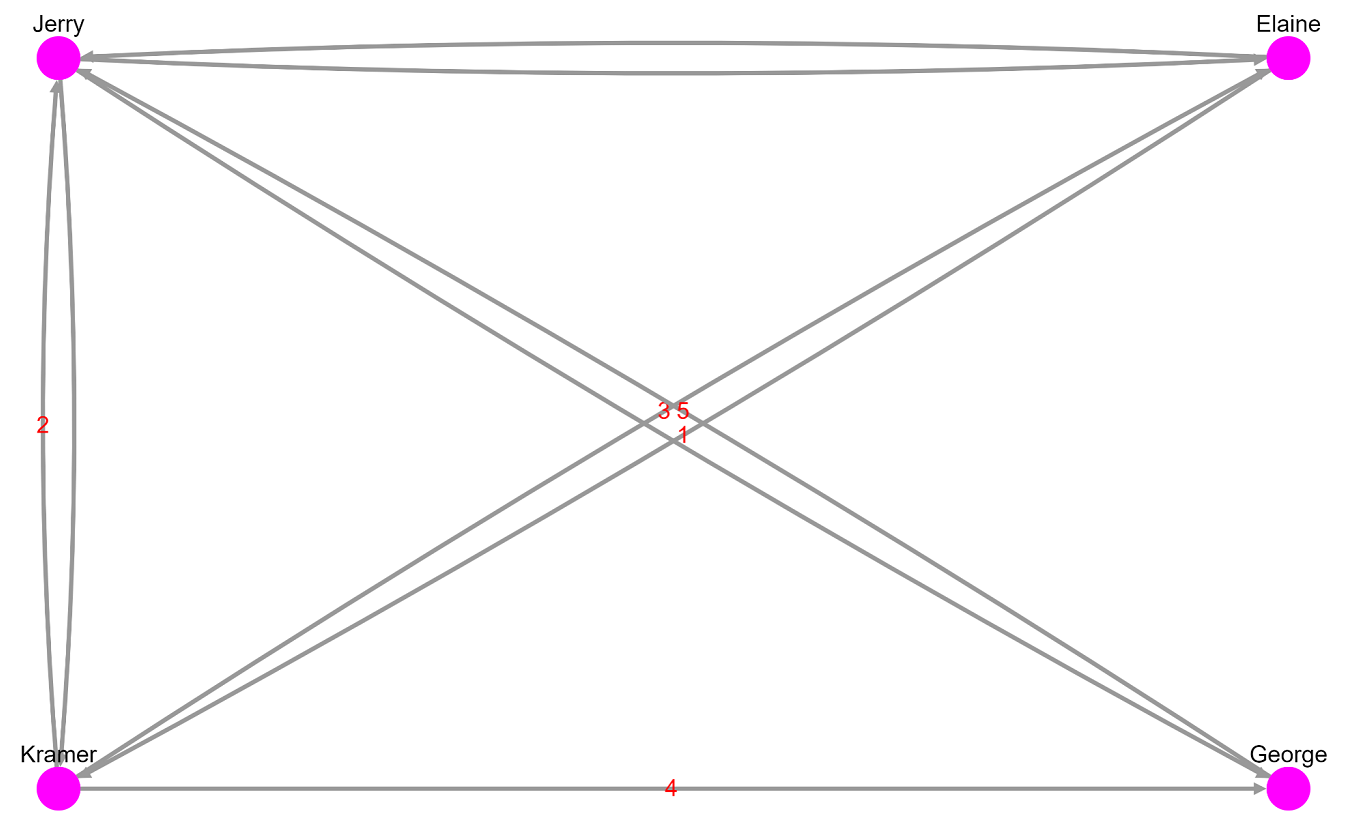
cytoscape.js在vue项目中的安装及案例的更多相关文章
- d3.js在vue项目中的安装及案例
1. 安装: npm i d3 --save 2. 引入:main.js import * as d3 from "d3"; Vue.prototype.$d3 = d3; win ...
- vue项目中npm安装sass,less,stylus
用vue-cli脚手架搭建出来的,默认是用标准css的.如果你想用sass,less,stylus就需要自己手动安装一下了. 进入项目文件夹,然后安装(这里以stylus为例)stylus和stylu ...
- 【bcrypt】vue项目中bcrypt安装报错
[报错] 报错时安装方法: npm install bcrypt [解决方法] npm install bcryptjs 用 bcryptjs 替换 bcrypt 即可.
- 在vue项目中的axios使用配置记录
默认vue项目中已经安装axios,基于element-ui开发,主要记录配置的相关. axiosConfig.js import Vue from 'vue' import axios from ' ...
- 在vue项目中使用canvas-nest.js,报parameter 1 is not of type 'Element'
canvas-nest.js是一款轻量的网页特效,如图: github地址:https://github.com/hustcc/canvas-nest.js 在普通的html项目中,只要将<sc ...
- vue 项目中安装npm--save-dev 和 --save 命令
在vue项目中我们常用npm install 安装模块或插件 有两种命令把他们写入到 package.json 文件里面去 例如安装axios 安装到开发环境npm axios --save-dev ...
- vue 项目中实用的小技巧
# 在Vue 项目中引入Bootstrap 有时在vue项目中会根据需求引入Bootstrap,而Bootstrap又是依赖于jQuery的,在使用npm按照时,可能会出现一系列的错误 1.安装jQu ...
- 如何在VUE项目中添加ESLint
如何在VUE项目中添加ESLint 1. 首先在项目的根目录下 新建 .eslintrc.js文件,其配置规则可以如下:(自己小整理了一份),所有的代码如下: // https://eslint.or ...
- 浅谈 Axios 在 Vue 项目中的使用
介绍 Axios 是一个基于 promise 的 HTTP 库,可以用在浏览器和 node.js 中. 特性 它主要有如下特性: 浏览器端发起XMLHttpRequests请求 Node端发起http ...
随机推荐
- 通俗理解 CPU && GPU
CPU 力气大啥P事都能干,还要协调.GPU 上面那家伙的小弟,老大让他处理图形,这方面处理简单,但是量大,老大虽然能处理,可是老大只有那么几个兄弟,所以不如交给小弟处理了,小弟兄弟多,有数百至数千个 ...
- Opencv基本数据类型
1.OpenCV中数据类型和常用数据类型对应 Mat<uchar> CV_8U Mat<char> ...
- pat -1004(树的遍历)
题目链接:https://pintia.cn/problem-sets/994805342720868352/problems/994805521431773184 思路: (1)用vector记录每 ...
- boost--asio
1.asio综述 asio的核心类是io_service,它相当于前摄器模式的Proactor角色,在异步模式下发起的I/O操作,需要定义一个用于回调的完成处理函数,当I/O完成时io_service ...
- excel2007vba绘图1
参考:http://club.excelhome.net/thread-480025-1-1.html '----------------------------------------------- ...
- mysql学习之路_视图
视图 视图:view是一种有结构的但是没有结构来源的虚拟表,虚拟表的结构来源不是自己定义的而是从对应的基表中产生(来源) 创建视图 基本语法: Create view 视图名字 as select 语 ...
- i2c总线,核心,驱动详解
Linux I2C驱动分析(一)----I2C架构和总线驱动 一.I2C总线原理 I2C是一种常用的串行总线,由串行数据线SDA 和串线时钟线SCL组成.I2C是一种多主机控制总线,它和USB总线不同 ...
- keras model.compile(loss='目标函数 ', optimizer='adam', metrics=['accuracy'])
深度学习笔记 目标函数的总结与整理 目标函数,或称损失函数,是网络中的性能函数,也是编译一个模型必须的两个参数之一.由于损失函数种类众多,下面以keras官网手册的为例. 在官方keras.io里 ...
- C++对象模型:成员变量<一>非静态成员变量
非静态成员变量,分别两种可能,要么类自定义,要么继承而来.根据<深度探索C++对象模型>的解读. class X { private: int x,y,z; }; 在这个类中,有三个私有成 ...
- Ethernet II和802.3
在卷一中:(章节二:数据链路层) 在T C P / I P协议族中,链路层主要有三个目的: (1)为IP模块发送和接收IP数据报: (2 )为ARP模块发送ARP请求和接收ARP应答: (3 )为RA ...