
Spring Shell参考文档
Spring Shell的核心组件是它的插件模型(plugin model)、内置命令(built-in commands)和转换器( converters)。
1.1 Plugin Model(插件模型)
插件模型是基于Spring的。每个插件jar需要包含的文件META-INF/spring/spring-shell-plugin.xml。当shell启动时,将加载这些配置文件以引导一个Spring ApplicationContext。其实现如下:
new ClassPathXmlApplicationContext("classpath*:/META-INF/spring/spring-shell-plugin.xml");
spring-shell-plugin.xml文件里定义了命令类和支持该命令操作的任何其他协作对象。下面的图中描述了插件模型:
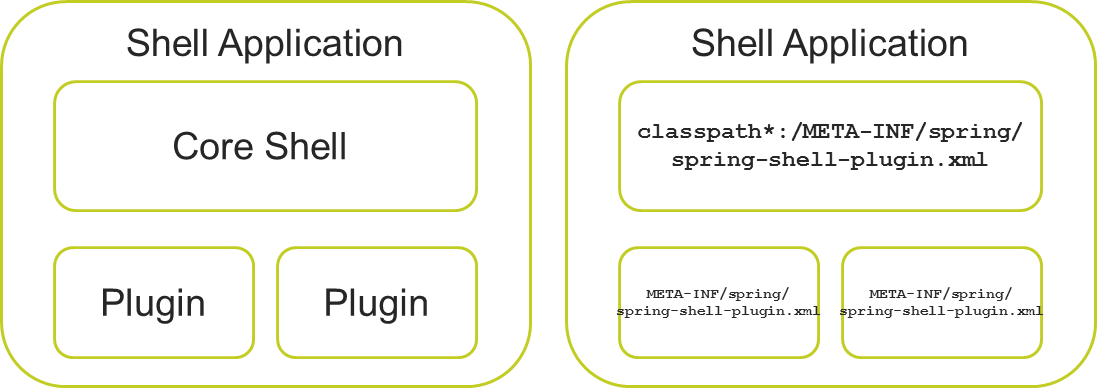
注意:当前核心命令解析器会加载下面所有的插件,建议提供一个类加载器进行隔离。
1.1.1 Commands(命令)
声明这些命令的一种简单方法是使用Spring的组件扫描功能。这是一个来自示例程序的例子spring-shell-plugin.xml:
<beans xmlns="http://www.springframework.org/schema/beans"

       xmlns:xsi="http://www.w3.org/2001/XMLSchema-instance"

       xmlns:context="http://www.springframework.org/schema/context"

       xsi:schemaLocation="http://www.springframework.org/schema/beans

       http://www.springframework.org/schema/beans/spring-beans.xsd

       http://www.springframework.org/schema/context

       http://www.springframework.org/schema/context/spring-context-3.1.xsd">

  <context:component-scan

           base-package="org.springframework.shell.samples.helloworld.commands" />

</beans>
这些命令是Spring组件,使用@Component注解进行划分。例如,HelloWorldCommands类的示例应用程序是这样的
@Component

public class HelloWorldCommands implements CommandMarker {

  // use any Spring annotations for Dependency Injection or other Spring

  // interfaces as required.

  // methods with @Cli annotations go here

}
一旦这些命令注册并被Spring容器实例化,它们就会被注册到核心命令解析器中,这样就可以处理@cli注解了。通过实现CommandMarker接口,可以识别命令。
1.1.2 Converters(转换器)
org.springframework.shell.core.Converter接口提供了在命令行中输入的字符串转换成丰富的Java类型,作为@Cli方法的参数。
通用类型转换程序是默认注册的,这些覆盖原始类型(boolean, int, float...)以及 Date、Character和File。
如果你需要注册任何额外的转换器实例,可以在spring-shell-plugin.xml配置,Spring容它们将被识别转换。
1.2 Built in commands(内置命令)
允许执行的操作系统(OS)的命令
以下是Spring shell提供的内置命令,按照类名-命令-功能的格式排列
- ConsoleCommands - clr 和 clear - 清空控制台
- DateCommands - date - 显示当前日期
- ExitCommands - exit 和 quit - 退出shell
- HelpCommands - help - 列出所有命令和它们的用法
- InlineCommentCommands - // 和 ; - 内联注释标记
- OsCommands - ! -允许执行的操作系统(OS)的命令。这个命令的关键字是感叹号,使用方法是在感叹号之后加一个空格,一个unix/windows命令字符串。
- SystemPropertyCommands - system properties - 显示shell的系统属性
- VersionCommands - version - 显示shell的版本
有两个命令提供的AbstractShell类产品使用相关的注释块
- / *和* / 注释块的开始和结束字符
1.3 Customizing the shell(自定义shell)
提供一些扩展点允许定制shell。扩展点是以下接口:
- BannerProvider——指定标题文本,欢迎信息,版本号将在shell启动时显示
- PromptProvider——指定命令提示文本,如:"shell>" 或 "#" 或 "$"”。这将在每次命令执行之后被调用,因此它需要是一个静态字符串。
- HistoryFileNameProvider——指定命令历史文件的名称
这些接口有一个默认的实现,但是可以为自己的shell应用程序创建自己的实现,即重写这些方法。所有这些接口从NamedProvider延伸。使用Spring的@Order注解来设置优先级。这允许您的实现优先于其他插件上的其他实现。
1.4 插件之间的交互
由于这是一个标准的Spring应用程序,您可以使用Spring的ApplicationContext事件基础设施来跨插件进行通信。
1.5 命令方法拦截
在调用命令方法时提供了一种简单的拦截方式。这使得命令类可以检查状态的更新,例如在执行命令方法之前,由其他插件修改的配置信息。使用此功能应该实现接口ExecutionProcessor代替CommandMarker。ExecutionProcessor接口如下所示:
 public interface ExecutionProcessor extends CommandMarker {

  /**

   * Method called before invoking the target command (described by {@link ParseResult}).

   * Additionally, for advanced cases, the parse result itself effectively changing the

   * invocation calling site.

   *

   * @param invocationContext target command context

   * @return the invocation target

   */

  ParseResult beforeInvocation(ParseResult invocationContext);

  /**

   * Method called after successfully invoking the target command (described by

   * {@link ParseResult}).

   *

   * @param invocationContext target command context

   * @param result the invocation result

   */

  void afterReturningInvocation(ParseResult invocationContext, Object result);

  /**

   * Method called after invoking the target command (described by {@link ParseResult})

   * had thrown an exception .

   *

   * @param invocationContext target command context

   * @param thrown the thrown object

   */

  void afterThrowingInvocation(ParseResult invocationContext, Throwable thrown);

 }
1.6 命令行选项
在启动shell时,可以指定一些命令行选项。它们是:
- --profiles - 指定spring.profiles系统属性的值,激活了Spring 3.1和更大的概要支持。
- --cmdfile - 指定一个文件读取它包含shell命令
- --histsize - 指定存储在命令历史文件的最大数量行,默认值是3000。
- --disableInternalCommands - 在注册命令前禁用所有命令,可以通过在您的shell插件文件中引用它们来选择性地添加任何内部命令。看看Spring Shell javadocs特定命令位于org.springframework.shell.commands包以及内建命令的部分在这个文档。
1.7 脚本和注释
可以通过在命令--cmdfile 来启动或执行脚本命令。使用脚本有助于添加注释,这可以块注释的/*和*/,或行注释//或; 。
其他相关链接:
《Spring Shell介绍》http://www.cnblogs.com/acm-bingzi/p/springshell.html
《开发Spring Shell应用程序》http://www.cnblogs.com/acm-bingzi/p/springshell2.html
Spring Shell参考文档的更多相关文章
- 教您怎么从spring 官网下载参考文档
假如您使用spring,那么本经验可能帮助到您. 假如您使用spring的过程中,需要查询一些文档,那么本经验可能帮助到您. 假如您对下载spring的文档有疑惑,那么本经验可能帮助到您. 教您怎么从 ...
- redis参考文档
本文为之前整理的关于redis的文档,放到博客上一份,也方便我以后查阅. redis简介 Redis是一个开源的.高性能的.基于键值对的缓存与存储系统, 通过提供多种键值数据类型来适应不同场景下的缓存 ...
- 微信小程序 不在以下合法域名列表中,请参考文档:https://mp.weixin.qq.com/debug/wxadoc/dev/api/network-request.html
微信小程序 不在以下合法域名列表中,请参考文档:https://mp.weixin.qq.com/debug/wxadoc/dev/api/network-request.html 友情提示: 大家 ...
- Web Api 在线参考文档
参考文档: https://developer.mozilla.org/zh-CN/docs/Web/API
- 让IE8兼容问题,参考文档bootstrap
问题:制作的页面基本没啥问题,只有IE8不好使 参考文档:bootstrap官网 方案一 方案二
- nexus 参考文档
参考文档: http://books.sonatype.com/nexus-book/reference/index.html E:\e\nexus\nexus-2.12.0-01\conf\nexu ...
- Oracle官网下载参考文档
最近有人问我有没有Oracle11g数据库官方参考文档,我就想,这不是在官网可以下载到的吗,疑惑,问了之后才知道,他官网找过,但时没有找到.不要笑,其实有很多人一样是找不到的,下面就一步一步操作下: ...
- Qt5.11参考文档
Qt5.11参考文档: http://www.bim-times.com/qt/Qt-5.11.1/qtdoc/index.html (来源于Qt官网)
- RxJava 参考文档
/*************************************************************** * RxJava 参考文档 * 说明: * 最近无意中发现RxJava ...
随机推荐
- Getting Start chrome-extension demo
写一个小小的chrome扩展demo~ 准备工作 了解一下插件chrome-extension: 在应用商店里的插件基本上都是以.crx为文件后缀,该文件其实就是一个压缩包,包括插件所需要的html. ...
- Nuget包CommonServiceLocator从1.0.3升级到2.0.4时MvvmLight的ViewModelLocator初始化SimpleIoc.Default格式不匹配问题
原文:Nuget包CommonServiceLocator从1.0.3升级到2.0.4时MvvmLight的ViewModelLocator初始化SimpleIoc.Default格式不匹配问题 把旧 ...
- 不成功的RMAN恢复到其他机器的例子
事实上,RMAN备份的时候,如果是使用control file 来作catalog,那么一定要把control file和spfile恢复到另外的机器上面. 否则,会出现类似如下的错误: 原来的实例: ...
- 异常 org.apache.ibatis.binding.BindingException: Invalid bound statement (not found) 解决方案
原来是因为 AssetsMapper.xml 不知道为什么不见了,导致这个异常,在启动项目时的启动任务里调用到了它,然后因为没有这个xml,所以抛出异常 启动信息: C:\extend\Develop ...
- 部署AlwaysOn第二步:配置AlwaysOn,创建可用性组
AlwaysOn是在SQL Server 2012中新引入的一种高可用技术,从名称中可以看出,AlwaysOn的设计目标是保持数据库系统永远可用.AlwaysOn利用了Windows服务器故障转移集群 ...
- commitizen和cz-customizable配置git commit message
起因 团队对提交的commit message格式有约定俗称的要求,但是没有一个统一的规范,导致大家提交的commit message或多或少不太一样.因此,需要一个工具来帮助大家统一commit m ...
- linux一切皆文件之tcp socket描述符(三)
一.知识准备 1.在linux中,一切皆为文件,所有不同种类的类型都被抽象成文件(比如:块设备,socket套接字,pipe队列) 2.操作这些不同的类型就像操作文件一样,比如增删改查等 二.环境准备 ...
- coinmarketcap前20之cardano卡尔达诺(ADA艾达币)
1. 在开始讲述cardano前,我先说说自己在coinmarketcap前20系列的"学习方法". 最初,我把前20做了一个简单表格,不做任何功课的基础上,记录自己对它们的简要认 ...
- 3月web前端面试小结
说一下box-sizing的应用场景 box-sizing的属性值分为两个,border-box和content-box,其中, border-box:width=content+padding+bo ...
- zookeeper应用
1. 下载zookeeper-3.4.10.tar.gz 2.tar zxvf zoo*.tar.gz 3. cd /usr/local/zookeeper/zookeeper-3.4.10/conf ...