
django 不能访问静态资源的解决办法
最近在中文win10下使用python的django搭建web测试服务器,发现一个诡异的现象,正常配置好django的模型,视图和模板,
1.setting.py内容如下:
"""
Django settings for test4 project.

Generated by 'django-admin startproject' using Django 1.8.3.

For more information on this file, see
https://docs.djangoproject.com/en/1.8/topics/settings/

For the full list of settings and their values, see
https://docs.djangoproject.com/en/1.8/ref/settings/
"""

# Build paths inside the project like this: os.path.join(BASE_DIR, ...)
import os

BASE_DIR = os.path.dirname(os.path.dirname(os.path.abspath(__file__)))

# Quick-start development settings - unsuitable for production
# See https://docs.djangoproject.com/en/1.8/howto/deployment/checklist/

# SECURITY WARNING: keep the secret key used in production secret!
SECRET_KEY = ')j2-td!h@f=*(cb3htaifp19u47j6l8=ky*lumq!q7*#=uu1-9'

# SECURITY WARNING: don't run with debug turned on in production!
DEBUG = True

ALLOWED_HOSTS = ['*', ]

# Application definition

INSTALLED_APPS = (
    'django.contrib.admin',
    'django.contrib.auth',
    'django.contrib.contenttypes',
    'django.contrib.sessions',
    'django.contrib.messages',
    'django.contrib.staticfiles',
    'booktest',
)

MIDDLEWARE_CLASSES = (
    'django.contrib.sessions.middleware.SessionMiddleware',
    'django.middleware.common.CommonMiddleware',
    'django.middleware.csrf.CsrfViewMiddleware',
    'django.contrib.auth.middleware.AuthenticationMiddleware',
    'django.contrib.auth.middleware.SessionAuthenticationMiddleware',
    'django.contrib.messages.middleware.MessageMiddleware',
    'django.middleware.clickjacking.XFrameOptionsMiddleware',
    'django.middleware.security.SecurityMiddleware',
)

ROOT_URLCONF = 'test4.urls'

TEMPLATES = [
    {
        'BACKEND': 'django.template.backends.django.DjangoTemplates',
        'DIRS': [os.path.join(BASE_DIR, 'templates')]
        ,
        'APP_DIRS': True,
        'OPTIONS': {
            'context_processors': [
                'django.template.context_processors.debug',
                'django.template.context_processors.request',
                'django.contrib.auth.context_processors.auth',
                'django.contrib.messages.context_processors.messages',
            ],
        },
    },
]

WSGI_APPLICATION = 'test4.wsgi.application'

# Database
# https://docs.djangoproject.com/en/1.8/ref/settings/#databases

DATABASES = {
    'default': {
        'ENGINE': 'django.db.backends.mysql',
        'NAME': "mysql",
        'USER': "root",
        "PASSWORD": "mysql",
        "HOST": "localhost",
        "PORT": 3306,
    }
}

# Internationalization
# https://docs.djangoproject.com/en/1.8/topics/i18n/

LANGUAGE_CODE = 'zh-hans'

TIME_ZONE = 'UTC'

USE_I18N = True

USE_L10N = True

USE_TZ = True

# Static files (CSS, JavaScript, Images)
# https://docs.djangoproject.com/en/1.8/howto/static-files/

STATIC_URL = '/static/'
STATICFILES_DIR = [os.path.join(BASE_DIR, 'static'), ]

2.应用booktest的views.py
from django.shortcuts import render

# Create your views here.
def index(request):
    return render(request,"booktest/index.html")
3.应用booktest的urls.py内容如下:
from django.conf.urls import url
from booktest import views

urlpatterns = [
    url(r'^test/', views.index),
]
4.模板文件index.html
<!DOCTYPE html>
 {% load staticfiles %}
<html lang="en">
<head>
    <meta charset="UTF-8">
    <title>静态文件显示演示</title>
</head>
<body>
<h1>这是一个演示图片</h1>
<img src="/static/images/test.JPG"><br/>
<img src={% static 'images/test.JPG' %}><br/>
</body>
</html>

工程结构如下:
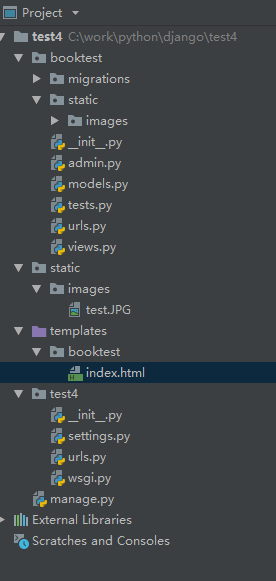
工程test4下urls.py的内容如下:
from django.conf.urls import include, url
from django.contrib import admin

urlpatterns = [
    url(r'^admin/', include(admin.site.urls)),
    url(r'^', include("booktest.urls"))
]
然后通过通过浏览器http://localhost/test/访问,总是在后端提示404错误
后来无意发现把静态资源文件挪到应用booktest目录下即可正常访问静态资源了,当然也可直接http://localhost/static/images/test.jpg进行访问了
但是直接使用http://localhost/static/不能访问,在后端提示“Directory indexes are not allowed here.”
这个问题希望网友能提供解决办法,谢谢。

我使用的python3.6,djanggo版本是1.8.3
django 不能访问静态资源的解决办法的更多相关文章
- [刘阳Java]_SpringMVC访问静态资源_第9讲
有些时候我们在使用SpringMVC的时候造成无法访问静态资源文件(如:html,js,css,image等等).其主要的原因出在web.xml文件我们设置SpringMVC前端控制器的映射路径 &l ...
- nodejs 构建本地web测试服务器 以及 解决访问静态资源的问题!
直接打开html文件,是以file:///方式打开的,这种方式很多时候会遇到跨域的问题,因此我们一般会搭建一个简易的本地服务器,来运行测试页面. 一.构建静态服务器 1.使用express模块 建立个 ...
- django 访问静态资源
urlpatterns = patterns('', url(r'^$', views.show, name='index'), url(r'^static/(?P<path>.*)', ...
- 解决SpringBoot页面跳转无法访问静态资源的问题
初学SpringBoot,写项目的时候遇到了问题,原本的页面是这样的 但启动项目后是这样的 这是因为thymeleaf中引入静态资源及模板需要使用到 th:xxx 属性,否则无法在动态资源中访问静态资 ...
- SpringMVC使用可以访问静态资源,但是导致Controller访问失败
如果在web.xml 拦截配置如下: <!-- Spring MVC servlet --> <servlet> <servlet-name>SpringMVC&l ...
- spring访问静态资源出错,No mapping found for HTTP request with URI xxx/resources/js/jquery.min.js...
问题:spring访问静态资源出错,No mapping found for HTTP request with URI xxx/resources/js/jquery.min.js... web.x ...
- SpringMVC访问静态资源的三种方式(转)
本文转自:http://www.iigrowing.cn/springmvc_fang_wen_jing_tai_zi_yuan_de_san_zhong_fang_shi.html 如何你的Disp ...
- 用node.js express设置路径后 子路径下的页面访问静态资源路径出问题
在routes/news_mian.js 设置了访问news_main.html 的路径 '/',通知设置一个访问news-page.html的子路径'/newspage'子路径.但是在访问loacl ...
- SpringBoot读取war包jar包Resource资源文件解决办法
SpringBoot读取war包jar包Resource资源文件解决办法 场景描述 在开发过程中我们经常会碰到要在代码中获取资源文件的情况,而我在最近在SpringBoot项目中时碰到一个问题,就是在 ...
随机推荐
- 【转】如何应用Query语句进行规则的语法设置?
在Altium Designer中, 设计规则通常用来定义用户的设计需求. 这些规则涵盖了设计的方方面面, 从布线宽度, 对象的安全间距,内电层的连接风格, 过孔风格等等. 设计规则不仅能在PCB设计 ...
- 【codeforces 623E】 Transforming Sequence
http://codeforces.com/problemset/problem/623/E (题目链接) 题意 长度为${n}$的满足前缀按位或为单调递增的${k}$位序列.要求每个位置为${[1, ...
- java Random.nextInt()方法
转: java Random.nextInt()方法 lic int nextInt(int n) 该方法的作用是生成一个随机的int值,该值介于[0,n)的区间,也就是0到n之间的随机int值,包含 ...
- #include<iostream>与#include<iostream.h>以及#inclue<string> 和 #include<string.h>的区别
转载于:http://www.cnblogs.com/charley_yang/archive/2010/12/08/1900715.html 1.从功能性的角度来讲,<iostream> ...
- Scala进阶之路-Scala函数篇详解
Scala进阶之路-Scala函数篇详解 作者:尹正杰 版权声明:原创作品,谢绝转载!否则将追究法律责任. 一.传值调用和传名调用 /* @author :yinzhengjie Blog:http: ...
- Spark记录-spark编程介绍
Spark核心编程 Spark 核心是整个项目的基础.它提供了分布式任务调度,调度和基本的 I/O 功能.Spark 使用一种称为RDD(弹性分布式数据集)一个专门的基础数据结构,是整个机器分区数据的 ...
- Web性能优化系列(2):剖析页面绘制时间
本文由 伯乐在线 - J.c 翻译,sunbiaobiao 校稿.未经许可,禁止转载!英文出处:www.deanhume.com.欢迎加入翻译小组. 最近,我参加了在伦敦举办的Facebook移动开发 ...
- iOS必学技-cocoapods
我就不再造轮子了,网上的教程很详细,楼主亲测,好用. http://code4app.com/article/cocoapods-install-usage 楼主安装使用过程中遇到以下几个问题,同学们 ...
- 图的最短路径-----------SPFA算法详解(TjuOj2831_Wormholes)
这次整理了一下SPFA算法,首先相比Dijkstra算法,SPFA可以处理带有负权变的图.(个人认为原因是SPFA在进行松弛操作时可以对某一条边重复进行松弛,如果存在负权边,在多次松弛某边时可以更新该 ...
- MySQL常见的两种存储引擎:MyISAM与InnoDB的爱恨情仇
Java面试通关手册(Java学习指南,欢迎Star,会一直完善下去,欢迎建议和指导):https://github.com/Snailclimb/Java_Guide 一 MyISAM 1.1 My ...