
mysql安装及错误解决
#下载mysql源安装包
shell> wget http://dev.mysql.com/get/mysql57-community-release-el7-8.noarch.rpm
# 安装mysql源
shell> yum localinstall mysql57-community-release-el7-8.noarch.rpm
检查mysql源是否安装成功
shell> yum repolist enabled | grep "mysql.*-community.*"
安装MySQL
shell> yum install mysql-community-server
开机启动
shell> systemctl enable mysqld
shell> systemctl daemon-reload
/etc/my.cnf 新增如下三行
character_set_server=utf8
init_connect='SET NAMES utf8'
validate_password = off 密码策略失效
常用命令:
shell> systemctl start mysqld
systemctl stop mysqld
systemctl restart mysqld
systemctl status mysqld
首次登录
mysql -uroot -p
密码使用如下查找到的_ZfwDGlsd0=g
[root@localhost /]# grep 'temporary password' /var/log/mysqld.log
2018-05-21T11:55:15.515167Z 1 [Note] A temporary password is generated for root@localhost: _ZfwDGlsd0=g
修改用户名密码
ALTER USER 'root'@'localhost' IDENTIFIED BY 'MyNewPass4!';
显示字符集
show variables like '%character%';
修改密码
mysqladmin -uroot -pMyNewPass4! password a123456
//创建用户
CREATE USER 'abc'@'host' IDENTIFIED BY 'abc123456';
//刷新系统权限表
flush privileges;
查看启动日志
cd /var/log/mysql.log
用navicat for mysql连接
报错:1130 host is not allowed to connect to
解决办法,执行如下命令:
mysql -uroot -p
mysql>use mysql;
mysql>update user set host = '%' where user = 'root';
mysql>select host, user from user;
mysql>flush privileges;
mysql卸载
查看安装的内容 rpm -qa |grep -i mysql
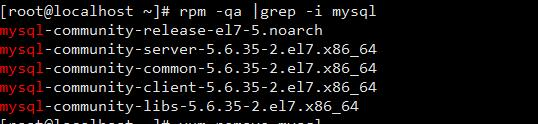
卸载 yum remove mysql-community mysql-community-server mysql-community-libs mysql-community-common
检查是否卸载干净 rpm -qa |grep -i mysql

继续卸载 yum remove mysql-community-release
mysql安装及错误解决的更多相关文章
- MySQL安装常见错误及解决方案
错误1:wizard安装最后一页,出现cannot create Windows service for mysql.error:0 错误 解决方法:打开命令行 输入 sc delete mysql ...
- 2016最新CocoaPods安装和错误解决 + 自己的经验
p.p1 { margin: 0.0px 0.0px 0.0px 0.0px; font: 20.0px Times; color: #333333; background-color: #fffff ...
- Linux 下一个 Mysql error 2002 错误解决
Linux 下一个 Mysql error 2002 错误解决 首先查看 /etc/rc.d/init.d/mysqld status 查看mysql它已开始. 假设启动的的话,先将数 ...
- 安装Mysql提示1045错误解决方法
MySQL安装提示一下错误 The security settings could not be applied to the database because the connection has ...
- MySQL ERROR 1045错误解决办法
今天在安装MySQL数据库时,有安装过程中报ERROR 1045错误,网上查了一下,解决方法如下: 1.对于安装过程中该错选择"skip"继续向下安装,完成安装: 2.在MySQL ...
- linux apache+php+mysql安装及乱码解决办法
1.乱码解决方法 首先确认mysql数据库字符集设置正确,php页面字符设置正确,之后修改apache配制文件http.conf 注释掉以下字符 AddDefaultCharset UTF-8 此为乱 ...
- setuptools安装和错误解决
错误解决:ImportError No module named setuptools GitHub: https://github.com/pypa/setuptools 下载安装 wget htt ...
- MySQL的1067错误解决方法
今天在学校的时候MySQL还运行的好好的,关机来公司后MySQL一直报错,错误为1067,网上找了好多办法,但是大都没效果,因此对这个错误做个总结: 打开你的安装目录下,查看my.ini文件中MySQ ...
- redis 安装 与错误解决办法
redis 安装与安装中遇到的错误 redis 安装 wget http://download.redis.io/releases/redis-4.0.11.tar.gz .tar.gz cd red ...
随机推荐
- Javascript 随机数函数 学习之一:产生服从均匀分布随机数
大家都知道Math.random是 javascript 中返回伪随机数的函数,但查看 MDN, The Math.random() function returns a floating-point ...
- 1-1 sacc(scss)入门
定义: CSS 预处理器定义了一种新的语言,其基本思想是,用一种专门的编程语言,为 CSS 增加了一些编程的特性,将 CSS 作为目标生成文件,然后开发者就只要使用这种语言进行编码工作. 通俗的说,“ ...
- How to use Data Iterator in TensorFlow
How to use Data Iterator in TensorFlow one_shot_iterator initializable iterator reinitializable iter ...
- Django 处理modelform错误信息
cp:https://blog.csdn.net/qq_34964399/article/details/79781071
- chrome中workspace配置达到同步修改本地文件的作用
在前端开发中,我们经常需要在浏览器中进行调试,特别是一些样式的修改,如果你还是先在浏览器elements中调试好在复制到本地文件,那就真的out了. chrome浏览器的workspace功能完全可以 ...
- OneASP 安全公开课,深圳站, Come Here, Feel Safe!
在这个世界上,一共有两种公司:一种被「黑」过,另一种,不知道自己被「黑」过. 在安全攻击频发的今天: 如何构建完善的安全防护壁垒? 如何借助威胁情报改善安全态势? 如何检测新形式下的漏洞? 答案,就在 ...
- .NET、ADO.NET、ASP.NET名称解析及.NET平台架构组成
转https://blog.csdn.net/xiaouncle/article/details/53265256 名词解释 1.Winform:Windows应用程序.桌面应用程序.C/S应用程序 ...
- Nginx服务器报 "Too Many Open Files"
近日服务器上的运行的一个站点经常性出现500错误.查了下服务器负载,负载正常.而后查询了下nginx记录的站点运行错误日志,发现提示Too many open files.因为站点静态文件居多,而且h ...
- python 之__new__
注意: 继承自object的新式类才有__new__方法 类中的__init__方法依赖__new__方法的正确返回,init中的self就是__new__返回的实例 __new__至少要有一个参数c ...
- JavaScript、ES5、ES6的区别
一.什么是JavaScript 1.JavaScript一种动态类型.弱类型.基于原型的客户端脚本语言,用来给HTML网页增加动态功能. 动态:在运行时确定数据类型.变量使用之前不需要类型声明,通常变 ...