
Download Visual Studio
Welcome to a new way to install Visual Studio! In our newest version, we've made it easier for you to select and install just the features you need. We've also reduced the minimum footprint of Visual Studio so that it installs more quickly and with less system impact than ever before.+
Want to know more about what else is new in this version? See our release notes. +
Ready to install? We'll walk you through it, step-by-step.+
Check system requirements
Before you begin, check the system requirements to make sure that your computer is ready to install Visual Studio 2017.+
Download Visual Studio
Next, download the Visual Studio bootstrapper file. To do so, click the following button, select the edition of Visual Studio 2017 that you want, click Save, and then click Open folder.+
 |
Watch a video on how to download the Visual Studio bootstrapper file and select the edition of Visual Studio that's right for you. |
Install the installer
Then, run the bootstrapper file to install the Visual Studio Installer. This new lightweight installer includes everything you need to both install and customize Visual Studio 2017.+
From your Downloads folder, double-click the bootstrapper that matches or is similar to one of the following files:
- vs_enterprise.exe for Visual Studio Enterprise
- vs_professional.exe for Visual Studio Professional
- vs_community.exe for Visual Studio Community
If you receive a User Account Control notice, click Yes.
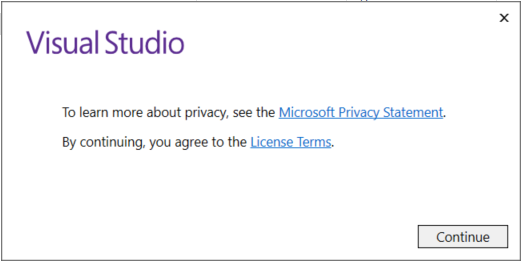
We'll ask you to acknowledge the Microsoft License Terms and the Microsoft Privacy Statement. Click Continue.
Install workloads
After the installer is installed, you can use it to customize your installation by selecting the feature sets—or workloads—that you want. Here's how.+
Find the workload you want in the Installing Visual Studio screen.
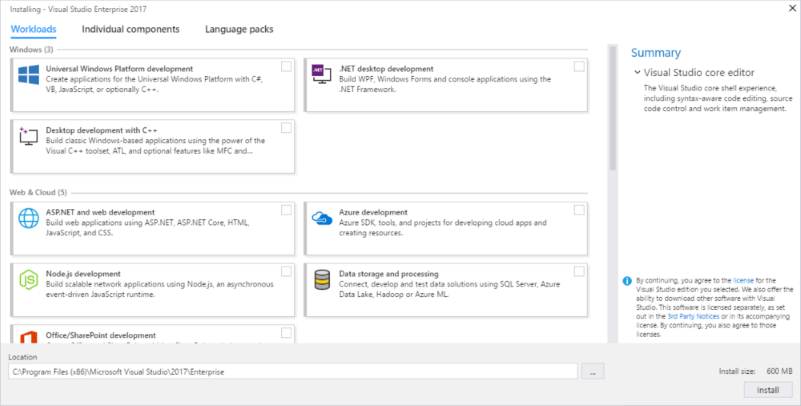
For example, choose the .NET desktop development workload. It comes with the default core editor, which includes basic code editing support for over 20 languages, the ability to open and edit code from any folder without requiring a project, and integrated source code control.
After you select the workload(s) you want, click Install.
Next, status screens appear that show the progress of your Visual Studio installation.
After the new workloads and components are installed, click Launch.
|
Watch a video on how to install the Visual Studio Installer and then install a workload. |
Install individual components
If you don't want to use the handy Workloads feature to customize your Visual Studio installation, you can do so by installing individual components instead. To do this, click the Individual components option from the Visual Studio Installer, select what you want, and then follow the prompts.+

|
Watch a video on how to install an individual component by using the Visual Studio Installer. |
Install language packs
By default, the installer program tries to match the language of the operating system when it runs for the first time. To install Visual Studio 2017 in a language of your choosing, click the Language packs option from the Visual Studio Installer, and follow the prompts.+

|
Watch a video on how to install a language pack by using the Visual Studio Installer. |
Change the installer language from the command line
Another way that you can change the default language is by running the installer from the command line. For example, you can force the installer to run in English by using the following command: vs_installer.exe --locale en-US. The installer will remember this setting when it is run the next time. The installer supports the following language tokens: zh-cn, zh-tw, cs-cz, en-us, es-es, fr-fr, de-de, it-it, ja-jp, ko-kr, pl-pl, pt-br, ru-ru, and tr-tr.+
Get support
Sometimes, things can go wrong. If your Visual Studio installation fails, see the Troubleshooting Visual Studio 2017 installation and upgrade issues page for troubleshooting tips.+
See also


Custom HTML Preview

JOSHBEK078 5ptsFeatured
Jul 25, 2017
hi everybody; i have a big problem when i tryed to make a new prject in VS_2017; the program launch this error. what can i do

salimsadekin 5ptsFeatured
Jul 7, 2017
Which visual studio should i use as a beginner?
Please suggest me.

Jeremy_Brooks 5ptsFeatured
Jul 22, 2017
@salimsadekin I'd recommend 2015 or 2017. The tooling will be the same between the two.

Rey 5ptsFeatured
Jul 6, 2017
Hi,
I install visual studio 2017 in my computer.My computer windows is 8.1. Now i am writting program my computer has this error :
''You need to be running Windows 10 to open this project.Please update to windows 10 to continue development of your Universal Windows app project.''
Is there solution for this error without install windows 10?

BertilFriman 5ptsFeatured
Jul 4, 2017
Nothing happens after running vs_community__1429479102.1495754844.exe.
No error message no installation windows.
The bootstrap installer shows a green progress bar for a couple of seconds, then disappears.
After that nothing happens.
I just want to be able to compile a C# program. Can anyone help me?

dmarlow 5ptsFeatured
Jun 28, 2017
Am I missing something? I don't see Azure SDK 3.0.1 available for VS 2017. I see it's available for 2015 and this page (https://www.microsoft.com/en-us/download/details.aspx?id=54917) says it's available via the "web workload", this page (https://msdn.microsoft.com/library/azure/dn627519.aspx) hasn't been updated in a long while. WebPI says to use the VS Installer, but I can't seem to locate it.

Manuel_OS 5ptsFeatured
Jun 23, 2017
can't install it!! :(
even thought I modifyed the installation folder to some folder in my secondary HDD (D:) with 300+gb free
the installer seems to download everything to my primary disk (C:) where I barely have 5gb free, so the installation always fails at some point :(
sorry for my bad english

Sarabjit_Mann 5ptsFeatured
Jun 21, 2017
Try to install workloader on Visual Studio 2017 for Mac and according to the instructions when I double click on vs_community.exe it opens stupid Xamarin Profiler. I tried to uninstall and install many timed but without any success.

kjw638 5ptsFeatured
Jun 10, 2017
For those of us who are new to Visual Studio, perhaps a line indicating whether adding features after the initial installation requires the same process?

Raghavendra_Mudugal1 5ptsFeatured
Jun 10, 2017
@kjw638 Yup, It has to download every file from the internet. There are some indications which I have figured it out, All the workloads as some files in common, as in common share so when you select a workload, on the right side it shows all the necessary files which is already installed from the previous installation and there is a install size indicator which shows how much size it is going to take after installation, it is indicating as "---" then no download or extra space is needed, if it shows some number then it will download the remaining files as needed. For the entire process it still need a active internet connection, it cannot install offline, even for the new workloads which has its related files installed.
Raghavendra_Mudugal1 5ptsFeatured
Jun 10, 2017
Any idea how to install the offline documentation for VS2017 Community?

vessela_exseee 5ptsFeatured
Jun 9, 2017
i have downloaded community version to my desktop. Now i want to install it to my notebook too. Do i have to download it again or there is download folder or something so i can move it with my usb or local area network.
This comment has been deleted

Rahul_Gupta1 5ptsFeatured
May 25, 2017
Also the vs_installer.exe is missing from the path C:\Program Files (86)\Microsoft Visual Studio\installer
Rahul_Gupta1 5ptsFeatured
May 25, 2017
I was installing VS on my system but for some reason it failed in between (may be due to disconnecting from internet) and ow I am trying to uninstall it but getting error-
"Unable to install the files to target location. Error: The folder 'c:\Program Files (86)\Microsoft Visual Studio\installer" or a file within is locked by another program. Close any application that might be using it and try again."
I have restarted machine 6 times for this, still no able to fix it.
Rahul

timsneath 5ptsFeatured
May 26, 2017
@Rahul_Gupta1 You can use a tool like Process Explorer (https://technet.microsoft.com/en-us/sysinternals/processexplorer.aspx) to find out what process is locking the file / folder (use Ctrl+F and type `Visual Studio\Installer` (no quotes) to filter. Then you can terminate the offending process. It shouldn't be the case that Visual Studio itself is holding a lock here - it might conceivably be anti-virus software or a command prompt that got left open.

Kislay.Mohan 5ptsFeatured
May 24, 2017
I am trying to install Visual studio 2017 to different drive(D:\) by changing location at the bottom of the installer, still the installer is checking default(C:\Program Files(x86)\...) for size check and installation fails.

Lubenskiy_Dmitry 5ptsFeatured
May 20, 2017
Cannot run VS2017 Enterprise after install. I upgraded from RC. No logs, no errors. It is just cannot be opened.

Hussam_Saba 5ptsFeatured
May 15, 2017
Hello, what is the size of VS2017 Enterprise? it downloaded almost 22GB and still counting. I opted for full layout?

Michael_Linetsky 5ptsFeatured
May 14, 2017
I installed the Data Science workload and selected R but the R project type still does not come up
timsneath 5ptsFeatured
May 14, 2017
@Michael_Linetsky Are you running on a 32-bit OS, by any chance? R requires 64-bit Windows, as documented here: https://docs.microsoft.com/en-us/visualstudio/rtvs/

Chris_Scott 5ptsFeatured
May 14, 2017
I am running 64 bit - but the Data Science workload only has the R Client has the only options. R runtime suppoet, etc.. are not listed. Please advise.
timsneath 5ptsFeatured
May 18, 2017
@Michael_Linetsky Paging @john_lam, one of the program managers on the R tools team. Can you confirm that you're running Visual Studio 2017 build 15.2 or later (Help / About), and that you're running on Windows 10?

Hideki_ASHIDA 5ptsFeatured
May 12, 2017
Isn't Offline Installer required internet connection at all?
# Sorry, I have not read all post, for I'm not good at English.

Ershad_Nozari 5ptsFeatured
May 12, 2017
Offline installer for update 2 (26430.04) does not work. Can someone from Microsoft please look into this! Failed installation screwed up my development environment. Very disappointing.
Ershad_Nozari 5ptsFeatured
May 12, 2017
Stackoverflow thread here ;http://stackoverflow.com/questions/43924449/offline-installation-of-visual-studio-2017-update-2-26430-04-fails

RolandCooper7 5ptsFeatured
May 13, 2017
@Ershad_Nozari I had a look at your error on stack overflow, it seems you didn't include the --includeRecommended and --includeOptional parameters in your offline layout command, this is required because it only downloads required packages by default which is not sufficient for the installation to work offline.
Ershad_Nozari 5ptsFeatured
May 13, 2017
Oh thanks. This is interesting, I will need to have a look into this. Cheers
This comment has been deleted

Bladey 5ptsFeatured
May 11, 2017
How can I update the existing downloaded VS Enterprise packages to the new update 15.2?

sybex 5ptsFeatured
May 11, 2017
Why is the link https://docs.microsoft.com/en-us/visualstudio/install/create-an-offline-installation-of-visual-studio bringing me to this page? And what happened to all of the discussion??
timsneath 5ptsFeatured
May 11, 2017
@sybex We completely rewrote that section of the documentation to optimize it for two different user types:
- A user with an unreliable network connection, who just wants to get the bits down before installing them in the simplest way;
- An enterprise administrator who wants to do a large deployment to a network of client workstations that are firewalled from the internet.
We’ve expanded our content for each of these scenarios:
- For the former - Install Visual Studio 2017 on low bandwidth or unreliable network environments
- For the latter - multiple admin guide pages, such as Create a network installation of Visual Studio 2017 and Special considerations for installing Visual Studio in an offline environment.
Hope that helps! Tim

JackUkleja 5ptsFeatured
May 15, 2017
@timsneath @sybex Hi Tim, this link in the docs to the "offline" install no longer works: https://docs.microsoft.com/en-gb/visualstudio/install/create-an-offline-installation-of-visual-studio (is broken)

Dan_Engle 5ptsFeatured
May 10, 2017
For those of you looking for the instructions on creating an offline installer: https://docs.microsoft.com/en-us/visualstudio/install/create-a-network-installation-of-visual-studio

mhardy 5ptsFeatured
May 7, 2017
Downloaded bootstrapper & double-clicked. It completed (apparently) quickly w/o any questions or messages! What now???????????

James_Mason 5ptsFeatured
May 4, 2017
I just found it here:
C:\Program Files (x86)\Microsoft Visual Studio\2017\Professional\Common7\IDE\devenv.exe
James_Mason 5ptsFeatured
May 4, 2017
I just downloaded and installed Visual Studio Professional 2017, but it's not showing up anywhere after the required reboot. I don't see it in Program Files or Program Files (x86), and there is no shortcut on the desktop. Can you help?
Thanks

Le_Khang 5ptsFeatured
Apr 27, 2017
I want to install C# language.What should I check in the Visual Installer?
Thanks.

Steven_Edison 5ptsFeatured
Apr 19, 2017
Is anyone working on allowing installing with a proxy? At very large financial institutions you might only be able to download from certain sources, and cannot make an offline install if we can't download, but a simple --proxy command line would let us do this.

Evgeny_Lukiyanov 5ptsFeatured
Apr 17, 2017
Having an issue with the installation. Well to be more correct, i must say with the launching, it gets stuck on the splash screen.

JoeFizx 5ptsFeatured
Apr 17, 2017
Should be a simple answer for this question. I installed VS 2017 Community for the purpose of learning Microsoft's Macro Assembler (MASM). It works well but I notice that I get a message saying that VS is a 30 day trial. I thought the Community version did not have a time restriction. When I select "Registration" I am taken to a page that has no registration ability. What am I missing?

AntonZ 5ptsFeatured
Apr 11, 2017
Hi.
Please provide a way to install/download VS 2017 being behind internet proxy. Currently it doesn't work.
This comment has been deleted

Jonathan 5ptsFeatured
Apr 7, 2017
Is there a way to install just the 2017 remote debugging tools to a computer without installing the entire IDE?

Diego_Perez_Botero_[MSFT] 5ptsFeatured
Apr 19, 2017
@Jonathan I found the 2017 remote debugging tools download here: https://www.visualstudio.com/downloads/?q=remote+2017

CarlosO 5ptsFeatured
Apr 4, 2017
How I can install individual components from the command lines? e.g. Help Viewer
TerryGLee 5ptsFeatured
Apr 6, 2017
@CarlosO Please try the instructions listed on our "Use command-line parameters to install Visual Studio 2017" page at https://docs.microsoft.com/visualstudio/install/use-command-line-parameters-to-install-visual-studio
Download Visual Studio的更多相关文章
- Visual Studio 2013 Update 2 RTM 发布
今天,微软再Visual Studio Blog发布了开放Visual Studio 2013 Update 2 RTM 下载的文章. 原来安装RC版本的同志们可以直接安装,提供在线安装和ISO下载安 ...
- Visual Studio 2012 trial version
Update: vs2012.5.iso http://download.microsoft.com/download/9/F/1/9F1DEA0F-97CC-4CC4-9B4D-0DB45B8261 ...
- 微软正式发布Visual Studio 2013 Update 3 (2013.3) RTM
昨天微软的Visual Studio 2013 Update 3(Visual Studio 2013.3)正式发布(RTM)了,做为微软认证金牌合作的葡萄城控件,我们组织力量第一时间进行翻译.分享给 ...
- 微软正式公布Visual Studio 2013 Update 3 (2013.3) RTM
昨天微软的Visual Studio 2013 Update 3(Visual Studio 2013.3)正式公布(RTM)了,做为微软认证金牌合作的葡萄城控件,我们组织力量第一时间进行翻译. ...
- Visual Studio 2013 Update 3
微软正式发布Visual Studio 2013 Update 3 (2013.3) RTM 昨 天微软的Visual Studio 2013 Update 3(Visual Studio 201 ...
- Visual Studio 2010 集成 SP1 补丁 制作 Visual Studio 2010 Service Pack 1 完整版安装光盘的方法
Now that Visual Studio 2010 SP1 has been released, administrators and developers may wish to install ...
- visual studio 2017 创建 android 本地共享库(.so) 并从 C# android 项目中调用
Developing Xamarin Android Native Applications ★★★★★ ★★★★ ★★★ ★★ ★ February 23, 2015 by Ankit Asthan ...
- Visual Studio 2017 发布 附带下载地址
链接: https://pan.baidu.com/s/1kFjGwyj5HwabvmJKiyLF_g 提取码: 关注公众号[GitHubCN]回复获取 winform框架源码-Devexpre ...
- Visual Studio 2010以及TeamFoundationServer 2010 MSDN免Key版地址分享(转载)
以下链接转自互联网,已经下载验证SHA1码和MSDN公布的一致,跟我一样不喜欢下试用版再自己动手的同学,请使用最新版的BT工具或者迅雷下载(需要支持Magnet协议) Download Visual ...
随机推荐
- javascript 中关于function中的prototype
在javascrpit中每个函数中都有一个prototype属性,在其创建的时候,无论是用var method = function(){}或者 var method = new Function() ...
- maven spring整合mybatis是使用junit测试报字节序列的错误
转载 http://blog.csdn.net/hjun01/article/details/40858753 错误信息 com.sun.org.apache.xerces.internal.impl ...
- PlayMaker GUI的Normalized
PlayMaker GUI的Normalized 在PlayMaker的GUI设置中,开发者可以通过Left.Top设置控件元素的起始点位置,通过Width.Height设置控件的大小.考虑到用户 ...
- Xamarin.Forms教程开发Xamarin.Forms应用程序需要的工具
开发Xamarin.Forms应用程序需要的工具 Xamarin.Forms教程开发Xamarin.Forms应用程序需要的工具,2014年5月8日在发布的Xamrin 3中引进了Xamarin.Fo ...
- Sea Battle<海战>(思路题)
time limit per test1 second memory limit per test256 megabytes inputstandard input outputstandard ou ...
- Redis学习篇(八)之连接相关
PING 测试客户端和服务器之间的连接是否有效,有效返回PONG ECHO 打印特定的信息, 如: ECHO 'HELLO WORLD' QUIT/EXIT 断开当前客户端与服务器之间的连接,可以重连 ...
- FastReport.Net使用:[22]地图(Map)控件
标记有学生地区 1.在报表中放一个地图控件 将地图控件放在标题区即可,其他栏目删除. 2.双击地图控件进行地图添加. 可以再网上下载到地图数据,ESRI shapefile文件,本例中找了个省会城市地 ...
- 【BZOJ 3443】 3443: 装备合成 (离线+线段树)
3443: 装备合成 Time Limit: 15 Sec Memory Limit: 128 MBSubmit: 63 Solved: 31 Description [背景] lll69 ...
- 「APIO2018选圆圈」
「APIO2018选圆圈」 题目描述 在平面上,有 \(n\) 个圆,记为 \(c_1, c_2, \ldots, c_n\) .我们尝试对这些圆运行这个算法: 找到这些圆中半径最大的.如果有多个半径 ...
- 第1篇--基于jdk7和jdk8分析 JVM的内存区域
基于jdk7和jdk8分析 JVM的内存区域 目录前言1.什么是JVM2.JRE/JDK/JVM是什么关系3.JVM执行程序的过程4. JVM的生命周期5.JVM垃圾回收一.运行时数据区的组成1.程 ...