
jQuery实现高亮显示网页关键词的方法
本文实例讲述了jQuery实现高亮显示网页关键词的方法。分享给大家供大家参考。具体如下:
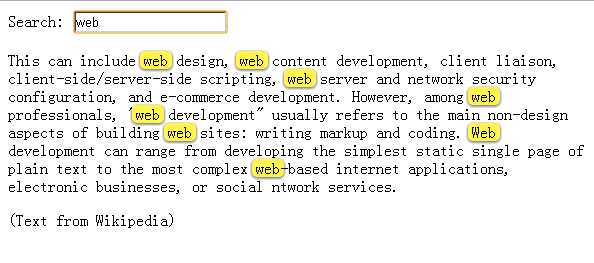
这是一款基于jquery实现的高亮显示网页上搜索关键词的代码,当你在文本框中输入的时候,如果下面的正文中包括你输入的内容,也就是关键字,那么这些关键字是会高亮显示的,被动态添加成黄色,看上去很醒目,就像百度快照显示关键词的样子。
运行效果如下图所示:
<!DOCTYPE html><head><meta http-equiv="Content-Type" content="text/html; charset=utf-8" /><title>jquery文字高亮显示</title><style type="text/css">.highlight { padding: 0px 0px 0px 5px; background-image: initial; background-position: initial; background-size: initial; background-repeat: initial; background-attachment: initial; background-origin: initial; background-clip: initial; border-left: 3px solid rgb(108, 226, 108); line-height: 20px; width: 640px; clear: both; border-radius: 0px !important; border-top: 0px !important; border-right: 0px !important; border-bottom: 0px !important; border-image: initial !important; bottom: auto !important; float: none !important; height: auto !important; left: auto !important; outline: 0px !important; overflow: visible !important; position: static !important; right: auto !important; top: auto !important; vertical-align: baseline !important; box-sizing: content-box !important; font-family: Consolas, "Bitstream Vera Sans Mono", "Courier New", Courier, monospace !important; min-height: auto !important; color: gray !important;">#fff34d; -moz-border-radius: 5px; /* FF1+ */ -webkit-border-radius: 5px; /* Saf3-4 */ border-radius: 5px; /* Opera 10.5, IE 9, Saf5, Chrome */ -moz-box-shadow: 0 1px 4px rgba(0, 0, 0, 0.7); /* FF3.5+ */ -webkit-box-shadow: 0 1px 4px rgba(0, 0, 0, 0.7); /* Saf3.0+, Chrome */ box-shadow: 0 1px 4px rgba(0, 0, 0, 0.7); /* Opera 10.5+, IE 9.0 */}.highlight { padding:1px 4px; margin:0 -4px;}</style></head><body>Search: <input type="text" id="text-search" /><p>This can include web design, web content development, client liaison, client-side/server-side scripting, web server and network security configuration, and e-commerce development. However, among web professionals, "web development" usually refers to the main non-design aspects of building web sites: writing markup and coding. Web development can range from developing the simplest static single page of plain text to the most complex web-based internet applications, electronic businesses, or social ntwork services.</p>(Text from Wikipedia)<script type="text/javascript" src="jquery-1.6.2.min.js"></script><script type="text/javascript">jQuery.fn.highlight = function(pat) { function innerHighlight(node, pat) { var skip = 0; if (node.nodeType == 3) { var pos = node.data.toUpperCase().indexOf(pat); if (pos >= 0) { var spannode = document.createElement('span'); spannode.className = 'highlight'; var middlebit = node.splitText(pos); var endbit = middlebit.splitText(pat.length); var middleclone = middlebit.cloneNode(true); spannode.appendChild(middleclone); middlebit.parentNode.replaceChild(spannode, middlebit); skip = 1; } } else if (node.nodeType == 1 && node.childNodes && !/(script|style)/i.test(node.tagName)) { for (var i = 0; i < node.childNodes.length; ++i) { i += innerHighlight(node.childNodes[i], pat); } } return skip; } return this.each(function() { innerHighlight(this, pat.toUpperCase()); });};jQuery.fn.removeHighlight = function() { function newNormalize(node) { for (var i = 0, children = node.childNodes, nodeCount = children.length; i < nodeCount; i++) { var child = children[i]; if (child.nodeType == 1) { newNormalize(child); continue; } if (child.nodeType != 3) { continue; } var next = child.nextSibling; if (next == null || next.nodeType != 3) { continue; } var combined_text = child.nodeValue + next.nodeValue; new_node = node.ownerDocument.createTextNode(combined_text); node.insertBefore(new_node, child); node.removeChild(child); node.removeChild(next); i--; nodeCount--; } }return this.find("span.highlight").each(function() { var thisParent = this.parentNode; thisParent.replaceChild(this.firstChild, this); newNormalize(thisParent); }).end();};</script><script type="text/javascript">$(function() { $('#text-search').bind('keyup change', function(ev) { // pull in the new value var searchTerm = $(this).val(); // remove any old highlighted terms $('body').removeHighlight(); // disable highlighting if empty if ( searchTerm ) { // highlight the new term $('body').highlight( searchTerm ); } });});</script></body></html>jQuery实现高亮显示网页关键词的方法的更多相关文章
- [JS]jQuery,javascript获得网页的高度和宽度
[JS]jQuery,javascript获得网页的高度和宽度网页可见区域宽: document.body.clientWidth 网页可见区域高: document.body.clientHeigh ...
- Jquery获得控件值的方法
一 Jquery获得服务器控件值的方法 由于ASP.NET网页运行后,服务器控件会随机生成客户端id,jquery获取时候不太好操作,google了下,总结有以下3种方法: 服务器控件代码:<a ...
- JQuery阻止表单提交的方法总结 - 使用onsubmit()验证表单并阻止非法提交
方法1:<form onsubmit="javascript:confirm()"> 方法内返回false阻止表单提交 示例:代码检测textarea内填写的长度,未填 ...
- 记一个jquery 无缝轮播的制作方法
接触前端也很久了,今天才发现,要做好一个轮播,其实有很多东西需要考虑进去,否则做出来的轮播效果并不好,下面我就来做一个轮播,是依赖jquery来写的 1.要做轮播,首先需要的是HTML的内容,css的 ...
- Python爬虫之三种网页抓取方法性能比较
下面我们将介绍三种抓取网页数据的方法,首先是正则表达式,然后是流行的 BeautifulSoup 模块,最后是强大的 lxml 模块. 1. 正则表达式 如果你对正则表达式还不熟悉,或是需要一些提 ...
- jquery数组删除指定元素的方法:grep()
jquery数组删除指定元素的方法:grep() 金刚 数组 jquery javascript 元素 遇到的问题 今天遇到一个问题,删除数组中的一个指定元素,并返回新的数组. 我定义的js数组是这样 ...
- JQuery中操作Css样式的方法
JQuery中操作Css样式的方法//1.获取和设置样式 $("#tow").attr("class")获取ID为tow的class属性 $("#tw ...
- jquery ajax success 函数 异步调用方法中不能给全局变量赋值的原因及解决办法
jquery ajax success 函数 异步调用方法中不能给全局变量赋值的原因及解决办法 在调用一个jquery的ajax方法时我们有时会需要该方法返回一个值或者给某个全局变量赋值,可是我们 ...
- php查看网页源代码的方法
这篇文章主要介绍了php查看网页源代码的方法,涉及php读取网页文件的技巧,具有一定参考借鉴价值,需要的朋友可以参考下 本文实例讲述了php查看网页源代码的方法.分享给大家供大家参考.具体实现 ...
随机推荐
- 从0开始搭建symphony
目标:在本地服务器中运行symphonyX 困难:=.= 基本全是困难…服务器重装了win/ubuntu/centos均不识别网卡,也是醉了. 1.通过Eclipse进行配置. 一开始以为需要单独下载 ...
- 【phpstorm】破解安装
1.使用前修改C:\windows\system32\Driver\hosts文件,将“0.0.0.0 account.jetbrains.com”添加到hosts文件中. 2. 浏览器打开 http ...
- Ubuntu14.04安装redis-server
1.update再install操作: sudo apt-get update sudo apt-get install -y redis-server 如果你已经安装了redis,会提示:redis ...
- Linux下查看磁盘挂载的三种方法
Linux下查看磁盘挂载的三种方法 2009-06-05 23:17 好久没有更新日志了,呵呵.不是没有要写的东东.实在抽不出时间来写,要准备公司的考试呢,C++考试.已经有七个月没有写C++代码了, ...
- List多个字段标识过滤
class Program { public static void Main(string[] args) { List<T> list = new List<T>(); ...
- Python图像处理(14):神经网络分类器
快乐虾 http://blog.csdn.net/lights_joy/ 欢迎转载,但请保留作者信息 在opencv中支持神经网络分类器.本文尝试在python中调用它. 和前面的贝叶斯分类器一样.神 ...
- bcdedit的研究
首先说明下引导: 微软在Vista之前的系统,采用的是Ntldr来进行引导系统,使用的是boot.ini文件. 在目前的Vista和win7中,采用的是新的引导方式Windows Boot Manag ...
- NHibernate中ISession的Flush
不知道在执行Insert或者Delete,update之后为什么要调用Flush(),后来看了http://www.cnblogs.com/lyj/archive/2008/10/17/1313612 ...
- GOF对Builder模式的定义(转载)
(1)意图 将一个复杂对象的构建与它的表示分离,使得同样的构建过程可以创建不同的表示. (2)适用性 1. 当创建复杂对象的算法应该独立于该对象的组成部分以及他们的装配方式:2. 当构造过程必须允许构 ...
- Qt 积累
总结(-) 1> 定时器的使用 QTimer *timer = new QTimer(this); connect(timer, SIGNAL(timeout()), this, SLOT(u ...