
Netty心跳简单Demo
前面简单地了解了一下IdleStateHandler,我们现在写一个简单的心跳demo:
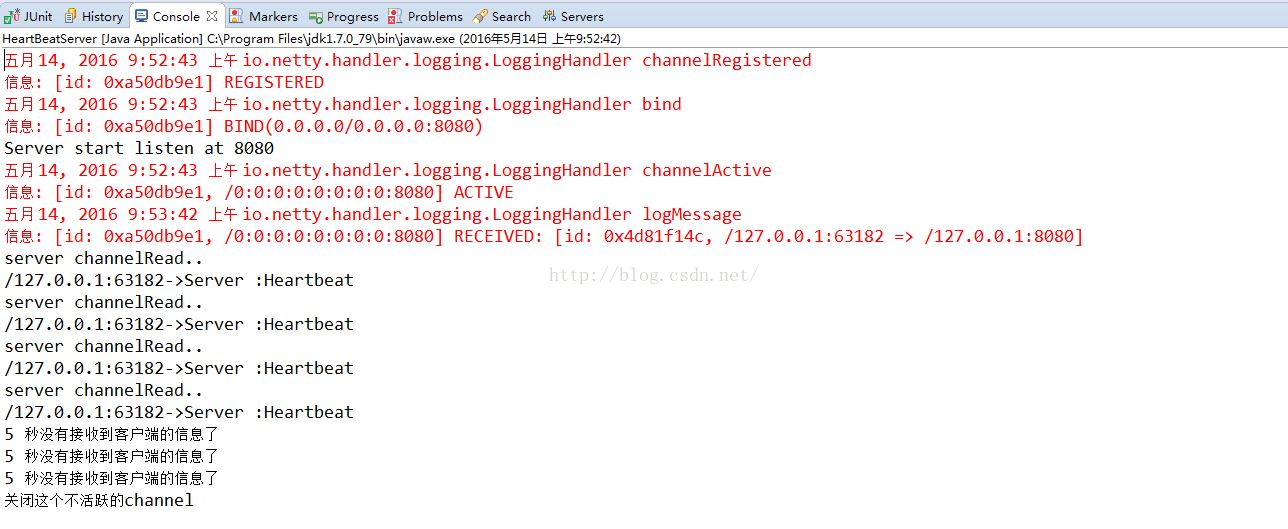
1)服务器端每隔5秒检测服务器端的读超时,如果5秒没有接受到客户端的写请求,也就说服务器端5秒没有收到读事件,则视为一次超时
2)如果超时二次则说明连接处于不活跃的状态,关闭ServerChannel
3)客户端每隔4秒发送一些写请求,这个请求相当于一次心跳包,告之服务器端:客户端仍旧活着
我们开始先开始写服务器端的handler,继承ChannelInboundHandlerAdapter,我们先重写userEventTriggered方法,这个方法我们前面讲过,如果超时则会触发相应的超时事件
HeartBeatServerHandler.java
- package com.lyncc.netty.heartbeats;
- import io.netty.channel.ChannelHandlerContext;
- import io.netty.channel.ChannelInboundHandlerAdapter;
- import io.netty.handler.timeout.IdleState;
- import io.netty.handler.timeout.IdleStateEvent;
- public class HeartBeatServerHandler extends ChannelInboundHandlerAdapter {
- private int loss_connect_time = 0;
- @Override
- public void userEventTriggered(ChannelHandlerContext ctx, Object evt) throws Exception {
- if (evt instanceof IdleStateEvent) {
- IdleStateEvent event = (IdleStateEvent) evt;
- if (event.state() == IdleState.READER_IDLE) {
- loss_connect_time++;
- System.out.println("5 秒没有接收到客户端的信息了");
- if (loss_connect_time > 2) {
- System.out.println("关闭这个不活跃的channel");
- ctx.channel().close();
- }
- }
- } else {
- super.userEventTriggered(ctx, evt);
- }
- }
- @Override
- public void channelRead(ChannelHandlerContext ctx, Object msg) throws Exception {
- System.out.println("server channelRead..");
- System.out.println(ctx.channel().remoteAddress() + "->Server :" + msg.toString());
- }
- @Override
- public void exceptionCaught(ChannelHandlerContext ctx, Throwable cause) throws Exception {
- cause.printStackTrace();
- ctx.close();
- }
- }
再写一下服务器端,我们要注意的是,我们要在channelPipeline中加入IdleStateHandler,我们在handler中提示的是5秒读,所以我们配置的是:
这样就可以每隔5秒检测一下服务端的读超时。完整代码清单如下:

- package com.lyncc.netty.heartbeats;
- import io.netty.bootstrap.ServerBootstrap;
- import io.netty.channel.ChannelFuture;
- import io.netty.channel.ChannelInitializer;
- import io.netty.channel.ChannelOption;
- import io.netty.channel.EventLoopGroup;
- import io.netty.channel.nio.NioEventLoopGroup;
- import io.netty.channel.socket.SocketChannel;
- import io.netty.channel.socket.nio.NioServerSocketChannel;
- import io.netty.handler.codec.string.StringDecoder;
- import io.netty.handler.codec.string.StringEncoder;
- import io.netty.handler.logging.LogLevel;
- import io.netty.handler.logging.LoggingHandler;
- import io.netty.handler.timeout.IdleStateHandler;
- import java.net.InetSocketAddress;
- import java.util.concurrent.TimeUnit;
- public class HeartBeatServer {
- private int port;
- public HeartBeatServer(int port) {
- this.port = port;
- }
- public void start(){
- EventLoopGroup bossGroup = new NioEventLoopGroup(1);
- EventLoopGroup workerGroup = new NioEventLoopGroup();
- try {
- ServerBootstrap sbs = new ServerBootstrap().group(bossGroup,workerGroup).channel(NioServerSocketChannel.class).handler(new LoggingHandler(LogLevel.INFO)).localAddress(new InetSocketAddress(port))
- .childHandler(new ChannelInitializer<SocketChannel>() {
- protected void initChannel(SocketChannel ch) throws Exception {
- ch.pipeline().addLast(new IdleStateHandler(5, 0, 0, TimeUnit.SECONDS));
- ch.pipeline().addLast("decoder", new StringDecoder());
- ch.pipeline().addLast("encoder", new StringEncoder());
- ch.pipeline().addLast(new HeartBeatServerHandler());
- };
- }).option(ChannelOption.SO_BACKLOG, 128)
- .childOption(ChannelOption.SO_KEEPALIVE, true);
- // 绑定端口,开始接收进来的连接
- ChannelFuture future = sbs.bind(port).sync();
- System.out.println("Server start listen at " + port );
- future.channel().closeFuture().sync();
- } catch (Exception e) {
- bossGroup.shutdownGracefully();
- workerGroup.shutdownGracefully();
- }
- }
- public static void main(String[] args) throws Exception {
- int port;
- if (args.length > 0) {
- port = Integer.parseInt(args[0]);
- } else {
- port = 8080;
- }
- new HeartBeatServer(port).start();
- }
- }
HeartBeatClientHandler.java方法也重写userEventTriggered方法,因为客户端没有任何写的情况,所以我们可以每次都能进行写超时:
也就说这个方法每隔4秒都能触发:
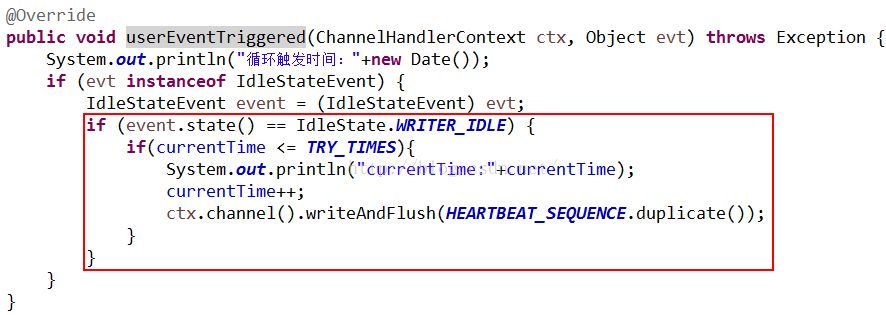
红色边框代码在客户端没有写事件的时候,一超时就会触发写请求:
完整代码如下:
HeartBeatClientHandler.java
- package com.lyncc.netty.heartbeats;
- import java.util.Date;
- import io.netty.buffer.ByteBuf;
- import io.netty.buffer.Unpooled;
- import io.netty.channel.ChannelHandlerContext;
- import io.netty.channel.ChannelInboundHandlerAdapter;
- import io.netty.handler.timeout.IdleState;
- import io.netty.handler.timeout.IdleStateEvent;
- import io.netty.util.CharsetUtil;
- import io.netty.util.ReferenceCountUtil;
- public class HeartBeatClientHandler extends ChannelInboundHandlerAdapter {
- private static final ByteBuf HEARTBEAT_SEQUENCE = Unpooled.unreleasableBuffer(Unpooled.copiedBuffer("Heartbeat",
- CharsetUtil.UTF_8));
- private static final int TRY_TIMES = 3;
- private int currentTime = 0;
- @Override
- public void channelActive(ChannelHandlerContext ctx) throws Exception {
- System.out.println("激活时间是:"+new Date());
- System.out.println("HeartBeatClientHandler channelActive");
- ctx.fireChannelActive();
- }
- @Override
- public void channelInactive(ChannelHandlerContext ctx) throws Exception {
- System.out.println("停止时间是:"+new Date());
- System.out.println("HeartBeatClientHandler channelInactive");
- }
- @Override
- public void userEventTriggered(ChannelHandlerContext ctx, Object evt) throws Exception {
- System.out.println("循环触发时间:"+new Date());
- if (evt instanceof IdleStateEvent) {
- IdleStateEvent event = (IdleStateEvent) evt;
- if (event.state() == IdleState.WRITER_IDLE) {
- if(currentTime <= TRY_TIMES){
- System.out.println("currentTime:"+currentTime);
- currentTime++;
- ctx.channel().writeAndFlush(HEARTBEAT_SEQUENCE.duplicate());
- }
- }
- }
- }
- @Override
- public void channelRead(ChannelHandlerContext ctx, Object msg) throws Exception {
- String message = (String) msg;
- System.out.println(message);
- if (message.equals("Heartbeat")) {
- ctx.write("has read message from server");
- ctx.flush();
- }
- ReferenceCountUtil.release(msg);
- }
- }
HeartBeatsClient.java
客户端代码也要加入IdleStateHandler这个handler,注意的是,我们要注意的是写超时,所以要设置写超时的时间,因为服务器端是5秒检测读超时,所以客户端必须在5秒内发送一次心跳,告之服务端,所以我们设置4秒:

完整代码如下:
- package com.lyncc.netty.heartbeats;
- import java.util.concurrent.TimeUnit;
- import io.netty.bootstrap.Bootstrap;
- import io.netty.channel.ChannelFuture;
- import io.netty.channel.ChannelInitializer;
- import io.netty.channel.ChannelOption;
- import io.netty.channel.ChannelPipeline;
- import io.netty.channel.EventLoopGroup;
- import io.netty.channel.nio.NioEventLoopGroup;
- import io.netty.channel.socket.SocketChannel;
- import io.netty.channel.socket.nio.NioSocketChannel;
- import io.netty.handler.codec.string.StringDecoder;
- import io.netty.handler.codec.string.StringEncoder;
- import io.netty.handler.logging.LogLevel;
- import io.netty.handler.logging.LoggingHandler;
- import io.netty.handler.timeout.IdleStateHandler;
- public class HeartBeatsClient {
- public void connect(int port, String host) throws Exception {
- // Configure the client.
- EventLoopGroup group = new NioEventLoopGroup();
- try {
- Bootstrap b = new Bootstrap();
- b.group(group)
- .channel(NioSocketChannel.class)
- .option(ChannelOption.TCP_NODELAY, true)
- .handler(new LoggingHandler(LogLevel.INFO))
- .handler(new ChannelInitializer<SocketChannel>() {
- @Override
- public void initChannel(SocketChannel ch) throws Exception {
- ChannelPipeline p = ch.pipeline();
- p.addLast("ping", new IdleStateHandler(0, 4, 0, TimeUnit.SECONDS));
- p.addLast("decoder", new StringDecoder());
- p.addLast("encoder", new StringEncoder());
- p.addLast(new HeartBeatClientHandler());
- }
- });
- ChannelFuture future = b.connect(host, port).sync();
- future.channel().closeFuture().sync();
- } finally {
- group.shutdownGracefully();
- }
- }
- /**
- * @param args
- * @throws Exception
- */
- public static void main(String[] args) throws Exception {
- int port = 8080;
- if (args != null && args.length > 0) {
- try {
- port = Integer.valueOf(args[0]);
- } catch (NumberFormatException e) {
- // 采用默认值
- }
- }
- new HeartBeatsClient().connect(port, "127.0.0.1");
- }
- }
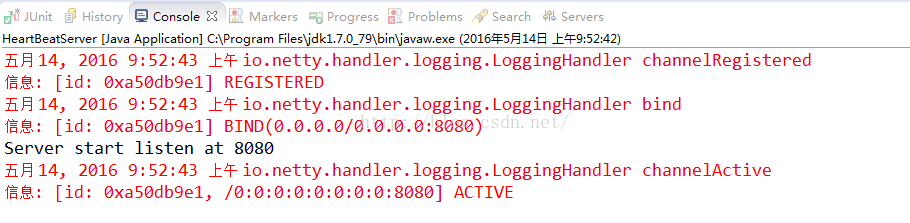
我们先启动服务器端:
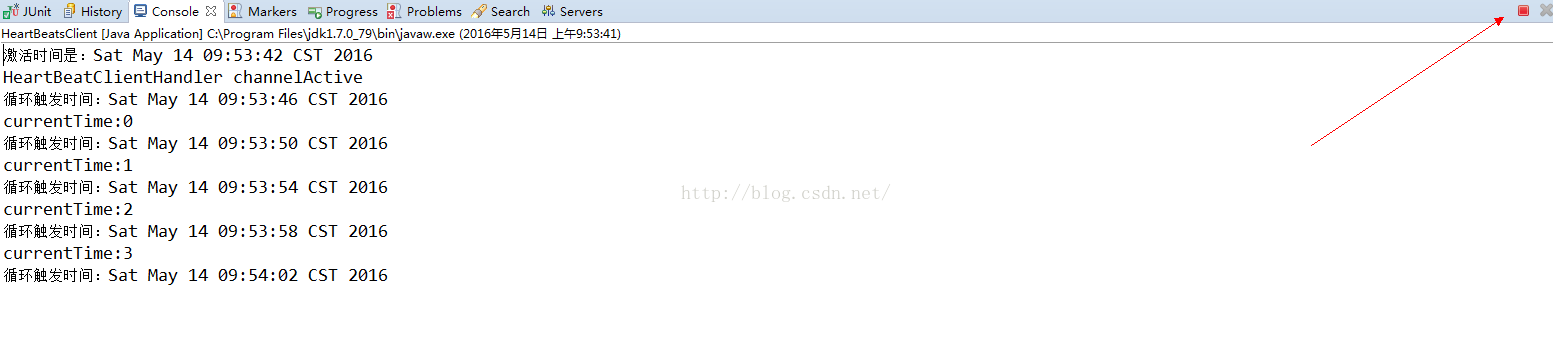
再启动客户端:
此时客户端还存活着,我们看看服务器端的输出:
我们再看看客户端的输出:
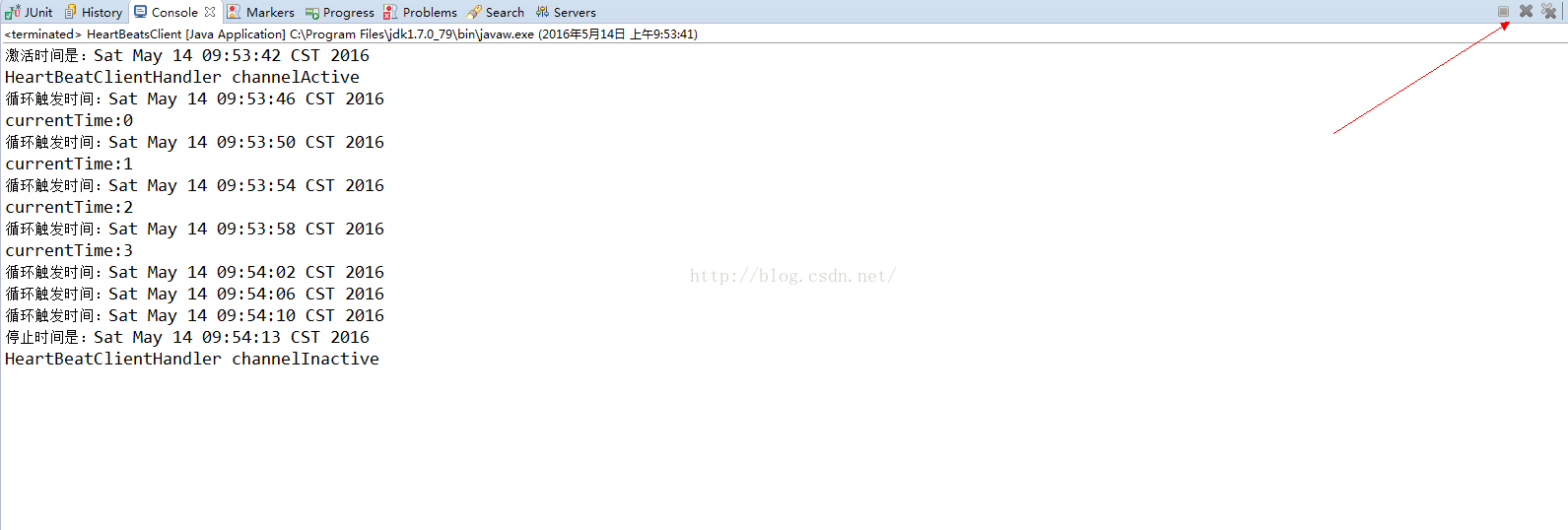
inactive的事件触发了,且客户端自动停止了~
Netty心跳简单Demo的更多相关文章
- Netty的简单Demo
这个demo是通过网上下载: 使用maven构建的: 项目结构: pom.xml: <dependencies> <dependency> <groupId>io. ...
- 连接管理 与 Netty 心跳机制
一.前言 踏踏实实,动手去做,talk is cheap, show me the code.先介绍下基础知识,然后做个心跳机制的Demo. 二.连接 长连接:在整个通讯过程,客户端和服务端只用一个S ...
- NETTY 心跳机制
最近工作比较忙,但闲暇之余还是看了阿里的冯家春(fengjiachun)的github上的开源代码Jupiter,写的RPC框架让我感叹人外有人,废话不多说,下面的代码全部截取自Jupiter,写了一 ...
- 设计模式之单例模式的简单demo
/* * 设计模式之单例模式的简单demo */ class Single { /* * 创建一个本类对象. * 和get/set方法思想一样,类不能直接调用对象 * 所以用private限制权限 * ...
- Spring的简单demo
---------------------------------------- 开发一个Spring的简单Demo,具体的步骤如下: 1.构造一个maven项目 2.在maven项目的pom.xml ...
- 使用Spring缓存的简单Demo
使用Spring缓存的简单Demo 1. 首先创建Maven工程,在Pom中配置 <dependency> <groupId>org.springframework</g ...
- Managed DirectX中的DirectShow应用(简单Demo及源码)
阅读目录 介绍 准备工作 环境搭建 简单Demo 显示效果 其他 Demo下载 介绍 DirectX是Microsoft开发的基于Windows平台的一组API,它是为高速的实时动画渲染.交互式音乐和 ...
- angular实现了一个简单demo,angular-weibo-favorites
前面必须说一段 帮客户做了一个过渡期的项目,唯一的要求就是速度,我只是会点儿基础的php,于是就用tp帮客户做了这个项目.最近和客户架构沟通,后期想把项目重新做一下,就用现在最流行的技术,暂时想的使用 ...
- Solr配置与简单Demo[转]
Solr配置与简单Demo 简介: solr是基于Lucene Java搜索库的企业级全文搜索引擎,目前是apache的一个项目.它的官方网址在http://lucene.apache.org/sol ...
随机推荐
- 程序设计入门-C语言基础知识-翁恺-第六周:数组-详细笔记(六)
目录 第六章:数组 6-1 数组 6-2 数组计算 6.3 课后习题 第六章:数组 6-1 数组 题目:让用户输入一组整数以-1结束输入,算出这组数的平均值,并且输出大于平均值的数. 我们需要记录用户 ...
- LARAVEL IOC容器 示例解析
<?php class People { public $dog = null; public function __construct() { $this->dog = new Dog( ...
- java sundry tips
1.关于Arrays 记得binarySearch方法返回的int 类型的数值的含义. If the array contains multiple elements with the spec ...
- Django项目部署(阿里云)(1)--基本功能实现
新博客地址:http://muker.net/django-server.html 手头需要部署一个Django项目,前面的博客也因为偷懒也没有部署,这里记录一下部署过程.ps:其实网上比较靠谱的说明 ...
- SVN 如何更新整个目录
SVN 有时会遇到更新整个目录的情况, 比如依赖的某个库有了新版本, 需要更新. 这个时候的处理可能需要注意一些问题.(直接跳到最后看结论) 举个例子: 根文件是 test, 里面用 external ...
- Quartz 2D编程指南- PDF文档的创建、显示及转换
PDF文档存储依赖于分辨率的向量图形.文本和位图,并用于程序的一系列指令中.一个PDF文档可以包含多页的图形和文本.PDF可用于创建跨平台.只读的文档,也可用于绘制依赖于分辨率的图形. ...
- ubuntu scrapy 开发环境搭建
我的版本是14.04 1.更新系统 ##如果系统没有换国内下载路径需要换下系统的更新下载路径 http://www.cnblogs.com/seablog/p/7043798.html sudo a ...
- wamp配置局域网访问
Apache的版本是2.4.9. <Directory "D:/wamp/www/"> # # Possible values for the Option ...
- js写的体彩足球预测分析
最近室友在玩世界杯的预测,我顺手写点分析:下面直接给出代码,很简单的,拷贝代码直接存为html文件就可以了.---------mq0036 说明下:需要你自己去找个Jquery引用到当前页面就可以了 ...
- JDK1.5java新特性
JDK1.5java增加的新特性: 自动装箱/拆箱 增强for 泛型 枚举 静态导入 可变参数 1 自动装箱/拆箱 * JDK1.5允许开发人员把一个基 ...