
【spring源码学习】spring集成orm数据框架
【一】简易的数据源配置
(1)配置文件
<!--springJdbcTemplemate数据操作配置信息 -->

    <bean id="driver" class="com.mysql.jdbc.Driver"></bean>

   <bean id="dataSource" class="org.springframework.jdbc.datasource.SimpleDriverDataSource">

           <property name="url"><value>jdbc:mysql://localhost:3306/mobile_thinks</value></property>

           <property name="username"><value>root</value></property>

           <property name="password"><value>shangxiaofei</value></property>

           <property name="driver" ref="driver"/>

   </bean>

   <bean id="JdbcTemplate" class="org.springframework.jdbc.core.JdbcTemplate">

           <property name="dataSource" ref="dataSource"/>

   </bean>
(2)测试类
package com.mobile.thinks.service.impl;

import java.math.BigDecimal;

import java.sql.ResultSet;

import java.sql.SQLException;

import java.util.Date;

import java.util.List;

import org.springframework.beans.factory.annotation.Autowired;

import org.springframework.jdbc.core.JdbcTemplate;

import org.springframework.jdbc.core.RowMapper;

import org.springframework.stereotype.Service;

import com.mobile.thinks.entity.User;

import com.mobile.thinks.service.UserInfoService;

@Service(value="userInfoServiceImpl")

public class UserInfoServiceImpl implements UserInfoService{

    @Autowired

    private JdbcTemplate JdbcTemplate;

    @Override

    public User createUserAcountByUser(String userId) {

        //sql

        String sql="select * from thinks_user where id='"+userId+"'";

        //转换器

        RowMapper<User> rowMapper=new RowMapper<User>() {

            @Override

            public User mapRow(ResultSet rs, int rowNum) throws SQLException {

                User user=new User();

                user.setId(rs.getString("id"));

                user.setUserName(rs.getString("user_name"));

                user.setPassword(rs.getString("password"));

                user.setName(rs.getString("name"));

                user.setAddress(rs.getString("address"));

                user.setAge(rs.getInt("age"));

                user.setCreateTime(rs.getDate("create_time"));

                user.setUpdateTime(rs.getDate("update_time"));

                return user;

            }

        };

        //查询

        List<User> users= JdbcTemplate.query(sql,rowMapper);

        User user=users.get(0);

        //创建记录

        String insertSql="INSERT INTO thinks_user_acount(id, acount_name, acount_type, amount, user_id, age, create_time, update_time)VALUES('12344567890poiuytrewq', '"+user.getName()+"的账户', '人民币',"+new BigDecimal(88888888)+",'"+user.getId()+"', 28, now(), now());";

        JdbcTemplate.execute(insertSql);

        return user;

    }

}
【二】JNDI方式配置在tomcat数据源,使用com.alibaba.druid连接池
(1)将数据库数据源用到的jdbc的jar包和数据库连接池的jar包copy到tomcat解压包的lib目录下
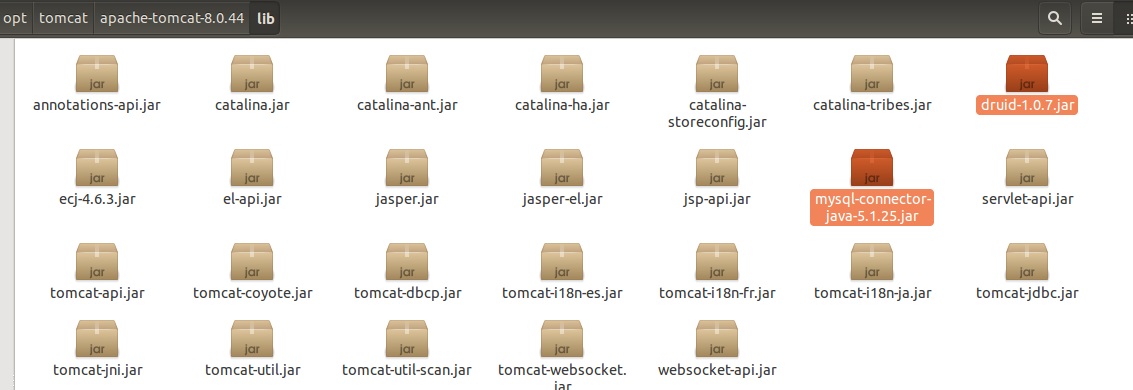
(2)在tomcat的conf目录下的context.xml配置文件中添加jndi数据源的配置
<?xml version="1.0" encoding="UTF-8"?>

<!--

  Licensed to the Apache Software Foundation (ASF) under one or more

  contributor license agreements.  See the NOTICE file distributed with

  this work for additional information regarding copyright ownership.

  The ASF licenses this file to You under the Apache License, Version 2.0

  (the "License"); you may not use this file except in compliance with

  the License.  You may obtain a copy of the License at

      http://www.apache.org/licenses/LICENSE-2.0

  Unless required by applicable law or agreed to in writing, software

  distributed under the License is distributed on an "AS IS" BASIS,

  WITHOUT WARRANTIES OR CONDITIONS OF ANY KIND, either express or implied.

  See the License for the specific language governing permissions and

  limitations under the License.

--><!-- The contents of this file will be loaded for each web application --><Context>

<Resource

    name="jdbc/thinkDS"

    auth="Container"

    type="javax.sql.DataSource"

    factory="com.alibaba.druid.pool.DruidDataSourceFactory"

    maxActive="10"

    minIdle="1"

    initialSize="1"

    maxWait="10000"

    username="root"

    password="shangxiaofei"

    driverClassName="com.mysql.jdbc.Driver"

    url="jdbc:mysql://localhost:3306/mobile_thinks"

     />

    <!-- Default set of monitored resources. If one of these changes, the    -->

    <!-- web application will be reloaded.                                   -->

    <WatchedResource>WEB-INF/web.xml</WatchedResource>

    <WatchedResource>${catalina.base}/conf/web.xml</WatchedResource>

    <!-- Uncomment this to disable session persistence across Tomcat restarts -->

    <!--

    <Manager pathname="" />

    -->

    <!-- Uncomment this to enable Comet connection tacking (provides events

         on session expiration as well as webapp lifecycle) -->

    <!--

    <Valve className="org.apache.catalina.valves.CometConnectionManagerValve" />

    -->

</Context>
(3)在项目的xml配置文件里引用jndi的配置
<?xml version="1.0" encoding="UTF-8"?>

<beans xmlns="http://www.springframework.org/schema/beans"

       xmlns:xsi="http://www.w3.org/2001/XMLSchema-instance" xmlns:tx="http://www.springframework.org/schema/tx"

       xmlns:jpa="http://www.springframework.org/schema/data/jpa"

        xmlns:aop="http://www.springframework.org/schema/aop"

       xmlns:context="http://www.springframework.org/schema/context"

       xmlns:task="http://www.springframework.org/schema/task"

       xsi:schemaLocation="http://www.springframework.org/schema/beans

           http://www.springframework.org/schema/beans/spring-beans.xsd

           http://www.springframework.org/schema/tx

              http://www.springframework.org/schema/tx/spring-tx.xsd

              http://www.springframework.org/schema/aop

              http://www.springframework.org/schema/aop/spring-aop.xsd

              http://www.springframework.org/schema/task

              http://www.springframework.org/schema/task/spring-task.xsd

              http://www.springframework.org/schema/data/jpa

           http://www.springframework.org/schema/data/jpa/spring-jpa.xsd http://www.springframework.org/schema/context http://www.springframework.org/schema/context/spring-context.xsd">

   <!-- <context:property-placeholder location="classpath:resources.properties"/> -->

    <!-- 扫描注解Bean -->

    <context:component-scan base-package="com.mobile.thinks.**">

        <context:include-filter type="annotation" expression="org.springframework.stereotype.Service"/>

        <context:include-filter type="annotation" expression="org.springframework.beans.factory.annotation.Autowired"/>

    </context:component-scan>

    <!--springJdbcTemplemate数据操作配置信息 -->

    <bean id="driver" class="com.mysql.jdbc.Driver"></bean>

   <bean id="dataSource" class="org.springframework.jdbc.datasource.SimpleDriverDataSource">

           <property name="url"><value>jdbc:mysql://localhost:3306/mobile_thinks</value></property>

           <property name="username"><value>root</value></property>

           <property name="password"><value>shangxiaofei</value></property>

           <property name="driver" ref="driver"/>

   </bean>

   <bean id="JdbcTemplate" class="org.springframework.jdbc.core.JdbcTemplate">

           <property name="dataSource" ref="dataSource"/>

   </bean>

   <!-- spring集成jndi数据源配置 -->

   <bean id="jndiDataSources" class="org.springframework.jndi.JndiObjectFactoryBean">

           <property name="jndiName">

            <value>java:comp/env/jdbc/thinkDS</value>

        </property>

   </bean>

    <bean id="jndiJdbcTemplate" class="org.springframework.jdbc.core.JdbcTemplate">

           <property name="dataSource" ref="jndiDataSources"/>

   </bean>

   <!-- springHibernate继承 -->

</beans>
(4)项目中使用jndi数据源
@Service(value="userInfoServiceImpl")

public class UserInfoServiceImpl implements UserInfoService{

    @Autowired

    private JdbcTemplate JdbcTemplate;

    @Resource(name="jndiJdbcTemplate")

    private JdbcTemplate jndiJdbcTemplate;

    @Override

    public User findUserById(String userId) {

        //sql

        String sql="select * from thinks_user where id='"+userId+"'";

        //转换器

        RowMapper<User> rowMapper=new RowMapper<User>() {

            @Override

            public User mapRow(ResultSet rs, int rowNum) throws SQLException {

                        User user=new User();

                        user.setId(rs.getString("id"));

                        user.setUserName(rs.getString("user_name"));

                        user.setPassword(rs.getString("password"));

                        user.setName(rs.getString("name"));

                        user.setAddress(rs.getString("address"));

                        user.setAge(rs.getInt("age"));

                        user.setCreateTime(rs.getDate("create_time"));

                        user.setUpdateTime(rs.getDate("update_time"));

                        return user;

            }

        };

        //查询

        List<User> users= jndiJdbcTemplate.query(sql,rowMapper);

        User user=users.get(0);

        return user;

    }

}
【spring源码学习】spring集成orm数据框架的更多相关文章
- spring源码学习——spring整体架构和设计理念
Spring是在Rod Johnson的<Expert One-On-One J2EE Development and Design >的基础上衍生而来的.主要目的是通过使用基本的java ...
- Spring源码学习
Spring源码学习--ClassPathXmlApplicationContext(一) spring源码学习--FileSystemXmlApplicationContext(二) spring源 ...
- Spring源码学习-容器BeanFactory(一) BeanDefinition的创建-解析资源文件
写在前面 从大四实习至今已一年有余,作为一个程序员,一直没有用心去记录自己工作中遇到的问题,甚是惭愧,打算从今日起开始养成写博客的习惯.作为一名java开发人员,Spring是永远绕不过的话题,它的设 ...
- Spring源码学习-容器BeanFactory(四) BeanDefinition的创建-自定义标签的解析.md
写在前面 上文Spring源码学习-容器BeanFactory(三) BeanDefinition的创建-解析Spring的默认标签对Spring默认标签的解析做了详解,在xml元素的解析中,Spri ...
- 【目录】Spring 源码学习
[目录]Spring 源码学习 jwfy 关注 2018.01.31 19:57* 字数 896 阅读 152评论 0喜欢 9 用来记录自己学习spring源码的一些心得和体会以及相关功能的实现原理, ...
- spring源码学习之路---深入AOP(终)
作者:zuoxiaolong8810(左潇龙),转载请注明出处,特别说明:本博文来自博主原博客,为保证新博客中博文的完整性,特复制到此留存,如需转载请注明新博客地址即可. 上一章和各位一起看了一下sp ...
- spring源码学习之路---IOC初探(二)
作者:zuoxiaolong8810(左潇龙),转载请注明出处,特别说明:本博文来自博主原博客,为保证新博客中博文的完整性,特复制到此留存,如需转载请注明新博客地址即可. 上一章当中我没有提及具体的搭 ...
- Spring源码学习-容器BeanFactory(三) BeanDefinition的创建-解析Spring的默认标签
写在前面 上文Spring源码学习-容器BeanFactory(二) BeanDefinition的创建-解析前BeanDefinition的前置操作中Spring对XML解析后创建了对应的Docum ...
- Spring源码学习-容器BeanFactory(二) BeanDefinition的创建-解析前BeanDefinition的前置操作
写在前面 上文 Spring源码学习-容器BeanFactory(一) BeanDefinition的创建-解析资源文件主要讲Spring容器创建时通过XmlBeanDefinitionReader读 ...
- spring源码学习(一):eclipse导入spring源码
前言 对于一门技术,我们最先是了解它(what),然后再熟练的使用它(how)以及何时用它(when),最后肯定要看透它(why).spring作为Java开发人员可以说是最熟悉不过的了,基本每个Ja ...
随机推荐
- C++实现矩阵压缩
C++实现矩阵压缩 转置运算时一种最简单的矩阵运算.对于一个m*n的矩阵M,他的转置矩阵T是一个n*m的矩阵,且T(i,j) = M(j,i). 一个稀疏矩阵的转置矩阵仍然是稀疏矩阵. 矩阵转置 方案 ...
- HTTP下载图片
网上有专门写的http下载的C++代码,但是我发现windows自带的http下载,一行代码就搞定,非常简单,目前为止使用正常. 首先包含头文件和lib文件 #include <urlmon.h ...
- 虚拟机中安装windows server 2008方法
我们简单的介绍一下怎么在虚拟机上安装 windows server 2008系统. 工具/原料 已经安装好的虚拟机. windows server 2008 iso系统镜像 方法/步骤1虚拟机上虚 ...
- day6-面向对象补充篇--类的特殊成员
先说明一下,今天的内容主要转自师兄张其高的博客http://www.cnblogs.com/zhangqigao/articles/6935221.html 前面我们讲了类的方法,有普通方法,就是我们 ...
- 【hdu1005】Number Sequence
题目描述 一个数列的定义如下: f(1) = 1, f(2) = 1, f(n) = (A * f(n - 1) + B * f(n - 2)) mod 7. 给出A和B,你要求出f(n). 输入 输 ...
- 火影忍者之~鸣人 (字符串处理,strcmp)
火影忍者的男主角漩涡鸣人,因为身上封印着邪恶的九尾妖狐,无父无母的他受尽了村人的冷眼与歧视,他下定决心要成为第六代火影,让所有人都认同他的存在,火影是动漫火影忍者中主人公鸣人所在的国家的最强忍者的头衔 ...
- 【Html 学习笔记】第六节——列表
无序列表:<ul></ul> 有序列表:<ol start=$num></ol> 不同类型的无序列表:<ul type="***&quo ...
- eureka-7-多网卡下的ip选择
目前没有需求,后面需要的话,再补充 只是简单使用的话,只需要指定ip即可 eureka.instance.ip-address:127.0.0.1
- Java发送短信
1.接口使用介绍 发送短信肯定需要使用第三方接口,Java本身是肯定不能直接发送短信的.第三方接口有很多,这里直接找个正规靠谱一点的学习一下 这里使用了中国网建(http://sms.webchine ...
- iOS笔记杂记
Google Mobile Ads SDK更新至7.2.1不能编译,添加依赖库QuartzCore.framework后正常编译 imageName会把image缓存到手机内存里,不适合大量图片浏览会 ...