
Easyui Datagrid相同连续列合Demo之三
效果图:
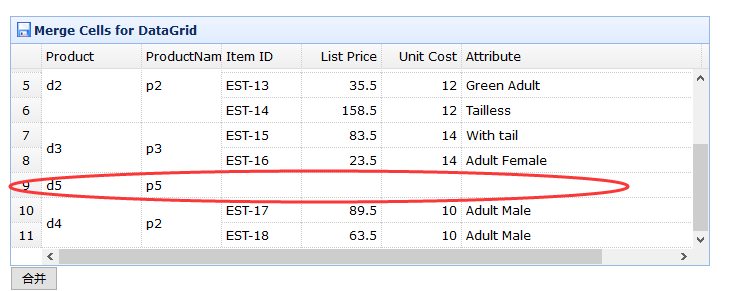
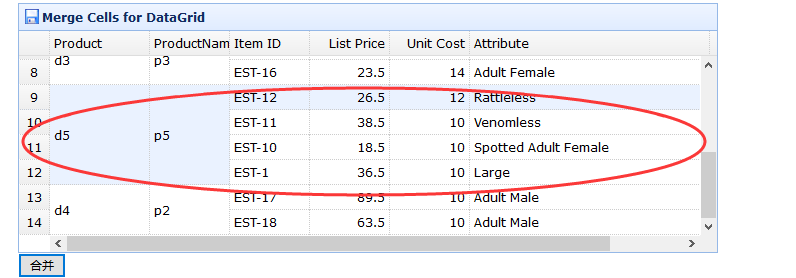
html

<!DOCTYPE html>

<html>

<head>

    <meta charset="UTF-8">

    <title>Merge Cells for DataGrid - jQuery EasyUI Demo</title>

    <link rel="stylesheet" type="text/css" href="../../themes/default/easyui.css">

    <link rel="stylesheet" type="text/css" href="../../themes/icon.css">

    <link rel="stylesheet" type="text/css" href="../demo.css">

    <script type="text/javascript" src="../../jquery.min.js"></script>

    <script type="text/javascript" src="../../jquery.easyui.min.js"></script>

    <script type="text/javascript" src="../../extends.js"></script>

</head>

<body>

    <h2>Merge Cells for DataGrid</h2>

    <p>Cells in DataGrid body can be merged.</p>

    <div style="margin:20px 0;"></div>

    <table class="easyui-datagrid" id="dg" title="Merge Cells for DataGrid" style="width:700px;height:250px"

            data-options="

                rownumbers: true,

                singleSelect: true,

                iconCls: 'icon-save',

                data:qyData,

                method: 'get',

                onLoadSuccess: onLoadSuccess

            ">

        <thead>

            <tr>

                <th data-options="field:'productid',width:100">Product</th>

                <th data-options="field:'productname',width:80">ProductName</th>

                <th data-options="field:'itemid',width:80">Item ID</th>

                <th data-options="field:'listprice',width:80,align:'right'">List Price</th>

                <th data-options="field:'unitcost',width:80,align:'right'">Unit Cost</th>

                <th data-options="field:'attr1',width:240">Attribute</th>

                <th data-options="field:'status',width:60,align:'center'">Status</th>

            </tr>

        </thead>

    </table>

    <input type="button" value="合并" id="mergeCells" onclick="hb()">

    <script type="text/javascript">

       var qyData = {"total":11,"rows":[

                {"productid":"d1","productname":"p1","unitcost":10.00,"status":"P","listprice":36.50,"attr1":"Large","itemid":"EST-1"},

                {"productid":"d1","productname":"p1","unitcost":10.00,"status":"P","listprice":18.50,"attr1":"Spotted Adult Female","itemid":"EST-10"},

                {"productid":"d1","productname":"p2","unitcost":10.00,"status":"P","listprice":38.50,"attr1":"Venomless","itemid":"EST-11"},

                {"productid":"d2","productname":"p2","unitcost":12.00,"status":"P","listprice":26.50,"attr1":"Rattleless","itemid":"EST-12"},

                {"productid":"d2","productname":"p2","unitcost":12.00,"status":"P","listprice":35.50,"attr1":"Green Adult","itemid":"EST-13"},

                {"productid":"d2","productname":"p2","unitcost":12.00,"status":"P","listprice":158.50,"attr1":"Tailless","itemid":"EST-14"},

                {"productid":"d3","productname":"p3","unitcost":14.00,"status":"P","listprice":83.50,"attr1":"With tail","itemid":"EST-15"},

                {"productid":"d3","productname":"p3","unitcost":14.00,"status":"P","listprice":23.50,"attr1":"Adult Female","itemid":"EST-16"},

                {"productid":"d5","productname":"p5"},

                {"productid":"d4","productname":"p2","unitcost":10.00,"status":"P","listprice":89.50,"attr1":"Adult Male","itemid":"EST-17"},

                {"productid":"d4","productname":"p2","unitcost":10.00,"status":"P","listprice":63.50,"attr1":"Adult Male","itemid":"EST-18"}

            ]}

        var jcData = [

            {"unitcost":10.00,"status":"P","listprice":36.50,"attr1":"Large","itemid":"EST-1"},

            {"unitcost":10.00,"status":"P","listprice":18.50,"attr1":"Spotted Adult Female","itemid":"EST-10"},

            {"unitcost":10.00,"status":"P","listprice":38.50,"attr1":"Venomless","itemid":"EST-11"},

            {"unitcost":12.00,"status":"P","listprice":26.50,"attr1":"Rattleless","itemid":"EST-12"}

        ]

        function onLoadSuccess(data){

            $(this).datagrid("autoMergeCellAndCells",['productid','productname']);

        }

        function hb(){

            var id = "d5";

            var data = $("#dg").datagrid('getData');

            var rows = data.rows;

            var total = data.total;

            var qFileds = ['productid','productname'];

            var qrow = {};

            var n = null;

            var d = 0;

            for(var i = 0;i<rows.length;i++){

               if(rows[i][qFileds[0]] == id){

                 if(n == null)  n = i;

                 d++;

               }

            }

            for(var i = 0;i<qFileds.length;i++){

                qrow[qFileds[i]] = rows[n][qFileds[i]];

            }

            var r = null;

            for(var i = 0;i<jcData.length;i++){

              //Array.prototype.push.apply(jcData[i], qrow);  //数组追加

              jcData[i] = $.extend({}, jcData[i],qrow);//json对象追加

              if(i == 0){

                 r = rows.splice(n,d,jcData[i]);//从n个位置,开始删除d个,并追加jcData

              }else{

                 r = rows.splice(n,0,jcData[i]);

              }

            }

            total = total - d + jcData.length;

            $("#dg").datagrid('loadData',{total:total,rows:rows})

        }

    </script>

</body>

</html>
Easyui Datagrid相同连续列合Demo之三的更多相关文章
- 扩展-Easyui Datagrid相同连续列合并扩展(一)
一.autoMergeCellAndCells实现效果 调用方法: function onLoadSuccess(data){ $(this).datagrid("autoMerge ...
- EasyUI DataGrid 相同连续列合并
扩展方法:$.extend($.fn.datagrid.methods, { autoMergeCells: function(jq, fields) { return jq.each(functio ...
- Easyui Datagrid相同连续列合并扩展(三)
function MergeCells(seletor, rows, fields) { if(rows == null || rows.length == 0 || fields == null | ...
- Easyui Datagrid相同连续列合并扩展(二)
JS: //合并相同数据的单元格 function MergeCells(seletor, rows, fields) { if(rows == null || rows.length == 0 || ...
- jQuery Easyui Datagrid相同连续列合并扩展
/** * author ____′↘夏悸 * create date 2012-11-5 **/$.extend($.fn.datagrid.methods, { autoMergeCells : ...
- 完美实现保存和加载easyui datagrid自定义调整列宽位置隐藏属性功能
需求&场景 例表查询是业务系统中使用最多也是最基础功能,但也是调整最平凡,不同的用户对数据的要求也不一样,所以在系统正式使用后,做为开发恨不得坐在业务边上,根据他们的要求进行调整,需要调整最多 ...
- (转)扩展jquery easyui datagrid 之动态绑定列和数据
本文转载自:http://blog.csdn.net/littlewolf766/article/details/7336550 easyui datagrid 不支持动态加载列,上次使用的方法是自己 ...
- easyui datagrid Column Group 列组、 复杂表头 嵌套表头 组合表头 (转载)
核心: rowspan:2 //占两行 colspan:3 //占三列 所有的colspan下的二级列表头,统一放在一个数组里. 文章一: 转载来源:https://blog.csdn.ne ...
- easyui datagrid自定义操作列
通过formatter方法给Jquery easyui 的datagrid 每行增加操作链接 我们都知道Jquery的EasyUI的datagrid可以添加并且自定义Toolbar, 这样我们选择一行 ...
随机推荐
- Python——Shell编程关于Sha-Bang(#!)
Q. #!的名字为什么叫Sha-Bang? A. Sha-Bang是Sharp和Bang的组合词.Sharp for #, Bang for ! 类似的情况是,C#通常被称为C Sharp Q. Sh ...
- postgres时间转换函数
函数 返回类型 描述 例子 to_char(timestamp, text) text 把时间戳转换成字串 to_char(current_timestamp, 'HH12:MI:SS') to_ch ...
- Jquery中对checkbox的各种“全选”或者“取消”功能实现(特别注意1.6+的一定不能使用attr来取属性了!用prop!)
<!DOCTYPE html PUBLIC "-//W3C//DTD XHTML 1.0 Transitional//EN" "http://www.w3.org/ ...
- 【Linux】mkdir命令
用途 mkdir命令主要是用来建立目录的 全称 mkdir的全称为:Make Directory 参数 -m :配置文件的权限 -p :帮助你直接将所需要的目录递归建立起来 案例 进入到目录/usr/ ...
- 【Linux】cd命令
用途 cd命令的主要作用是变换目录 全称 cd的全称是Change Directory 案例 以下是一些基础的cd命令操作(酒红色字体为命令 ,蓝色字体为解释字体) [root@bigdata ~ ...
- VC、OpenGL、ArcGIS Engine开发的二维三维结合的GIS系统
一.前言 众所周知,二维GIS技术发展了近四十年,伴随着计算机软硬件以及关系型数据库的飞速发展,二维GIS技术已日臻完善.在对地理信息的分析功能上有着无可比拟的优势.一些宏观的地理信息,一维的地理信息 ...
- Eclipse wtp project dependent project facets问题
wtp project会编译成一个war包,但在eclipse里debug时,依赖的project没有自动编译成jar包并打包到war的lib目录里. 原因:依赖project的facets未设置或未 ...
- HTTP标头信息
HTTP头信息头信息由“键:值”组成.它们描述客户端或者服务器的属性.被传输的资源以及应该实现连接. 四种不同类型的头标 通用头标:即可用于请求,也可用于响应,是作为一个整体而不是特定资源与事务相关联 ...
- ItelliJ项目打jar包
不是Eclipse里方便的export...了. 一.配置 . 点击View->Open Module Settings(快捷键是F4) . 在弹出的对话框中,点击最左侧树的Artifacts ...
- 零基础学python-5.4 数字精度与复数
1.整数精度 这里我们对照一下python2.7与python3.4的整数精度 watermark/2/text/aHR0cDovL2Jsb2cuY3Nkbi5uZXQv/font/5a6L5L2T/ ...