
android window(二)从getSystemService到WindowManagerGlobal
在Activity调用getSystemService(WINDOW_SERVICE) 调用的是父类ContextThemeWrapper
package android.view;

public class ContextThemeWrapper extends ContextWrapper {

  @Override

    public Object getSystemService(String name) {

        if (LAYOUT_INFLATER_SERVICE.equals(name)) {

            if (mInflater == null) {

                mInflater = LayoutInflater.from(getBaseContext()).cloneInContext(this);

            }

            return mInflater;

        }

        return getBaseContext().getSystemService(name);

    }

}
这里getBaseContext返回是context的实现类ContextImpl
//ContextImpl

@Override

public Object getSystemService(String name) {

    return SystemServiceRegistry.getSystemService(this, name);

}

//SystemServiceRegistry

public static Object getSystemService(ContextImpl ctx, String name) {

    ServiceFetcher<?> fetcher = SYSTEM_SERVICE_FETCHERS.get(name);

    return fetcher != null ? fetcher.getService(ctx) : null;

}
SYSTEM_SERVICE_FETCHERS是一个map,key为WINDOW_SERVICE时,对应的value是什么?
ContextImpl.java 的源码
208  class ContextImpl extends Context {

//...

628        registerService(WINDOW_SERVICE, new ServiceFetcher() {

629                Display mDefaultDisplay;

630                public Object getService(ContextImpl ctx) {

631                    Display display = ctx.mDisplay;

632                    if (display == null) {

633                        if (mDefaultDisplay == null) {

634                            DisplayManager dm = (DisplayManager)ctx.getOuterContext().

635                                    getSystemService(Context.DISPLAY_SERVICE);

636                            mDefaultDisplay = dm.getDisplay(Display.DEFAULT_DISPLAY);

637                        }

638                        display = mDefaultDisplay;

639                    }

640                    return new WindowManagerImpl(display);

641                }});

1829    @Override

1830    public Object getSystemService(String name) {

1831        ServiceFetcher fetcher = SYSTEM_SERVICE_MAP.get(name);

1832        return fetcher == null ? null : fetcher.getService(this);

1833    }

//...

}
public final class WindowManagerImpl implements WindowManager {

    private final WindowManagerGlobal mGlobal = WindowManagerGlobal.getInstance();

    private final Display mDisplay;

    private final Window mParentWindow;

    //...

    public WindowManagerImpl createLocalWindowManager(Window parentWindow) {

        return new WindowManagerImpl(mDisplay, parentWindow);

    }

    public WindowManagerImpl createPresentationWindowManager(Display display) {

        return new WindowManagerImpl(display, mParentWindow);

    }

    @Override

    public void addView(View view, ViewGroup.LayoutParams params) {

        mGlobal.addView(view, params, mDisplay, mParentWindow);

    }

    @Override

    public void updateViewLayout(View view, ViewGroup.LayoutParams params) {

        mGlobal.updateViewLayout(view, params);

    }

    @Override

    public void removeView(View view) {

        mGlobal.removeView(view, false);

    }

    @Override

    public void removeViewImmediate(View view) {

        mGlobal.removeView(view, true);

    }

    @Override

    public Display getDefaultDisplay() {

        return mDisplay;

    }

}
public interface WindowManager extends ViewManager {

//...

}
public interface ViewManager

{

    public void addView(View view, ViewGroup.LayoutParams params);

    public void updateViewLayout(View view, ViewGroup.LayoutParams params);

    public void removeView(View view);

}
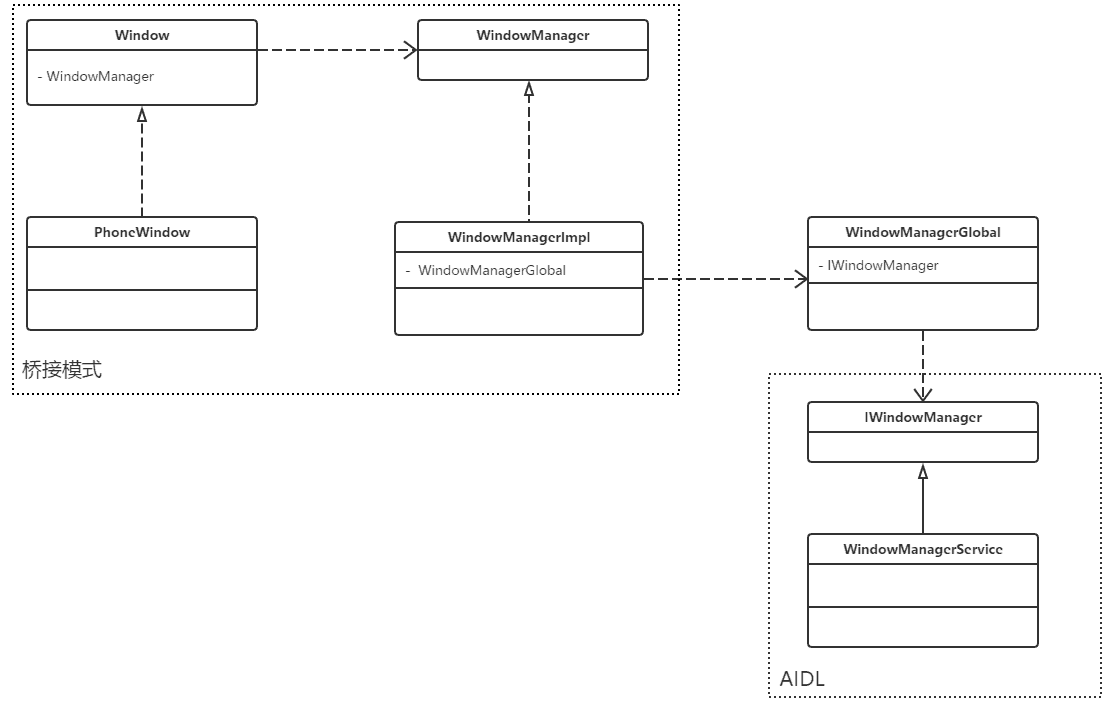
WindowManager的addView的过程,WindowManager是个接口,它的实现类是WindowManagerImpl类,而WindowManagerImpl又把相关逻辑交给了WindowManagerGlobal处理。WindowManagerGlobal是个单例类,它在进程中只存在一个实例,是它内部的addView方法最终创建了我们的核心类ViewRootImpl。
可以看到这里的WindowManagerImpl 的主要功能都是通过WindowManagerGlobal来实现的
public final class WindowManagerGlobal {

    private static final String TAG = "WindowManager";

       //...

    private static WindowManagerGlobal sDefaultWindowManager;

    private static IWindowManager sWindowManagerService;

    private static IWindowSession sWindowSession;

    private final Object mLock = new Object();

    private final ArrayList<View> mViews = new ArrayList<View>();

    private final ArrayList<ViewRootImpl> mRoots = new ArrayList<ViewRootImpl>();

    private final ArrayList<WindowManager.LayoutParams> mParams =

            new ArrayList<WindowManager.LayoutParams>();

    private final ArraySet<View> mDyingViews = new ArraySet<View>();

    private Runnable mSystemPropertyUpdater;

    private WindowManagerGlobal() {

    }

    public static WindowManagerGlobal getInstance() {

        synchronized (WindowManagerGlobal.class) {

            if (sDefaultWindowManager == null) {

                sDefaultWindowManager = new WindowManagerGlobal();

            }

            return sDefaultWindowManager;

        }

    }

    public static IWindowManager getWindowManagerService() {

        synchronized (WindowManagerGlobal.class) {

            if (sWindowManagerService == null) {

                sWindowManagerService = IWindowManager.Stub.asInterface(

                        ServiceManager.getService("window"));

            }

            return sWindowManagerService;

        }

    }

    public static IWindowSession getWindowSession() {

        synchronized (WindowManagerGlobal.class) {

            if (sWindowSession == null) {

                try {

                    InputMethodManager imm = InputMethodManager.getInstance();

                    IWindowManager windowManager = getWindowManagerService();

                    sWindowSession = windowManager.openSession(

                            new IWindowSessionCallback.Stub() {

                                @Override

                                public void onAnimatorScaleChanged(float scale) {

                                    ValueAnimator.setDurationScale(scale);

                                }

                            },

                            imm.getClient(), imm.getInputContext());

                    ValueAnimator.setDurationScale(windowManager.getCurrentAnimatorScale());

                } catch (RemoteException e) {

                    Log.e(TAG, "Failed to open window session", e);

                }

            }

            return sWindowSession;

        }

    }

    public static IWindowSession peekWindowSession() {

        synchronized (WindowManagerGlobal.class) {

            return sWindowSession;

        }

    }

    public String[] getViewRootNames() {

        synchronized (mLock) {

            final int numRoots = mRoots.size();

            String[] mViewRoots = new String[numRoots];

            for (int i = 0; i < numRoots; ++i) {

                mViewRoots[i] = getWindowName(mRoots.get(i));

            }

            return mViewRoots;

        }

    }

    public View getRootView(String name) {

        synchronized (mLock) {

            for (int i = mRoots.size() - 1; i >= 0; --i) {

                final ViewRootImpl root = mRoots.get(i);

                if (name.equals(getWindowName(root))) return root.getView();

            }

        }

        return null;

    }

    public void addView(View view, ViewGroup.LayoutParams params,

            Display display, Window parentWindow) {

       //...

            root = new ViewRootImpl(view.getContext(), display);

            view.setLayoutParams(wparams);

            mViews.add(view);

            mRoots.add(root);

            mParams.add(wparams);

        }

        // do this last because it fires off messages to start doing things

        try {

            root.setView(view, wparams, panelParentView);

        } catch (RuntimeException e) {

            // BadTokenException or InvalidDisplayException, clean up.

            synchronized (mLock) {

                final int index = findViewLocked(view, false);

                if (index >= 0) {

                    removeViewLocked(index, true);

                }

            }

            throw e;

        }

    }

    public void updateViewLayout(View view, ViewGroup.LayoutParams params) {

        if (view == null) {

            throw new IllegalArgumentException("view must not be null");

        }

        if (!(params instanceof WindowManager.LayoutParams)) {

            throw new IllegalArgumentException("Params must be WindowManager.LayoutParams");

        }

        final WindowManager.LayoutParams wparams = (WindowManager.LayoutParams)params;

        view.setLayoutParams(wparams);

        synchronized (mLock) {

            int index = findViewLocked(view, true);

            ViewRootImpl root = mRoots.get(index);

            mParams.remove(index);

            mParams.add(index, wparams);

            root.setLayoutParams(wparams, false);

        }

    }

    public void removeView(View view, boolean immediate) {

        if (view == null) {

            throw new IllegalArgumentException("view must not be null");

        }

        synchronized (mLock) {

            int index = findViewLocked(view, true);

            View curView = mRoots.get(index).getView();

            removeViewLocked(index, immediate);

            if (curView == view) {

                return;

            }

            throw new IllegalStateException("Calling with view " + view

                    + " but the ViewAncestor is attached to " + curView);

        }

    }

    public void closeAll(IBinder token, String who, String what) {

     //...

    }

    private void removeViewLocked(int index, boolean immediate) {

        ViewRootImpl root = mRoots.get(index);

        View view = root.getView();

        if (view != null) {

            InputMethodManager imm = InputMethodManager.getInstance();

            if (imm != null) {

                imm.windowDismissed(mViews.get(index).getWindowToken());

            }

        }

        boolean deferred = root.die(immediate);

        if (view != null) {

            view.assignParent(null);

            if (deferred) {

                mDyingViews.add(view);

            }

        }

    }

    void doRemoveView(ViewRootImpl root) {

        synchronized (mLock) {

            final int index = mRoots.indexOf(root);

            if (index >= 0) {

                mRoots.remove(index);

                mParams.remove(index);

                final View view = mViews.remove(index);

                mDyingViews.remove(view);

            }

        }

        if (HardwareRenderer.sTrimForeground && HardwareRenderer.isAvailable()) {

            doTrimForeground();

        }

    }

    private int findViewLocked(View view, boolean required) {

        final int index = mViews.indexOf(view);

        if (required && index < 0) {

            throw new IllegalArgumentException("View=" + view + " not attached to window manager");

        }

        return index;

    }

    //...

}
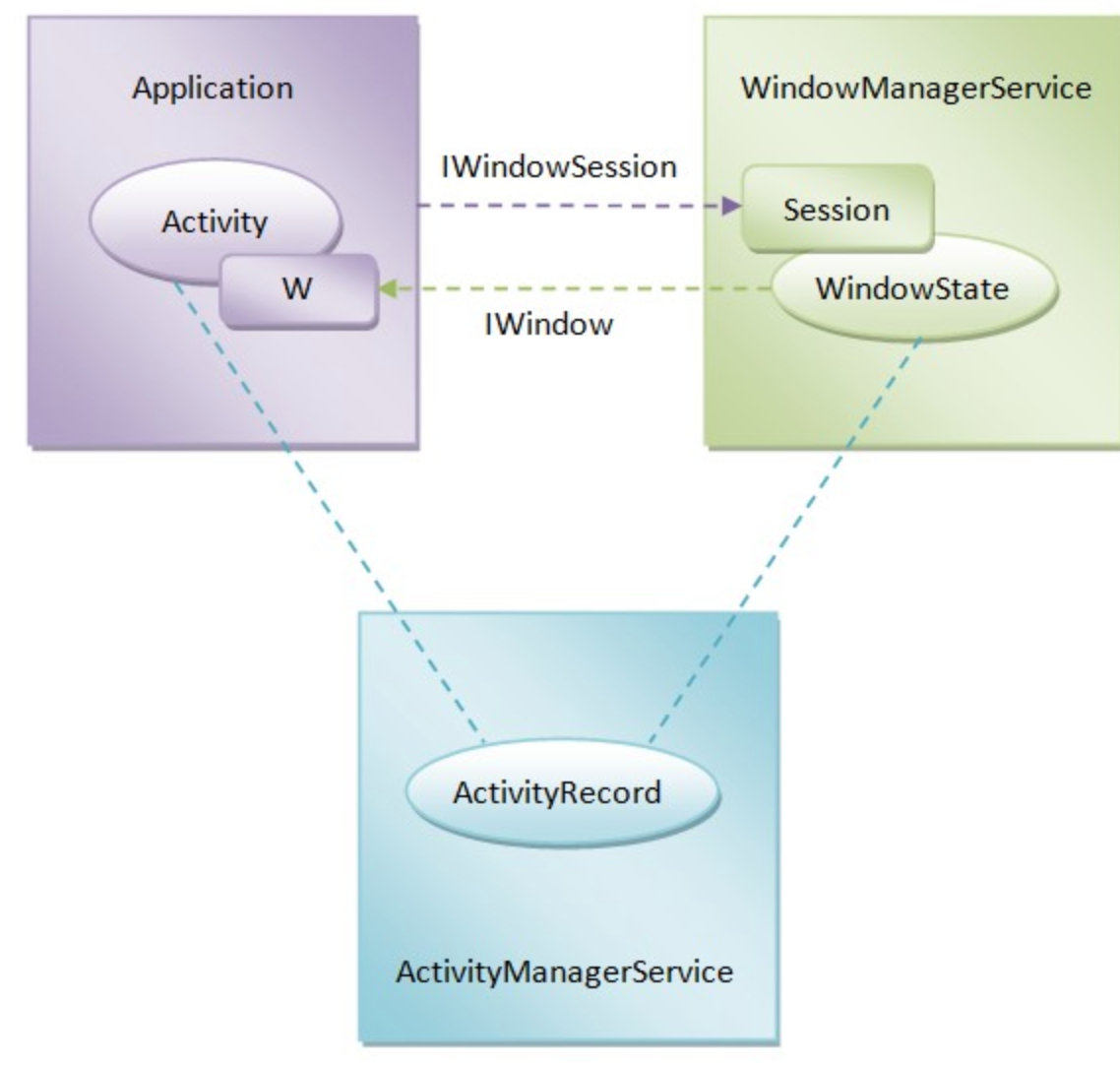
每个应用进程,仅有一个 sWindowSession 对象,它对应了 WmS 中的 Session 子类,WmS 为每一个应用进程分配一个 Session 对象。WindowState 类有一个 IWindow mClient 参数,是由 Session 调用 addToDisplay 传递过来的,对应了 ViewRootImpl 中的 W 类的实例。
WindowManagerGlobal的addView里面初始化了
  public void addView(View view, ViewGroup.LayoutParams params,

            Display display, Window parentWindow) {

       //...

            root = new ViewRootImpl(view.getContext(), display);

            view.setLayoutParams(wparams);

            mViews.add(view);

            mRoots.add(root);

            mParams.add(wparams);

        }

        // do this last because it fires off messages to start doing things

        try {

            root.setView(view, wparams, panelParentView);

        } catch (RuntimeException e) {

            // BadTokenException or InvalidDisplayException, clean up.

            synchronized (mLock) {

                final int index = findViewLocked(view, false);

                if (index >= 0) {

                    removeViewLocked(index, true);

                }

            }

            throw e;

        }

    }
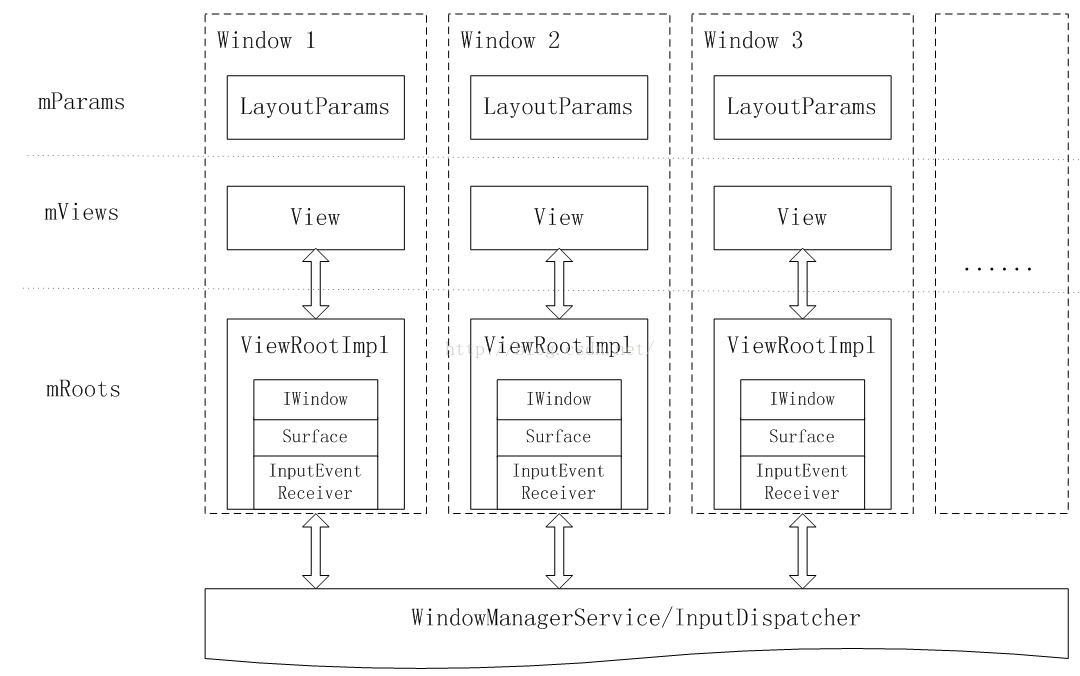
WindowManagerGlobal的窗口管理:
WindowManager的总结
经过前文的分析,相信读者对WindowManager的工作原理有了深入的认识。
鉴于窗口布局和控件布局的一致性,WindowManager继承并实现了接口ViewManager。
使用者可以通过Context.getSystemService(Context.WINDOW_SERVICE)来获取一个WindowManager的实例。这个实例的真实类型是WindowManagerImpl。WindowManagerImpl一旦被创建就确定了通过它所创建的窗口所属哪块屏幕?哪个父窗口?
WindowManagerImpl除了保存了窗口所属的屏幕以及父窗口以外,没有任何实质性的工作。窗口的管理都交由WindowManagerGlobal的实例完成。
WindowManagerGlobal在一个进程中只有一个实例。
WindowManagerGlobal在3个数组中统一管理整个进程中的所有窗口的信息。这些信息包括控件、布局参数以及ViewRootImpl三个元素。
除了管理窗口的上述3个元素以外,WindowManagerGlobal将窗口的创建、销毁与布局更新等任务交付给了ViewRootImpl完成。
说明 在实际的应用开发过程中,有时会在logcat的输出中遇到有关WindowLeaked的异常输出。WindowLeaked异常发生与WindowManagerGlobal中,其原因是Activity在destroy之前没有销毁其附属窗口,如对话框、弹出菜单等。
如此看来,WindowManager的实现仍然是很轻量的。窗口的创建、销毁与布局更新都指向了一个组件:ViewRootImpl。
android window(二)从getSystemService到WindowManagerGlobal的更多相关文章
- 【转】Android LCD(二):LCD常用接口原理篇
关键词:android LCD TFT TTL(RGB) LVDS EDP MIPI TTL-LVDS TTL-EDP 平台信息:内核:linux2.6/linux3.0系统:android/ ...
- 【转】android camera(二):摄像头工作原理、s5PV310 摄像头接口(CAMIF)
关键词:android camera CMM 模组 camera参数 CAMIF平台信息:内核:linux系统:android 平台:S5PV310(samsung exynos 4210) 作者 ...
- Android进阶(二十八)上下文菜单ContextMenu使用案例
上下文菜单ContextMenu使用案例 前言 回顾之前的应用程序,发现之前创建的选项菜单无法显示了.按照正常逻辑来说,左图中在"商品信息"一栏中应该存在选项菜单,用户可进行分享等 ...
- Android进阶(二十)AndroidAPP开发问题汇总(四)
· Android进阶(二十)AndroidAPP开发问题汇总(四) android:layout_width和android:width的区别 基中的android:layout_width和and ...
- Android生成二维码--保存和分享二维码图片
之前写过生成自定义二维码的两篇文章:<Android生成自定义二维码><Android生成二维码–拍照或从相册选取图片>,下面就介绍一下Android应用内如何保存以及分享二维 ...
- Android 利用二次贝塞尔曲线模仿购物车加入物品抛物线动画
Android 利用二次贝塞尔曲线模仿购物车加入物品抛物线动画 0.首先.先给出一张效果gif图. 1.贝塞尔曲线原理及相关公式參考:http://www.jianshu.com/p/c0d7ad79 ...
- Android LCD(二):LCD常用接口原理篇(转)
源: Android LCD(二):LCD常用接口原理篇
- Android Studio(二):快捷键设置、插件安装
Android Studio相关博客: Android Studio(一):介绍.安装.配置 Android Studio(二):快捷键设置.插件安装 Android Studio(三):设置Andr ...
- Android Window 9问9答
1.简述一下window是什么?在android体系里 扮演什么角色? 答:window就是一个抽象类,他的实现类是phoneWindow.我们一般通过windowManager 来访问window. ...
随机推荐
- 《Head First Servlets & JSP》-9-使用JSTL
安装JSTL1.1的说明 JSTL1.1不是JSP2.0规范的一部分,能访问servlet和JSP API并不意味着能访问JSTL. 使用JSTL之前,需要将jstl.jar文件安装到Web应用的WE ...
- Quartz.Net分布式运用
Quartz.Net的集群部署详解 标签(空格分隔): Quartz.Net Job 最近工作上要用Job,公司的job有些不满足个人的使用,于是就想自己搞一个Job站练练手,网上看了一下,发现Qua ...
- Exception in thread "main" brut.androlib.err.UndefinedResObject: resource spec: 0x01030200
Exception in thread "main" brut.androlib.err.UndefinedResObject: resource spec: 0x01030200 ...
- 工欲善其事——Sublime Text
一直在找mac下顺手的代码编辑器,要求能方便地查找和编辑,最好能再集成调试,最后选择了sublime.用了一段时间emacs,但是学习曲线过于陡峭.尤其是眼下的要务是啃代码时,玩弄emacs有点舍本逐 ...
- iOS开发图片与颜色处理工具
1.根据颜色生成一张图片 /** 根据颜色生成一张图片 @param color 颜色进制 UIColor类型 @return 一张UIImage图片 */ + (UIImage *)createIm ...
- KDevelop4调试pcl一直读取不到.pcd文件
如题所示,KD下,能编译,运行时一直使用reader.read读取不到pcd,但是使用cmake能正常运行. 后来,使用terminator删掉工程的build文件夹,直接在工程文件下进行编译,报错提 ...
- Educational Codeforces Round 60 (Rated for Div. 2)E(思维,哈希,字符串,交互)
#include <bits/stdc++.h>using namespace std;int main(){ string t; cin>>t; int n=t.size() ...
- web安全问题-csrf
web安全问题 csrf <script> document.write(` <form name="commentForm" target="csrf ...
- 2017第八届蓝桥杯决赛(C++ B组)4.发现环
描述 小明的实验室有N台电脑,编号1~N.原本这N台电脑之间有N-1条数据链接相连,恰好构成一个树形网络.在树形网络上,任意两台电脑之间有唯一的路径相连. 不过在最近一次维护网络时,管理员误操作使得某 ...
- php字符串中去除html标签
strip_tags() 函数剥去字符串中的 HTML.XML 以及 PHP 的标签.