
hibernate_HelloWorld
环境准备
1、下载 hibernate 3.3.2;
2、下载 hibernate 3.4.0;
3、注意阅读 hibernate compatibility matrix(hibernate 网站,download),hibernate 3.5以后注解包和核心包打包在一起就可以不用管这条了;
4、下载 slf1.5.8。
下载链接: http://pan.baidu.com/s/1qYjmu5m 密码: pn25

第一个hibernate应用程序
1、建立新的 java 项目,名为:hibernate_0100_HelloWorld
2、学习建立 User-library - hibernate,并加入相应的jar包
a) 项目右键-build path-configure build path-add library
b) 选择User-library,在其中新建library,命名为hibernate
详细步骤:http://www.cnblogs.com/ShawnYang/p/6691935.html
c) 在该library中加入 hibernate 所需 jar 包
i. hibernate core
ii./required
iii.slfnop jar


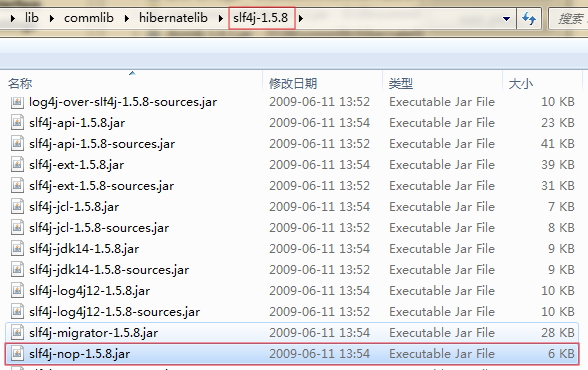
3、引入 mysql 的 JDBC 驱动包
4、在 mysql中建立对应的数据库以及表
a) create database hibernate;
b) user hibernate;
c) create table Student(id int primary key,name varchar(20),age int);
5、建立 hibernate 配置文件 hibernate.cfg.xml
a) 从参考文档中copy
b) 修改对应的数据库连接
c) 注释掉暂时用不上的内容
 <?xml version='1.0' encoding='utf-8'?>

 <!DOCTYPE hibernate-configuration PUBLIC

         "-//Hibernate/Hibernate Configuration DTD 3.0//EN"

         "http://hibernate.sourceforge.net/hibernate-configuration-3.0.dtd">

 <hibernate-configuration>

     <session-factory>

         <!-- Database connection settings -->

         <property name="connection.driver_class">com.mysql.jdbc.Driver</property>

         <property name="connection.url">jdbc:mysql://localhost:3306/hibernate</property>

         <property name="connection.username">root</property>

         <property name="connection.password">root</property>

         <!-- JDBC connection pool (use the built-in) -->

         <!-- <property name="connection.pool_size">1</property> -->

         <!-- SQL dialect -->

         <property name="dialect">org.hibernate.dialect.MySQLDialect</property>

         <!-- Enable Hibernate's automatic session context management -->

         <!-- <property name="current_session_context_class">thread</property> -->

         <!-- Disable the second-level cache  -->

         <property name="cache.provider_class">org.hibernate.cache.NoCacheProvider</property>

         <!-- Echo all executed SQL to stdout -->

         <property name="show_sql">true</property>

         <!-- Drop and re-create the database schema on startup -->

         <!-- <property name="hbm2ddl.auto">update</property> -->

         <mapping resource="com/bjsxt/hibernate/model/Student.hbm.xml"/>

     </session-factory>

 </hibernate-configuration>
6、建立 Student 类
 package com.bjsxt.hibernate.model;

 public class Student {

     private Integer id;

     private String name;

     private Integer age;

     public Integer getId() {

         return id;

     }

     public void setId(Integer id) {

         this.id = id;

     }

     public String getName() {

         return name;

     }

     public void setName(String name) {

         this.name = name;

     }

     public Integer getAge() {

         return age;

     }

     public void setAge(Integer age) {

         this.age = age;

     }

 }
7、建立 Student 映射文件 Student.hbm.xml
a)参考文档
 <?xml version="1.0"?>

 <!DOCTYPE hibernate-mapping PUBLIC

         "-//Hibernate/Hibernate Mapping DTD 3.0//EN"

         "http://hibernate.sourceforge.net/hibernate-mapping-3.0.dtd">

 <hibernate-mapping package="com.bjsxt.hibernate.model">

     <class name="Student" table="student">

         <id name="id" column="id"/>

         <property name="name" column="name"/>

         <property name="age" column="age"/>

     </class>

 </hibernate-mapping>
8、将映射文件加入到 hibernate.cfg.xml中
a) 参考文档
<mapping resource="com/bjsxt/hibernate/model/Student.hbm.xml"/>
9、写测试类Main,在Main中对Student对象进行直接的存储测试
a) 参考文档
 import org.hibernate.Session;

 import org.hibernate.SessionFactory;

 import org.hibernate.cfg.Configuration;

 import com.bjsxt.hibernate.model.Student;

 public class StudentTest {

     public static void main(String[] args) {

         Student s = new Student();

         s.setId(1);

         s.setName("s1");

         s.setAge(1);

         Configuration cfg = new Configuration();

         SessionFactory sf = cfg.configure().buildSessionFactory();

         Session session = sf.openSession();

         session.beginTransaction();

         session.save(s);

         session.getTransaction().commit();

         session.close();

         sf.close();

     }

 }
10、FAQ:
a) 要调用 new Configuration().configure().buildSessionFactory(),而不是省略configure,
否则会出 hibernate hibernate dialect must be sef 的异常。
11、Note:
a) 请务必建立自己动手查文档的能力
b) 重要的是
i.要建立自己动手查一手文档的信心;
ii.还有建立自己动手查一手文档的习惯;
iii.主动学习,放弃被动接收灌输的习惯。
链接: http://pan.baidu.com/s/1mi0VuPi 密码: 8dyv
示例项目所需jar包链接: http://pan.baidu.com/s/1qY6SRQ8 密码: vzpm
hibernate_HelloWorld的更多相关文章
- HIbernate学习笔记(一) 了解hibernate并搭建环境建立第一个hello world程序
Hibernate是一个开放源代码的ORM(对象关系映射)框架,它对JDBC进行了轻量级的封装,Java程序员可以使用面向对象的编程思维来操纵数据库,它通过对象属性和数据库表字段之间的映射关系,将对象 ...
随机推荐
- PHP 实现实现多线程
前言 前些天帮同事查一个问题,第一次接触到了 PHP 的多线程,原以为 PHP 普遍都是单线程模型,并不适合多线程领域,花些时间翻了几个多线程的项目源码之后,发现 PHP 的多线程也颇有可取之处,活用 ...
- zabbix监控nginx进程
确认nginx有没有安装模块 然后在主站点下添加(二级站点) location /NginxStatus { stub_status on; access_log off; allow 127.0.0 ...
- java中Runtime类和Process类的简单介绍
在java.lang包当中定义了一个Runtime类,在java中对于Runtime类的定义如下: Java code public class Runtime extends Object 每个 J ...
- Zookeeper查看版本
[root@ooccpp lib]# Zookeeper version: ---, built on // : GMT Clients: /[](queued=,recved=,sent=) /[] ...
- windows查看网络常用cmd命令
一.ping 主要是测试本机TCP/IP协议配置正确性与当前网络现状. ping命令的基本使用格式是: ping IP地址/主机名/域名 [-t] [-a] [-n count] [-l size] ...
- my27_OGG MySQL To MySQL错误汇总
OGG-00446 2019-02-12T14:57:57.668+0800 ERROR OGG-00446 Oracle GoldenGate Delivery for MySQL, r1.prm: ...
- 转 python 的常用函数replace, split(),enumerate() 函数
1.execmd = "su - " + ou + " -c 'sqlplus / as sysdba << EOF\n " + execmd3 + ...
- NIOGoodDemo
Java NIO是在jdk1.4开始使用的,它既可以说成“新I/O”,也可以说成非阻塞式I/O.下面是java NIO的工作原理: 1. 由一个专门的线程来处理所有的 IO 事件,并负责分发. 2. ...
- Linux安装mysql记录 重置密码
重置密码解决MySQL for Linux错误 ERROR 1045 (28000): Access denied for user 'root'@'localhost' (using passwor ...
- Unity3d 破解
在官网上或者其他地方下载unity3d后 运行注册机,需要详细的设置可以点击edit 一.点击browse,选择安装unity目录下的Editor文件夹 二.选择path,会提示Pathed 三. ...