
TouTiao开源项目 分析笔记3
1.搭建NewsTabLayout片段
1.1.加载布局
@Nullable

    @Override

    public View onCreateView(LayoutInflater inflater, @Nullable ViewGroup container, @Nullable Bundle savedInstanceState) {

        View view = inflater.inflate(R.layout.fragment_news_tab, container, false);

        initView(view);

        initData();

        return view;

    }
1.2.布局文件==>R.layout.fragment_news_tab
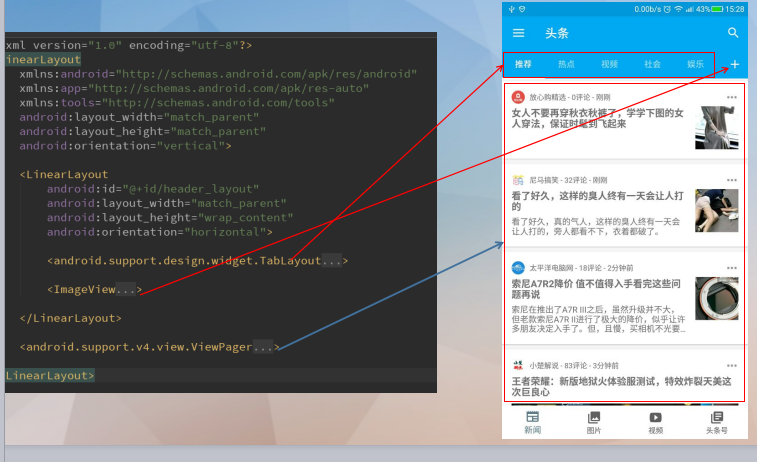
源代码如下:
<?xml version="1.0" encoding="utf-8"?>

<LinearLayout

    xmlns:android="http://schemas.android.com/apk/res/android"

    xmlns:app="http://schemas.android.com/apk/res-auto"

    xmlns:tools="http://schemas.android.com/tools"

    android:layout_width="match_parent"

    android:layout_height="match_parent"

    android:orientation="vertical">

    <LinearLayout

        android:id="@+id/header_layout"

        android:layout_width="match_parent"

        android:layout_height="wrap_content"

        android:orientation="horizontal">

        <android.support.design.widget.TabLayout

            android:id="@+id/tab_layout_news"

            style="@style/TabLayout"

            android:layout_width="0dp"

            android:layout_height="wrap_content"

            android:layout_weight="1"

            android:minHeight="?attr/actionBarSize"

            android:theme="@style/AppTheme.AppBarOverlay"

            app:tabTextColor="@color/gray">

        </android.support.design.widget.TabLayout>

        <ImageView

            android:id="@+id/add_channel_iv"

            android:layout_width="wrap_content"

            android:layout_height="match_parent"

            android:layout_gravity="center"

            android:background="?attr/selectableItemBackground"

            android:foreground="?attr/selectableItemBackground"

            android:maxHeight="?attr/actionBarSize"

            android:paddingBottom="4dp"

            android:paddingLeft="10dp"

            android:paddingRight="10dp"

            android:paddingTop="4dp"

            android:scaleType="center"

            app:srcCompat="@drawable/ic_add_white_24dp"

            tools:ignore="ContentDescription"/>

    </LinearLayout>

    <android.support.v4.view.ViewPager

        android:id="@+id/view_pager_news"

        android:layout_width="match_parent"

        android:layout_height="match_parent"

        app:layout_behavior="@string/appbar_scrolling_view_behavior"

        tools:layout="@layout/fragment_list">

    </android.support.v4.view.ViewPager>

</LinearLayout>
1.3.ViewPager中的 tools:layout="@layout/fragment_list
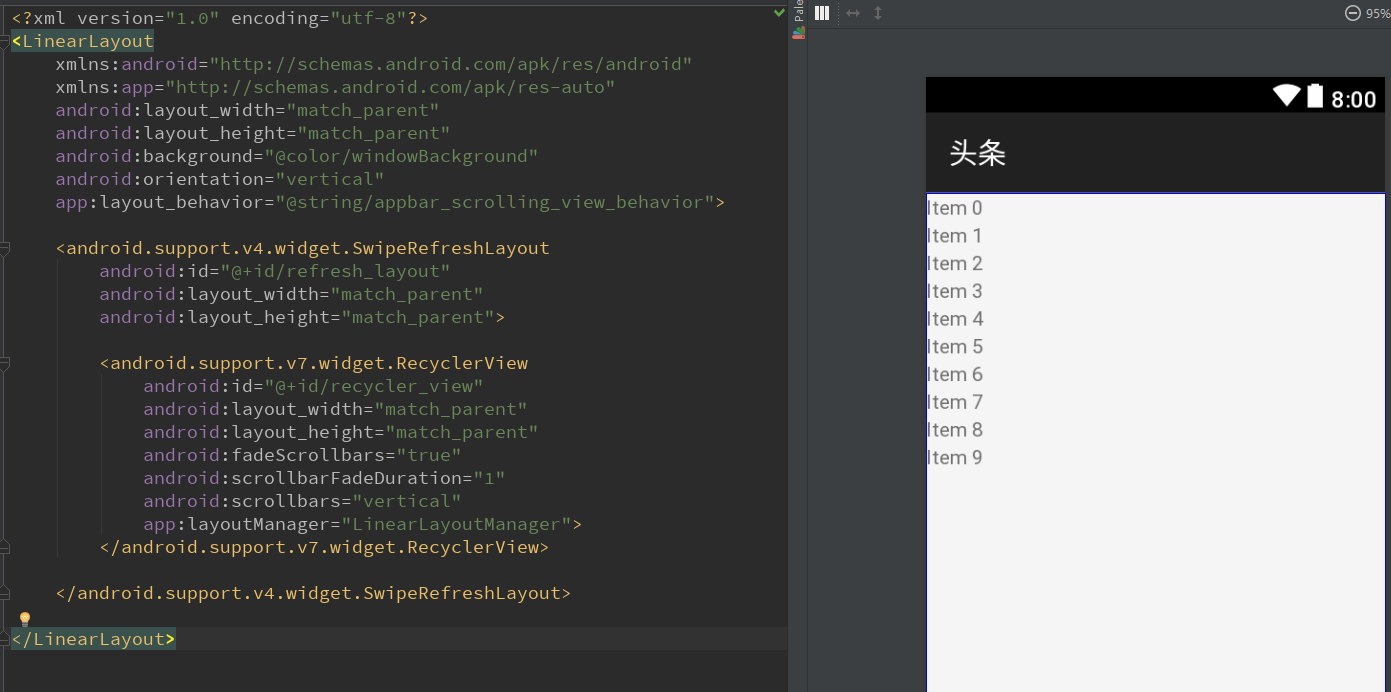
源代码如下:
<?xml version="1.0" encoding="utf-8"?>

<LinearLayout

    xmlns:android="http://schemas.android.com/apk/res/android"

    xmlns:app="http://schemas.android.com/apk/res-auto"

    android:layout_width="match_parent"

    android:layout_height="match_parent"

    android:background="@color/windowBackground"

    android:orientation="vertical"

    app:layout_behavior="@string/appbar_scrolling_view_behavior">

    <android.support.v4.widget.SwipeRefreshLayout

        android:id="@+id/refresh_layout"

        android:layout_width="match_parent"

        android:layout_height="match_parent">

        <android.support.v7.widget.RecyclerView

            android:id="@+id/recycler_view"

            android:layout_width="match_parent"

            android:layout_height="match_parent"

            android:fadeScrollbars="true"

            android:scrollbarFadeDuration="1"

            android:scrollbars="vertical"

            app:layoutManager="LinearLayoutManager">

        </android.support.v7.widget.RecyclerView>

    </android.support.v4.widget.SwipeRefreshLayout>

</LinearLayout>
1.4.android actionBar修改高度内容居中
在TabLayout中需要设置一个属性才能设置让内容居中
android:minHeight="?attr/actionBarSize"
1.5.设置TabLayout的风格
在styles.xml中加上TabLayout风格
   <style name="TabLayout" parent="Base.Widget.Design.TabLayout">

        <item name="tabMaxWidth">@dimen/design_tab_max_width</item>

        <item name="tabIndicatorColor">#FFFFFF</item>

        <item name="tabIndicatorHeight">2dp</item>

        <item name="tabPaddingStart">12dp</item>

        <item name="tabPaddingEnd">12dp</item>

        <item name="tabBackground">?attr/selectableItemBackground</item>

        <item name="tabTextAppearance">@style/TextAppearance.Design.Tab</item>

        <item name="tabSelectedTextColor">?android:textColorPrimary</item>

    </style>
1.6.tools:ignore意义
这里有一个tools:ignore="ContentDescription"
这里的意思就是忽略ContentDescription的警告。
1.7.在ViewPager中为了支持滚动收缩,要设置app:layout_behavior
 <android.support.v4.view.ViewPager

        android:id="@+id/view_pager_news"

        android:layout_width="match_parent"

        android:layout_height="match_parent"

        app:layout_behavior="@string/appbar_scrolling_view_behavior"

        tools:layout="@layout/fragment_list">

    </android.support.v4.view.ViewPager>
具体的app:layout_behavior是调用官方的一个行为:
<string name="appbar_scrolling_view_behavior" translatable="false">android.support.design.widget.AppBarLayout$ScrollingViewBehavior</string>
1.8.设置滚动条
这里设置滚动条淡出效果
android:scrollbarFadeDuration="1"
设置自动隐藏和显示
android:fadeScrollbars="true"
1.9.将tablayout和viewpager创建联系
tab_layout.setupWithViewPager(viewPager);
1.10.设置tab模式
MODE_SCROLLABLE:可滚动tabs,显示一部分tabs,
在这个模式下能包含长标签和大量的tabs,最好用于用户不需要直接比较tabs。
TouTiao开源项目 分析笔记3的更多相关文章
- TouTiao开源项目 分析笔记2
1.Constant常量定义类 1.1.源代码 public class Constant { public static final String USER_AGENT_MOBILE = " ...
- TouTiao开源项目 分析笔记6
1.NewsChannelBean简单类笔记 1.1.Comparable接口的实现和使用 参考文章:Comparable接口的实现和使用. 因为NewsChannelBean实现了Comparabl ...
- TouTiao开源项目 分析笔记4==>一个简单APP 整体常用框架
1.效果预览 1.1.如下图所以,到目前为止所有的功能. 2.从InitApp开始->SplashActivity->MainActivity 2.1.InitApp源代码.这是整个项目的 ...
- TouTiao开源项目 分析笔记15 新闻详情之两种类型的实现
1.预览效果 1.1.首先看一下需要实现的效果. 第一种,文字类型新闻. 第二种,图片类型新闻. 1.2.在NewsArticleTextViewBinder中设置了点击事件 RxView.click ...
- TouTiao开源项目 分析笔记12 从总体到局部 构建视频主页面
1.构建视频主列表的整体碎片VideoTabLayout 1.1.首先创建一个VideoTabLayout package com.jasonjan.headnews.module.video; im ...
- TouTiao开源项目 分析笔记10 实现通用普通文章片段页面
1.RxJava的Observable数据操作符总结 1.1.Map操作符 Map操作符对原始Observable发射的没一项数据应用一个你选择的函数, 然后返回一个发射这些结果的Observable ...
- TouTiao开源项目 分析笔记1
1.InitApp==>项目的入口Application 1.1.继承了MultiDexApplication 超过65K方法的APP,会遇到65535的错误.原因就是为了支持比较大型的APP而 ...
- TouTiao开源项目 分析笔记18 视频详情页面
1.效果预览 1.1.需要做到的真实效果 1.2.触发的点击事件 在MediaArticleVideoViewBinder的每一个item点击事件中: VideoContentActivity.lau ...
- TouTiao开源项目 分析笔记17 新闻媒体专栏
1.效果预览 1.1.要实现的效果 1.2.如何调转到新闻媒体专栏 点击右上角的用户图标. 在新闻详情页面的Fragment的菜单点击事件中触发. case R.id.action_open_medi ...
- TouTiao开源项目 分析笔记16 新闻评论
1.要达到的效果 1.1.主要效果图 点击了标题栏的消息图标后,然后会跳转到评论详情的页面. 1.2.触发的点击事件 在新闻详情的片段中的菜单点击事件中 设置上方标题栏的消息标的监听事件 case R ...
随机推荐
- 搭建日志环境并配置显示DDL语句
现在一般用log4j用的比较多,用slf4j用的比较少,所有这里我们就不用 hibernate内置的slf4j了. 用到slf的接口,log4j的实现. 要在hibernate中使用log4j,如图所 ...
- bootstrap-table之通用方法( 时间控件,导出,动态下拉框, 表单验证 ,选中与获取信息)
1.bootstrap-table 单击单行选中 $('#gzrwTable').on('click-row.bs.table', function(e, row, $element) { $('.s ...
- C语言总结的知识点
什么是有效数字? ------------------------- 数据类型 运算符: 函数: 程序结构: 存储结构 内存管理 关键字: ------------------------- C语言: ...
- DOM(十四):代理检测和事件处理(跨浏览器)
一.检测 用于用户代理检测,检测范围包括浏览器引擎.平台.Windows.移动设备和游戏系统等 /* *用户代理检测脚本,检测范围包括浏览器引擎.平台.Windows.移动设备和游戏系统 */ var ...
- IOS 计算文字尺寸(UILabel)
方式1 :普通用法 #define MJNameFont [UIFont systemFontOfSize:14] /** * 计算文字尺寸 * * @param text 需要计算尺寸的文字 * ...
- Last_IO_Errno: 1032
(一):更新找不到记录 1032 Last_SQL_Errno: 1032 Last_SQL_Error: Could not execute Update_rows ...
- javaweb基础(40)_jdbc框架
一.元数据介绍 元数据指的是"数据库"."表"."列"的定义信息. 1.1.DataBaseMetaData元数据 Connection.g ...
- 第21章 DMA—直接存储区访问—零死角玩转STM32-F429系列
第21章 DMA—直接存储区访问 全套200集视频教程和1000页PDF教程请到秉火论坛下载:www.firebbs.cn 野火视频教程优酷观看网址:http://i.youku.com/fi ...
- matlab时间测试
因为想把样本筛选一下,所以简单的分类器先跑了一下,没想到跑完分类器在对样本筛选时的时间大大超过了样本进分类器的时间,这个显然不能达到我要的节省时间目的.于是分析了一下matlab中各个环节的时间成本, ...
- 【Java】数组知识回顾
package another; import java.util.Arrays; import java.util.List; /** * 数组知识回顾 * @author ChristineBas ...