
TouTiao开源项目 分析笔记3
1.搭建NewsTabLayout片段
1.1.加载布局
@Nullable

    @Override

    public View onCreateView(LayoutInflater inflater, @Nullable ViewGroup container, @Nullable Bundle savedInstanceState) {

        View view = inflater.inflate(R.layout.fragment_news_tab, container, false);

        initView(view);

        initData();

        return view;

    }
1.2.布局文件==>R.layout.fragment_news_tab
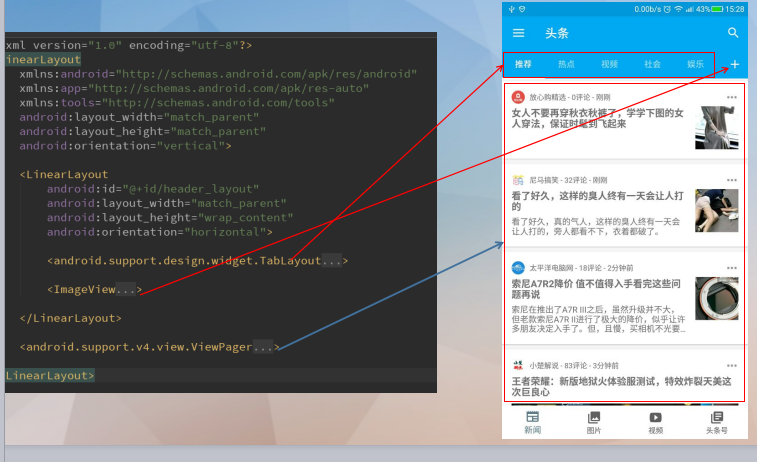
源代码如下:
<?xml version="1.0" encoding="utf-8"?>

<LinearLayout

    xmlns:android="http://schemas.android.com/apk/res/android"

    xmlns:app="http://schemas.android.com/apk/res-auto"

    xmlns:tools="http://schemas.android.com/tools"

    android:layout_width="match_parent"

    android:layout_height="match_parent"

    android:orientation="vertical">

    <LinearLayout

        android:id="@+id/header_layout"

        android:layout_width="match_parent"

        android:layout_height="wrap_content"

        android:orientation="horizontal">

        <android.support.design.widget.TabLayout

            android:id="@+id/tab_layout_news"

            style="@style/TabLayout"

            android:layout_width="0dp"

            android:layout_height="wrap_content"

            android:layout_weight="1"

            android:minHeight="?attr/actionBarSize"

            android:theme="@style/AppTheme.AppBarOverlay"

            app:tabTextColor="@color/gray">

        </android.support.design.widget.TabLayout>

        <ImageView

            android:id="@+id/add_channel_iv"

            android:layout_width="wrap_content"

            android:layout_height="match_parent"

            android:layout_gravity="center"

            android:background="?attr/selectableItemBackground"

            android:foreground="?attr/selectableItemBackground"

            android:maxHeight="?attr/actionBarSize"

            android:paddingBottom="4dp"

            android:paddingLeft="10dp"

            android:paddingRight="10dp"

            android:paddingTop="4dp"

            android:scaleType="center"

            app:srcCompat="@drawable/ic_add_white_24dp"

            tools:ignore="ContentDescription"/>

    </LinearLayout>

    <android.support.v4.view.ViewPager

        android:id="@+id/view_pager_news"

        android:layout_width="match_parent"

        android:layout_height="match_parent"

        app:layout_behavior="@string/appbar_scrolling_view_behavior"

        tools:layout="@layout/fragment_list">

    </android.support.v4.view.ViewPager>

</LinearLayout>
1.3.ViewPager中的 tools:layout="@layout/fragment_list
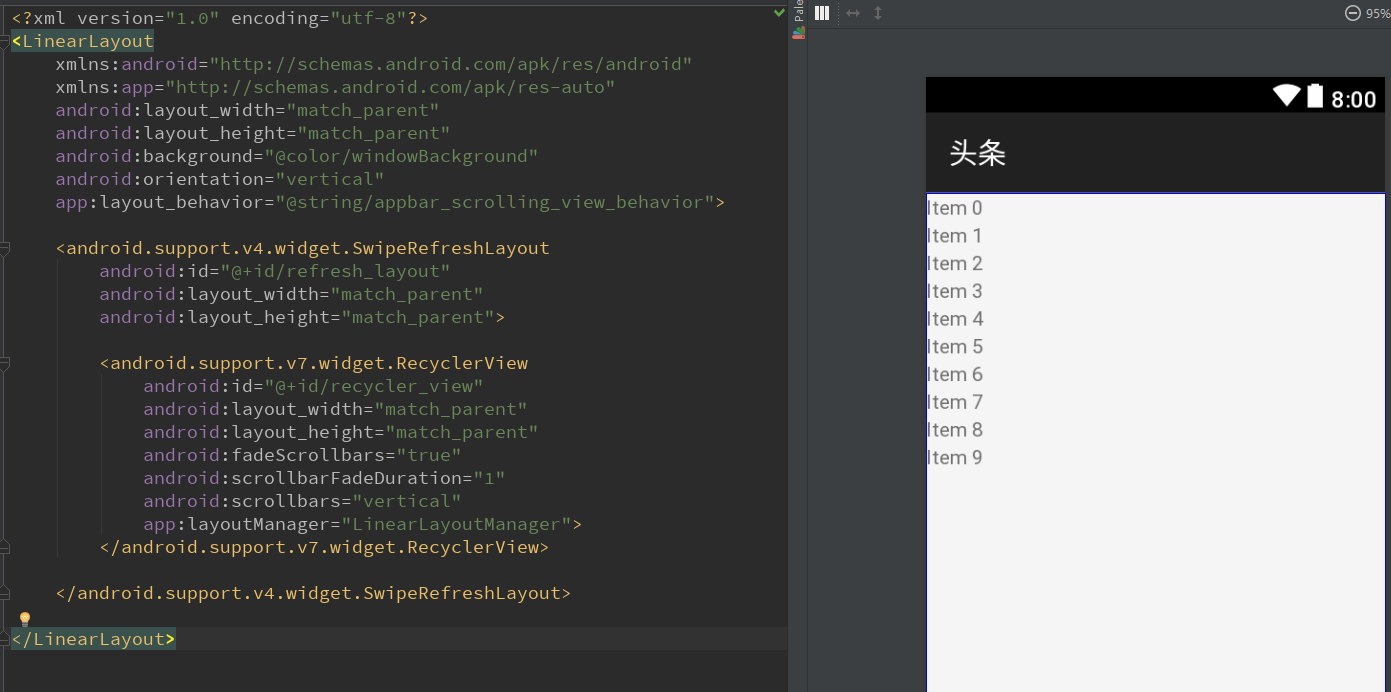
源代码如下:
<?xml version="1.0" encoding="utf-8"?>

<LinearLayout

    xmlns:android="http://schemas.android.com/apk/res/android"

    xmlns:app="http://schemas.android.com/apk/res-auto"

    android:layout_width="match_parent"

    android:layout_height="match_parent"

    android:background="@color/windowBackground"

    android:orientation="vertical"

    app:layout_behavior="@string/appbar_scrolling_view_behavior">

    <android.support.v4.widget.SwipeRefreshLayout

        android:id="@+id/refresh_layout"

        android:layout_width="match_parent"

        android:layout_height="match_parent">

        <android.support.v7.widget.RecyclerView

            android:id="@+id/recycler_view"

            android:layout_width="match_parent"

            android:layout_height="match_parent"

            android:fadeScrollbars="true"

            android:scrollbarFadeDuration="1"

            android:scrollbars="vertical"

            app:layoutManager="LinearLayoutManager">

        </android.support.v7.widget.RecyclerView>

    </android.support.v4.widget.SwipeRefreshLayout>

</LinearLayout>
1.4.android actionBar修改高度内容居中
在TabLayout中需要设置一个属性才能设置让内容居中
android:minHeight="?attr/actionBarSize"
1.5.设置TabLayout的风格
在styles.xml中加上TabLayout风格
   <style name="TabLayout" parent="Base.Widget.Design.TabLayout">

        <item name="tabMaxWidth">@dimen/design_tab_max_width</item>

        <item name="tabIndicatorColor">#FFFFFF</item>

        <item name="tabIndicatorHeight">2dp</item>

        <item name="tabPaddingStart">12dp</item>

        <item name="tabPaddingEnd">12dp</item>

        <item name="tabBackground">?attr/selectableItemBackground</item>

        <item name="tabTextAppearance">@style/TextAppearance.Design.Tab</item>

        <item name="tabSelectedTextColor">?android:textColorPrimary</item>

    </style>
1.6.tools:ignore意义
这里有一个tools:ignore="ContentDescription"
这里的意思就是忽略ContentDescription的警告。
1.7.在ViewPager中为了支持滚动收缩,要设置app:layout_behavior
 <android.support.v4.view.ViewPager

        android:id="@+id/view_pager_news"

        android:layout_width="match_parent"

        android:layout_height="match_parent"

        app:layout_behavior="@string/appbar_scrolling_view_behavior"

        tools:layout="@layout/fragment_list">

    </android.support.v4.view.ViewPager>
具体的app:layout_behavior是调用官方的一个行为:
<string name="appbar_scrolling_view_behavior" translatable="false">android.support.design.widget.AppBarLayout$ScrollingViewBehavior</string>
1.8.设置滚动条
这里设置滚动条淡出效果
android:scrollbarFadeDuration="1"
设置自动隐藏和显示
android:fadeScrollbars="true"
1.9.将tablayout和viewpager创建联系
tab_layout.setupWithViewPager(viewPager);
1.10.设置tab模式
MODE_SCROLLABLE:可滚动tabs,显示一部分tabs,
在这个模式下能包含长标签和大量的tabs,最好用于用户不需要直接比较tabs。
TouTiao开源项目 分析笔记3的更多相关文章
- TouTiao开源项目 分析笔记2
1.Constant常量定义类 1.1.源代码 public class Constant { public static final String USER_AGENT_MOBILE = " ...
- TouTiao开源项目 分析笔记6
1.NewsChannelBean简单类笔记 1.1.Comparable接口的实现和使用 参考文章:Comparable接口的实现和使用. 因为NewsChannelBean实现了Comparabl ...
- TouTiao开源项目 分析笔记4==>一个简单APP 整体常用框架
1.效果预览 1.1.如下图所以,到目前为止所有的功能. 2.从InitApp开始->SplashActivity->MainActivity 2.1.InitApp源代码.这是整个项目的 ...
- TouTiao开源项目 分析笔记15 新闻详情之两种类型的实现
1.预览效果 1.1.首先看一下需要实现的效果. 第一种,文字类型新闻. 第二种,图片类型新闻. 1.2.在NewsArticleTextViewBinder中设置了点击事件 RxView.click ...
- TouTiao开源项目 分析笔记12 从总体到局部 构建视频主页面
1.构建视频主列表的整体碎片VideoTabLayout 1.1.首先创建一个VideoTabLayout package com.jasonjan.headnews.module.video; im ...
- TouTiao开源项目 分析笔记10 实现通用普通文章片段页面
1.RxJava的Observable数据操作符总结 1.1.Map操作符 Map操作符对原始Observable发射的没一项数据应用一个你选择的函数, 然后返回一个发射这些结果的Observable ...
- TouTiao开源项目 分析笔记1
1.InitApp==>项目的入口Application 1.1.继承了MultiDexApplication 超过65K方法的APP,会遇到65535的错误.原因就是为了支持比较大型的APP而 ...
- TouTiao开源项目 分析笔记18 视频详情页面
1.效果预览 1.1.需要做到的真实效果 1.2.触发的点击事件 在MediaArticleVideoViewBinder的每一个item点击事件中: VideoContentActivity.lau ...
- TouTiao开源项目 分析笔记17 新闻媒体专栏
1.效果预览 1.1.要实现的效果 1.2.如何调转到新闻媒体专栏 点击右上角的用户图标. 在新闻详情页面的Fragment的菜单点击事件中触发. case R.id.action_open_medi ...
- TouTiao开源项目 分析笔记16 新闻评论
1.要达到的效果 1.1.主要效果图 点击了标题栏的消息图标后,然后会跳转到评论详情的页面. 1.2.触发的点击事件 在新闻详情的片段中的菜单点击事件中 设置上方标题栏的消息标的监听事件 case R ...
随机推荐
- 开启win7笔记本自带无线功能
在cmd中输入以下命令: netsh wlan set hostednetwork mode=allow /disallow netsh wlan set hostednetwork ssid=Myw ...
- Form上传编译
编译上传的Form,使用命令: 在R12服务器上: cd $AU_TOP/forms/US frmcmp_batch module=$CUX_TOP/forms/ZHS/XXX.fmbuserid=a ...
- Struts2_使用token拦截器控制重复提交(很少用)
控制重复提交的方式:1.表单提交后页面重定向:2.Struts2.x token拦截器 大致流程: 例子: index.jsp <%@ page language="java" ...
- Java字体优化
需求背景 最近在做的项目显示的字体感觉太丑,于是乎想着DIY改进一下. 查阅资料,总觉得别人写的都不咋地,于是决心写一篇略微完善点的关于项目字体优化方面的文章. 当然,这篇文章不会教你如何使用True ...
- OpenCart-2.3 (Ubuntu 16.04)
平台: Ubuntu 类型: 虚拟机镜像 软件包: opencart-2.3 commercial ecommerce opencart open-source 服务优惠价: 按服务商许可协议 云 ...
- ansible使用2-inventory & dynamic inventory
默认位置 /etc/ansible/hosts 标准 mail.example.com [webservers] foo.example.com bar.example.com [dbservers] ...
- 怎样解决putty终端乱码的方法
原文地址:https://jingyan.baidu.com/article/3aed632e5f00ae701080913a.html?qq-pf-to=pcqq.c2c 终端输入:echo $LA ...
- 关于ASP.NET页面事件的知识点
ASP是动态服务器页面(ActiveServerPage)的英文缩写,是微软公司开发的代替CGI脚本程序的一种应用,它可以与数据库和其它程序进行交互,是一种简单.方便的编程工具.那么关于ASP.NET ...
- 在IE中解决当前安全设置不允许下载该文件的方案
解决方案一: 1.0打开IE后,单击菜单栏中的“工具”菜单,在弹出的菜单中选择“Internet选项”命令: 2.0在弹出“Internet选项”的对话框中,打开“Internet选项”对话框: 3. ...
- QT OpenGL中文教程在QT4版本后的错误代码更改(一)
由于教程中说的已经够可以了,这里就不对代码进行分析了,有兴趣可以自己去看看.这个教程来源于原来的NeHeOpenGL中文教程 (http://www.yakergong.net/nehe/) ,但其有 ...