
poi解析Excel(转)
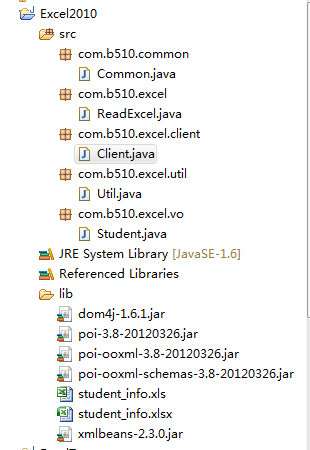
下面是本文的项目结构:
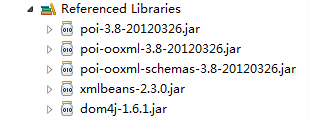
项目中所需要的jar文件:
所用的Excel数据(2003-2007,2010都是一样的数据)

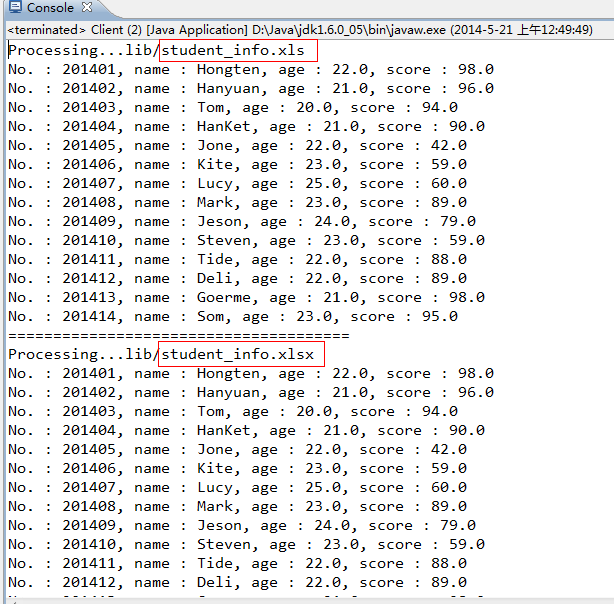
运行效果:
/Excel2010/src/com/b510/common/Common.java
/**

 *

 */

package com.b510.common;

/**

 * @author Hongten

 * @created 2014-5-21

 */

public class Common {

    public static final String OFFICE_EXCEL_2003_POSTFIX = "xls";

    public static final String OFFICE_EXCEL_2010_POSTFIX = "xlsx";

    public static final String EMPTY = "";

    public static final String POINT = ".";

    public static final String LIB_PATH = "lib";

    public static final String STUDENT_INFO_XLS_PATH = LIB_PATH + "/student_info" + POINT + OFFICE_EXCEL_2003_POSTFIX;

    public static final String STUDENT_INFO_XLSX_PATH = LIB_PATH + "/student_info" + POINT + OFFICE_EXCEL_2010_POSTFIX;

    public static final String NOT_EXCEL_FILE = " : Not the Excel file!";

    public static final String PROCESSING = "Processing...";

}
/Excel2010/src/com/b510/excel/ReadExcel.java
**

 *

 */

package com.b510.excel;

import java.io.FileInputStream;

import java.io.IOException;

import java.io.InputStream;

import java.util.ArrayList;

import java.util.List;

import org.apache.poi.hssf.usermodel.HSSFCell;

import org.apache.poi.hssf.usermodel.HSSFRow;

import org.apache.poi.hssf.usermodel.HSSFSheet;

import org.apache.poi.hssf.usermodel.HSSFWorkbook;

import org.apache.poi.xssf.usermodel.XSSFCell;

import org.apache.poi.xssf.usermodel.XSSFRow;

import org.apache.poi.xssf.usermodel.XSSFSheet;

import org.apache.poi.xssf.usermodel.XSSFWorkbook;

import com.b510.common.Common;

import com.b510.excel.util.Util;

import com.b510.excel.vo.Student;

/**

 * @author Hongten

 * @created 2014-5-20

 */

public class ReadExcel {

    /**

     * read the Excel file

     * @param path the path of the Excel file

     * @return

     * @throws IOException

     */

    public List<Student> readExcel(String path) throws IOException {

        if (path == null || Common.EMPTY.equals(path)) {

            return null;

        } else {

            String postfix = Util.getPostfix(path);

            if (!Common.EMPTY.equals(postfix)) {

                if (Common.OFFICE_EXCEL_2003_POSTFIX.equals(postfix)) {

                    return readXls(path);

                } else if (Common.OFFICE_EXCEL_2010_POSTFIX.equals(postfix)) {

                    return readXlsx(path);

                }

            } else {

                System.out.println(path + Common.NOT_EXCEL_FILE);

            }

        }

        return null;

    }

    /**

     * Read the Excel 2010

     * @param path the path of the excel file

     * @return

     * @throws IOException

     */

    public List<Student> readXlsx(String path) throws IOException {

        System.out.println(Common.PROCESSING + path);

        InputStream is = new FileInputStream(path);

        XSSFWorkbook xssfWorkbook = new XSSFWorkbook(is);

        Student student = null;

        List<Student> list = new ArrayList<Student>();

        // Read the Sheet

        for (int numSheet = 0; numSheet < xssfWorkbook.getNumberOfSheets(); numSheet++) {

            XSSFSheet xssfSheet = xssfWorkbook.getSheetAt(numSheet);

            if (xssfSheet == null) {

                continue;

            }

            // Read the Row

            for (int rowNum = 1; rowNum <= xssfSheet.getLastRowNum(); rowNum++) {

                XSSFRow xssfRow = xssfSheet.getRow(rowNum);

                if (xssfRow != null) {

                    student = new Student();

                    XSSFCell no = xssfRow.getCell(0);

                    XSSFCell name = xssfRow.getCell(1);

                    XSSFCell age = xssfRow.getCell(2);

                    XSSFCell score = xssfRow.getCell(3);

                    student.setNo(getValue(no));

                    student.setName(getValue(name));

                    student.setAge(getValue(age));

                    student.setScore(Float.valueOf(getValue(score)));

                    list.add(student);

                }

            }

        }

        return list;

    }

    /**

     * Read the Excel 2003-2007

     * @param path the path of the Excel

     * @return

     * @throws IOException

     */

    public List<Student> readXls(String path) throws IOException {

        System.out.println(Common.PROCESSING + path);

        InputStream is = new FileInputStream(path);

        HSSFWorkbook hssfWorkbook = new HSSFWorkbook(is);

        Student student = null;

        List<Student> list = new ArrayList<Student>();

        // Read the Sheet

        for (int numSheet = 0; numSheet < hssfWorkbook.getNumberOfSheets(); numSheet++) {

            HSSFSheet hssfSheet = hssfWorkbook.getSheetAt(numSheet);

            if (hssfSheet == null) {

                continue;

            }

            // Read the Row

            for (int rowNum = 1; rowNum <= hssfSheet.getLastRowNum(); rowNum++) {

                HSSFRow hssfRow = hssfSheet.getRow(rowNum);

                if (hssfRow != null) {

                    student = new Student();

                    HSSFCell no = hssfRow.getCell(0);

                    HSSFCell name = hssfRow.getCell(1);

                    HSSFCell age = hssfRow.getCell(2);

                    HSSFCell score = hssfRow.getCell(3);

                    student.setNo(getValue(no));

                    student.setName(getValue(name));

                    student.setAge(getValue(age));

                    student.setScore(Float.valueOf(getValue(score)));

                    list.add(student);

                }

            }

        }

        return list;

    }

    @SuppressWarnings("static-access")

    private String getValue(XSSFCell xssfRow) {

        if (xssfRow.getCellType() == xssfRow.CELL_TYPE_BOOLEAN) {

            return String.valueOf(xssfRow.getBooleanCellValue());

        } else if (xssfRow.getCellType() == xssfRow.CELL_TYPE_NUMERIC) {

            return String.valueOf(xssfRow.getNumericCellValue());

        } else {

            return String.valueOf(xssfRow.getStringCellValue());

        }

    }

    @SuppressWarnings("static-access")

    private String getValue(HSSFCell hssfCell) {

        if (hssfCell.getCellType() == hssfCell.CELL_TYPE_BOOLEAN) {

            return String.valueOf(hssfCell.getBooleanCellValue());

        } else if (hssfCell.getCellType() == hssfCell.CELL_TYPE_NUMERIC) {

            return String.valueOf(hssfCell.getNumericCellValue());

        } else {

            return String.valueOf(hssfCell.getStringCellValue());

        }

    }

}
/Excel2010/src/com/b510/excel/client/Client.java
/**

 *

 */

package com.b510.excel.client;

import java.io.IOException;

import java.util.List;

import com.b510.common.Common;

import com.b510.excel.ReadExcel;

import com.b510.excel.vo.Student;

/**

 * @author Hongten

 * @created 2014-5-21

 */

public class Client {

    public static void main(String[] args) throws IOException {

        String excel2003_2007 = Common.STUDENT_INFO_XLS_PATH;

        String excel2010 = Common.STUDENT_INFO_XLSX_PATH;

        // read the 2003-2007 excel

        List<Student> list = new ReadExcel().readExcel(excel2003_2007);

        if (list != null) {

            for (Student student : list) {

                System.out.println("No. : " + student.getNo() + ", name : " + student.getName() + ", age : " + student.getAge() + ", score : " + student.getScore());

            }

        }

        System.out.println("======================================");

        // read the 2010 excel

        List<Student> list1 = new ReadExcel().readExcel(excel2010);

        if (list1 != null) {

            for (Student student : list1) {

                System.out.println("No. : " + student.getNo() + ", name : " + student.getName() + ", age : " + student.getAge() + ", score : " + student.getScore());

            }

        }

    }

}
/Excel2010/src/com/b510/excel/util/Util.java
/**

 *

 */

package com.b510.excel.util;

import com.b510.common.Common;

/**

 * @author Hongten

 * @created 2014-5-21

 */

public class Util {

    /**

     * get postfix of the path

     * @param path

     * @return

     */

    public static String getPostfix(String path) {

        if (path == null || Common.EMPTY.equals(path.trim())) {

            return Common.EMPTY;

        }

        if (path.contains(Common.POINT)) {

            return path.substring(path.lastIndexOf(Common.POINT) + 1, path.length());

        }

        return Common.EMPTY;

    }

}
/Excel2010/src/com/b510/excel/vo/Student.java
/**

 *

 */

package com.b510.excel.vo;

/**

 * Student

 *

 * @author Hongten

 * @created 2014-5-18

 */

public class Student {

    /**

     * id

     */

    private Integer id;

    /**

     * 学号

     */

    private String no;

    /**

     * 姓名

     */

    private String name;

    /**

     * 学院

     */

    private String age;

    /**

     * 成绩

     */

    private float score;

    public Integer getId() {

        return id;

    }

    public void setId(Integer id) {

        this.id = id;

    }

    public String getNo() {

        return no;

    }

    public void setNo(String no) {

        this.no = no;

    }

    public String getName() {

        return name;

    }

    public void setName(String name) {

        this.name = name;

    }

    public String getAge() {

        return age;

    }

    public void setAge(String age) {

        this.age = age;

    }

    public float getScore() {

        return score;

    }

    public void setScore(float score) {

        this.score = score;

    }

}
poi解析Excel(转)的更多相关文章
- java读写excel文件( POI解析Excel)
package com.zhx.base.utils; import org.apache.poi.hssf.usermodel.HSSFWorkbook; import org.apache.poi ...
- poi解析Excel文件版本问题
poi解析Excel文件时有两种格式: HSSFWorkbook格式用来解析Excel2003(xls)的文件 XSSFWorkbook格式用来解析Excel2007(xlsx)的文件 如果用HSSF ...
- POI解析Excel时,如何获取单元格样式以及单元格Style的一些操作
最近,公司运营平台需要上传Excel文件并进行解析导入数据库,在开发完成后出现了一个始料不及的生产bug,下面是具体原因: 1.在用POI解析Excel时,默认如果Excel单元格中没有数据,且单元格 ...
- poi解析Excel内容
poi可以将指定目录下的Excel中的内容解析.读取到java程序中.下面是一个Demo: 使用poi需要导下包,如下: 首先是准备读取的Excel表,存放在"E:\programming\ ...
- java POI 解析excel 2003和2007 直接转为List<Map> 返回
1.POI 官网下载jar包,3.5以上 2.项目导入jar包 3.参数:String数组--对应的excel列名对应的KEY,File excel文件,sheetNumber ---excel的s ...
- java 使用 poi 解析excel
背景: web应用经常需要上传文件,有时候需要解析出excel中的数据,如果excel的格式没有问题,那就可以直接解析数据入库. 工具选择: 目前jxl和poi可以解析excel,jxl很早就停止维护 ...
- Apache POI解析excel文件
这里需要用到poi.jar和poi-ooxml.jar 没有的可以去http://mvnrepository.com/下载 import org.apache.poi.POIXMLDocument; ...
- poi解析excel
一.遇见的问题: 当单元格设置为日期类型时,cell.getCellStyle().getDataFormat()返回的值都为176. poi jar包3.14以上不支持用cell.getCellTy ...
- Java中常用到的文件操作那些事(二)——使用POI解析Excel的两种常用方式对比
最近生产环境有个老项目一直内存报警,不时的还出现内存泄漏,导致需要重启服务器,已经严重影响正常服务了.获取生成dump文件后,使用MAT工具进行分析,发现是其中有个Excel文件上传功能时,经常会导致 ...
- 使用POI解析Excel时,出现org.xml.sax.SAXParseException: duplicate attribute 'o:relid'的解决办法
1.使用org.apache.poi解析excle,.xlsx类型文件InputStream is = new FileInputStream(strFileName);XSSFWorkbook wb ...
随机推荐
- 最简单的PHP开发环境搭建
近期发现一个非常easy的,适合刚開始学习的人的PHP开发环境,整个环境仅仅有三样东东,PHP ,APACHE , MYSQL可是对于初学PHP的人来说,己经足够了. 假设有兴趣的话能够直接去百度PN ...
- wait() 区别 sleep()
wait() notify() notifyAll() wait和notify方法必须写在synchronized方法内,即在调用wait和notify方法前,需先获得对象锁: 调用wait方法则释放 ...
- Socket 群聊功能
1.Server端: 拥有一个存放与客户端连接对象的List<socket> 有一个客户端发信息后 遍历List 实现群发功能 代码如下: package com.socket; impo ...
- AWS:3. S3
主要内容 1.S3入门 2.S3安全性 对象 权限 访问策略 3.S3实战--BAAS 应用与定价 S3入门 S3概念 S3是simple storge server简单存储服务 相当于网盘,例如百度 ...
- Grunt学习笔记【8】---- grunt-angular-templates插件详解
本文主要讲如何用Grunt打包AngularJS的模板HTML. 一 说明 AngularJS中使用单独HTML模板文件的地方非常多,例如:自定义指令.ng-include.templateUrl等. ...
- UVa 11586 - Train Tracks
题目:给你一些积木碎片,每一个碎片的两端仅仅能是凸或凹(M或F).凸凹可拼起来.是否能拼成一个环. 分析:图论.欧拉回路.推断入度等于出度就可以,即M和F同样且大于1组. 说明:╮(╯▽╰)╭. #i ...
- 查找SAP 系统Parameter ID 4种方法
转自 http://blog.csdn.net/jy00873757/article/details/8517426 ***程序RPR_ABAP_SOURCE_SCAN 一.用F1,直接可以看到这个 ...
- Java for LeetCode 103 Binary Tree Zigzag Level Order Traversal
Given a binary tree, return the zigzag level order traversal of its nodes' values. (ie, from left to ...
- Java for LeetCode 091 Decode Ways
A message containing letters from A-Z is being encoded to numbers using the following mapping: 'A' - ...
- windows下python安装face_recognition模块
安装face_recognition出现报错,要先安装dlib 安装dlib时报错,要先安装cmake cmake安装成功后,用pip安装dlib失败 从pypi下载dlib的wheel文件,然后用w ...