
Easyui datagrid 怎么添加操作按钮,rowStyler
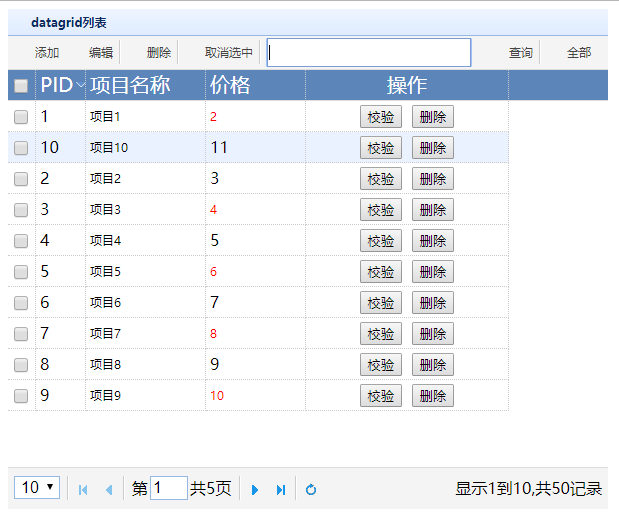
说明:本篇文章主要是展示怎么设置easyUI datagrid的格式,包括行样式和列样式,以及添加操作按钮列
开发环境 vs2012 asp.net mvc4 c#
1、效果图
3、HTML代码
<%@ Page Language="C#" AutoEventWireup="true" CodeBehind="DataGridTest.aspx.cs" Inherits="MvcAppTest.DataGridTest" %> <!DOCTYPE html> <html xmlns="http://www.w3.org/1999/xhtml">
<head runat="server">
<meta http-equiv="Content-Type" content="text/html; charset=utf-8"/>
<title></title>
<link href="Easyui/themes/default/easyui.css" rel="stylesheet" />
<script src="Easyui/jquery-1.7.2.min.js"></script>
<script src="Easyui/jquery.easyui.min.js"></script>
<script src="Easyui/locale/easyui-lang-zh_CN.js"></script>
<style type="text/css">
/*.datagrid-btable .datagrid-cell{overflow: hidden;text-overflow:ellipsis;white-space: nowrap;}
.datagrid-header {position: absolute; visibility: hidden;}*/
</style>
<script type="text/javascript">
var datagrid;
var officeId = 100;
var searchText = '';
$(function () {
InitData();
});
function InitData()
{
datagrid = $('#wg').datagrid({
url: 'Home/getWGList',
title: 'datagrid列表',
iconCls: 'icon-save',
pagination: true,
pagePosition: 'bottom',
pageSize: 10,
height: 500,
width:600,
pageList: [10, 20, 30, 40],
queryParams: { officeId: officeId, srText: searchText },
fitColumns: false,
nowrap: true,
border: false,
idField: 'PID',
sortName: 'PID',
sortOrder: 'desc',
rownumbers: false,
singleSelect: false,
checkOnSelect: true,
selectOnCheck: true,
columns: [[{
field: 'ck',
checkbox:true
}, {
title: 'PID',
field: 'PID',
width:50
}, {
title: '项目名称',
field: 'PRJNAME',
width:120,
formatter: function (value, row, index) {
return '<span title=' + value + '>' + value + '</span>'
}
}, {
title: '价格',
field: 'Price',
width: 100,
formatter: function (value, row, index) {
if (value % 2 == 0) {
return '<span style="color:red;">' + value + '</span>';
} else {
return value;
}
} },
{
field: 'ID', title: '操作', width: '35%', align: 'center', formatter: formatOper
}]],
toolbar: [{
text: '添加',
iconCls: 'icon-add',
handler: function () { AddUser(); }
}, {
text: '编辑',
iconCls: 'icon-edit',
handler: function () { EditUser(); }
}, '-', {
text: '删除',
iconCls: 'icon-delete',
handler: function () { RemoveUser(); }
}, '-', {
text: '取消选中',
iconCls: 'icon-undo',
handler: function () {
datagrid2.datagrid('uncheckAll');
datagrid2.datagrid('clearSelections');
datagrid2.datagrid('unselectAll');
}
}, '-', {
text: '<input id="searchOptionbox" style="width:200px;height:23px;"></input> ',
id: 'txtSearch'
}, {
text: '查询',
iconCls: 'icon-search',
handler: function () {
PrjSearch();
}
}, '-', {
text: '全部',
iconCls: 'icon-reload',
handler: function () {
PrjAll();
}
}],
rowStyler: function (index, row) {
if(row.Price>30){
return 'background-color:#6293BB;color:#fff;font-weight:bold;';
} }, onRowContextMenu: function (e, rowIndex, rowData) {
e.preventDefault();
$(this).datagrid('unselectAll');
$(this).datagrid('selectRow', rowIndex);
},
onCheck: function (rowIndex, rowData) {
var PID = rowData.PID; },
onLoadSuccess: function (data) { }
});
}
function formatOper(val, row, index) {
return '<input type="button" onclick="remove(\'' + row["PID"] + '\')" value="校验" /> <input type="button" onclick="removeXM(\'' + row["PID"] + '\')" value="删除" />';
}
function removeXM(pid) {
alert('删除');
}
function remove(pid) {
alert('校验');
}
function rowStyle(index,row)
{
if (row.Price > 30) {
//return '<span style="color:red;">'+value+'</span>';
return 'background-color:#6293BB;color:#fff;';
}
}
</script>
</head>
<body>
<div>
<table id="wg"></table>
</div>
</body>
</html>
4、Home控制器后台代码
  public JsonResult getWGList(string officeId, string srText)

        {

            DataGridWGModel model = new DataGridWGModel();

            var pageIndex = ;

            var pageSize = ;

            if (Request["page"] != null)

            {

                pageIndex = Int32.Parse(Request["page"].ToString());

            }

            if (Request["rows"] != null)

            {

                pageSize = Int32.Parse(Request["rows"].ToString());

            }

            List<WGTotalTableModel> myList = new List<WGTotalTableModel>();

            for (int i = ; i < ;i++ )

            {

                WGTotalTableModel HModel = new WGTotalTableModel();

                HModel.PID = i + ;

                HModel.PRJNAME="项目"+(i+).ToString();

                HModel.LANDFOUR = "土地四至" + (i + ).ToString();

                HModel.EARTHCOUNTRY = "地块" + (i + ).ToString();

                HModel.EARTHTWON = "位置" + (i + ).ToString();

                HModel.Price = i + ;

                myList.Add(HModel);

            }

            List<WGTotalTableModel> ItemList = myList.Skip((pageIndex - ) * pageSize).Take(pageSize).OrderBy(t => t.PRJNAME).ToList();

            model.rows = ItemList;

            model.total = myList.Count;

            return Json(model, JsonRequestBehavior.DenyGet);

        }
 public class DataGridWGModel

    {

        public List<WGTotalTableModel> rows { get; set; }

        public Int32 total { get; set; }

    }

    public class WGTotalTableModel

    {

        public System.Int32 PID { get; set; }

        public System.String PRJNAME { get; set; }

        public System.String LANDFOUR { get; set; }

        public System.String EARTHTWON { get; set; }

        public System.String EARTHCOUNTRY { get; set; }

        public System.Int32 Price { get; set; }

    }
5、Easyui 引用文件
链接:https://pan.baidu.com/s/1KxL2QeVEbEVHU9UxV6LBWw
提取码:cwbd
Easyui datagrid 怎么添加操作按钮,rowStyler的更多相关文章
- easyui datagrid 动态添加columns属性
公司在项目设计的时候,有一个需求,就是查出来的表的字段不唯一,一张表的字段可能是三个,也可能是五个,但是却要把它显示到页面,这个给我做ui的带来一点麻烦.因为以前一般用easyui 的datagrid ...
- JS-easyui 扩展easyui.datagrid,添加数据loading遮罩效果代码
(function (){ $.extend($.fn.datagrid.methods, { //显示遮罩 loading: function(jq){ return jq.each(functio ...
- 扩展easyui.datagrid,添加数据loading遮罩效果代码 --来自网摘收集
//jquery.datagrid 扩展 (function (){ $.extend($.fn.datagrid.methods, { //显示遮罩 loading: function(jq){ r ...
- easyui datagrid toolbar 添加搜索框
最近用到了就研究了下,效果 把列名稍加转换放入menubtton,对于单项搜索来说还是非常方便的 var fields = $('#tt').datagrid('getColumnFields') ...
- jQuery扩展easyui.datagrid,添加数据loading遮罩效果代码
//jquery.datagrid 扩展加载数据Loading效果 (function (){ $.extend($.fn.datagrid.methods, { //显示遮罩 loading: fu ...
- easyui datagrid 中添加combobox
项目需要,如下图所示 <!DOCTYPE html> <html> <head> <meta charset="UTF-8"> &l ...
- easyUI datagrid表格添加“暂无记录”显示
扩展grid的onAfterRender事件 var myview = $.extend({}, $.fn.datagrid.defaults.view, { onAfterRender: f ...
- easyui datagrid 每条数据后添加操作按钮
easyui datagrid 每条数据后添加“编辑.查看.删除”按钮 1.给datagrid添加操作字段:字段值 <table class="easyui-datagrid" ...
- ASP.NET MVC5+EF6+EasyUI 后台管理系统(82)-Easyui Datagrid批量操作(编辑,删除,添加)
前言 有时候我们的后台系统表单比较复杂,做过进销存或者一些销售订单的都应该有过感觉 虽然Easyui Datagrid提供了行内编辑,但是不够灵活,但是我们稍微修改一下来达到批量编辑,批量删除,批量添 ...
随机推荐
- jquery 同源跨域请求整理
//同源ajax请求数据 function getData(url,paramjson,fn) { $.ajax({ type : "POST", //提交方式 url : url ...
- hdu 5971 Wrestling Match 二分图染色
题目链接 题意 \(n\)人进行\(m\)场比赛,给定\(m\)场比赛的双方编号:再给定已知的为\(good\ player\)的\(x\)个人的编号,已知的为\(bad\ player\)的\(y\ ...
- poj 2318 TOYS 点与矩形的关系
题目链接 题意 有一个矩形盒子,\(n(n\leq 5e4)\)条线段将其分成了\(n+1\)个区域(每条线段的两个端点分别在矩形的上边和下边,且线段互不相交).现向盒子中扔\(m(m\leq 5e4 ...
- 系统虚拟内存的理解 转载自http://blog.csdn.net/do2jiang/article/details/4690967
在进入正题前先来谈谈操作系统内存管理机制的发展历程,了解这些有利于我们更好的理解目前操作系统的内存管理机制. 一 早期的内存分配机制 在 早期的计算机中,要运行一个程序,会把这些程序全都装入内存,程序 ...
- Scrapy学习-15-降低被识别为爬虫的方法
3种常见的方法 1. 在settings中配置禁用cookies COOKIES_ENABLED = False 2. scrapy限速处理,scrapy为我们提供了扩展模块,它能动态的限制下载速度 ...
- win7dos删除文件和删除文件夹
如果要删除呢?也简单:假设删除d盘下的123文件夹 del/s/q d:\123\*.* ----(用于删除文件夹下的子文件) rd/s/q d:\123 ----(用于删除文件夹) /s参数为子目录 ...
- MySQL中limit使用动态参数的解决方法(拼接SQL字符串语句来执行SQL)
官方好像说过limit已经在5.6版本上支持了动态参数,但是测试时依然还是不行. 那么要解决limit动态参数唯一能做的就是使用字符串SQL拼接的形式,然后再进行执行. 一般有以下方式解决: 1.存储 ...
- 12.Java web--过滤器与监听器
1)过滤器 就是为请求与目标之间加一个或多个过滤器 自定义过滤器要实现Filter接口 下面是定义一个所有Servlet的请求中文不乱码 /** * 用于servlet输出中文乱码的过滤 */ @We ...
- 分布式文件系统 FastDFS 5.0.8 & Linux CentOS 6.7 安装配置
原文:http://blog.csdn.net/wlwlwlwl015/article/details/52619851 前言 项目中用到文件服务器,有朋友推荐用fastdfs,所以就了解学习了一番, ...
- 最新最全的 Android 开源项目合集
原文链接:https://github.com/opendigg/awesome-github-android-ui 在 Github 上做了一个很新的 Android 开发相关开源项目汇总,涉及到 ...