
图文混排——用表情代替"[文字]"
1.简单设置带属性的字符串
定义一个NSMutableAttributedString带属性的字符串
NSMutableAttributedString *str = [[NSMutableAttributedString alloc] initWithString:@"hello[1_1] world![哈哈][微笑]"];
设置属性
[str setAttributes:@{NSFontAttributeName:[UIFont systemFontOfSize:60], NSForegroundColorAttributeName:[UIColor redColor], NSBackgroundColorAttributeName:[UIColor greenColor], NSUnderlineColorAttributeName:[UIColor blueColor], NSUnderlineStyleAttributeName:@(NSUnderlineStyleDouble)} range:NSMakeRange(0, 5)];
显示
_label.attributedText = str;
2. 用表情代替带[]的文字(qq会话,微信会话)
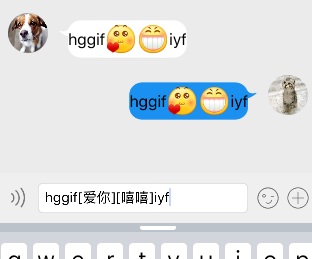
定义正则表达式
NSString *pattern = @"\\[[\u4E00-\u9FA5]+\\]";
NSRegularExpression *regular = [NSRegularExpression regularExpressionWithPattern:pattern options:NSRegularExpressionCaseInsensitive error:nil];
NSString *text = @"hello[1_1] world![哈哈]";
得到符合表达式的数组NSTextCheckingResult类型的
NSArray *resultArray = [regular matchesInString:text options:0 range:NSMakeRange(0, text.length)];
定义一个带附件的字符串
NSMutableAttributedString *attStr = [[NSMutableAttributedString alloc] initWithString:text];
for (NSTextCheckingResult *result in resultArray) {
位置
NSRange range = result.range;
得到附件
NSTextAttachment *attach = [[NSTextAttachment alloc] init];
设置附件的图片
attach.image = [UIImage imageNamed:@"d_guzhang"];
得到附件生成的字符串
NSAttributedString *imageStr = [NSAttributedString attributedStringWithAttachment:attach];
把文字替换成表情
[attStr replaceCharactersInRange:range withAttributedString:imageStr];
}
_label.attributedText = attStr;
图文混排——用表情代替"[文字]"的更多相关文章
- UILabel图文混排显示图片和文字
//传入文字 自动图片放在左边文字紧接着后排排布 -(void)setAttrDetailLabelWithTitle:(NSString *)title { NSMutableAttributedS ...
- HTML5[8]: 图文混排,图片与文字居中对齐
<img src="image.png"><span>999</span> img { /* ... */ vertical-align: t ...
- 使用android SpannableStringBuilder实现图文混排,看到许多其他
项目开发需要达到这种效果 watermark/2/text/aHR0cDovL2Jsb2cuY3Nkbi5uZXQvZmFuY3lsb3ZlamF2YQ==/font/5a6L5L2T/fontsiz ...
- ios开发--图文混排(富文本)
最近准备接一个编辑类的app,所以就查了下相关的功能,并自己试验了下: /** iOS 6之前:CoreText,纯C语言,极其蛋疼 iOS 6开始:NSAttributedString,简单易用 i ...
- javaWeb css图文混排
<!DOCTYPE html> <html> <head> <meta charset="UTF-8"> <title> ...
- [Swift通天遁地]八、媒体与动画-(15)使用TextKit实现精美的图文混排效果
★★★★★★★★★★★★★★★★★★★★★★★★★★★★★★★★★★★★★★★★➤微信公众号:山青咏芝(shanqingyongzhi)➤博客园地址:山青咏芝(https://www.cnblogs. ...
- IOS实现UIButton图文混排、自定义按钮按下和正常状态下不同的背景颜色、根据文字长度自定义UIButton长度
在一些项目中,我们需要自定义自己的UIButton,使Button上面同时具有图片和文字描述,实现自定义UIButton的图文混排. 首先我们需要定义一个继承自UIButton的类,同时实现自己的in ...
- Unity UGUI图文混排源码(三) -- 动态表情
这里是根据图文混排源码(二)进一步修改的,其他链接也不贴了,就贴一个链接就好了,第一次看这文章的同学可以先去看看其他几篇文章 Unity UGUI图文混排源码(二):http://blog.csdn. ...
- CoreText实现图文混排之文字环绕及点击算法
系列文章: CoreText实现图文混排:http://www.jianshu.com/p/6db3289fb05d CoreText实现图文混排之点击事件:http://www.jianshu.co ...
随机推荐
- linux上 安装并 运行opencv
我是在树莓派上安装的. 1.先安装依赖项 OpenCV 2.2以后版本需要使用Cmake生成makefile文件,因此需要先安装cmake. sudo apt-get install build-es ...
- QT VS2008未处理的异常: 0xC0000005
症状如图所示 出错代码段在第3行 QString dir = QFileDialog::getExistingDirectory(this, tr("Save file path&qu ...
- ubuntu openssh-server
1. sudo apt-get install openssh-server 2. sudo service ssh start 3. sudo service ssh status 4. ...
- JQuery实现隔行变色和突出显示当前行 效果
运行效果如下图: jquery关键代码: <script type="text/javascript"> //该文件为:js.js // 当鼠标移到表格上是,当前一行背 ...
- Backbone一些参考资源
最近想找一个single-page JavaScript application Framework ,而不是单纯的Toolkit+Widget.来看YUI3的一段介绍: 引用 The YUI App ...
- 消息机制 - Windows程序设计(SDK)004
消息机制 让编程改变世界 Change the world by program 内容节选: 我们来回顾一下,窗口是怎么从代码中诞生出来的? 1. 首先我们是通过给 WNDCLASS 窗口类结构各个成 ...
- C程序设计语言练习题1-1
练习1-1 在你自己的系统中运行"hello, world"程序.再有意去掉程序中的部分内容,看看会得到什么出错信息. 代码如下: #include <stdio.h> ...
- Jasper_pass data_from main report to subReport (local CSV)
<dataSourceExpression><![CDATA[$P{REPORT_DATA_SOURCE}]]></dataSourceExpression>< ...
- ios晃动检测
ios晃动检测 第一种 1.在AppDelegate.h中进行如下设置: - (BOOL)application:(UIApplication *)application didFinishLaun ...
- c#秒转时分秒
2个办法 @{ int hour = item.track / 3600; int min = (item.track - hour * 3 ...