
Eclipse IDE for Java EE Developers使用和新建工程helloworld
开发j2ee还是用专门的java ee eclipse,自带了许多开发j2ee的插件,包括:
This package includes:
- Data Tools Platform
- Eclipse Git Team Provider
- Eclipse Java Development Tools
- Eclipse Java EE Developer Tools
- JavaScript Development Tools
- Maven Integration for Eclipse
- Mylyn Task List
- Eclipse Plug-in Development Environment
- Remote System Explorer
- Eclipse XML Editors and Tools
(
我用的ide是
Eclipse Java EE IDE for Web Developers.
Version: Kepler Service Release 1.
新建一个工程: c dynamic web project.
创建dynamic web project
eclipse本身的dynamic web project类似MyEclipse?的web project,
MyEclipse对Eclipse进行了扩展,如:web project可以添加一些开源的框架支持,比如Struts、Hibernate等等。
也就是说,web project是Myeclipse扩展后的项目,而dynamic web project是Eclipse自带的分类,在Myeclipse中,web project具有dynamic web project特性并具有一些方便开发的集成功能。
)
启动后:
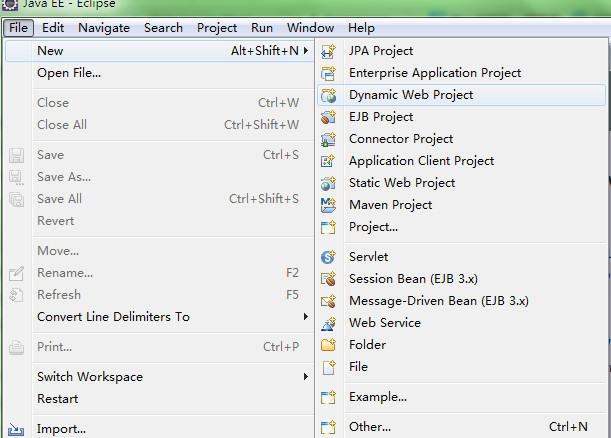
可以看到有一个Dynamic web project 选项,在eclipse标准版里是没有的。
创建Server
通过菜单选择File > New > Other>Server,创建Server,如下图所示。
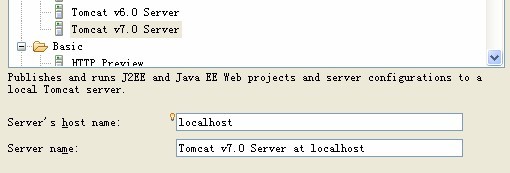
单击“下一步”,再单击“完成”。
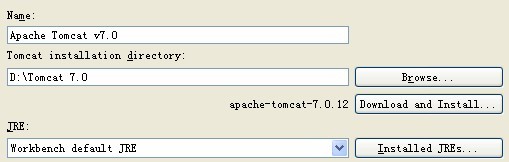
二,创建Dynamic Web Project项目
1,通过菜单选择File > New > Dynamic Web Project,新建项目,项目名HelloWorld,其他值默认。
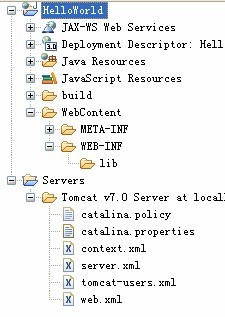
2, 项目资源如下图所示。
三,创建JSP文件
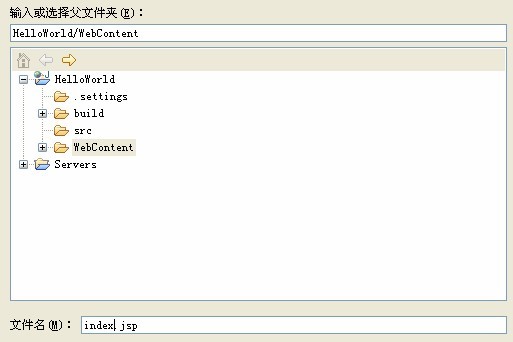
1,创建index.jsp文件,右击项目,New >JSP FILE,如下图所示,单击完成。
2,在<body></body>中间处插入如下代码:
<% java.util.Date d =new java.util.Date();%>
<h1>Today's date is<%= d.toString()%></h1>
3,右击项目,Run...>Run on Server,选择刚新建的Server。运行效果如下图所示:

四,创建Servlet文件
1,新建HelloWorldServlet,右击项目,New >Servlet,如下图所示,单击完成。
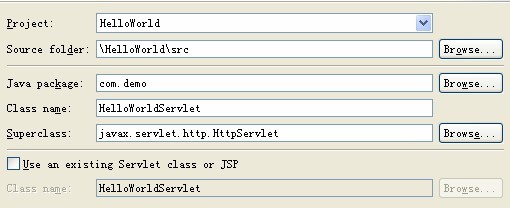
(可以看到,servlet文件放在根目录下的src包中)
2,在doGet方法中添加如下代码:
response.getWriter().write("Hello, world!");
3,运行Servlet,重新启动Server。运行效果如下:

说明:
1.Dynamic Web Project项目的WEB-INF目录下默认没有web.xml文件。除非勾选这个.
Server只是方便开发和调试WEB项目,真实布署WEB应用时,应该修改Tomcat安装目录下的conf/server.xml文件和Web端项目下的WEB-INF/web.xml文件。
用户登录例子
1.新建login.jsp
<%@ page language="java" contentType="text/html; charset=utf8"

    pageEncoding="utf-8"%>

<!DOCTYPE html PUBLIC "-//W3C//DTD HTML 4.01 Transitional//EN" "http://www.w3.org/TR/html4/loose.dtd">

<html>

<head>

<meta http-equiv="Content-Type" content="text/html; charset=ISO-8859-1">

<title>Login</title>

</head>

<body>

<form  method="POST" action="login">

    <input type="text" name="username"/>

    <input type="text" name="password"/>

    <input type="submit" value="登陆"/>

</form>

</body>

</html>
注意我们的action
2.Servlet,在Web项目的src中右键新建一个类LoginAction 的servlet
package com.demo;

import java.io.IOException;

import java.io.PrintWriter;

import javax.servlet.ServletException;

import javax.servlet.annotation.WebServlet;

import javax.servlet.http.HttpServlet;

import javax.servlet.http.HttpServletRequest;

import javax.servlet.http.HttpServletResponse;

/**

 * Servlet implementation class LoginServlet

 */

@WebServlet("/LoginServlet")

public class LoginAction extends HttpServlet {

    private static final long serialVersionUID = 1L;

    /**

     * @see HttpServlet#HttpServlet()

     */

    public LoginAction() {

        super();

        // TODO Auto-generated constructor stub

    }

    /**

     * @see HttpServlet#doGet(HttpServletRequest req, HttpServletResponse res)

     */

    protected void doGet(HttpServletRequest req, HttpServletResponse res) throws ServletException, IOException {

        // TODO Auto-generated method stub

        //response.getWriter().append("Served at: ").append(request.getContextPath());

        PrintWriter out=res.getWriter();

        String username=req.getParameter("username");

        String password=req.getParameter("password");

        String ret;

        if(username.equals("admin"))

        {

            if(password.equals("admin"))

            {

                ret="登陆成功";

            }

            else

            {

                ret="密码错误";

            }

        }

        else

        {

            ret="用户名错误";

        }

          //返回html页面

        res.setContentType("text/html;charset=utf-8");

        out.println("<html>");

        out.println("<head>");

        out.println("<title>登录信息</title>");

        out.println("</head>");

        out.println("<body>");

        out.println("welcome欢迎【" + username + "】用户登录成功!!!");

        out.println("</body>");

        out.println("</html>");

        out.flush();

        out.close();

    }

    /**

     * @see HttpServlet#doPost(HttpServletRequest request, HttpServletResponse response)

     */

    protected void doPost(HttpServletRequest request, HttpServletResponse response) throws ServletException, IOException {

        // TODO Auto-generated method stub

        doGet(request, response);

    }

}
3.在WebRoot下的WEB-INF的web.xml,部署我们的Servlet,启动服务器。
  <servlet>

          <servlet-name>login</servlet-name> <!-- 名字随便 -->

          <servlet-class>com.demo.LoginAction</servlet-class><!-- servlet类名 -->

  </servlet>

  <servlet-mapping>

      <servlet-name>login</servlet-name>

      <url-pattern>/login</url-pattern> <!-- url虚拟访问路径,最后我们通过工程名/login进行访问,像这样http://127.0.0.1:8080/helloworld/login -->

  </servlet-mapping>
4.一定要启动服务器,之后在浏览器中输入你的URL
http://localhost:8080/helloworld/login.jsp
上面中我们没有配置类似:*.jsp的访问格式也能够访问jsp页面,为什么?
tomcat的 conf目录下默认配置文件web.xml文件中有这个配置项,类似这样
    <!-- The mapping for the default servlet -->

    <servlet-mapping>

        <servlet-name>default</servlet-name>

        <url-pattern>/</url-pattern>

    </servlet-mapping>

    <!-- The mappings for the JSP servlet -->

    <servlet-mapping>

        <servlet-name>jsp</servlet-name>

        <url-pattern>*.jsp</url-pattern>

        <url-pattern>*.jspx</url-pattern>

    </servlet-mapping>
可以看到,通过通配符*进行了映射,所以可以访问任意jsp文件。
参考:
http://blog.csdn.net/jiuqiyuliang/article/details/36424981
更多参考:
http://blog.csdn.net/wangchenggong88/article/details/6830316
http://www.blogjava.net/ynstudio/archive/2009/07/01/284960.html
http://orajc.blog.51cto.com/458434/263296/ eclipse Java EE平台使用指南(一)
http://blog.sina.com.cn/s/blog_7ee821410101ipt6.html
Eclipse IDE for Java EE Developers使用和新建工程helloworld的更多相关文章
- Eclipse IDE for Java EE Developers 与 Eclipse Classic(Eclipse Standard)区别
Eclipse下载官网:http://www.eclipse.org/downloads/ 版本: 1.Eclipse classic(Eclipse Standard):Eclipse的标准版; 2 ...
- eclipse ide for java ee developers 开发环境搭建(j2ee)
转载自:http://www.iteye.com/topic/982182 真的是一片很不错的文章啊! 使用eclipse真的有年头了,相信java程序员没有不知道它的,最近在给团队中新来的应届生做指 ...
- eclipse ide for java ee developers 开发环境搭建(J2EE) 【转载】
使用eclipse真的有年头了,相信java程序员没有不知道它的,最近在给团队中新来的应届生做指导,专门讲解了一下Eclipse开发环境的搭建过程, 一是帮助他们尽快的熟悉IDE的使用,二也是保证团队 ...
- Eclipse IDE for java EE Developers下载和安装
1.登录 http://www.eclipse.org/home/index.php ,下载Eclipse IDE for java EE Developers 2.解压缩压缩包到任意路径(推荐:G: ...
- eclipse ide for java ee developers与eclipse ide for java developers有什么区别
前者集成了WTP,可用于j2ee开发,功能更完善
- Eclipse IDE for C/C++ Developers安装配置详解
Eclipse IDE for C/C++ Developers安装配置详解(转) 转自:http://hi.baidu.com/ltb6w/item/986532efd712460f570f1ddc ...
- ubuntu下安装eclipse IDE for C/C++ developers
序 linux的GUI和windos比起来实在逊色,虽然它的终端模式(命令行模式)非常强大.linux发行版ubuntu的GUI相对其他版本要华丽一些,所以最近由redhat转向ubuntu进行li ...
- Linux下安装JRE和Eclipse IDE for C/C++ Developers
Linux32位,下载eclipse-cpp-luna-R-linux-gtk.tar.gz和jre-8u11-linux-i586.rpm 放到家文件夹中. http://www.eclipse. ...
- Eclipse IDE for C/C++ Developers和MinGW安装配置C/C++开发学习环境详解
Eclipse IDE for C/C++ Developers和MinGW安装配置C/C++开发学习环境详解 操作系统:Windows 7 JDK版本:1.6.0_33 Eclipse版本:Juno ...
随机推荐
- POJ 2182 Lost Cows (线段树)
题目大意: 有 n 头牛,编号为 1 - n 乱序排成一列,现已知每头牛前面有多少头牛比它的编号小,从前往后输出每头牛的编号. 思路: 从后往前推,假如排在最后的一头牛比他编号小的数量为a,那么它的编 ...
- 解决Struts2.2.20版本的标签不支持style属性的问题
我先把Exception错误信息贴出来:org.apache.jasper.JasperException: /WEB-INF/jsp/topicAction/addUI.jsp (line: 40, ...
- JAVA大整数傻瓜入门
http://blog.csdn.net/skiffloveblue/article/details/7032290..先记着
- 04747_Java语言程序设计(一)_第7章_图形、图像与多媒体
例7.1小应用程序用6种字型显示字符串,显示内容说明本身的字型. import java.applet.*; import java.awt.*; public class Example7_1 ex ...
- Hibernate框架增删改查测试类归为一个类
package cn.happy.test; import org.hibernate.Session; import org.hibernate.SessionFactory; import org ...
- 酷狗音乐QQ显示(VC源代码)
效果图: 原理网上有,只是都是易语言,自己分析一下.知道原理. 但近期喜欢用酷狗听课就写这个小软件认出来,你自己能够随意改动. 不说了直接丢代码.. http://pan.baidu.com/s/1q ...
- 给定N个整数集合是否存在两个其和刚好为指定常数的元素
又一次学习一遍<算法导论>,看到了这个问题: 描写叙述一个执行时间为O(nlgn)的算法,使之能在给定一个由n个整数构成的集合S和还有一个整数 X 时,推断出S中是否存在有两个其和刚好等于 ...
- iframe框架默认占满整个屏幕
<script language="JavaScript"> if (window != top) { top.location.href = location.hre ...
- ProFTPD“killed (signal 15)”自动退出问题解决
proftpd服务端每隔几天就重启一次,日志如下: 看起来这又像是一个仅有两行日志的无头案了.不过由于日志明确给出了退出信号“killed (signal 15)”,因此Google的话还是比较简单找 ...
- Oracle11g x64使用Oracle SQL Developer报错:Unable to find a Java Virtual Machine
原因oracle 11g中安装的Oracle SQL Developer是32位的,而我们现在给他指定的java.exe却是64位的,所以会出现这种错误.解决方法1)从网上下载Oracle SQL D ...