
(七)Android中AIDL的应用与理解
一、跨应用启动Service
Intent serviceIntent=new Intent();
serviceIntent.setComponent(new ComponentName("com.example.shiyanshi.startservicefromanotherapp","com.example.shiyanshi.startservicefromanotherapp.AppService"));
跨应用启动Service时,Android5.0以前可以调用隐式Intent(通过在Service设置过滤器intent-filte),Android5.0之后只允许显示Intent来启动。首先创建Intent,之后调用setComponent函数来设置组件,该函数需要一个ComponentName的对象,ComponentName第一个参数为包名,第二个参数为包中的服务类名。
二、跨应用绑定Service并进行通信
app模块中:
1.MainActivity.java
package com.example.shiyanshi.startservicefromoterapp;

import android.app.Activity;
import android.content.Intent;
import android.os.Bundle;
import android.view.Menu;
import android.view.MenuItem;

public class MainActivity extends Activity {

    @Override
    protected void onCreate(Bundle savedInstanceState) {
        super.onCreate(savedInstanceState);
        setContentView(R.layout.activity_main);

        startService(new Intent(this,MyService.class));
    }

    @Override
    protected void onDestroy() {
        super.onDestroy();

        stopService(new Intent(this,MyService.class));
    }

    @Override
    public boolean onCreateOptionsMenu(Menu menu) {
        // Inflate the menu; this adds items to the action bar if it is present.
        getMenuInflater().inflate(R.menu.menu_main, menu);
        return true;
    }

    @Override
    public boolean onOptionsItemSelected(MenuItem item) {
        // Handle action bar item clicks here. The action bar will
        // automatically handle clicks on the Home/Up button, so long
        // as you specify a parent activity in AndroidManifest.xml.
        int id = item.getItemId();

        //noinspection SimplifiableIfStatement
        if (id == R.id.action_settings) {
            return true;
        }

        return super.onOptionsItemSelected(item);
    }
}
2.MyService.java
package com.example.shiyanshi.startservicefromoterapp;

import android.app.Service;
import android.content.Intent;
import android.os.IBinder;
import android.os.RemoteException;

public class MyService extends Service {
    public MyService() {
    }

    private String data="default data";
    private boolean flag;

    @Override
    public IBinder onBind(Intent intent) {
        // TODO: Return the communication channel to the service.
//        throw new UnsupportedOperationException("Not yet implemented");
//返回的是AIDL中的接口,并且此处实现了接口函数的重定义
return new IAppRemoteServiceBinder.Stub() {
@Override
public void basicTypes(int anInt, long aLong, boolean aBoolean, float aFloat, double aDouble, String aString) throws RemoteException {
}
@Override
public void setData(String data) throws RemoteException {
MyService.this.data=data;
}
};
    }

    @Override
    public void onCreate() {
        super.onCreate();
        System.out.println("**********MyService onCreate************");
//该线程主要用于不断的输出该service种的数据data,data数据的值可以通过在anotherapp中调用setData函数进行设置,这样便实现了双方的通信
        new Thread(){
            @Override
            public void run() {
                super.run();
                flag=true;
                while (flag) {
                    System.out.println(data);
                    try {
                        Thread.sleep(1000);
                    } catch (InterruptedException e) {
                        e.printStackTrace();
                    }
                }
            }
        }.start();
    }

    @Override
    public void onDestroy() {
        super.onDestroy();

        System.out.println("***************MyService onDestroy********************");
        flag=false;
    }
}
//
不同的应用进行通信时需要创建aidl文件,并且在其中实现接口函数的定义
3.IAppRemoteServiceBinder.aidl
// IAppRemoteServiceBinder.aidl
package com.example.shiyanshi.startservicefromoterapp;

// Declare any non-default types here with import statements

interface IAppRemoteServiceBinder {
    /**
     * Demonstrates some basic types that you can use as parameters
     * and return values in AIDL.
     */
    void basicTypes(int anInt, long aLong, boolean aBoolean, float aFloat,
            double aDouble, String aString);
void setData(String data); //用于两个应用程序之间进行通信的接口函数
}
anotherapp中:
1.布局文件
<LinearLayout xmlns:android="http://schemas.android.com/apk/res/android"
    xmlns:tools="http://schemas.android.com/tools" android:layout_width="match_parent"
    android:layout_height="match_parent" android:paddingLeft="@dimen/activity_horizontal_margin"
    android:paddingRight="@dimen/activity_horizontal_margin"
    android:paddingTop="@dimen/activity_vertical_margin"
    android:orientation="vertical"
    android:paddingBottom="@dimen/activity_vertical_margin" tools:context=".MainActivity">

    <TextView android:text="@string/hello_world" android:layout_width="wrap_content"
        android:layout_height="wrap_content" />

    <Button
        android:layout_width="wrap_content"
        android:layout_height="wrap_content"
        android:text="启动外部服务"
        android:id="@+id/btnStartService"
        android:layout_gravity="bottom" />

    <Button
        android:layout_width="wrap_content"
        android:layout_height="wrap_content"
        android:text="关闭外部服务"
        android:id="@+id/btnStopService"
        android:layout_gravity="center_vertical" />

    <Button
        android:layout_width="wrap_content"
        android:layout_height="wrap_content"
        android:text="绑定外部服务"
        android:id="@+id/btnBindService" />

    <Button
        android:layout_width="wrap_content"
        android:layout_height="wrap_content"
        android:text="解除绑定外部服务"
        android:id="@+id/btnUnbindService" />

    <Button
        android:layout_width="wrap_content"
        android:layout_height="wrap_content"
        android:text="同步数据到外部服务"
        android:id="@+id/btnSyncDataToAppService" />
    <EditText
        android:layout_width="fill_parent"
        android:layout_height="wrap_content"
        android:text="**************"
        android:id="@+id/editTextInput"/>

</LinearLayout>
2.MainActivity.java
package com.example.shiyanshi.anotherapp;

import android.app.Activity;
import android.content.ComponentName;
import android.content.Context;
import android.content.Intent;
import android.content.ServiceConnection;
import android.os.Bundle;
import android.os.IBinder;
import android.os.RemoteException;
import android.view.Menu;
import android.view.MenuItem;
import android.view.View;
import android.widget.EditText;

import com.example.shiyanshi.startservicefromoterapp.IAppRemoteServiceBinder;

public class MainActivity extends Activity implements View.OnClickListener, ServiceConnection {

    Intent serviceIntent;
    private EditText editTextInput;
    private IAppRemoteServiceBinder binder;

    @Override
    protected void onCreate(Bundle savedInstanceState) {
        super.onCreate(savedInstanceState);
        setContentView(R.layout.activity_main);

        editTextInput=(EditText)findViewById(R.id.editTextInput);

        findViewById(R.id.btnStartService).setOnClickListener(this);
        findViewById(R.id.btnStopService).setOnClickListener(this);
        findViewById(R.id.btnBindService).setOnClickListener(this);
        findViewById(R.id.btnUnbindService).setOnClickListener(this);
findViewById(R.id.btnSyncDataToAppService).setOnClickListener(this);
        serviceIntent=new Intent();
        serviceIntent.setComponent(new ComponentName("com.example.shiyanshi.startservicefromoterapp","com.example.shiyanshi.startservicefromoterapp.MyService"));

    }

    @Override
    public boolean onCreateOptionsMenu(Menu menu) {
        // Inflate the menu; this adds items to the action bar if it is present.
        getMenuInflater().inflate(R.menu.menu_main, menu);
        return true;
    }

    @Override
    public boolean onOptionsItemSelected(MenuItem item) {
        // Handle action bar item clicks here. The action bar will
        // automatically handle clicks on the Home/Up button, so long
        // as you specify a parent activity in AndroidManifest.xml.
        int id = item.getItemId();

        //noinspection SimplifiableIfStatement
        if (id == R.id.action_settings) {
            return true;
        }

        return super.onOptionsItemSelected(item);
    }

    @Override
    public void onClick(View view) {
        switch (view.getId()){
            case R.id.btnStartService:
                startService(serviceIntent);
                break;
            case R.id.btnStopService:
                stopService(serviceIntent);
                break;
            case R.id.btnBindService:
bindService(serviceIntent,this, Context.BIND_AUTO_CREATE);
                break;
            case R.id.btnUnbindService:
                unbindService(this);
                binder=null;
                break;
case R.id.btnSyncDataToAppService:
if (binder!=null){
try {
binder.setData(editTextInput.getText().toString());
} catch (RemoteException e) {
e.printStackTrace();
}
}
break;
        }

    }

    @Override
    public void onServiceConnected(ComponentName componentName, IBinder iBinder) {
        System.out.println("*******onServiceConnected*************");
//不能直接强制类型转换,因为两个类型处于不同的应用程序中
binder=IAppRemoteServiceBinder.Stub.asInterface(iBinder);
    }

    @Override
    public void onServiceDisconnected(ComponentName componentName) {

    }
}
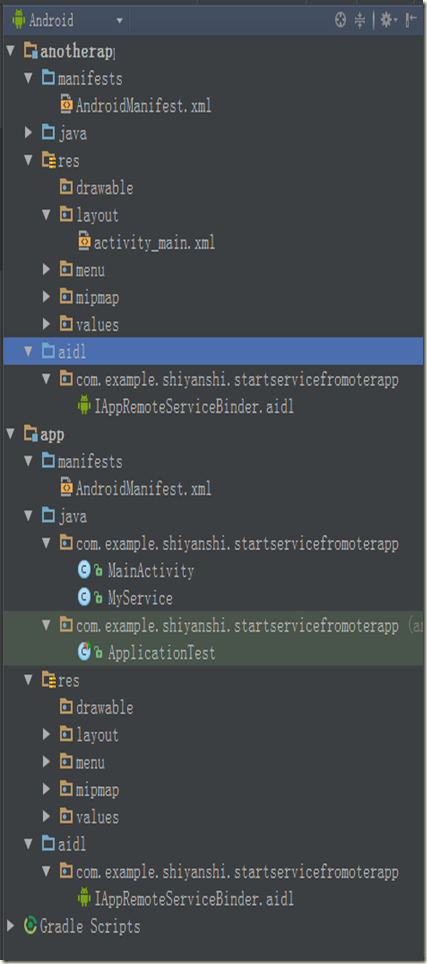
3.文件目录结构,将在App模块中创建的aidl文件复制到了anotherapp中,首先穿件aidl目录,然后在aidl目录中创建app中的程序包(com.example.shiyanshi.startservicefromoterapp),之后将app中的IAppRemoteServiceBinder.aidl文件复制到该程序包
(七)Android中AIDL的应用与理解的更多相关文章
- Android 中AIDL的使用与理解
AIDL的使用: 最常见的aidl的使用就是Service的跨进程通信了,那么我们就写一个Activity和Service的跨进程通信吧. 首先,我们就在AS里面新建一个aidl文件(ps:现在AS建 ...
- Android中AIDL的理解与使用(二)——跨应用绑定Service并通信
跨应用绑定Service并通信: 1.(StartServiceFromAnotherApp)AIDL文件中新增接口: void setData(String data); AppService文件中 ...
- android中对线程池的理解与使用
前段时间有幸接到腾讯上海分公司的 Android开发面试,虽然最后一轮被毙了.但还是得总结一下自己在android开发中的一些盲点,最让我尴尬的是面试官问我几个android中线程池的使用与理解..哎 ...
- 【转】Android中BindService方式使用的理解
原文网址:http://www.cnblogs.com/onlylittlegod/archive/2011/05/15/2046652.html 最近学习了一下Android里面的Service的应 ...
- Android中对Handle机制的理解
一.重要參考资料 [參考资料] 眼下来看,以下的几个网址中的内容质量比較不错.基本不须要再读别的网址了. 1.android消息机制一 http://xtfncel.javaeye. ...
- Android中Adapter和Bridge模式理解和应用
一 Adapter模式 意图: 将一个类的接口转换成客户希望的另外一个接口. Adapter模式使得原本由于接口不兼容而不能在一起工作的那些类可以在一起工作. 适用性: 使用一个已存在的类,而它的接口 ...
- 谈谈对Android中的消息机制的理解
Android中的消息机制主要由Handler.MessageQueue.Looper三个类组成,他们的主要作用是 Handler负责发送.处理Message MessageQueue负责维护Mess ...
- Android中AIDL的理解与使用(一)——跨应用启动/绑定Service
AIDL(Android Interface Definition Language)--安卓接口定义语言 一.startService/stopService 1.同一个应用程序启动Service: ...
- Android中AIDL通信机制分析
一.背景 ·1.AIDL出现的原因 在android系统中,每一个程序都是运行在自己的进程中,进程之间无法进行通讯,为了在Android平台,一个进程通常不能访问另一个进程的内存空间,所以要想对话,需 ...
随机推荐
- 设置MySQL数据表主键
设置MySQL数据表主键: 使用“primary key”关键字创建主键数据列.被设置为主键列不允许出现重复的值,很多情况下与“auto_increment”递增数字相结合.如下SQL语句所示: My ...
- Jquery 工具类函数
1.$.browser 获取当前浏览器的名称和版本信息 $.browser.chrome 获取chrome浏览器 $.browser.mozilla 获取火狐浏览器 $.browser.msie ...
- 全分布式环境下,DataNode不启动的问题解决
问题出现:机器重启之后,再次在master结点上面执行start-all.sh,发现有一个datanode没有启动,通过jps检查之后,发现slave1上面的datanode进程未启动 原因:每次na ...
- Android studio教程:[1] 创建app项目
Android studio作为面市不久的安卓开发工具,越来越受到大家的喜爱,这里我将介绍如何在Android studio中创建一个APP项目,并在以后经验中介绍其他有关Android studio ...
- linux安装perl模块
查询perl CPAN模块 shell>perl -MCPAN -e shell cpan>install module_name 手动安装perl CPAN模块 从 CPAN(h ...
- 【转载自友盟消息推送iOS文档】在appDelegate中注册推送
1.2 基本功能集成指南 提示 请先在友盟的消息推送管理后台中创建App,获得AppKey和AppSecret 导入SDK 下载 UMessage_Sdk_All_x.x.x.zip并解压缩 导入 ...
- C#操作AD的例子
一下连接中包含了使用c#对AD操作的各种列子 http://www.codeproject.com/Articles/18102/Howto-Almost-Everything-In-Active-D ...
- CheckStyle插件
如今代码静态检查越来越重要,已经成为构建高质量软件的不可或缺的一个验证步骤.如果你使用的是java语言,那么CheckStyle则是一个利器. CheckStyle能够帮助程序员检查代码是否符合制定的 ...
- error LNK2019: 无法解析的外部符号 "public:
错误 1 error LNK2019: 无法解析的外部符号 "public: __thiscall test::test(void)" (??0test@@QAE@XZ),该符号在 ...
- [汇编语言]-debug跟踪执行
ffff:0-ffff:d内存中数值求和放入dx寄存器中 代码: add.asm assume cs:code code segment mov ax,0ffffH mov ds,ax mov dx, ...