
Good Zookeeper Tutorial with Java client
参考: https://stackoverflow.com/questions/33524537/good-zookeeper-tutorial-with-java-client
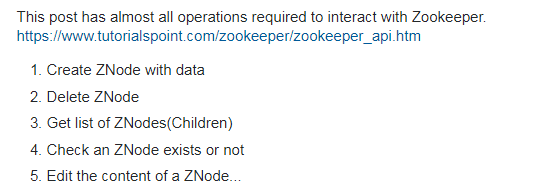
I was trying to use Zookeeper in our project. Could run the server..Even test it using zkcli.sh .. All good.. But couldn't find a good tutorial for me to connect to this server using Java ! All I need in Java API is a method
-----------------------------------------
Finally, this is the simplest and most basic program I came up with which will help you with ZooKeeper "Getting Started":
package com.fly.app;

import java.util.Date;

import java.util.List;

import java.util.concurrent.CountDownLatch;

import org.apache.zookeeper.CreateMode;

import org.apache.zookeeper.WatchedEvent;

import org.apache.zookeeper.Watcher;

import org.apache.zookeeper.Watcher.Event.KeeperState;

import org.apache.zookeeper.ZooDefs.Ids;

import org.apache.zookeeper.ZooKeeper;

public class ZkConnect {

    private ZooKeeper zk;

    private CountDownLatch connSignal = new CountDownLatch(0);

    //host should be 127.0.0.1:3000,127.0.0.1:3001,127.0.0.1:3002

    public ZooKeeper connect(String host) throws Exception {

        zk = new ZooKeeper(host, 3000, new Watcher() {

            public void process(WatchedEvent event) {

                if (event.getState() == KeeperState.SyncConnected) {

                    connSignal.countDown();

                }

            }

        });

        connSignal.await();

        return zk;

    }

    public void close() throws InterruptedException {

        zk.close();

    }

    public void createNode(String path, byte[] data) throws Exception

    {

        zk.create(path, data, Ids.OPEN_ACL_UNSAFE, CreateMode.PERSISTENT);

    }

    public void updateNode(String path, byte[] data) throws Exception

    {

        zk.setData(path, data, zk.exists(path, true).getVersion());

    }

    public void deleteNode(String path) throws Exception

    {

        zk.delete(path,  zk.exists(path, true).getVersion());

    }

    public static void main (String args[]) throws Exception

    {

        ZkConnect connector = new ZkConnect();

        ZooKeeper zk = connector.connect("54.169.132.0,52.74.51.0");

        String newNode = "/deepakDate"+new Date();

        connector.createNode(newNode, new Date().toString().getBytes());

        List<String> zNodes = zk.getChildren("/", true);

        for (String zNode: zNodes)

        {

           System.out.println("ChildrenNode " + zNode);

        }

        byte[] data = zk.getData(newNode, true, zk.exists(newNode, true));

        System.out.println("GetData before setting");

        for ( byte dataPoint : data)

        {

            System.out.print ((char)dataPoint);

        }

        System.out.println("GetData after setting");

        connector.updateNode(newNode, "Modified data".getBytes());

        data = zk.getData(newNode, true, zk.exists(newNode, true));

        for ( byte dataPoint : data)

        {

            System.out.print ((char)dataPoint);

        }

        connector.deleteNode(newNode);

    }

}
pom.xml
<project xmlns="http://maven.apache.org/POM/4.0.0" xmlns:xsi="http://www.w3.org/2001/XMLSchema-instance"

 xsi:schemaLocation="http://maven.apache.org/POM/4.0.0 http://maven.apache.org/xsd/maven-4.0.0.xsd">

    <modelVersion>4.0.0</modelVersion>

    <groupId>com.fly.app</groupId>

    <artifactId>new-app</artifactId>

    <version>0.0.1-SNAPSHOT</version>

    <packaging>jar</packaging>

    <name>new-app</name>

    <url>http://maven.apache.org</url>

    <properties>

        <project.build.sourceEncoding>UTF-8</project.build.sourceEncoding>

        <maven.compiler.source>1.6</maven.compiler.source>

        <maven.compiler.target>1.6</maven.compiler.target>

    </properties>

    <dependencies>

        <dependency>

            <groupId>junit</groupId>

            <artifactId>junit</artifactId>

            <version>3.8.1</version>

            <scope>test</scope>

        </dependency>

        <dependency>

            <groupId>org.apache.zookeeper</groupId>

            <artifactId>zookeeper</artifactId>

            <version>3.4.6</version>

        </dependency>

    </dependencies>

<build>

    <plugins>

       <plugin>

           <groupId>org.apache.maven.plugins</groupId>

           <artifactId>maven-compiler-plugin</artifactId>

           <version>2.3.1</version>

           <configuration>

               <source>1.8</source>

               <target>1.8</target>

           </configuration>

       </plugin>

        <plugin>

            <artifactId>maven-assembly-plugin</artifactId>

            <version>2.4</version>

            <configuration>

                <descriptorRefs>

 </configuration>

            <executions>

                <execution>

                   <id>make-assembly</id>

                   <phase>package</phase>

                   <goals>

                        <goal>single</goal>

                   </goals>

                </execution>

            </executions>

        </plugin>

    </plugins>

  </build>

</project>
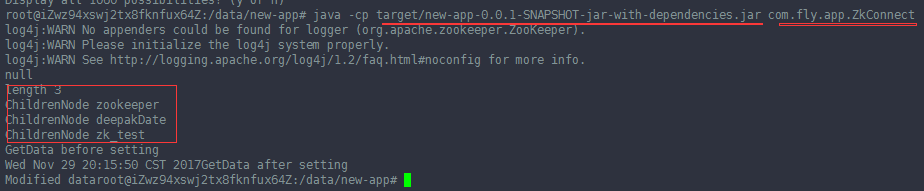
编译后,运行的结果:
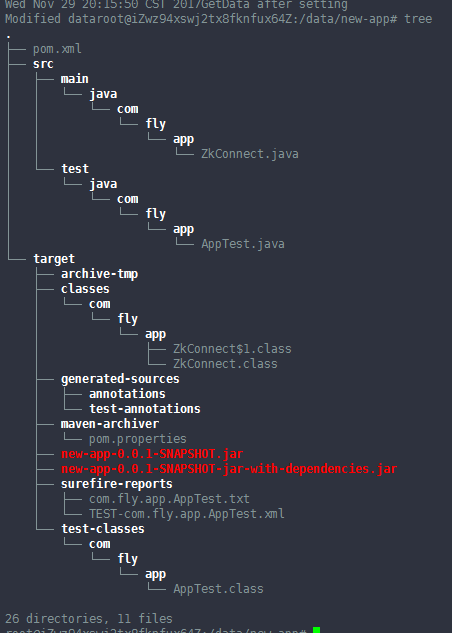
项目的结构:
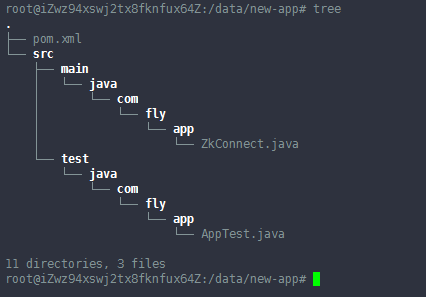
执行 mvn clean 之后:
执行 mvn assembly:assembly 之后,编译后的结果为:
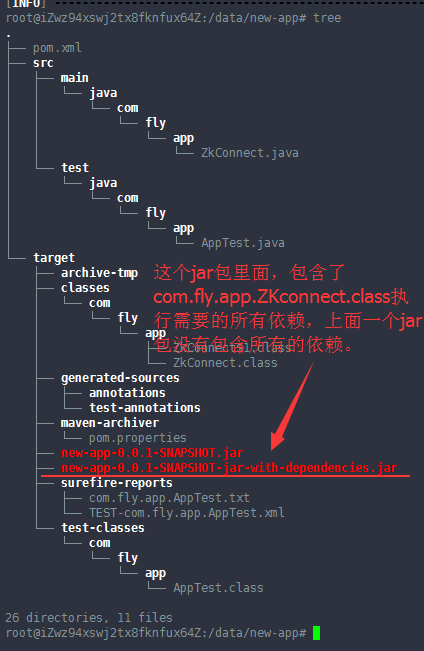
两个jar包的内容是不一样的。
java -cp target/new-app-0.0.1-SNAPSHOT-jar-with-dependencies.jar com.fly.app.ZkConnect

或者:java -cp target/new-app-0.0.1-SNAPSHOT.jar:/data/tools/zookeeper-3.4.11/lib/slf4j-api-1.6.1.jar:/data/tools/zookeeper-3.4.11/zookeeper-3.4.11.jar:/data/tools/zookeeper-3.4.11/lib/*.jar com.fly.app.ZkConnect
Good Zookeeper Tutorial with Java client的更多相关文章
- [Kerberos] Java client访问kerberos-secured cluster
使用java client访问kerberos-secured cluster,最重要的是先从admin那里拿到可用的keytab文件,用来作认证.接下来就是调整连接的配置.以下先用连接hdfs为例进 ...
- JIRA Rest JAVA Client API实现问题管理及自定义字段(原创)
JIRA是一个缺陷跟踪管理系统,被广泛应用于缺陷跟踪.客户服务.需求收集.流程审批.任务跟踪.项目跟踪和敏捷管理等工作领域,当我们需要把第三方业务系统集成进来时,可以调用他的API. JIRA本身的A ...
- Zookeeper API for JAVA实战与应用
package com.zookeeper.watcher; import java.util.List; import java.util.concurrent.CountDownLatch; im ...
- Memcached Java Client with sample program--reference
In my previous post, I listed down most common telnet commands for memcached with sample execution t ...
- Redis c/c++, java client连接
Redis 介绍 redis这个想必大家都了解,关于redis的安装參考这里,redis使用文档參见这里,英文文档. Redis Cclient的用法 Redis的cclient Hiredis使用比 ...
- zookeeper报错java.net.ConnectException: Connection refused: no further information
zookeeper报错java.net.ConnectException: Connection refused: no further information 这是在linux 启动 https:/ ...
- elasticsearch系列七:ES Java客户端-Elasticsearch Java client(ES Client 简介、Java REST Client、Java Client、Spring Data Elasticsearch)
一.ES Client 简介 1. ES是一个服务,采用C/S结构 2. 回顾 ES的架构 3. ES支持的客户端连接方式 3.1 REST API ,端口 9200 这种连接方式对应于架构图中的RE ...
- ES系列十五、ES常用Java Client API
一.简介 1.先看ES的架构图 二.ES支持的客户端连接方式 1.REST API http请求,例如,浏览器请求get方法:利用Postman等工具发起REST请求:java 发起httpClien ...
- rabbitmq - java client lib一二事
由于不可抗因素, 需要给对接方撸一个client的demo.基于比较老的jdk. 所幸找到了这里:http://www.rabbitmq.com/releases/rabbitmq-java-clie ...
随机推荐
- 如何选安卓android|linux系统开发板,简化学习难度,缩短开发进程
平台一:iTOP-4412精英版 系统支持:Android 4.0.3系统 / Android 4.4系统 / Linux + Qt系统 / Ubuntu12.04系统 开发板特点:Cortex-A ...
- 生产者-消费者中的缓冲区:BlockingQueue接口
BlockingQueue接口使用场景相信大家对生产者-消费者模式不陌生,这个经典的多线程协作模式,最简单的描述就是生产者线程往内存缓冲区中提交任务,消费者线程从内存缓冲区里获取任务执行.在生产者-消 ...
- linux crontab创建计划任务
1.编辑计划任务 编辑crontab文件 crontab -e 2.查看计划任务日志 查看crontab日志 tail -100f /var/log/cron 3.创建计划任务格式 (1)基本格式 : ...
- 使用GetLogicalDriveStrings获取卷标
#include <windows.h> #include <stdio.h> #define BUFSIZE 512 int main() { TCHAR szTemp[BU ...
- CAD使用SetxDataString写数据(com接口)
主要用到函数说明: MxDrawEntity::SetxDataString 写一个字符串扩展数据,详细说明如下: 参数 说明 [in] BSTR val 字符串值 szAppName 扩展数据名称 ...
- 获取windows版本号
原文:https://blog.csdn.net/justFWD/article/details/44856277 内容整理如下,点击跳至指定内容: manifest文件加上compatibility ...
- Python3中assert断言
一般的用法是: assert condition 用来让程序测试这个condition,如果condition为false,那么raise一个AssertionError.逻辑上等于: if not ...
- js页面文字选中后分享实现
var $sinaMiniBlogShare = function(eleShare, eleContainer) { var eleTitle = document.getElementsByTag ...
- <Redis> 入门四 Jedis操作Redis
pom依赖 <dependencies> <!-- https://mvnrepository.com/artifact/redis.clients/jedis --> < ...
- Yii 2.0版本调试输出SQL语句
项目是基于框架Yii 2.0开发的. 今天梳理一些数据统计功能代码的时候,想把当前运行的sql语句打印出来,然后放到navicat工具里面运行,并分析一下运行效率和调优方案,之前大部分时候都是写增加. ...