
WinRT ListView间隔变色(一)
我们知道,在WPF里,MSDN提供了三种方法
1.使用转换器Converter
2.继承ListView类,自己处理
3.使用StyleSelctor
到了WinRT的世界了
1. Winrt中Setter不能Binding,需要找办法解决,正在找办法解决(已经找到解决方法,请参看WinRT ListView间隔变色(二))
2.继承类肯定是可以的。就不尝试了
3.使用ItemContainerStyleSelector
我们从第三种开始做起:
在Winrt中,我们没有办法直接重写SelectStyle构造函数了,好在天无绝人之路。WinRt贴心的提供了SelectStyleCore函数。
protected virtual Style SelectStyleCore(System.Object item, DependencyObject container);
接下来我们就重写这个函数就好
   protected override Style SelectStyleCore(object item, DependencyObject container)

         {

             var style = new Style {TargetType = typeof (ListViewItem)};

             var backgroudSetter = new Setter {Property = Windows.UI.Xaml.Controls.Control.BackgroundProperty};

             var listview = ItemsControl.ItemsControlFromItemContainer(container) as ListView;

             if (listview != null)

             {

                 var index = listview.IndexFromContainer(container);

                 backgroudSetter.Value = index%== ? EvenColorBrush : OddColorBrush ;

             }

             style.Setters.Add(backgroudSetter);

             return style;

         }
这里,我们定义了连个Brush( EvenColorBrush ,OddColorBrush),方便我们后来修改
public SolidColorBrush OddColorBrush { get; set; }

public SolidColorBrush EvenColorBrush { get; set; }
我们把这个StylesSecltor命名为ListViewItemStyleSelector;在资源文件里使用
<converter:ListViewItemStyleSelector x:Key="ListViewItemStyleSelector" OddColorBrush="{StaticResource SilverColorBrush}" EvenColorBrush="{StaticResource AsbestosColorBrush}"/>
其中,converter前缀为ListViewItemStyleSelector所在的命名空间。
最后,我们在项目中使用这个Selector,
<ListView ItemsSource="{Binding VM.AuthorPostList}" ItemContainerStyleSelector="{StaticResource ListViewItemStyleSelector}" ItemTemplate="{StaticResource AuthorPostDetailItemDataTemplate}" Grid.Row=""/>
我们最终效果如下:
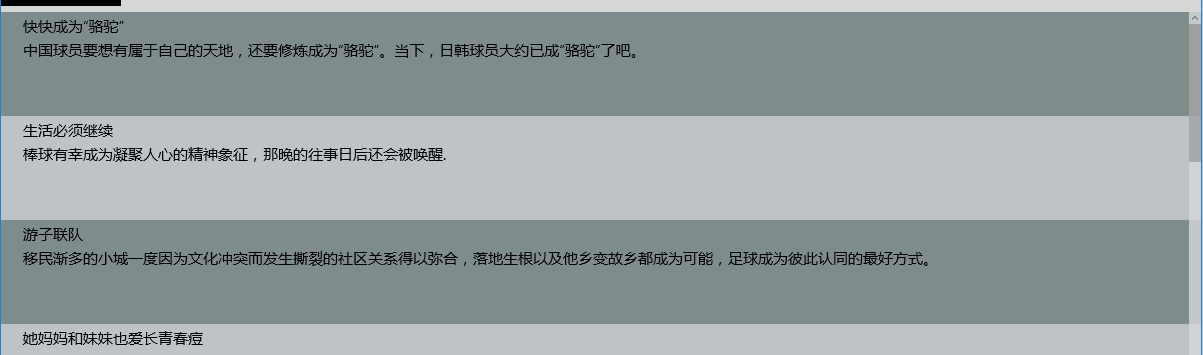
接下来,还有第二篇有关间隔变色的问题 WinRT ListView间隔变色(二)
写完这个,经高手提醒,还可以用Behavior来做
Alternating Colors of rows in ListView in Windows Phone 8.1
摘录主要代码如下:
namespace Behaviors

{

    public class AlternatingColorItemContainerStyleSelector : StyleSelector

    {

        private Style _oddStyle = new Style { TargetType = typeof(ListViewItem) }, _evenStyle = new Style { TargetType = typeof(ListViewItem) };

        public Style OddStyle { get { return _oddStyle; } }

        public Style EvenStyle { get { return _evenStyle; } }

        protected override Style SelectStyleCore(object item, DependencyObject container)

        {

            var listViewItem = (ListViewItem)container;

            var listView = GetParent<ListView>(listViewItem);

            var index = listView.IndexFromContainer(listViewItem);

            if (index %  == )

            {

                return this.EvenStyle;

            }

            else

            {

                return this.OddStyle;

            }

        }

        public static T GetParent<T>(DependencyObject child) where T : DependencyObject

        {

            while (!(child is T))

            {

                child = VisualTreeHelper.GetParent(child);

            }

            return (T)child;

        }

    }

    public class ListViewAlternatingColorBehavior : DependencyObject, IBehavior

    {

        public DependencyObject AssociatedObject { get; set; }

        public Style SharedItemContainerStyle { get; set; }

        #region colors dp

        public SolidColorBrush OddBrush

        {

            get { return (SolidColorBrush)GetValue(OddBrushProperty); }

            set { SetValue(OddBrushProperty, value); }

        }

        public static readonly DependencyProperty OddBrushProperty =

            DependencyProperty.Register("OddBrush", typeof(SolidColorBrush), typeof(ListViewAlternatingColorBehavior), new PropertyMetadata(null));

        public SolidColorBrush EvenBrush

        {

            get { return (SolidColorBrush)GetValue(EvenBrushProperty); }

            set { SetValue(EvenBrushProperty, value); }

        }

        public static readonly DependencyProperty EvenBrushProperty =

            DependencyProperty.Register("EvenBrush", typeof(SolidColorBrush), typeof(ListViewAlternatingColorBehavior), new PropertyMetadata(null));

        #endregion

        public void Attach(DependencyObject associatedObject)

        {

            this.AssociatedObject = associatedObject;

            this.ApplyItemContainerStyleSelectors();

        }

        private void ApplyItemContainerStyleSelectors()

        {

            var itemContainerStyleSelector = new AlternatingColorItemContainerStyleSelector();

            if (this.SharedItemContainerStyle != null)

            {

                itemContainerStyleSelector.OddStyle.BasedOn = this.SharedItemContainerStyle;

                itemContainerStyleSelector.EvenStyle.BasedOn = this.SharedItemContainerStyle;

            }

            itemContainerStyleSelector.OddStyle.Setters.Add(new Setter { Property = Control.BackgroundProperty, Value = this.OddBrush });

            itemContainerStyleSelector.EvenStyle.Setters.Add(new Setter { Property = Control.BackgroundProperty, Value = this.EvenBrush });

            var listView = (ListView)this.AssociatedObject;

            listView.ItemContainerStyleSelector = itemContainerStyleSelector;

        }

        public void Detach()

        {

        }

    }

}
使用时如下:
<interactivity:Interaction.Behaviors>

behaviors:ListViewAlternatingColorBehavior  EvenBrush="Red" OddBrush="Green"/>

</interactivity:Interaction.Behaviors>
WinRT ListView间隔变色(一)的更多相关文章
- WinRT ListView间隔变色(二)
上文说到,WinRt中,我们不能在Style的Setter使用Binding.这个问题其实从SL5之前,一直都不可以.但是,为了使用强大的Binding,人们也一直想使用各种方法来达到Binding ...
- wpf listview 行变色
<ListView x:Name="listView_Date" Grid.Row="3" BorderBrush="{x:Null}" ...
- ListView间隔设置颜色
在Adapter的getView中 if (position % 2 == 0) holder.shoucangbt.setBackgroundColor( Color.rgb(246, 246, 2 ...
- ListView的基本使用技巧
ListView的基本使用技巧 1.headerView和footerView 2.ViewHolder 3.OnScrollListener 4.单行刷新 5.其它细节 ListView提供head ...
- GridView
1.设置间隔变色 css: .oddRow{ background:#fafafa; } js: ,loadComplete:function(){ $("tr.jqgrow:odd&quo ...
- Android开发颜色大全
<!-- dialog背景颜色 --> <color name=</color> <color name="white">#FFFFFF& ...
- Android 点击ListView(或GridView)的一个item,使其里面textview变色,点击另一个这个恢复原来颜色
今天作一个项目,就是做视频app,如果电视剧的话有许多剧集,点击一个item,播放不同的剧集,要有点击效果,并且默认是选择第一个.花费了一段时间,自己觉得有点难 度,现在和大家分享一下,下面是效果显示 ...
- ListView防止滑动变色的小技巧
listview滑动时会变成白色,如果背景色不是白色的话可以通过设置setCacheColorHint(Color.TRANSPARENT);来避免变色,.对应的xml也可以进行设置.
- 设置ListView每条数据之间的间隔
1:如果不需要分割线可以在xml布局文件中ListView下设置XML属性: android:divider="#00000000" android:dividerHeight=& ...
随机推荐
- android 到底是什么决定了app的名称 application label activity label
原文地址:http://blog.csdn.net/lamp_zy/article/details/7878979 原来博主的博客的名字仅仅是application label表示菜比的我没有搜到,然 ...
- Java RMI之HelloWorld程序以及相关的安全管理器的知识
Java RMI 指的是远程方法调用 (Remote Method Invocation).它是一种机制,可以让在某个 Java 虚拟机上的对象调用还有一个 Java 虚拟机中的对象上的方法.可以用此 ...
- openTSDB ConnectionManager: Unexpected exception from downstream java.io.IOException: Broken pipe
openTSDB有这种错误: ConnectionManager: Unexpected exception from downstream for [id: 0xf85323a8, /10.65.3 ...
- [LeetCode][Java] Jump Game II
题目: Given an array of non-negative integers, you are initially positioned at the first index of the ...
- train_action
# 导入数值计算模块 import numpy as np import tensorflow as tf # 创建计算会话 sess = tf.Session() # 生成数据,创建占位符和变量A ...
- VMware14秘钥
VMware虚拟机已升级至14版本,之前的12版本的秘钥已经无法使用,在此分享一下VMware Workstation 14永久激活密钥: CG54H-D8D0H-H8DHY-C6X7X-N2KG6 ...
- presentModalViewController和dismissModalViewControllerAnimated的使用总结
在实际开发中,如果要弹出视图: 我们常用到presentModalViewController方法和dismissModalViewControllerAnimated方法. presentModal ...
- [ZJOI 2007] 矩阵游戏
[题目链接] https://www.lydsy.com/JudgeOnline/problem.php?id=1059 [算法] 二分图最大匹配 时间复杂度 : O(N^3) [代码] #inclu ...
- git 查看、切换用户
查看命令: 查看用户名: git config user.name 查看用户邮箱: git config user.email 修改命令: 修改用户名: git config --global use ...
- ZOJ1450 Minimal Circle 最小圆覆盖
ZOJ1450 给定N个点(N<=100)求最小的圆把这些点全部覆盖 考虑对于三角形,可以唯一的找到外接圆,而多边形又可以分解为三角形,所以对于多边形也可以找到唯一的最小覆盖圆. #includ ...