
React Native学习(五)—— 使用插件react-native-scrollable-tab-view
本文基于React Native 0.52
Demo上传到Git了,有需要可以看看,写了新内容会上传的。Git地址 https://github.com/gingerJY/React-Native-Demo
一、总览
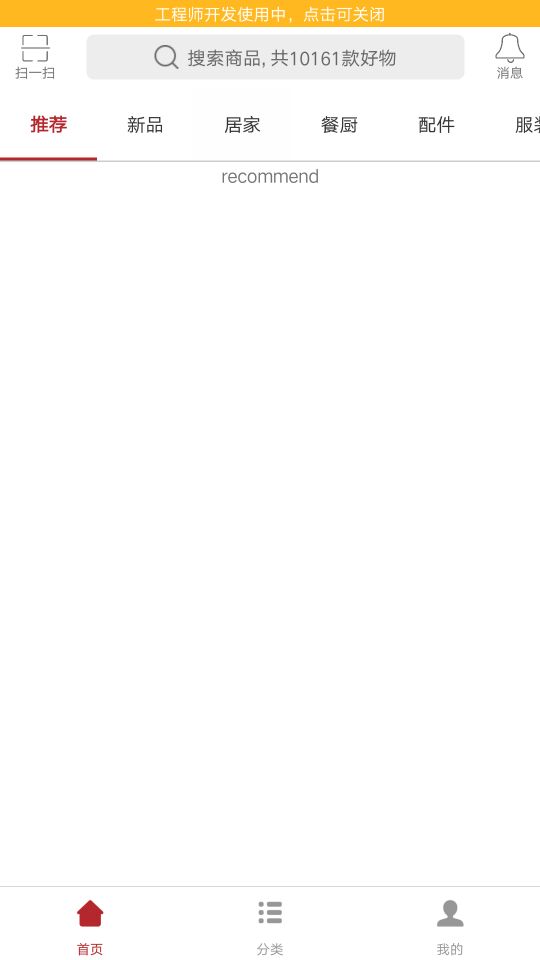
如下图,有一个滑动的tab切换,就是用react-native-scrollable-tab-view来实现的。
二、使用react-native-scrollable-tab-view插件
1、通过npm将插件加入项目
npm install react-native-scrollable-tab-view --save
2、在home.js引入插件
import ScrollableTabView, { ScrollableTabBar, DefaultTabBar } from 'react-native-scrollable-tab-view';
3、使用插件
① 这里就写一下我这个效果的实现,其他内容可以看 https://github.com/skv-headless/react-native-scrollable-tab-view
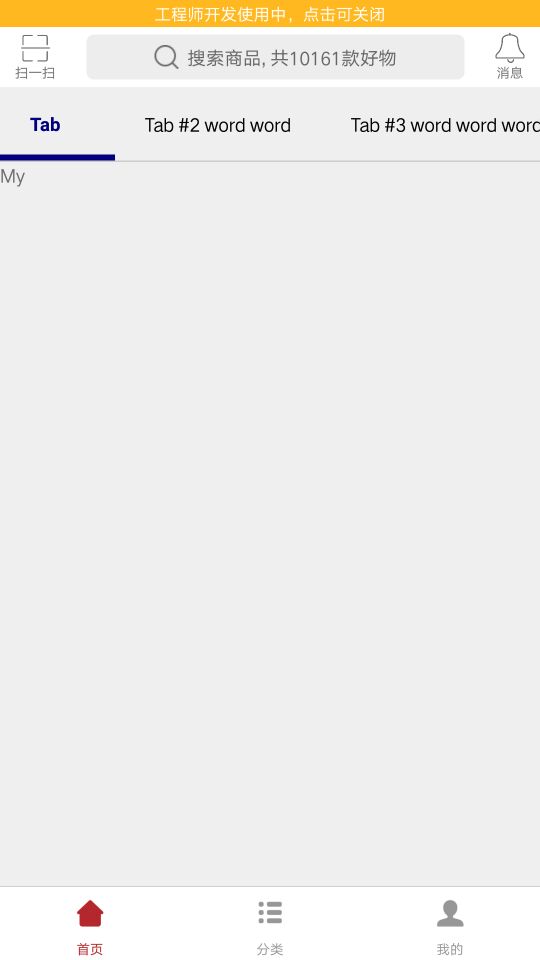
② TabBar有DefaultTabBar和ScrollableTabBar两种,这里使用ScrollableTabBar,下面是官方给出的例子(如果是在APP的首页会出现内容不显示的问题,三里面有解决办法)
     <ScrollableTabView

            initialPage={0}

            renderTabBar={() => <ScrollableTabBar />}

      >

            <Text tabLabel='Tab #1'>My</Text>

            <Text tabLabel='Tab #2 word word'>favorite</Text>

            <Text tabLabel='Tab #3 word word word'>project</Text>

            <Text tabLabel='Tab #4 word word word word'>favorite</Text>

            <Text tabLabel='Tab #5'>project</Text>

     </ScrollableTabView>
③ 修改默认样式
注意改变下划线颜色,要设置backgroundColor
<ScrollableTabView

      renderTabBar={() => <ScrollableTabBar />}

      tabBarBackgroundColor='#fff'

      tabBarActiveTextColor='#b4282d'

      tabBarInactiveTextColor='#333'

      tabBarUnderlineStyle={styles.tabBarUnderline}

>

 …………省略

</ScrollableTabView>
tabBarUnderline: {

    backgroundColor: '#b4282d',

    height: 2,

}
④ 添加数据
由于tab项很多,所以数据写在state里,减少重复代码,也便于修改
constructor(props) {

   super(props);

   this.state = {

      label: ['推荐', '新品', '居家', '餐厨', '配件', '服装', '电器', '洗护', '杂货', '饮食', '婴童', '志趣'],

   };

}
⑤ 遍历数据
   renderScrollableTab() {

        let label = this.state.label

            return (

                    <ScrollableTabView

                        renderTabBar={() => <ScrollableTabBar />}

                        …………省略

                    >

                        {

                            label.map((item, index) => {

                                return (<Recommend tabLabel={item} key={index}/>)

                            })

                        }

                    </ScrollableTabView>

            )

    }
注:Recommend 是一个新加的页面,注意要在home.js引入。当然也可以不加新页面,return一个Text也可以。
home.js完整代码 https://github.com/gingerJY/example/blob/master/RN_scrollableTab/home.js
三、解决不显示问题
APP首页使用插件经常会出现一些别处没有的问题,这个tab下面内容不显示就是其中之一。解决方法为:
1、加一个是否显示的状态
  constructor(props) {

        super(props);

        this.state = {

            tabShow: false,

        };

  }
2、在初始化render之后,将状态设为true
componentDidMount() {

   setTimeout(() => {

     this.setState({

         tabShow: true

     });

   }, 0)

}
3、render的时候判断this.state.tabShow,等setTimeout执行后改变了状态,才会渲染
   if (this.state.tabShow){

            return (

                <ScrollableTabView

                    renderTabBar={() => <ScrollableTabBar />}

                   …………略

                >

                    …………略

                </ScrollableTabView>

            )

     }
这样就可以显示了。
END--------------------------------------------------
生命周期、布局
React Native学习(五)—— 使用插件react-native-scrollable-tab-view的更多相关文章
- 【学】React的学习之旅2 - React Component的生命周期
分成三个状态: Mounted Update Unmounted Mounted:当我们看到组件在浏览器中从无到有的效果的时候,mounted已经结束了,这个组件已经被mounted了 有这个阶段有2 ...
- react系列(五)在React中使用Redux
上一篇展示了Redux的基本使用,可以看到Redux非常简单易用,不限于React,也可以在Angular.Vue等框架中使用,只要需要Redux的设计思想的地方,就可以使用它. 这篇主要讲解在Rea ...
- React Native 学习-01
React Native 学习 (学习版本 0.39) 一.环境配置 二.IDE选择 webstorm 1.webstorm配置 ①.首先是可以选择使用汉化包汉化.eu68 ②.安装插件和外部库. 由 ...
- iOS 写给iOS开发者的React Native学习路线(转)
我是一名iOS开发者,断断续续一年前开始接触React Native,最近由于工作需要,专职学习React Native也有一个多月了.网络上知识资源非常的多,但能让人豁然开朗.迅速学习的还是少数,我 ...
- react native学习资料
一:基础学习: react-native中文文档(react native中文网,人工翻译,官网完全同步)http://react-native.cn/docs/getting-started.htm ...
- 写给iOS开发者的React Native学习路线(转)
我是一名iOS开发者,断断续续一年前开始接触React Native,最近由于工作需要,专职学习React Native也有一个多月了.网络上知识资源非常的多,但能让人豁然开朗.迅速学习的还是少数,我 ...
- React Native学习笔记之2
1:如何创建一个react native工程 首先进入到指定文件夹里面,然后在终端执行react-native init ReactNativeProject :其中ReactNativeProjec ...
- react native 学习一(环境搭配和常见错误的解决)
react native 学习一(环境搭配) 首页,按照http://reactnative.cn/docs/0.30/getting-started.html#content上的介绍,下载安装pyt ...
- React Native 学习资料
React Native 学习资料 学习资料 网址 React Native中文网 https://reactnative.cn/
- React Native学习
学习 首先,假使你已经安装了Nodejs 6,也有使用npm进行Nodejs的包管理 npm install -g react-native-cli 也可以使用yarn作为包管理工具 npm inst ...
随机推荐
- 一个DBA萌新的烦恼
莫名其妙也好机缘巧合也罢,现在我成为了一名MySQL DBA. 为什么: 1.为什么leader让我转到DBA? 首先,我本身学习运维管理的时候就接触过数据库(mysql,redis),算是自身的优势 ...
- AJPFX关于Java NIO的概述总结
Java NIO 由以下几个核心部分组成: Channels Buffers Selectors 虽然Java NIO 中除此之外还有很多类和组件,但在我看来,Channel,Buffer 和 Sel ...
- CF915C Permute Digits
思路: 从左到右贪心放置数字,要注意判断这个数字能否放置在当前位. 实现: #include <bits/stdc++.h> using namespace std; typedef lo ...
- 详解java基础--抽象类、接口与多态
抽象类.接口.多态都是面向对象中很基础的东西,我相信看到能本篇博客的人本不会再纠结它的基本定义了,本篇文章将尽量的更加深层次的挖掘其内涵,希望能对大家有帮助. 一.抽象类 1.形式 abstract ...
- 面向对象编程(OOP)基础知识(一)
Java是一个支持并发.基于类和面向对象的计算机编程语言. 下面列出了面向对象软件开发的优点: 1.代码开发模块化,更易维护和修改. 2.代码复用. 3.增强代码的可靠性和灵活性. 4.增加代码的可理 ...
- 迅为八核cortex a53开发板android/linux/Ubuntu系统
详情请点击了解:http://www.topeetobard.com 店铺:https://arm-board.taobao.com 核心板: 提供1G和2G内存版本,全机器焊接,杜绝手工,批量无忧. ...
- Codeforces Round #460 (Div. 2)_D. Substring_[dp][拓扑排序]
题意:一个有向图,每个结点 被赋予一个小写字母,一条路径的value等与这条路径上出现次数最多的字母的数目,求该图的最大value 比赛时,用dfs超时,看官方题解用的dp和拓扑排序,a--z用0-2 ...
- python的logging的简单使用
用Python写代码的时候,在想看的地方写个print xx 就能在控制台上显示打印信息,这样子就能知道它是什么了,但是当我需要看大量的地方或者在一个文件中查看的时候,这时候print就不大方便了,所 ...
- 并发-5CAS与AQS
juc: java.util.concurrent 锁: 悲观锁:写的比较多,对数据的增删改,读(查)少.Lock 乐观锁:反之,读多写少.版本 并发编程之 CAS 的原理 什么是CAS CAS (c ...
- 原生js上传图片
<!DOCTYPE html PUBLIC "-//W3C//DTD XHTML 1.0 Transitional//EN" "http://www.w3.org/ ...