
PCB 利用nginx正向代理实现上网
在PCB行业中,为了保证服务器的安全性,服务器正常都是需要与外网断开的,如果想在服务器通过浏览器下载一点东西是不行。通常作法是在一台可以上网的电脑下载文件,接着放到网络盘上,再从网络盘拷贝到服务器上。而另一种方式是用浏览器代理的方式实现上网,,这里介绍使用nginx正向代理实现上网.
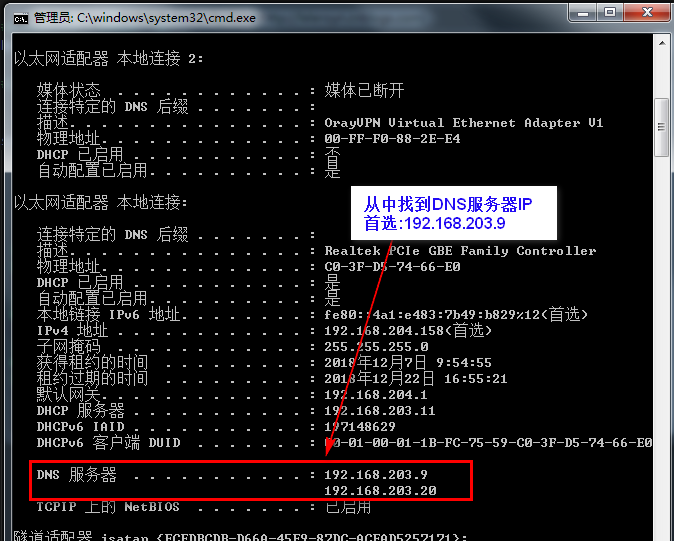
一.查找DNS服务器IP
nginx正向代理时配置用

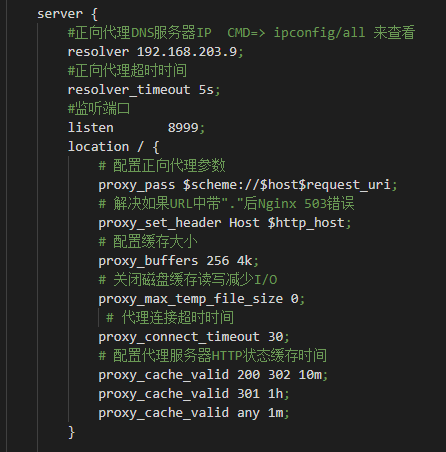
二.修改nginx.conf配置文件
#user  nobody;

worker_processes  1;

#error_log  logs/error.log;

#error_log  logs/error.log  notice;

#error_log  logs/error.log  info;

#pid        logs/nginx.pid;

events {

    worker_connections  1024;

}

http {

    include       mime.types;

    default_type  application/octet-stream;

    #log_format  main  '$remote_addr - $remote_user [$time_local] "$request" '

    #                  '$status $body_bytes_sent "$http_referer" '

    #                  '"$http_user_agent" "$http_x_forwarded_for"';

    #access_log  logs/access.log  main;

    sendfile        on;

    #tcp_nopush     on;

    #keepalive_timeout  0;

    keepalive_timeout  65;

    #gzip  on;

    server {

        #正向代理DNS服务器IP  CMD=> ipconfig/all 来查看

        resolver 192.168.203.9;

        #正向代理超时时间

        resolver_timeout 5s;

        #监听端口

        listen       8999;

        location / {

            # 配置正向代理参数

            proxy_pass $scheme://$host$request_uri;

            # 解决如果URL中带"."后Nginx 503错误

            proxy_set_header Host $http_host;

            # 配置缓存大小

            proxy_buffers 256 4k;

            # 关闭磁盘缓存读写减少I/O

            proxy_max_temp_file_size 0;

             # 代理连接超时时间

            proxy_connect_timeout 30;

            # 配置代理服务器HTTP状态缓存时间

            proxy_cache_valid 200 302 10m;

            proxy_cache_valid 301 1h;

            proxy_cache_valid any 1m;

        }

        #error_page  404              /404.html;

        # redirect server error pages to the static page /50x.html

        #

        error_page   500 502 503 504  /50x.html;

        location = /50x.html {

            root   html;

        }

        # proxy the PHP scripts to Apache listening on 127.0.0.1:80

        #

        #location ~ \.php$ {

        #    proxy_pass   http://127.0.0.1;

        #}

        # pass the PHP scripts to FastCGI server listening on 127.0.0.1:9000

        #

        #location ~ \.php$ {

        #    root           html;

        #    fastcgi_pass   127.0.0.1:9000;

        #    fastcgi_index  index.php;

        #    fastcgi_param  SCRIPT_FILENAME  /scripts$fastcgi_script_name;

        #    include        fastcgi_params;

        #}

        # deny access to .htaccess files, if Apache's document root

        # concurs with nginx's one

        #

        #location ~ /\.ht {

        #    deny  all;

        #}

    }

    # another virtual host using mix of IP-, name-, and port-based configuration

    #

    #server {

    #    listen       8000;

    #    listen       somename:8080;

    #    server_name  somename  alias  another.alias;

    #    location / {

    #        root   html;

    #        index  index.html index.htm;

    #    }

    #}

    # HTTPS server

    #

    #server {

    #    listen       443 ssl;

    #    server_name  localhost;

    #    ssl_certificate      cert.pem;

    #    ssl_certificate_key  cert.key;

    #    ssl_session_cache    shared:SSL:1m;

    #    ssl_session_timeout  5m;

    #    ssl_ciphers  HIGH:!aNULL:!MD5;

    #    ssl_prefer_server_ciphers  on;

    #    location / {

    #        root   html;

    #        index  index.html index.htm;

    #    }

    #}

}
三.启动nginx.exe并本机打开Web网页
查看nginx Web应用是否正常
http://192.168.204.158:8999/

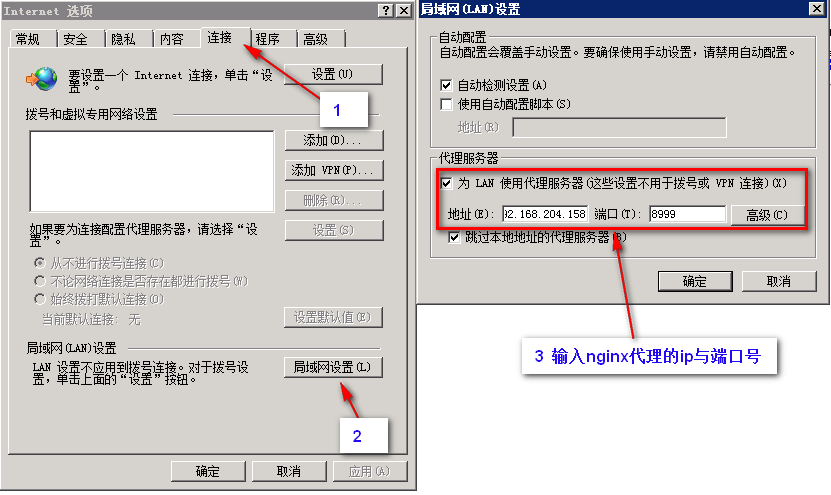
四.浏览器代理设置
nginx代理不支持https
PCB 利用nginx正向代理实现上网的更多相关文章
- Nginx正向代理让无法直接上网的机器通过代理上网
Nginx正向代理让无法直接上网的机器通过代理上网 在阿里云平台买了几台ECS.但是只要其中一台开通了公网.由于要初始化系统环境,需要网络安装相关依赖. Nginx正向代理配置: 一.Nginx 正向 ...
- nginx正向代理,反向代理,透明代理(总结)
1正向代理 正向代理,也就是传说中的代理,他的工作原理就像一个跳板, 简单的说, 我是一个用户,我访问不了某网站,但是我能访问一个代理服务器 这个代理服务器呢,他能访问那个我不能访问的网站 于是我先连 ...
- Nginx正向代理代理http和https服务
Nginx正向代理代理http和https服务 1. 背景需求 通过Nginx正向代理,去访问外网.可实现局域网不能访问外网的能力,以及防止在上网行为上,留下访问痕迹. 2. 安装配置 2.1安装 w ...
- nginx正向代理
通过把Nginx设置为正向代理,我们就可以在局域网中用运行着Nginx的主机作为正向代理服务器了.那什么是正向代理和反向代理呢?正向代理和反向代理-百度百科 正向代理:如果把局域网外的Internet ...
- nginx 正向代理配置
需求场景:从以下俩张图可以比较直观的理解正向代理的作用(在其他文章中会表示为“http代理”,注意当前文档的配置不支持https代理) Nginx正向代理配置文件: server{ listen de ...
- 使用nginx 正向代理暴露k8s service && pod ip 外部直接访问
有时在我们的实际开发中我们希望直接访问k8s service 暴露的服务,以及pod的ip 解决方法,实际上很多 nodeport ingress port-forword 实际上我们还有一种方法:正 ...
- Nginx笔记总结十三:nginx 正向代理
server { listen ; location / { resolver 202.106.0.20 202.106.119.116; resolver_timeout 30s; proxy_pa ...
- CentOS 7 配置 Nginx 正向代理 http、https 最详解
手头项目中有使用到 nginx,因为使用的三方云服务器,想上外网需要购买外网IP的,可是有些需要用到外网却不常用的主机也挂个外网IP有点浪费了,便想使用nginx的反向代理来实现多台内网服务器使用一台 ...
- Nginx正向代理和反向代理
关于代理 说到代理,首先我们要明确一个概念,所谓代理就是一个代表.一个渠道: 此时就设计到两个角色,一个是被代理角色,一个是目标角色,被代理角色通过这个代理访问目标角色完成一些任务的过程称为代理操作过 ...
随机推荐
- Linux kernel-汇编基础
mov ASSEMABLE C LANGUAGE movl %eax,%edx edx = eax; --->register mode movl $0x123,%edx edx = 0x123 ...
- js识别手机访问自动跳转到相应页面
/* * 智能机浏览器版本信息: * */ var browser={ versions:function(){ var u = navigator.userAgent, app = navigato ...
- 洛谷——P2261 [CQOI2007]余数求和
P2261 [CQOI2007]余数求和 关键在于化简公式,题目所求$\sum_{i=1}^{n}k\mod i$ 简化式子,也就是$\sum_{i=1}^{n}(k-\frac{k}{i}\time ...
- python 使用time / datetime进行时间、时间戳、日期转换
python 使用time 进行时间.时间戳.日期格式转换 #!/usr/bin/python3 # -*- coding: utf-8 -*- # @Time : 2017/11/7 15:53 # ...
- MFC 多行文本显示心得
最近在利用MFC做端口扫描器实验,其中涉及CString.char.int等之间的转换.文本框的多行显示问题.总是显示底层最新结果等问题,下面写一些我总结的相关方法. 一.CString 转 cha ...
- js之标签操作
<!DOCTYPE html> <html lang="en"> <head> <meta charset="UTF-8&quo ...
- Spring核心技术(四)——Spring的依赖及其注入(续二)
前面两篇文章描述了IoC容器中依赖的概念,包括依赖注入以及注入细节配置.本文将继续描述玩全部的依赖信息. 使用 depends-on 如果一个Bean是另一个Bean的依赖的话,通常来说这个Bean也 ...
- 调试pcb板子的步骤
在从外边焊回来的板子中查找问题的时候,如果只是简单的 一通乱调,很有可能一下子就调好了,但是大多数的时候是调了半天,不知道接下来该如何进行,因此,严格的按照步骤走,是个不错的想法: 1.拿到板子的第一 ...
- idea结合git版本控制
IntelliJ-IDEA和Git.GitHub.Gitlab的使用(五)----https://blog.csdn.net/milsevol/article/details/72792468
- java方法的虚分派和方法表
java:方法的虚分派(virtual dispatch)和方法表(method table) Java方法调用的虚分派 虚分配(Virtual Dispatch) 首先从字节码中对方法的调用说起.J ...