
重绘DataGridView的DataGridViewCheckBoxCell控件
最近项目中要用到在DataGridView单元格里面放置一个带有文本的 DataGridViewCheckBoxCell控件但原有
的是不支持的然后我就想着重写个 DataGridViewCheckBoxTextCell
下面是源码:(如有疑问可以加源码分享群 81582487 来问我)
using System;
using System.Collections.Generic;
using System.Linq;
using System.Text;
using System.Windows.Forms;
using System.Windows.Forms.VisualStyles;
using System.Drawing;
namespace WindowsDemo
{
public class DataGridViewCheckBoxTestCell : DataGridViewCheckBoxCell
{
public DataGridViewCheckBoxTestCell()
: base()
{
}
public CheckBoxState CheckBoxTestState { get; set; }
/// <summary>
/// 单元格边框颜色
/// </summary>
private Color CellBorderColor { get { return Color.FromArgb(172, 168, 153); } }
protected override void Paint(Graphics graphics, Rectangle clipBounds, Rectangle
cellBounds, int rowIndex, DataGridViewElementStates cellState, object value, object
formattedValue, string errorText, DataGridViewCellStyle cellStyle,
DataGridViewAdvancedBorderStyle advancedBorderStyle, DataGridViewPaintParts paintParts)
{
var check = (Boolean)value;
CheckBoxTestState = check ? CheckBoxState.CheckedNormal :
CheckBoxState.UncheckedNormal;
if (paintParts == DataGridViewPaintParts.Background || paintParts ==
DataGridViewPaintParts.All)
{
graphics.FillRectangle(new SolidBrush(cellStyle.BackColor), cellBounds);
}
if (paintParts == DataGridViewPaintParts.Border || paintParts ==
DataGridViewPaintParts.All)
{
graphics.DrawRectangle(new Pen(CellBorderColor), cellBounds);
}
if (paintParts == DataGridViewPaintParts.SelectionBackground || Selected)
{
graphics.FillRectangle(new SolidBrush(cellStyle.SelectionBackColor),
cellBounds);
}
var col = OwningColumn as DataGridViewCheckBoxTextColumn;
if (col != null && !string.IsNullOrEmpty(col.Text))
{
graphics.DrawString(col.Text, cellStyle.Font, new SolidBrush(Selected ?
cellStyle.SelectionForeColor : cellStyle.ForeColor),
new Point(cellBounds.X + 25, cellBounds.Y + cellBounds.Height / 4));
}
if (!string.IsNullOrEmpty(Text))
{
graphics.DrawString(Text, cellStyle.Font, new SolidBrush(Selected ?
cellStyle.SelectionForeColor : cellStyle.ForeColor),
new Point(cellBounds.X + 25, cellBounds.Y + cellBounds.Height / 4));
}
CheckBoxRenderer.DrawCheckBox(graphics, new Point(cellBounds.X + 4, cellBounds.Y +
cellBounds.Height / 4), CheckBoxTestState);
// ButtonRenderer.DrawButton(graphics, new Rectangle(new Point(cellBounds.X + 50,
cellBounds.Y + cellBounds.Height / 4), new Size(20, 20)), true, PushButtonState.Default);
// base.Paint(graphics, clipBounds, cellBounds, rowIndex, cellState, value,
formattedValue, errorText, cellStyle, advancedBorderStyle, paintParts);
}
protected override void OnMouseDown(DataGridViewCellMouseEventArgs e)
{
var check = (bool)Value;
CheckBoxTestState = check ? CheckBoxState.CheckedNormal :
CheckBoxState.UncheckedNormal;
Value = !check;
base.OnMouseDown(e);
}
public string Text { get; set; }
}
}
使用也很简单:(使用时先把结构加载完了在对这列进行如下操作)
DataGridViewCheckBoxTestCell check3 = new DataGridViewCheckBoxTestCell();
check3.Text = "请选择";
check3.Value = true;
row.Cells["check"] = check3;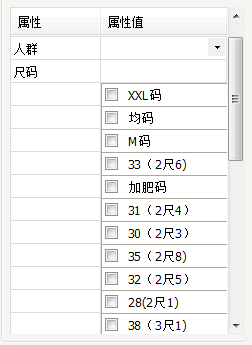
重绘DataGridView的DataGridViewCheckBoxCell控件的更多相关文章
- 玩转控件:重绘DEVEXPRESS中DateEdit控件 —— 让DateEdit支持只选择年月 (提供源码下载)
前言 上一篇博文<玩转控件:重绘ComboBox —— 让ComboBox多列显示>中,根据大家的回馈,ComboBox已经支持筛选了,更新见博文最后最后最后面. 奇葩 这两天遇到 ...
- C# DataGridView自定义分页控件
好些日子不仔细写C#代码了,现在主要是Java项目,C#.Net相关项目不多了,有点手生了,以下代码不足之处望各位提出建议和批评. 近日闲来无事想研究一下自定义控件,虽然之前也看过,那也仅限于皮毛,粗 ...
- 使用DataGridView数据窗口控件,构建用户快速输入体验
在"随风飘散" 博客里面,介绍了一个不错的DataGridView数据窗口控件<DataGridView数据窗口控件开发方法及其源码提供下载>,这种控件在有些场合下,还 ...
- C# 自定义重绘DataGridView
using System.Collections.Generic; using System.ComponentModel; using System.Diagnostics; using Syste ...
- Winform带dataGridview的Combox控件
调用控件: public partial class Form1 : Form { public Form1() { InitializeComponent(); //---------------- ...
- 初识DataGridView 表格数据控件
DataGridView控件提供了一种强大而灵活的以表格形式显示数据的方式,用户可以使用DataGridView控件来显示少量数据的只读视图,也可以对其进行缩放以显示特大数据集的可编辑视图. 扩展Da ...
- 重绘DataGridView标头
最近突然想在DataGridView标头放置一个CheckBox,我就想着重写下DataGridViewColumnHeaderCell抱着试试的心态结果真的是可以的下面是源码:(如果有看不懂的可以加 ...
- winfrom中DataGridView绑定数据控件中DataGridViewCheckBoxColumn怎么选中
; i < this.dataGridView1.Rows.Count; i++) { this.dataGridView1.Rows[i].Cells["CheckBoxCulums ...
- 自绘CProgressCtrl进度条控件,支持自定义显示文本和进程百分比信息
// CXProgressCtrl 头文件 #pragma once // CXProgressCtrl class CXProgressCtrl : public CProgressCtrl { D ...
随机推荐
- - > 动规讲解基础讲解四——矩阵取数
给定一个m行n列的矩阵,矩阵每个元素是一个正整数,你现在在左上角(第一行第一列),你需要走到右下角(第m行,第n列),每次只能朝右或者下走到相邻的位置,不能走出矩阵.走过的数的总和作为你的得分,求最大 ...
- - > 最大公约数(辗转相除法)和最小公倍数(公式法)
最大公约数 #include<iostream> using namespace std; int a,b; int gcd(int x,int y){ return x==0?y:gcd ...
- Ubuntu 16.04安装Chrome浏览器
一.先有一个hosts能访问Google 参考:http://www.cnblogs.com/EasonJim/p/5999060.html 二.安装方法有两种,如下所示: 1.下载deb包(推荐) ...
- Chrome资源嗅探器应用
http://hi.baidu.com/thankyouanyway/item/5230a49a7665848959146142 在网上转转,经常会发现一些好视频,但是往往找不到下载地址,或者需要安装 ...
- Ubuntu-14.04. sh .py腳本双击無法執行问题的解决方法
Ubuntu-14.04中默认文件用gedit文本打开,而不是BT5里面的默认双击打开四个选择,例如以下图(这是配置完毕后的结果,就不换BT5系统了): 直接文本打开,尽管非常安全.实际生产中肯定是不 ...
- MVC中从控制器到视图的数据传递方法汇总
1.ViewData对象概述ViewData是一种字典集合数据,是"视图基类"和"控制器基类"的属性常见用法是在控制器中写入数据,在视图中读取数据ViewDat ...
- 错误代码: 1045 Access denied for user 'skyusers'@'%' (using password: YES)
1. 错误描写叙述 GRANT ALL PRIVILEGES ON *.* TO root@"%" IDENTIFIED BY "."; 1 queries e ...
- [C++] 自己主动关闭右下角弹窗
近期腾讯.迅雷等各种client,都越发喜欢在屏幕的右下角弹框了. 有骨气的人当然能够把这些软件卸载了事,可是这些client在某些情况下却又还是实用的.怎么办呢? 作为码农,自己实现一个自己主动关闭 ...
- git 入门级使用
git-book 全局配置:(配置完之后,进行一次密码设置之后,无需再使用密码进行分支管理) git config --global user.name "zhxj" git co ...
- ERROR (ConnectionError): HTTPConnectionPool (Caused by <class 'socket.error'>: [Errno 111] Connecti
感谢朋友支持本博客.欢迎共同探讨交流,因为能力和时间有限,错误之处在所难免.欢迎指正! 假设转载,请保留作者信息. 博客地址:http://blog.csdn.net/qq_21398167 原博文地 ...