
jstree CHECKBOX PLUGIN
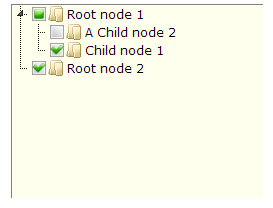
The checkbox plugin makes multiselection possible using three-state checkboxes.
Configuration
override_ui
A boolean. Default is false.
If set to true all selection will be handled by checkboxes. The checkbox plugin will map UI's get_selected function to its ownget_checked function and overwrite the UI reselect function. It will also disable the select_node, deselect_node anddeselect_all functions. If left as false nodes can be selected and checked independently.
checked_parent_open
A Boolean. Default is true.
When set to true when programatically checking a node in the tree all of its closed parents are opened automatically.
two_state
A boolean. Default is false.
If set to true checkboxes will be two-state only, meaning that you will be able to select parent and children independently and there will be no undetermined state.
real_checkboxes
A boolean. Default is false.
If set to true real hidden checkboxes will be created for each element, so if the tree is part of a form, checked nodes will be submitted automatically. By default the name of the checkbox is "check_" + the ID of the LI element and the value is 1, this can be changed using the real_checkboxes_names config option.
real_checkboxes_names
A function. Default is function (n) { return [("check_" + (n[0].id || Math.ceil(Math.random() * 10000))), 1]; }.
If real checkboxes are used this function is invoked in the current tree's scope for each new checkbox that is created. It receives a single argument - the node that will contain the checkbox. The function must return an array consisting of two values - the name for the checkbox and the value for the checkbox.
Demos
Using the checkbox plugin - all you need to do is include it in the list of active plugins.
1 |
$(function () { |
2 |
$("#demo1").jstree({ |
3 |
"plugins" : [ "themes", "html_data", "checkbox","sort", "ui" ] |
4 |
}); |
5 |
}); |
API
._prepare_checkboxes ( node )
Inserts the checkbox icons on the node. Used internally.
mixednodeThis can be a DOM node, jQuery node or selector pointing to an element within the tree.
._repair_state ( node )
Repairs the checkbox state inside the node. Used internally.
mixednodeThis can be a DOM node, jQuery node or selector pointing to an element within the tree.
.change_state ( node , uncheck )
Changes the state of a node. Used mostly internally - you'd be better off using the check_node and uncheck_node functions. Triggers an event.
mixednodeThis can be a DOM node, jQuery node or selector pointing to an element within the tree.
booleanuncheckIf set to
truethe node is unchecked, if set tofalsethe node is checked, otherwise - the state is toggled.
.check_node ( node )
Checks a node.
mixednodeThis can be a DOM node, jQuery node or selector pointing to an element within the tree.
.uncheck_node ( node )
Unchecks a node.
mixednodeThis can be a DOM node, jQuery node or selector pointing to an element within the tree.
.check_all ( )
Checks all nodes.
.uncheck_all ( )
Unchecks all nodes.
.is_checked ( node )
Checks if a node is checked. Returns boolean.
mixednodeThis can be a DOM node, jQuery node or selector pointing to an element within the tree.
.get_checked ( context, get_all ), .get_unchecked ( context, get_all )
Both functions return jQuery collections.
mixedcontextThis can be a DOM node, jQuery node or selector pointing to an element within the tree. If specified only nodes inside the specified context are returned, otherwise the whole tree is searched.
booleanget_allBy default these functions return only top level checked/unchecked nodes (if a node is checked its children are note returned), if this parameter is set to
truethey will return all checked/unchecked nodes.
.show_checkboxes ( ), .hide_checkboxes ( )
Show or hide the checkbox icons.
jstree CHECKBOX PLUGIN的更多相关文章
- jsTree checkbox plugin使用笔记
引入css文件 <link rel="stylesheet" type="text/css" href="js/assets/global/pl ...
- jsTree的checkbox默认选中和隐藏
jstree复选框自定义显示隐藏和初始化默认选中 首先需要配置 Checkbox plugin "plugins" : ['checkbox'] 设置默认选中状态(checkbox ...
- JQuery/JS插件 jsTree加载树,普通加载,点一级加载一级
前端: <!DOCTYPE html> <html> <head> <meta charset="utf-8" /> <tit ...
- JQuery/JS插件 jsTree加载树,预先加载,初始化时加载前三级节点,当展开第三级节点时 就加载该节点下的所有子节点
jsTree加载树, 初始化时 加载前三级节点, 当展开第三级节点时 就加载该节点下的所有子节点 html: <!DOCTYPE html> <html> <head&g ...
- 利用jstree插件轻松构建树应用
最近完成了项目中的一个树状应用,第一次接触了jstree这个插件,总的来说它的官方文档还是比较详细的,但是在使用过程中还是出现了一些问题,下面我就来谈谈这款插件的使用和心得. 首先项目需要构建一棵树, ...
- jquery插件开发(checkbox全选的简单实例)
html代码: <!DOCTYPE html PUBLIC "-//W3C//DTD XHTML 1.0 Transitional//EN" "http://www ...
- JQuery 目录树jsTree插件用法
PHP循环构造目录树结构 <ul> <php> function digui($fid,$level){ $class=M("wangpan_class") ...
- 无限分级和tree结构数据增删改【提供Demo下载】
无限分级 很多时候我们不确定等级关系的层级,这个时候就需要用到无限分级了. 说到无限分级,又要扯到递归调用了.(据说频繁递归是很耗性能的),在此我们需要先设计好表机构,用来存储无限分级的数据.当然,以 ...
- Ultimate Facebook Messenger for Business Guide (Feb 2019)
Ultimate Facebook Messenger for Business Guide (Updated: Feb 2019) By Iaroslav Kudritskiy November 2 ...
随机推荐
- springMVC 返回中文字符串时乱码
转载自:https://blog.csdn.net/yaov_yy/article/details/51819567
- 项目中应用到的框架和技术之二——ol3-ext
ol3-ext有很多很丰富的效果,可以不用重复造轮子,ol3-ext示例大全:http://viglino.github.io/ol3-ext/ 在本次项目中使用到了ol3-ext的两个功能:图层管理 ...
- iOS中xib与storyboard原理,与Android界面布局的异同
用文本标记语言来进行布局,用的最多的应该是HTML语言.HTML能够理解为有一组特殊标记的XML语言. 一.iOS中xib与storyboard显示原理 在iOS中基本的布置界面的方式有3种:代码.x ...
- tomcat连接mysql的3个问题解决
转载请标明出处: 本文出自:[ouyida3的博客] 1.BasicDataSourceFactory Caused by: java.lang.ClassNotFoundException: org ...
- USACO zerosum DFS 1A
USER: Kevin Samuel [kevin_s1] TASK: zerosum LANG: C++ Compiling... Compile: OK Executing... Test 1: ...
- 4.4系统,拍照-裁剪,resultCode返回0
问题描述: take photo -> 拍照 -> 确定 -> 截图 -> 保存,此时返回给onActivityResult的resultCode是0,截图无效.我查看图片储存 ...
- OTA升级包制作工具处理过程分析
http://blog.csdn.net/ly890700/article/details/56048815 Android Recovery(30) 1.概述 OTA升级包制作工具是一个用pyt ...
- FormatString格式大众人全
FormatString格式大众人全 Posted on 2010-08-12 16:14 moss_tan_jun 阅读(457) 评论(0) 编辑 收藏 格式化日期和数字的字符串经常要用到这个, ...
- [luogu_U15116]珈百璃堕落的开始
https://www.zybuluo.com/ysner/note/1239458 题面 给定\(n\)个二元组\((x,y)\),问有多少种方案,使得选出其中几个后,\(\sum x=\sum y ...
- PCB MS SQL 标量函数与表值函数(CLR) 实现文件与目录操作
一.C#写SQL SERVER(CLR)实现文件操作 标量函数: 文件移动 ,复制,检测文件存在,写入新文件文本,读取文本,创建目录,删除目录,检测目录是否存在 /// <summary> ...