
jQuery 点击查看 收起
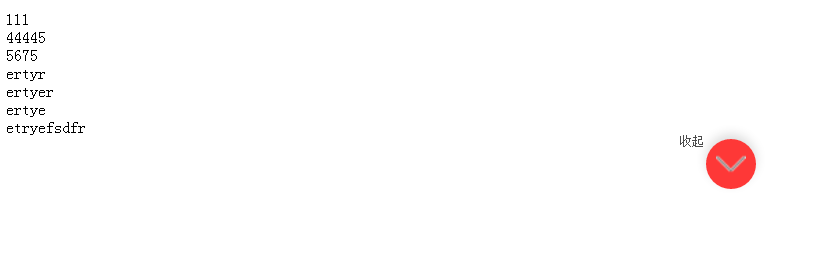
<!DOCTYPE html>

<html lang="en">

<head>

    <meta charset="UTF-8">

    <title>点击查看 收起</title>

    <script src="js/jquery-1.7.1.min.js"></script>

</head>

<style>

    .abc{width: 150px;height: 150px;background: red;}

    .fff{font-size: 18px;color: blue;}

    .big-box{background: #888;}

    .pink{

        width: 150px;

        height: 100px;

        background: pink;

        position: absolute;

        margin: auto;

        left: 0;

        right: 0;

        bottom: 0;

        top: 0;

        transform: rotate(80deg);

        text-align: center;

        line-height: 100px;

    }

    .fff{

        background: #fff;

        border: 1px solid #000;

    }

    .head{line-height: 30px;}

    .arrow{width: 20px;height: 20px;background: red;display: block;float: right;}

.show_hide_btn{line-height: .64rem;font-size: .28rem;color: #4c4c4c;text-align: center;}

.show_hide_btn i{display: inline-block;width: 50px;height:50px;vertical-align: top;margin-top: .18rem;margin-left: .1rem;

 background: url(img/fold_t.png) no-repeat center #fe3837;background-size: 30px auto;border-radius: 50%;    box-shadow: 0 5px 15px 0 rgba(0,0,0,.14);}

.show_hide_btn i.flod_t{background: url(img/fold_t.png) no-repeat center #fe3837; background-size: 30px auto;transform:rotate(180deg);

-ms-transform:rotate(180deg);     /* IE 9 */

-moz-transform:rotate(180deg);     /* Firefox */

-webkit-transform:rotate(180deg); /* Safari 和 Chrome */

-o-transform:rotate(180deg); }

</style>

<script>

    $(document).ready(function() {

 var le = $('div.coup_list').length;

if(le >1){

$('.show_hide_btn').css('display','block');

  $('.coup_list:gt(0)').css('display','none');

}

$('.show_hide_btn').toggle(function(){

    $('.coup_list:gt(0)').show();

    $('.show_hide_btn i').addClass('flod_t');

    $('.show_hide_btn span').html('收起')

}

    ,function(){

        $('.coup_list:gt(0)').hide();

        $('.show_hide_btn i').removeClass('flod_t');

        $('.show_hide_btn span').html('点击查看');

})

    });

</script>

<body>

<div class="coup">

    <div class="coup_list">111</div>

    <div class="coup_list">44445</div>

    <div class="coup_list">5675</div>

    <div class="coup_list">ertyr</div>

    <div class="coup_list">ertyer</div>

    <div class="coup_list">ertye</div>

    <div class="coup_list">etryefsdfr</div>

    <div class="show_hide_btn" style="display:none" ><span>点击查看全部券码 </span><i class=""></i></div>

</div>

</body>

</html>
jQuery 点击查看 收起的更多相关文章
- jquery 点击查看,收起特效
<div class="all"> <p><a href="javascript:;" id="onvk"&g ...
- jquery 点击查看更多箭头变化,文字变化,超出带滚动条。
从网上好了好久,没找到自己要的,自己写了一下. <!DOCTYPE html> <html> <head> <meta charset="utf-8 ...
- jQuery点击图片放大拖动查看效果
效果如图: 放大前: 放大后(可拖动图片浏览): 源码如下: <html xmlns="http://www.w3.org/1999/xhtml"> <head& ...
- JS点击查看更多内容 控制段落文字展开折叠
JavaScript+jQuery实现的文字展开折叠效果,点击文字后文字内容会完整的显示出来,控制段落来显示文字,不需要的时候,可以再次点击后将内容折叠起来,也就是隐藏了一部分内容.点击查看更多的功能 ...
- jquery点击放大图片
参考地址:https://blog.csdn.net/qq_42249896/article/details/86569636 一.应用场景:点击图片可以对图片进行放大显示. 二.实现代码: 说明:我 ...
- jquery点击复选框触发事件给input赋值
体验效果:http://keleyi.com/keleyi/phtml/jqtexiao/31.htm 代码如下: <!DOCTYPE html> <html xmlns=" ...
- 基于jQuery点击加载动画按钮特效
分享一款基于jQuery点击加载动画按钮特效.这是一款基于jQuery+CSS3实现的鼠标点击按钮加载动画特效代码.效果图如下: 在线预览 源码下载 实现的代码. html代码: <div ...
- jquery点击改变图片src源码并toggle
<!DOCTYPE html PUBLIC "-//W3C//DTD XHTML 1.0 Transitional//EN" "http://www.w3.org/ ...
- jquery点击改变class并toggle;jquery点击改变图片src源码并toggle;jquery显示隐藏toggle
<html><head><meta charset="utf-8"><title></title><script ...
随机推荐
- solr 命令
本文为转载内容:源地址:http://blog.csdn.net/matthewei6/article/details/50620600 查看帮助 bin/solr -help ...
- IIS application pool access desktop denied
https://stackoverflow.com/questions/5437723/iis-apppoolidentity-and-file-system-write-access-permiss ...
- 并不对劲的noip2017d1t3
因为A掉了d1t1,十分开心,把d1t3的代码调出来了. 一般情况下,noip每一天总有一道dp题,然而d1前两道题都不是,再看看第三题的数据范围,就能大概猜出是dp了. 这道题和最短路计数看上去很像 ...
- BZOJ_3479_[Usaco2014 Mar]Watering the Fields_Prim
BZOJ_3479_[Usaco2014 Mar]Watering the Fields_Prim Description Due to a lack of rain, Farmer John wan ...
- UI:数据的解析XML与JSON
XML 和 JSON 语言 本篇博客来自互联网参考 XML 和 JSON 的互相转化 有属性的转化为对象,无属性的转化为字符串 节点的顺序性不可逆,XML有顺序,JSON 无顺序 XML 和 J ...
- 初探js闭包
1.变量的作用域:全局变量.局部变量 函数内部可以直接读取局部变量 js代码 var n=2; function fun(){ alert(n); } fun(); //2 函数外部不能读取函数内部 ...
- win10解决vc++6.0不兼容问题方法
这个方法我是可以用了 所以就写在着勒... 1 这个是百度云链接 先下载这个东西 放在电脑上 http://pan.baidu.com/s/1c2MihLA(一个MSDEV.EXE) 2然后找到这个目 ...
- Uix Kit 快速建站前端开发套件-工具箱
这个产品维护已经有一年了(由于业务需求不同,目前没有做中文版,产品本身是针对国外网站),自己本身是做UI出生,开发只是业余爱好,仅仅作为平时工作的需要.杂七杂八会一些前后端开发.并非职业码农! 我是一 ...
- 例题 3-5 生成元 digit generator
#include<stdio.h> #include<string.h> #define maxn 100005 int ans[maxn]; //类似于 比较大的数组还是开导 ...
- POJ 3683 Priest John's Busiest Day
看这个题目之前可以先看POJ2186复习一下强联通分量的分解 题意:给出N个开始时间和结束时间和持续时间三元组,持续时间可以在开始后或者结束前,问如何分配可以没有冲突. -----–我是分割线---- ...