
SpringBoot自定义一个starter
@Configuration //指定这个类是一个配置类

@ConditionalOnXXX //在指定条件成立的情况下自动配置类生效

@AutoConfigureAfter //指定自动配置类的顺序

@Bean //给容器中添加组件

@ConfigurationPropertie结合相关xxxProperties类来绑定相关的配置

@EnableConfigurationProperties //让xxxProperties生效加入到容器中

自动配置类要能加载

将需要启动就加载的自动配置类,配置在META‐INF/spring.factories

org.springframework.boot.autoconfigure.EnableAutoConfiguration=\

org.springframework.boot.autoconfigure.admin.SpringApplicationAdminJmxAutoConfiguration,\

org.springframework.boot.autoconfigure.aop.AopAutoConfiguration,\
- 启动器只用来做依赖导入;
- 专门来写一个自动配置模块;
- 启动器依赖自动配置;别人只需要引入启动器(starter)
- mybatis-spring-boot-starter;自定义启动器名-spring-boot-starter
步骤:
启动器模块(就是一个Maven项目):
<?xml version="1.0" encoding="UTF-8"?>

<project xmlns="http://maven.apache.org/POM/4.0.0"

         xmlns:xsi="http://www.w3.org/2001/XMLSchema-instance"

         xsi:schemaLocation="http://maven.apache.org/POM/4.0.0 http://maven.apache.org/xsd/maven-4.0.0.xsd">

    <modelVersion>4.0.0</modelVersion>

    <groupId>ustc-anmin-starter</groupId>

    <artifactId>ustc-anmin-spring-boot-starter</artifactId>

    <version>1.0-SNAPSHOT</version>

    <properties>

        <project.build.sourceEncoding>UTF-8</project.build.sourceEncoding>

        <maven.compiler.source>10</maven.compiler.source>

        <maven.compiler.target>10</maven.compiler.target>

    </properties>

    <!--引入自动配置模块-->

    <dependencies>

        <dependency>

            <groupId>ustc.anmin.starter</groupId>

            <artifactId>anmin-spring-boot-starter-autoconfigure</artifactId>

            <version>0.0.1-SNAPSHOT</version>

        </dependency>

    </dependencies>

</project>
自动配置模块
<?xml version="1.0" encoding="UTF-8"?>

<project xmlns="http://maven.apache.org/POM/4.0.0" xmlns:xsi="http://www.w3.org/2001/XMLSchema-instance"

         xsi:schemaLocation="http://maven.apache.org/POM/4.0.0 http://maven.apache.org/xsd/maven-4.0.0.xsd">

    <modelVersion>4.0.0</modelVersion>

    <parent>

        <groupId>org.springframework.boot</groupId>

        <artifactId>spring-boot-starter-parent</artifactId>

        <version>2.1.6.RELEASE</version>

        <relativePath/> <!-- lookup parent from repository -->

    </parent>

    <groupId>ustc.anmin.starter</groupId>

    <artifactId>anmin-spring-boot-starter-autoconfigure</artifactId>

    <version>0.0.1-SNAPSHOT</version>

    <name>anmin-spring-boot-starter-autoconfigure</name>

    <description>Demo project for Spring Boot</description>

    <properties>

        <java.version>1.8</java.version>

    </properties>

    <dependencies>

        <dependency>

            <groupId>org.springframework.boot</groupId>

            <artifactId>spring-boot-starter</artifactId>

        </dependency>

    </dependencies>

</project>
package ustc.anmin.starter;

import org.springframework.boot.context.properties.ConfigurationProperties;

@ConfigurationProperties(prefix = "ustc.anmin")

public class HelloServiceProperty {

    private String prefix;

    private String suffix;

    public String getSuffix() {

        return suffix;

    }

    public void setSuffix(String suffix) {

        this.suffix = suffix;

    }

    public String getPrefix() {

        return prefix;

    }

    public void setPrefix(String prefix) {

        this.prefix = prefix;

    }

}
package ustc.anmin.starter;

public class HelloService {

    HelloServiceProperty helloServiceProperty;

    public String sayHelloAnmin(String name){

        return helloServiceProperty.getPrefix() + name + helloServiceProperty.getSuffix();

    }

    public HelloServiceProperty getHelloServiceProperty() {

        return helloServiceProperty;

    }

    public void setHelloServiceProperty(HelloServiceProperty helloServiceProperty) {

        this.helloServiceProperty = helloServiceProperty;

    }

}
package ustc.anmin.starter;

import org.springframework.beans.factory.annotation.Autowired;

import org.springframework.boot.autoconfigure.condition.ConditionalOnWebApplication;

import org.springframework.boot.context.properties.EnableConfigurationProperties;

import org.springframework.context.annotation.Bean;

import org.springframework.context.annotation.Configuration;

@Configuration

@ConditionalOnWebApplication

@EnableConfigurationProperties(HelloServiceProperty.class)  //将配置类加入容器

public class HelloServiceAutoConfiguration {

    @Autowired

    HelloServiceProperty helloServiceProperty;

    @Bean

    public HelloService helloService(){

        HelloService service = new HelloService();

        service.setHelloServiceProperty(helloServiceProperty);

        return new HelloService();

    }

}
spring.factories文件
org.springframework.boot.autoconfigure.EnableAutoConfiguration=\

  ustc.anmin.starter.HelloServiceAutoConfiguration
test controller
<?xml version="1.0" encoding="UTF-8"?>

<project xmlns="http://maven.apache.org/POM/4.0.0" xmlns:xsi="http://www.w3.org/2001/XMLSchema-instance"

         xsi:schemaLocation="http://maven.apache.org/POM/4.0.0 http://maven.apache.org/xsd/maven-4.0.0.xsd">

    <modelVersion>4.0.0</modelVersion>

    <parent>

        <groupId>org.springframework.boot</groupId>

        <artifactId>spring-boot-starter-parent</artifactId>

        <version>2.1.6.RELEASE</version>

        <relativePath/> <!-- lookup parent from repository -->

    </parent>

    <groupId>ustc.anmin</groupId>

    <artifactId>starter-test</artifactId>

    <version>0.0.1-SNAPSHOT</version>

    <name>starter-test</name>

    <description>Demo project for Spring Boot</description>

    <properties>

        <java.version>1.8</java.version>

    </properties>

    <dependencies>

        <dependency>

            <groupId>org.springframework.boot</groupId>

            <artifactId>spring-boot-starter-web</artifactId>

        </dependency>

        <dependency>

            <groupId>ustc.anmin.starter</groupId>

            <artifactId>ustc-anmin-spring-boot-starter</artifactId>

            <version>1.0-SNAPSHOT</version>

        </dependency>

        <dependency>

            <groupId>org.springframework.boot</groupId>

            <artifactId>spring-boot-starter-test</artifactId>

            <scope>test</scope>

        </dependency>

    </dependencies>

    <build>

        <plugins>

            <plugin>

                <groupId>org.springframework.boot</groupId>

                <artifactId>spring-boot-maven-plugin</artifactId>

            </plugin>

        </plugins>

    </build>

</project>
package ustc.anmin.starter.controller;

import org.springframework.beans.factory.annotation.Autowired;

import org.springframework.web.bind.annotation.GetMapping;

import org.springframework.web.bind.annotation.RestController;

import ustc.anmin.starter.HelloService;

@RestController

public class HelloController {

    @Autowired

    HelloService service;

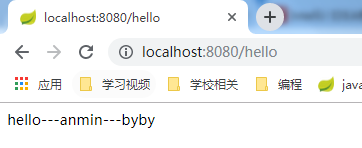
    @GetMapping("/hello")

    public String hello(){

        return service.sayHelloAnmin("---anmin---");

    }

}

SpringBoot自定义一个starter的更多相关文章
- Spring boot 自定义一个starter pom
用过springboot的自动配置会觉得非常方便,我们完全可以自己写一个starter pom,这样不仅可以有自动配置功能,而且具有更通用的的耦合度低的配置, 新建一个starter的maven项目, ...
- SpringBoot编写自定义的starter 专题
What’s in a name All official starters follow a similar naming pattern; spring-boot-starter-*, where ...
- SpringBoot系列三:SpringBoot自定义Starter
在前面两章 SpringBoot入门 .SpringBoot自动配置原理 的学习后,我们对如何创建一个 SpringBoot 项目.SpringBoot 的运行原理以及自动配置等都有了一定的了解.如果 ...
- springboot系列十四、自定义实现starter
一.starter的作用 当我们实现了一个组建,希望尽可能降低它的介入成本,一般的组建写好了,只要添加spring扫描路径加载spring就能发挥作用.有个更简单的方式扫描路径都不用加,直接引入jar ...
- springboot 自定义starter之AutoConfiguration【原】
八.自定义starter AutoConfiguration: 1.这个场景需要使用到的依赖是什么? 没有特别依赖的配置 2.如何编写自动配置 @Configuration //指定这个类是一个配置类 ...
- SpringBoot --- 自定义 Starter
SpringBoot --- 自定义 Starter 创建 1.需要创建一个新的空工程 2.新的工程需要引入两个模块 一个Maven 模块 作为启动器 一个SpringBoot 模块 作为自动配置模块 ...
- springBoot 自动配置原理--自己新建一个 starter
上篇我们说到 springboot 和 SSM 框架的区别,今天我们就看看 springboot 到底为我们做了哪些事情,让我们开发变得如此简单. springboot 中起着重要作用的是 start ...
- 深入springboot原理——动手封装一个starter
从上一篇文章<深入springboot原理——一步步分析springboot启动机制(starter机制)> 我们已经知道springboot的起步依赖与自动配置的机制.spring-bo ...
- springboot2.x基础教程:动手制作一个starter包
上一篇博客介绍了springboot自动装配的原理.springboot本身有丰富的spring-boot-starter-xx集成组件,这一篇趁热打铁加深理解,我们利用springboot自动装配的 ...
随机推荐
- 机器学习(2):简单线性回归 | 一元回归 | 损失计算 | MSE
前文再续书接上一回,机器学习的主要目的,是根据特征进行预测.预测到的信息,叫标签. 从特征映射出标签的诸多算法中,有一个简单的算法,叫简单线性回归.本文介绍简单线性回归的概念. (1)什么是简单线性回 ...
- composer下载tp5第三方扩展
(谨记:如果使用 composer 命令安装失败,请查看根目录下的 composer.json 文件是否正确,并查看下的扩展是否有多个版本,下载的版本是否符合当前框架的版本) 1.基础 compose ...
- c# 异常找不到源代码的情况
简单说下原因,调用的是dynamic参与的函数 dynamic dataqueue = pi.GetValue(this,null); var eo = ErrorObject.True; var v ...
- P5112 FZOUTSY
传送门 没想到这题还这能用莫队--本来看看以为复杂度会挂的-- 预处理出每个字母开头往后\(k\)个的字符串的哈希值,然后大概就是那道小z的袜子了 而且据说这题的哈希得用自然溢出 //minamoto ...
- 洛谷P2585 [ZJOI2006]三色二叉树(树形dp)
传送门 设$dp[u][i]$表示点$u$颜色为$i$时最多(最少)的绿点个数(这里用$0$表示绿点) 然后直接用树形dp就可以了 记得把情况讨论清楚 //minamoto #include<b ...
- 字符串-format格式化
format函数格式化操作(3.6以上) 基本格式: 变量.format(参数,参数,....) 限定符号:(必须在:后面使用) 对齐相关:参数位置:填充符号对齐符号总长度 1:#>20 < ...
- Maxim Buys an Apartment CodeForces - 854B
题意:已知一条街上有n幢房子,依次的编号为1~n,其中有k幢已经卖出去了但是不知道是哪k幢.当且仅当一幢房子没有卖出去且其两旁至少有一幢房子卖出去了的时候,认为这幢房子是好的.问这n幢房子中好的房子最 ...
- 阻止默认行为是配合passive使用
在使用lighthouse检测pwa应用时,发现提示下面有下面的警告 默认使用passive:true提高滚动性能并减少崩溃,passive即顺从的,是指它顺从浏览器的默认行为.设置该属性的目的主要是 ...
- python_8(模块)
第1章 模块 1.1 概述 1.2 模块的分类 1.2.1 内置模块 1.2.2 扩展模块 1.2.3 模块安装 1.2.4 自定义模块第2章 模块之内置模块 2.1 collections模块 2. ...
- 03.Java多线程并发库API使用2
1.多个线程之间共享数据的方式探讨 1.如果每个线程执行的代码相同,可以使用同一个Runnable对象,这个Runnable对象中有那个共享数据,例如,买票系统就可以这么做. 2.如果每个线程执行的代 ...