
andorid jar/库源码解析之zxing
Zxing:
作用:
生成和识别,二维码,条形码。
栗子:
生成二维码,赋值到ImageView上
     QRCodeWriter qrCodeWriter = new QRCodeWriter();

        Map<EncodeHintType, String> hints = new HashMap<>();

        hints.put(EncodeHintType.CHARACTER_SET, "utf-8"); //记得要自定义长宽

        BitMatrix encode = null;

        try {

            encode = qrCodeWriter.encode("hello,world!", BarcodeFormat.QR_CODE, width, height, hints);

        } catch (WriterException e) {

            e.printStackTrace();

        }

        int[] colors = new int[width * height];

        //利用for循环将要表示的信息写出来

        for (int i = 0; i < width; i++) {

            for (int j = 0; j < height; j++) {

                if (encode.get(i, j)) {

                    colors[i * width + j] = Color.BLACK;

                } else {

                    colors[i * width + j] = Color.WHITE;

                }

            }

        }

        Bitmap bit = Bitmap.createBitmap(colors, width, height, Bitmap.Config.RGB_565);

        imageView.setImageBitmap(bit);
生成条形码,赋值到ImageView上
     final int WHITE = 0xFFFFFFFF;

        final int BLACK = 0xFF000000;

        MultiFormatWriter writer = new MultiFormatWriter();

        BitMatrix result = null;

        try {

            BarcodeFormat barcodeFormat = BarcodeFormat.CODE_128;

            result = writer.encode("1234567123456", barcodeFormat, 400,

                    100, null);

        } catch (WriterException e) {

            // TODO Auto-generated catch block

            e.printStackTrace();

        }

        int width = result.getWidth();

        int height = result.getHeight();

        int[] pixels = new int[width * height];

        for (int y = 0; y < height; y++) {

            int offset = y * width;

            for (int x = 0; x < width; x++) {

                pixels[offset + x] = result.get(x, y) ? BLACK : WHITE;

            }

        }

        Bitmap bitmap = Bitmap.createBitmap(width, height,

                Bitmap.Config.ARGB_8888);

        bitmap.setPixels(pixels, 0, width, 0, 0, width, height);

        imageView2.setImageBitmap(bitmap);
识别二维码
   private void Test3() {

        recogQRcode(imageView);

    }

    public void recogQRcode(ImageView imageView){

        Bitmap QRbmp = ((BitmapDrawable) (imageView).getDrawable()).getBitmap();   //将图片bitmap化

        int width = QRbmp.getWidth();

        int height = QRbmp.getHeight();

        int[] data = new int[width * height];

        QRbmp.getPixels(data, 0, width, 0, 0, width, height);    //得到像素

        RGBLuminanceSource source = new RGBLuminanceSource(width, height, data);

        BinaryBitmap bitmap1 = new BinaryBitmap(new HybridBinarizer(source));

        QRCodeReader reader = new QRCodeReader();

        Result re = null;

        try {

            //得到结果

            re = reader.decode(bitmap1);

        } catch (NotFoundException e) {

            e.printStackTrace();

        } catch (ChecksumException e) {

            e.printStackTrace();

        } catch (FormatException e) {

            e.printStackTrace();

        }

        lblMsg1.setText(re.getText());

    }
识别条形码
     Bitmap QRbmp = ((BitmapDrawable) (imageView2).getDrawable()).getBitmap();   //将图片bitmap化

        int width = QRbmp.getWidth();

        int height = QRbmp.getHeight();

        int[] data = new int[width * height];

        QRbmp.getPixels(data, 0, width, 0, 0, width, height);    //得到像素

        RGBLuminanceSource source = new RGBLuminanceSource(width, height, data);

        //二进制图片转换成bitmap对象(说明:创建HybridBinarizer对象,需要传入LuminanceSource,所以传入source(二进制的图片),并且通过BinaryBitmap转换成bitmap对象)

        BinaryBitmap bitmap1 = new BinaryBitmap(new HybridBinarizer(source));

        //CodaBarReader codaBarReader= new CodaBarReader();    //codaBarReader  二维码

        try {

            //MultiFormatReader是读取图像的类(在core包)

            Result result = new MultiFormatReader().decode(bitmap1);      //识别条形码,和二维码(说明:获取到我们需要的信息)

            lblMsg2.setText(result.getText());

        } catch (NotFoundException e) {

            e.printStackTrace();

            lblMsg2.setText("ex " + e.getMessage());

        }
源码解读:
A:生成二维码
1、创建一个 QRCodeWriter对象,调用 encode,传入需要生成二维码的数据,格式化参数,大小,和编码信息
2、调用Encoder的encode方法,a,确定当前使用的编码。b,判断生成二维码数据的编码模式(数字,byte,和 0x00-0x5f)。c,附加ECI部分(二维码格式中的一部分)。d,填充 FNC1信息到头部中。e,写入模式标记到头部中。
3、把二维码文本数据,按照不同的模式,写入到不同的结果bit集合中。
4、判断版本和容量,是否在范围内。
5、合并头部,数据长度,数据内容到一个bit集合。
6、填充数据,使bit数据时8的整数倍。
7、把位数据信息和纠错码,交织在一起,存入新的数据(算法复杂,具体参考二维码生成算法)。
8、调用 MatrixUtil.buildMatrix,构建二维码矩阵,并返回二维码信息。 QRCode中 使用 ByteMatrix 存储矩阵,内部是一个二维的bytes数组。 private final byte[][] bytes;
9、转换矩阵颜色,从 输入矩阵使用0==白色,1==黑色,而输出矩阵使用 0==黑色,255==白色(即8位灰度位图)。
10、创建一个color数组,把颜色数据存入。调用 Bitmap.createBitmap ,把color集合信息,传递给他,然后返回一个Bitmap就是二维码数据了。
B:生成条形码
1、创建一个 MultiFormatWriter 对象,并调用他的 encode方法,传入条形码数据,和编码信息,和条形码结果大小。
2、根据不同的编码,选择了不同的写入器,这里采用了 Code128Writer
3、a,判断条形码内容,长度限制[1,80]。...略
4、使用二进制,把二进制转换成图片。就是最后的结果了。。
C:识别二维码。(反向解析)
D:识别条形码。(反向解析)
源码:https://github.com/zxing/zxing
引入:
api 'com.google.zxing:android-core:3.3.0'
api 'com.google.zxing:core:3.3.2'
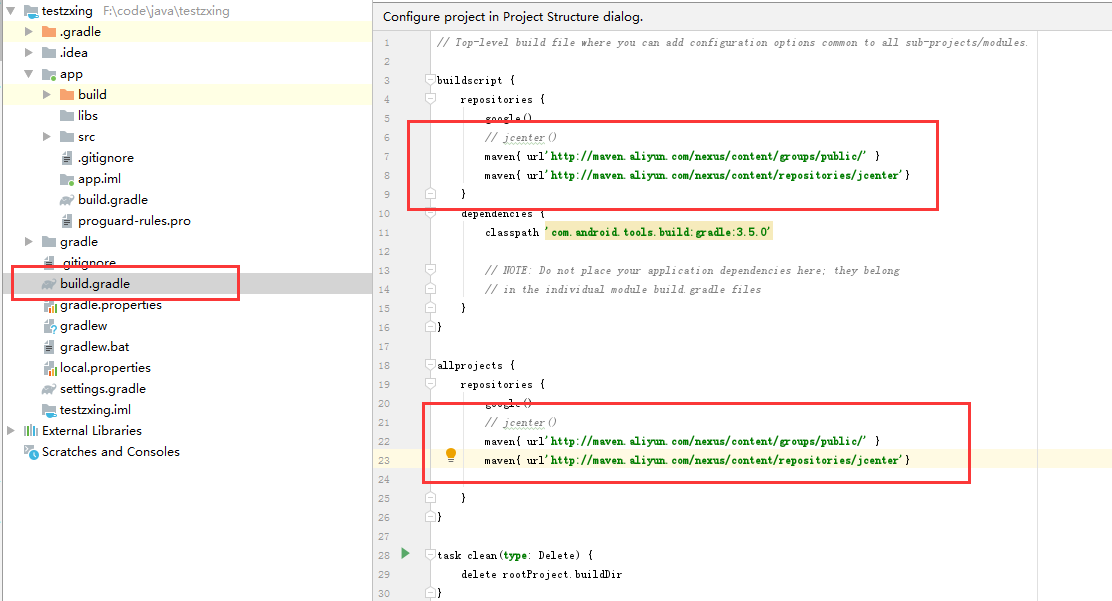
注意:(如果无法从google加载,就需要换一个来源,下面代码和图)
maven{ url'http://maven.aliyun.com/nexus/content/groups/public/' }

maven{ url'http://maven.aliyun.com/nexus/content/repositories/jcenter'}
andorid jar/库源码解析之zxing的更多相关文章
- andorid jar/库源码解析之Bolts
目录:andorid jar/库源码解析 Bolts: 作用: 用于链式执行跨线程代码,且传递数据 栗子: Task.call(new Callable<Boolean>() { @Ove ...
- andorid jar/库源码解析之EventBus
目录:andorid jar/库源码解析 EventBus: 作用: 用于不同Activity,Service等之间传递消息(数据). 栗子: A页面:onCreate定义 EventBus.ge ...
- andorid jar/库源码解析之Dagger/Dagger2
目录:andorid jar/库源码解析 Dagger.Dagger2: 作用: 1.用于解耦Activity和业务逻辑 2.在使用业务的时候,不需要重复编写new代码. 3.当业务变化的时候,不需要 ...
- andorid jar/库源码解析之okhttp3
目录:andorid jar/库源码解析 Okhttp3: 作用: 用于网络编程(http,https)的快速开发. 栗子: // okHttpClient定义成全局静态,或者单例,不然重复new可能 ...
- andorid jar/库源码解析之okio
目录:andorid jar/库源码解析 Okio: 作用: 说白了,就是一个IO库,基于java原生io.来进行操作,内部做了优化,简洁,高效.所以受到了一部分人的喜欢和使用 栗子: 读写文件. p ...
- andorid jar/库源码解析之retrofit2
目录:andorid jar/库源码解析 Retrofit2: 作用: 通过封装okhttp库,来进行web通讯,并且使用动态代理的方式,来调用接口地址,通过回调赋值结果. 栗子: 定义一个接口,用于 ...
- andorid jar/库源码解析之Butterknife
目录:andorid jar/库源码解析 Butterknife: 作用: 用于初始化界面控件,控件方法,通过注释进行绑定控件和控件方法 栗子: public class MainActivity e ...
- andorid jar/库源码解析之错误提示
目录:andorid jar/库源码解析 错误: 错误1: Error: Static interface methods are only supported starting with Andro ...
- andorid jar/库源码解析
前言 本篇作为开篇,会大体上说明,需要解读源码的,类库,或者jar. 序 原本,类库和jar的系列准备写到逆向系列课程的,但是那个东西,在写了两篇,就没有后续了,现在也不知道从哪里开始了, 只能等后期 ...
随机推荐
- 【Selenium07篇】python+selenium实现Web自动化:PO模型,PageObject模式!
一.前言 最近问我自动化的人确实有点多,个人突发奇想:想从0开始讲解python+selenium实现Web自动化测试,请关注博客持续更新! 这是python+selenium实现Web自动化第七篇博 ...
- group_concat有长度限制
group_concat有长度限制 group_concat 详细用法请点此链接. group_concat有长度限制!长度陷阱用了group_concat后,select里如果使用了li ...
- EL表达式---自定义函数(转)
EL表达式---自定义函数(转) 有看到一个有趣的应用了,转下来,呵呵!! 1.定义类MyFunction(注意:方法必须为 public static) package com.tgb.jstl; ...
- MD5中使用16进制
MD5中使用16进制消息摘要 分类: java_secruity2012-12-28 13:11 719人阅读 评论(0) 收藏 举报 消息摘要 由于数据在计算机中的表示,最终以二进制的形式存在,所以 ...
- Progress笔记
1. iconv -f gbk -t unicode test.tmp > test.csv 如果出现文件数据补全,需要确认在这之前,output是否已经close,如果output to指定了 ...
- 怎么自定义DataGridViewColumn(日期列,C#)
参考:https://msdn.microsoft.com/en-us/library/7tas5c80.aspx 未解决的问题:如果日期要设置为null,怎么办? DataGridView控件提供了 ...
- ES6新特性箭头函数和常用function()对比
// 无参 var fn1 = function() {} var fn1 = () => {} // 单个参数 var fn2 = function(a) {} var fn2 = a =&g ...
- Python爬虫某招聘网站的岗位信息
前言 文的文字及图片来源于网络,仅供学习.交流使用,不具有任何商业用途,版权归原作者所有,如有问题请及时联系我们以作处理. 作者:阿尔法游戏 PS:如有需要Python学习资料的小伙伴可以加点击下方链 ...
- stand up meeting 12/29/2015
part 组员 今日工作 工作耗时/h 明日计划 工作耗时/h UI 冯晓云 重写popup UI添加笔记功能 6 mergeUI ...
- vue axios post请求下载文件,后台springmvc完整代码
注意请求时要设置responseType,不加会中文乱码,被这个坑困扰了大半天... axios post请求: download(index,row){ var ts = ...