
Aircoinst 三层架构ASP.NET开源
<注意! 本源码为我本人所写,可能有点烂。仅供学习使用,请勿进行商业用途~!>
<本源码永久归于MineLSG 及 Aircoinst_慈 所拥有>
使用方法:直接拷贝
一、结构&环境介绍
<数据结构> 如下
BLL 业务逻辑层
DAL 数据交换层
FULL 全局变量
Model 实体类
UI 层为 WebApp
数据库为:SQL SERVER 2008 R2
IDE为:Visual Studio 2019 Pro
层的引用如下所示
BLL →DAL
BLL → Model
DAL → Model
FULL → BLL
FULL → Model
UI → 全部层
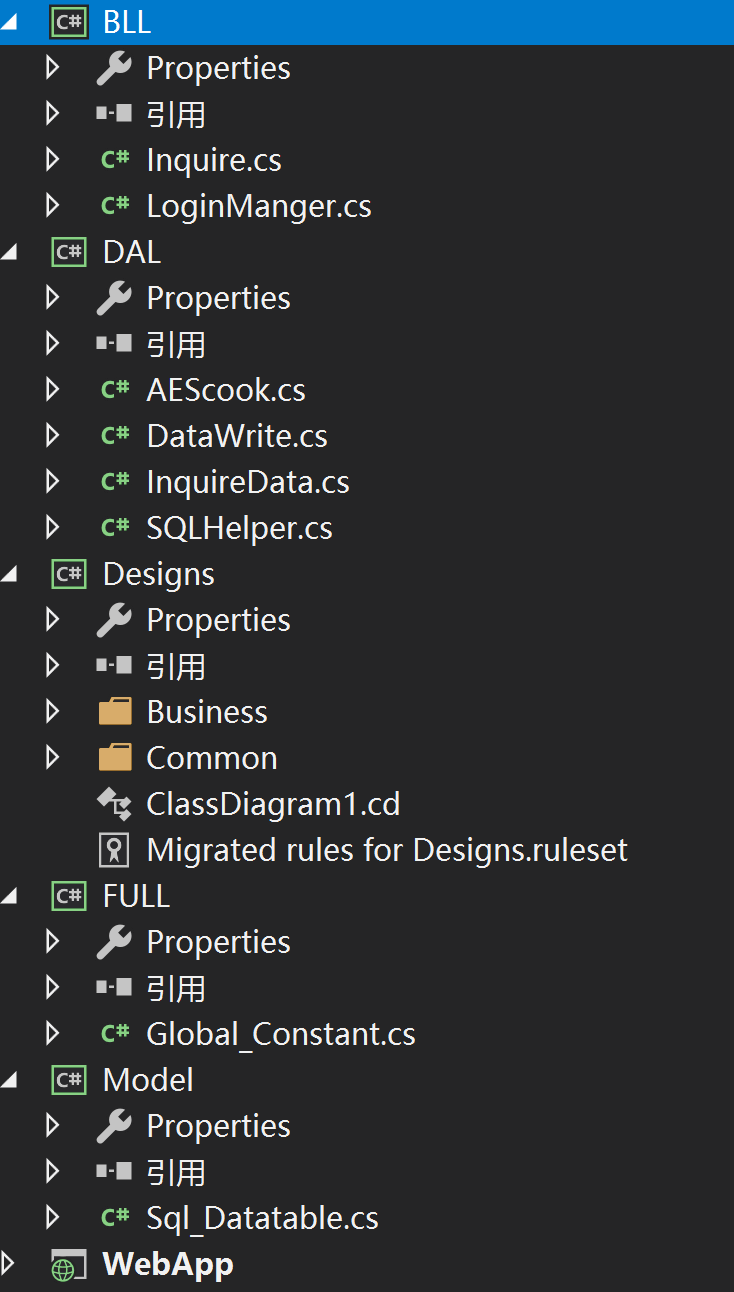
这几个层是什么意思想必大家都知道
[FULL]层负责控制全局的用户ID 和用户名
2、ASP.NET 版本为.NET farmworker 4.6版本 服务器为 IIS7.0版本 数据库为 SQL SERVER 2008R2
二、目录介绍
1、BLL 业务逻辑层
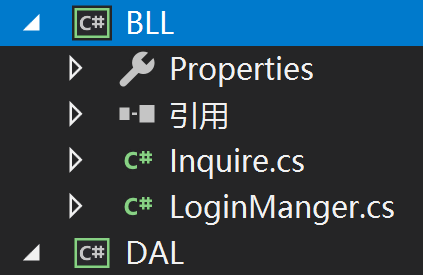
(1)inquire.cs类
验证登录是否成功
源码如下:
 #region << 版 本 注 释 >>

 /*----------------------------------------------------------------

 * 项目名称 :BLL

 * 项目描述 :

 * 类 名 称 :Inquire

 * 类 描 述 :

 * 所在的域 :AIRCOINST

 * 命名空间 :BLL

 * 机器名称 :AIRCOINST

 * CLR 版本 :4.0.30319.42000

 * 作    者 :RenZe

 * 创建时间 :2019/5/12 11:50:38

 * 更新时间 :2019/5/12 11:50:38

 * 版 本 号 :v1.0.0.0

 *******************************************************************

 * Copyright @ RenZe 2019. All rights reserved.

 *******************************************************************

 //----------------------------------------------------------------*/

 #endregion

 using System.Collections.Generic;

 using System.Linq;

 using System.Text;

 using DAL;

 using Model;

 using System.Threading.Tasks;

 using System.Windows.Forms;

 using System;

 namespace BLL

 {

     public class Inquire

     {

     }

     public class Inquire_Sign

     {

         public User_Table user_Login(string NickName, string Password)

         {

             InquireData inquireData = new InquireData();

             User_Table user_Table = inquireData.select_Usert(NickName, Password);

             if (user_Table != null)

             {

                 return user_Table;

             }

             else

             {

                 throw new Exception("登陆失败");

             }

         }

     }  //用户登陆

     public class Inquire_Query_User

     {

         public User_Table user_Query(string UserID,string UserName)

         {

             InquireData inquireData = new InquireData();

             User_Table user_Table = inquireData.select_Userts(UserID, UserName);

             if (user_Table != null)

             {

                 return user_Table;

             }

             else

             {

                 throw new Exception("查询失败");

             }

         }

     }  //查询个人信息

     public class Inquire_Query_User_Login_record

     {

         public User_Table user_Query(string UserID,string Login_record)

         {

             InquireData inquireData = new InquireData();

             User_Table user_Table = inquireData.SelectLogin_record(UserID, Login_record);

             if (user_Table != null)

             {

                 return user_Table;

             }

             else

             {

                 throw new Exception("查询失败");

             }

         }

     }   //查询登陆次数

 }
-----------inquire.cs类-----------
(2)LoginManger.cs类
用于登录验证
源码如下
 #region << 版 本 注 释 >>

 /*----------------------------------------------------------------

 * 项目名称 :BLL

 * 项目描述 :

 * 类 名 称 :LoginManger

 * 类 描 述 :

 * 所在的域 :AIRCOINST

 * 命名空间 :BLL

 * 机器名称 :AIRCOINST

 * CLR 版本 :4.0.30319.42000

 * 作    者 :RenZe

 * 创建时间 :2019/5/11 23:45:13

 * 更新时间 :2019/5/11 23:45:13

 * 版 本 号 :v1.0.0.0

 *******************************************************************

 * Copyright @ RenZe 2019. All rights reserved.

 *******************************************************************

 //----------------------------------------------------------------*/

 #endregion

 using System;

 using System.Collections.Generic;

 using System.Linq;

 using System.Text;

 using System.Threading.Tasks;

 using DAL;

 using Model;

 namespace BLL

 {

     public class LoginManger

     {

         private DataWrite dataWrite = new DataWrite();

         public bool Add(User_Table user_Table, out string messageStr)

         {

             messageStr = "";

             bool isSuccess = false;

             if (user_Table.UserName.Trim().Length != )

             {

                 dataWrite.AddUser(user_Table);

                 isSuccess = true;

                 //if (userDB.Equals(userInfo))

                 //{

                 //    userDB.AddUser(userInfo);

                 //    isSuccess = true;

                 //}

                 //else

                 //{

                 //    messageStr = "有相同的值";

                 //}

             }

             else

             {

                 messageStr = "不能为空";

             }

             return isSuccess;

         }

     }    //用户注册验证

     public class Login_record

     {

         private DataWrite dataWrite = new DataWrite();

         public bool Add(User_Table user_Table, out string messageStr)

         {

             messageStr = "";

             bool isSuccess = false;

             if (user_Table.Login_record != )

             {

                 dataWrite.AddLogin_record(user_Table);

                 isSuccess = true;

                 //if (userDB.Equals(userInfo))

                 //{

                 //    userDB.AddUser(userInfo);

                 //    isSuccess = true;

                 //}

                 //else

                 //{

                 //    messageStr = "有相同的值";

                 //}

             }

             else

             {

                 messageStr = "不能为空";

             }

             return isSuccess;

         }

     }    //写入登陆次数验证

     public class AddUser_document

     {

         private DataWrite dataWrite = new DataWrite();

         public bool Add(User_Document user_Document,out string messageStr)

         {

             messageStr = "";

             bool isSuccess = false;

             if (user_Document.Doc_head.Trim().Length != )

             {

                 dataWrite.AddDocument(user_Document);

                 isSuccess = true;

             }

             else

             {

                 messageStr = "不能为空";

             }

             return isSuccess;

         }

     }

 }
-----------LoginManger.cs类-----------
2、DAL 数据交换层
(1)AEScook.cs类
用于登录密码加密解密数
源码如下:
 using System;

 using System.Collections.Generic;

 using System.Linq;

 using System.Text;

 using System.Security.Cryptography;

 using System.Threading.Tasks;

 namespace DAL {

     public class AEScook

     {

         /// <summary>

         /// AES加密

         /// </summary>

         /// <param name="text">加密字符</param>

         /// <param name="password">加密的密码</param>

         /// <param name="iv">密钥</param>

         /// <returns></returns>

         public string AESEncrypt(string text, string password, string iv)

         {

             RijndaelManaged rijndaelCipher = new RijndaelManaged();

             rijndaelCipher.Mode = CipherMode.CBC;

             rijndaelCipher.Padding = PaddingMode.PKCS7;

             rijndaelCipher.KeySize = ;

             rijndaelCipher.BlockSize = ;

             byte[] pwdBytes = System.Text.Encoding.UTF8.GetBytes(password);

             byte[] keyBytes = new byte[];

             int len = pwdBytes.Length;

             if (len > keyBytes.Length) len = keyBytes.Length;

             System.Array.Copy(pwdBytes, keyBytes, len);

             rijndaelCipher.Key = keyBytes;

             byte[] ivBytes = System.Text.Encoding.UTF8.GetBytes(iv);

             rijndaelCipher.IV = new byte[];

             ICryptoTransform transform = rijndaelCipher.CreateEncryptor();

             byte[] plainText = Encoding.UTF8.GetBytes(text);

             byte[] cipherBytes = transform.TransformFinalBlock(plainText, , plainText.Length);

             return Convert.ToBase64String(cipherBytes);

         }

         /// <summary>

         /// AES解密

         /// </summary>

         /// <param name="text"></param>

         /// <param name="password"></param>

         /// <param name="iv"></param>

         /// <returns></returns>

         public string AESDecrypt(string text, string password, string iv)

         {

             RijndaelManaged rijndaelCipher = new RijndaelManaged();

             rijndaelCipher.Mode = CipherMode.CBC;

             rijndaelCipher.Padding = PaddingMode.PKCS7;

             rijndaelCipher.KeySize = ;

             rijndaelCipher.BlockSize = ;

             byte[] encryptedData = Convert.FromBase64String(text);

             byte[] pwdBytes = System.Text.Encoding.UTF8.GetBytes(password);

             byte[] keyBytes = new byte[];

             int len = pwdBytes.Length;

             if (len > keyBytes.Length) len = keyBytes.Length;

             System.Array.Copy(pwdBytes, keyBytes, len);

             rijndaelCipher.Key = keyBytes;

             byte[] ivBytes = System.Text.Encoding.UTF8.GetBytes(iv);

             rijndaelCipher.IV = ivBytes;

             ICryptoTransform transform = rijndaelCipher.CreateDecryptor();

             byte[] plainText = transform.TransformFinalBlock(encryptedData, , encryptedData.Length);

             return Encoding.UTF8.GetString(plainText);

         }

     }

 }
-----------AEScook.cs类-----------
(2)DataWrite.cs类
数据库写入类,主要负责数据库的insert 和 Update 操作
 #region << 版 本 注 释 >>

 /*----------------------------------------------------------------

 * 项目名称 :DAL

 * 项目描述 :

 * 类 名 称 :DataWrite

 * 类 描 述 :

 * 所在的域 :AIRCOINST

 * 命名空间 :DAL

 * 机器名称 :AIRCOINST

 * CLR 版本 :4.0.30319.42000

 * 作    者 :RenZe

 * 创建时间 :2019/5/11 23:29:17

 * 更新时间 :2019/5/11 23:29:17

 * 版 本 号 :v1.0.0.0

 *******************************************************************

 * Copyright @ RenZe 2019. All rights reserved.

 *******************************************************************

 //----------------------------------------------------------------*/

 #endregion

 using System;

 using System.Collections.Generic;

 using System.Linq;

 using System.Text;

 using System.Threading.Tasks;

 using System.Data;

 using System.Data.SqlClient;

 using Model;

 using DAL;

 using System.Configuration;

 using Microsoft.ApplicationBlocks.Data;

 namespace DAL

 {

     public class DataWrite

     {

         AEScook eScook = new AEScook();

         private string connString = ConfigurationManager.ConnectionStrings["connString"].ToString();

         /// <summary>

         /// 数据库写入

         /// </summary>

         /// <param name="user_Table">用户表</param>

         /// <returns></returns>

         public int AddUser(User_Table user_Table)

         //用户注册

         {

             string commandText = "insert into User_Table (UserName,NickName,Password,CreateDate,PwdDeed,Permission,Date_Of_Birth,Age,Sex,IDCard)values(@UserName,@NickName,@Password,@CreateDate,@PwdDeed,@Permission,@Date_Of_Birth,@Age,@Sex,@IDCard)"; //数据库写入

             SqlParameter[] paras = new SqlParameter[]

             {

                 #region 数据传值

                 new SqlParameter("@UserName",user_Table.UserName),

                 new SqlParameter("@NickName",user_Table.NickName),

                 new SqlParameter("@Password",user_Table.Password),

                 new SqlParameter("@CreateDate",user_Table.CreateDate),

                 new SqlParameter("@PwdDeed",user_Table.PwdDeed),

                 new SqlParameter("@Permission",user_Table.Permission),

                 new SqlParameter("@Date_Of_Birth",user_Table.Date_Of_Birth),

                 new SqlParameter("@Age",user_Table.Age),

                 new SqlParameter("@Sex",user_Table.Sex),

                 new SqlParameter("@IDCard",user_Table.IDCard)

                 #endregion 数据传值

             };

             return SqlHelper.ExecuteNonQuery(connString, CommandType.Text, commandText, paras);

         }

         /// <summary>

         /// 数据库写入

         /// </summary>

         /// <param name="user_Table">用户表</param>

         /// <returns></returns>

         public int AddLogin_record(User_Table user_Table)

         //升级插入每个用户登陆的次数

         {

             string commandText = "UPDATE User_Table SET  Login_record = @Login_record WHERE UserID = @UserID";

             SqlParameter[] paras = new SqlParameter[]

             {

                 #region 数据传值

                 new SqlParameter("@Login_record",user_Table.Login_record),

                 new SqlParameter("@UserID",user_Table.UserID)

                 #endregion 数据传值

             };

             return SqlHelper.ExecuteNonQuery(connString, CommandType.Text, commandText, paras);

         }

         /// <summary>

         /// 数据库写入

         /// </summary>

         /// <param name="user_Document">用户文档表</param>

         /// <returns></returns>

         public int AddDocument(User_Document user_Document)

         {

             string commandText = "insert into User_Document (Doc_head,Doc_brief_head,Doc_column,Doc_type,Doc_array,Doc_key,Doc_summary,Doc_author,Doc_source,Doc_Date,UserName,UserID)values(@Doc_head,@Doc_brief_head,@Doc_column,@Doc_type,@Doc_array,@Doc_key,@Doc_summary,@Doc_author,@Doc_source,@Doc_Date,@UserName,@UserID)";

             SqlParameter[] paras = new SqlParameter[]

             {

                 new SqlParameter("@Doc_head",user_Document.Doc_head),

                 new SqlParameter("@Doc_brief_head",user_Document.Doc_brief_head),

                 new SqlParameter("@Doc_column",user_Document.Doc_column),

                 new SqlParameter("@Doc_type",user_Document.Doc_type),

                 new SqlParameter("@Doc_array",user_Document.Doc_array),

                 new SqlParameter("@Doc_key",user_Document.Doc_key),

                 new SqlParameter("@Doc_summary",user_Document.Doc_summary),

                 new SqlParameter("@Doc_author",user_Document.Doc_author),

                 new SqlParameter("@Doc_source",user_Document.Doc_source),

                 new SqlParameter("@Doc_Date",user_Document.Doc_Date),

                 new SqlParameter("@UserName",user_Document.UserName),

                 new SqlParameter("@UserID",user_Document.UserID)

             };

             return SqlHelper.ExecuteNonQuery(connString, CommandType.Text, commandText, paras);

         }

     }

 }
-----------DataWrite.cs类-----------
(3)InquireData.cs类
主要用于数据库的select条件查询
源码如下:
 #region << 版 本 注 释 >>

 /*----------------------------------------------------------------

 * 项目名称 :DAL

 * 项目描述 :

 * 类 名 称 :InquireData

 * 类 描 述 :

 * 所在的域 :AIRCOINST

 * 命名空间 :DAL

 * 机器名称 :AIRCOINST

 * CLR 版本 :4.0.30319.42000

 * 作    者 :RenZe

 * 创建时间 :2019/5/12 12:13:48

 * 更新时间 :2019/5/12 12:13:48

 * 版 本 号 :v1.0.0.0

 *******************************************************************

 * Copyright @ RenZe 2019. All rights reserved.

 *******************************************************************

 //----------------------------------------------------------------*/

 #endregion

 using System.Collections.Generic;

 using System.Linq;

 using System.Text;

 using System.Threading.Tasks;

 using System.Data;

 using System.Data.SqlClient;

 using System.Configuration;

 using System;

 namespace DAL

 {

     public class InquireData

     {

         private string connString = ConfigurationManager.ConnectionStrings["connString"].ToString();

         /// <summary>

         ///  登陆验证并查询

         /// </summary>

         /// <param name="NickName">用户名</param>

         /// <param name="Password">密 码</param>

         /// <returns></returns>

         public Model.User_Table select_Usert(string NickName, string Password)

         {

             using (SqlConnection conn = new SqlConnection(connString))

             {

                 SqlCommand cmd = conn.CreateCommand();

                 cmd.CommandText = @"select UserID,UserName,NickName,Password from User_Table where NickName=@NickName and Password=@Password";

                 cmd.CommandType = CommandType.Text;

                 cmd.Parameters.Add(new SqlParameter(@"NickName", NickName));

                 cmd.Parameters.Add(new SqlParameter(@"Password", Password));

                 conn.Open();

                 SqlDataReader reader = cmd.ExecuteReader();

                 Model.User_Table user_Table = null;

                 while (reader.Read())

                 {

                     if (user_Table == null)

                     {

                         user_Table = new Model.User_Table();

                     }

                     user_Table.UserID = reader.GetInt32();

                     user_Table.UserName = reader.GetString().ToString();

                     user_Table.NickName = reader.GetString().ToString();

                     user_Table.Password = reader.GetString().ToString();

                 }

                 return user_Table;

             }

         } //用户登陆

         public Model.User_Table select_Userts(string UserID, string UserName)

         {

             using (SqlConnection conn = new SqlConnection(connString))

             {

                 SqlCommand cmd = conn.CreateCommand();

                 cmd.CommandText = "select UserID,UserName,NickName,Sex,IDCard,Date_Of_Birth from User_Table where UserID=@UserID and UserName=@UserName";

                 cmd.CommandType = CommandType.Text;

                 cmd.Parameters.Add(new SqlParameter(@"UserID", UserID));

                 cmd.Parameters.Add(new SqlParameter(@"UserName", UserName));

                 conn.Open();

                 SqlDataReader reader = cmd.ExecuteReader();

                 Model.User_Table user_Table = null;

                 while (reader.Read())

                 {

                     if (user_Table == null)

                     {

                         user_Table = new Model.User_Table();

                     }

                     user_Table.UserID = reader.GetInt32();

                     user_Table.UserName = reader.GetString().ToString();

                     user_Table.NickName = reader.GetString().ToString();

                     user_Table.Sex = reader.GetString().ToString();

                     user_Table.IDCard = reader.GetString().ToString();

                     user_Table.Date_Of_Birth = reader.GetDateTime();

                 }

                 return user_Table;

             }

         }  //获取个人信息

         public Model.Menu_Table Select_Menu(string 次级, string 应用程序ID, string 顺序)

         {

             using (SqlConnection conn = new SqlConnection(connString))

             {

                 SqlCommand cmd = conn.CreateCommand();

                 cmd.CommandText = @"select * from 菜单项 where @级次 = 2 and @应用程序ID=-1 order by 顺序";

                 cmd.CommandType = CommandType.Text;

                 cmd.Parameters.Add(new SqlParameter(@"次级", 次级));

                 cmd.Parameters.Add(new SqlParameter(@"应用程序ID", 应用程序ID));

                 cmd.Parameters.Add(new SqlParameter("顺序", 顺序));

                 conn.Open();

                 SqlDataReader reader = cmd.ExecuteReader();

                 Model.Menu_Table menu_Table = null;

                 while (reader.Read())

                 {

                     if (menu_Table == null)

                     {

                         menu_Table = new Model.Menu_Table();

                     }

                     menu_Table.菜单项ID = reader.GetInt32();

                     menu_Table.级次 = reader.GetInt32();

                     menu_Table.顺序 = reader.GetInt32();

                 }

                 return menu_Table;

             }

         } //菜单项

         public Model.User_Table SelectLogin_record(string UserID,string Login_record)

         {

             using (SqlConnection conn = new SqlConnection(connString))

             {

                 SqlCommand cmd = conn.CreateCommand();

                 cmd.CommandText = @"select UserID,Login_record from User_Table where Login_record=@Login_record";

                 cmd.CommandType = CommandType.Text;

                 cmd.Parameters.Add(new SqlParameter(@"Login_record", Login_record));

                 conn.Open();

                 SqlDataReader reader = cmd.ExecuteReader();

                 Model.User_Table user_Table = null;

                 while (reader.Read())

                 {

                     if (user_Table == null)

                     {

                         user_Table = new Model.User_Table();

                     }

                     user_Table.UserID = reader.GetInt32();

                     user_Table.Login_record = reader.GetInt32();

                 }

                 return user_Table;

             }

         } //获取登陆次数

     }

 }
-----------InquireData.cs类-----------
(4)SQLHelper.cs类
此类是MSDN官方类,里面包含数十种数据库操作<本人已经成功汉化,部分未汉化>
源码如下:
下载链接: 链接: https://pan.baidu.com/s/12G-QBID7Pyyl4-Rs1z59ag 提取码: ck8w
-----------SLQHelp.cs-----------
3、Model 实体类
Model是什么?它什么也不是!它在三层架构中是可有可无的。它其实就是面向对象编程中最基本的东西:类。一个桌子是一个类,一条新闻也是一个类,int、string、doublie等也是类,它仅仅是一个类而已。
这样,Model在三层架构中的位置,和int,string等变量的地位就一样了,没有其它的目的,仅用于数据的存储而已,只不过它存储的是复杂的数据。所以如果你的项目中对象都非常简单,那么不用Model而直接传递多个参数也能做成三层架构。
那为什么还要有Model呢,它的好处是什么呢。下面是思考一个问题时想到的,插在这里:
Model在各层参数传递时到底能起到做大的作用?
在各层间传递参数时,可以这样:
AddUser(userId,userName,userPassword,…,)
也可以这样:
AddUser(userInfo)
这两种方法那个好呢。一目了然,肯定是第二种要好很多。
什么时候用普通变量类型(int,string,guid,double)在各层之间传递参数,什么使用Model传递?下面几个方法:
SelectUser(int UserId)
SelectUserByName(string username)
SelectUserByName(string username,string password)
SelectUserByEmail(string email)
SelectUserByEmail(string email,string password)
可以概括为:
SelectUser(userId)
SelectUser(user)
这里用user这个Model对象囊括了username,password,email这三个参数的四种组合模式。UserId其实也可以合并到user中,但项目中其它BLL都实现了带有id参数的接口,所以这里也保留这一项。
传入了userInfo,那如何处理呢,这个就需要按照先后的顺序了,有具体代码决定。
这里按这个顺序处理
首先看是否同时具有username和password,然后看是否同时具有email和password,然后看是否有username,然后看是否有email。依次处理。
这样,如果以后增加一个新内容,会员卡(number),则无需更改接口,只要在DAL的代码中增加对number的支持就行,然后前台增加会员卡一项内容的表现与处理即可。
(1)Sql_Datatable.cs类:
源码如下:
#region << 版 本 注 释 >>

/*----------------------------------------------------------------

* 项目名称 :Model

* 项目描述 :

* 类 名 称 :Sql_Datatable

* 类 描 述 :

* 所在的域 :AIRCOINST

* 命名空间 :Model

* 机器名称 :AIRCOINST

* CLR 版本 :4.0.30319.42000

* 作    者 :RenZe

* 创建时间 :2019/5/11 23:08:16

* 更新时间 :2019/5/11 23:08:16

* 版 本 号 :v1.0.0.0

*******************************************************************

* Copyright @ RenZe 2019. All rights reserved.

*******************************************************************

//----------------------------------------------------------------*/

#endregion

using System.Collections.Generic;

using System.Linq;

using System.Text;

using System;

using System.Threading.Tasks;

namespace Model

{

    /// <summary>

    /// 菜单项

    /// </summary>

    public class Menu_Table

    {

        public int 菜单项ID { get; set; }

        public string 菜单项名称 { get; set; }

        public string 操作集合 { get; set; }

        public string 菜单项编号 { get; set; }

        public string 角色ID { get; set; }

        public string 窗体路径 { get; set; }

        public bool 是否无权时隐藏 { get; set; }

        public int 级次 { get; set; }

        public int 顺序 { get; set; }

        public string 进入时图标 { get; set; }

        public string 离开时图标 { get; set; }

        public int 应用程序ID { get; set; }

        public int 所属菜单项ID { get; set; }

    }

    /// <summary>

    /// 用户

    /// </summary>

    public class User_Table

    {

        //用户ID (用于其他关联)

        public int UserID { get; set; }

        //用户名

        public string UserName { get; set; }

        //姓名

        public string NickName { get; set; }

        //身份证

        public string IDCard { get; set; }

        //密码

        public string Password { get; set; }

        //注册日期

        public DateTime CreateDate { get; set; }

        //密码种子(用于找回密码)

        public string PwdDeed { get; set; }

        //用户权限 (其中1为管理员,其中2为领导,其中3为职员) (用于其他关联)

        public string Permission { get; set; }

        //出生日期

        public DateTime Date_Of_B { get; set; }

        //年龄

        public string Age { get; set; }

        //性别

        public string Sex { get; set; }

        //登陆记录

        public int Login_record { get; set; }

    }

    /// <summary>

    /// 文件上传

    /// </summary>

    public class User_UpFile

    {

        //上传文件ID

        public int UpFileID { get; set; }

        //文件名

        public string File_Name { get; set; }

        //文件路径

        public string File_Path { get; set; }

        //用户名  ---  关联用户名

        public string UserName { get; set; }

        //用户ID  ---  关联用户ID

        public string UserID { get; set; }

    }

    /// <summary>

    /// 文档记录

    /// </summary>

    public class User_Document

    {

        //文档ID

        public int DocID { get; set; }

        //文章标题

        public string Doc_head { get; set; }

        //文章简略标题

        public string Doc_brief_head { get; set; }

        //分类栏目

        public string Doc_column { get; set; }

        //文章类型

        public string Doc_type { get; set; }

        //文档排序

        public string Doc_array { get; set; }

        //文档关键字

        public string Doc_key { get; set; }

        //文档摘要

        public string Doc_summary { get; set; }

        //作者

        public string Doc_author { get; set; }

        // 文档来源

        public string Doc_source { get; set; }

        //创建日期

        public DateTime Doc_Date { get; set; }

        //用户名   ---  关联用户名

        public string UserName { get; set; }

        //用户ID  ---  关联用户ID

        public string UserID { get; set; }

    }

}
--------Sql_Datatable.cs---------
4、UI层 显示层
UI层就是网站的根目录,包含网页,及网页根目录
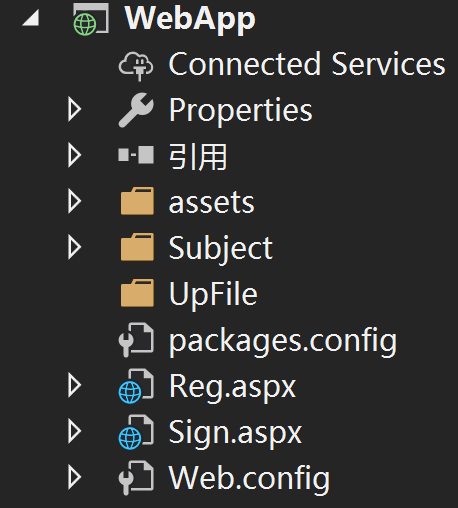
目录如图上图所示↑
其中重要的为Web.Config文件
对于我而言主要用来链接数据库使用
链接数据库命令如下:
 <connectionStrings>

     <add name="connString" connectionString="Data Source=.;Initial Catalog=你的数据库名称;uid=你的数据库用户名;pwd=你的密码;" providerName="System.Data.SqlClient" />

   </connectionStrings>
本人开发数据库版本为SQL 2008 R2
解释如下:connString 为DAL 操作层链接数据库模块的字段
Data Source = . 为数据库服务器 默认本机数据库为"."
Initial Catalog =WebDate 链接的数据名
uid=sa 链接数据库用户名
pwd=rzt123!@#; 链接数据库密码
Aircoinst 三层架构ASP.NET开源的更多相关文章
- Asp.Net MVC三层架构之autofac使用教程
开发环境:vs2015..net4.5.2.mvc5.ef6 Autofac简介 IOC控制反转(Inversion of Control,缩写为IOC),Autofac是一个开源的依赖注入框架,Au ...
- asp.net mvc 加三层架构 完美搭配
http://www.hysql.org/aspnet/20180630/5712.html 先来一张项目的层级结构图: Model:模型层,主要是各种类型.枚举以及ORM框架,框架完成数据库和实体类 ...
- asp.net三层架构 及其中使用泛型获取实体数据介绍
asp.net中使用泛型获取实体数据可以发挥更高的效率,代码简洁方便,本例采用三层架构.首先在model层中定义StuInfo实体,然后在 DAL层的SQLHelper数据操作类中定义list< ...
- Asp.Net MVC<一> : 三层架构、MVC
MVC.MVP.MVVM.Angular.js.Knockout.js.Backbone.js.React.js.Ember.js.Avalon.js.Vue.js 概念摘录 认清Android框架 ...
- 关于ASP.NET或VS2005 搭建三层架构的理解
最近想学习ASP.NET建网站,关于ASP.NET或VS2005 搭建三层架构的理解,网上摘录了一些资料,对于第(2)点的讲解让我理解印象深刻,如下: (1)为何使用N层架构? 因为每一层都可以在仅仅 ...
- Asp.Net 三层架构之泛型应用
一说到三层架构,我想大家都了解,这里就简单说下,Asp.Net三层架构一般包含:UI层.DAL层.BLL层,其中每层由Model实体类来传递,所以Model也算是三层架构之一了,例外为了数据库的迁移或 ...
- MVC项目实践,在三层架构下实现SportsStore-09,ASP.NET MVC调用ASP.NET Web API的查询服务
ASP.NET Web API和WCF都体现了REST软件架构风格.在REST中,把一切数据视为资源,所以也是一种面向资源的架构风格.所有的资源都可以通过URI来唯一标识,通过对资源的HTTP操作(G ...
- ASP.NET三层架构的分析
BLL 是业务逻辑层 Business Logic Layer DAL 是数据访问层 Data Access Layer ASP.NET的三层架构(DAL,BLL,UI ...
- 新闻公布系统 (Asp.net 三层架构 )
2012年度课程设计---新闻公布系统(小结) ...
随机推荐
- ES6的Proxy
最近在Javascript的设计编程中,用到的那个单例模式,感觉就类似一种代理的思想[其实就是缓存的一种机制],单例模式就是: function getSingle(fn){ var result; ...
- 开源一个使用python和pyQT实现的产测工具
导语 之前给朋友友情开发的一个产测工具,现开源,有需要的朋友可以在这个基础上进行二次开发. 操作界面如下 主要特性 自动识别启动信息,然后进入产测写入状态 序列号和MAC地址自动按指定数目增加 每次操 ...
- JavaScript(js)函数声明与函数表达式的区别
在JavaScript中,函数是经常用到的,在实际开发的时候,我想很多人都没有太在意函数的声明与函数表达式的区别,但是呢,这种细节的东西对于学好js是非常重要的. 函数声明与函数表达式用代码写出来是这 ...
- 【猫狗数据集】利用tensorboard可视化训练和测试过程
数据集下载地址: 链接:https://pan.baidu.com/s/1l1AnBgkAAEhh0vI5_loWKw提取码:2xq4 创建数据集:https://www.cnblogs.com/xi ...
- openwrt sdk 编译工具 及 hello world
需要先在 make menuconfig 中打开 sdk make -j4在 bin\targets\ramips\mt7620生成一个openwrt-sdk-ramips-mt7620_gcc-7. ...
- python学习列表(Lists).基础二
列表(Lists) 序列是Python中最基本的数据结构,序列中的每个元素都分配一个数字,它的第一个索引是0第二个索引是1,依次类推. 列表是最常用的Python数据类型,它可以作为一个方括号内的逗号 ...
- 通过欧拉计划学Rust编程(第500题)
由于研究Libra等数字货币编程技术的需要,学习了一段时间的Rust编程,一不小心刷题上瘾. "欧拉计划"的网址: https://projecteuler.net 英文如果不过关 ...
- [项目分享]JSP+Servlet+JDBC实现的云端汽修后台管理系统
本文存在视频版本,请知悉 项目简介 项目来源于:https://gitee.com/chenlinSir/CloudDemo-servlet 难度等级:简单 基于JSP+Servlet+Jdbc的云端 ...
- 建议10:建议使用splice删除数组
删除数组元素的方法有很多种,最简单就是利用length属性来截断数组,但这种方法比较笨,进能够截断尾部元素.在JS中,由于数组其实就是对象,因此可以使用delete运算符可以从数组中移除元素 var ...
- 在 macOS 下备份/还原/重置 LaunchPad 布局
原文链接:https://billc.io/2019/07/launchpad-layout-backup/ 前几天升级到 Catalina Public Beta 后,LauchPad 会出现无法刷 ...