
Java Mail 发送带有附件的邮件
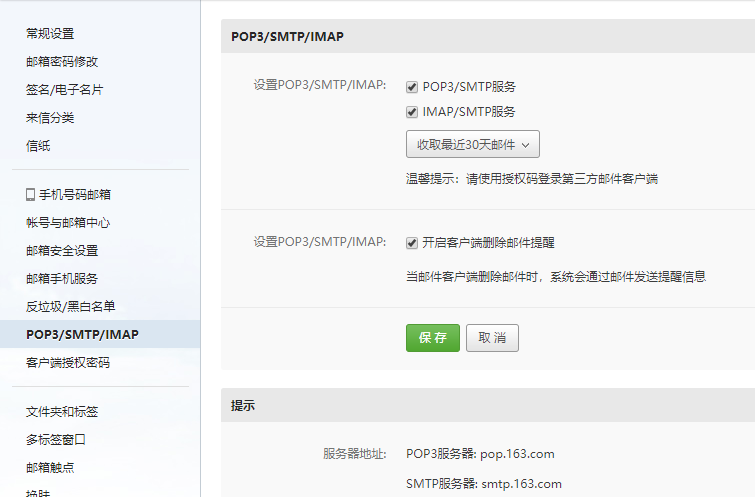
1、小编用的是163邮箱发送邮件,所以要先登录163邮箱开启POP3/SMTP/IMAP服务方法:
2、下载所需的java-mail 包
https://maven.java.net/content/repositories/releases/com/sun/mail/javax.mail/
3、贴上代码
public class sendMail {

/**

 * 创建邮件信息

 * @param session

 * @param fromAccount

 * @param toAccount

 * @param sourcePath xml文件目录   e.g. xml

 * @param zipPath   zip文件目录  e.g. zip/person.zip

 */

    public static void CreateMessage(final Session session, final String fromAccount, final String toAccount,final String sourcePath,final String zipPath){

        try{

            final String subjectStr="圣诞节快乐";//主题

            final StringBuffer contentStr=new StringBuffer();//内容

            contentStr.append("<h2>Dear Friends,</h2><br/>");

            contentStr.append("Christmas is coming up soon. <br/> Wish you lots of love, joy &happiness. happy christmas.");

            contentStr.append("<h3>Regards,</h3>").append("<h3>ZHBIT College</h3>");

           //创建默认的 MimeMessage 对象

           final MimeMessage message = new MimeMessage(session);

           //Set From: 头部头字段

           message.setFrom(new InternetAddress(fromAccount));

           //Set To: 头部头字段

           message.addRecipient(Message.RecipientType.TO,

                                    new InternetAddress(toAccount));

           //Set Subject: 头部头字段

           message.setSubject(subjectStr);

          //创建消息部分

           final BodyPart messageBodyPart = new MimeBodyPart();

           //消息

           messageBodyPart.setContent(contentStr.toString(),"text/html;charset=UTF-8");

           //创建多重消息

           final Multipart multipart = new MimeMultipart();

           //设置文本消息部分

           multipart.addBodyPart(messageBodyPart);

           //为邮件添加多个附件

           MimeBodyPart attachment = null;

           final File source = new File(sourcePath);

           if (!source.exists()) {

               System.out.println(sourcePath + " not exists");

               return;

           }

           final File[] files = source.listFiles();

           for (final File f : files) {

               attachment = new MimeBodyPart();

               final String filePath =f.getPath();

               //根据附件文件创建文件数据源

               final DataSource ds = new FileDataSource(filePath);

               attachment.setDataHandler(new DataHandler(ds));

               //为附件设置文件名

               attachment.setFileName(ds.getName());

               multipart.addBodyPart(attachment);

           }

           //添加zip附件

           attachment = new MimeBodyPart();

           //根据附件文件创建文件数据源

           final DataSource ds = new FileDataSource(zipPath);

           attachment.setDataHandler(new DataHandler(ds));

           //为附件设置文件名

           attachment.setFileName(ds.getName());

           multipart.addBodyPart(attachment);

           // 发送完整消息

           message.setContent(multipart);

           // 发送消息

           Transport.send(message);

        }catch (final MessagingException mex) {

           mex.printStackTrace();

        }

    }

/**

 * 将源文件目录下的所有文件打包成zip文件

 * @param sourceFilePath  e.g. xml

 * @param zipFilePath   e.g. zip

 * @param fileName   e.g. person

 * @return 返回生成的zip文件目录  e.g. zip/person.zip

 */

    public static String tozip(final String sourceFilePath, final String zipFilePath,

            final String fileName) {

        final File sourceFile = new File(sourceFilePath);

        FileInputStream fis = null;

        BufferedInputStream bis = null;

        FileOutputStream fos = null;

        ZipOutputStream zos = null;

        final String createZipPath=zipFilePath+ "/" + fileName+ ".zip";

        if(!sourceFile.exists()){

            System.out.println("待压缩的文件目录:" + sourceFilePath + "不存在");

        } else {

            try {

                final File zipFile = new File(createZipPath);

                final File[] sourceFiles = sourceFile.listFiles();

                if(null == sourceFiles || sourceFiles.length < 1) {

                    System.out.println("待压缩的文件目录:" + sourceFilePath + " 里面不存在文件,无需压缩");

                }else{

                    fos = new FileOutputStream(zipFile);

                    zos = new ZipOutputStream(new BufferedOutputStream(fos));

                    final byte[] bufs = new byte[1024*10];

                    for(int i=0;i<sourceFiles.length;i++) {

                        // 创建ZIP实体,并添加进压缩包

                        final ZipEntry zipEntry = new ZipEntry(sourceFiles[i].getName());

                        zos.putNextEntry(zipEntry);

                        // 读取待压缩的文件并写进压缩包里

                        fis = new FileInputStream(sourceFiles[i]);

                        bis = new BufferedInputStream(fis,1024*10);

                        int read = 0;

                        while((read=bis.read(bufs, 0, 1024*10)) != -1) {

                            zos.write(bufs, 0, read);

                        }

                    }

                }

            } catch (final FileNotFoundException e) {

                e.printStackTrace();

                throw new RuntimeException(e);

            } catch (final IOException e) {

                e.printStackTrace();

                throw new RuntimeException(e);

            } finally {

                try {

                    if (null != bis) {

                        bis.close();

                    }

                    if (null != zos) {

                        zos.close();

                    }

                } catch (final IOException e) {

                    e.printStackTrace();

                    throw new RuntimeException(e);

                }

            }

        }

        return createZipPath;

    }

    public static void main(final String[] args) {

        //收件人电子邮箱

        final String toAccount = "********@qq.com";

        //发件人的 邮箱 和 密码

        final String fromAccount = "**********@163.com";

        final String fromPassword = "**********";

        //指定发送邮件的主机

        final String host = "smtp.163.com";

        //创建参数配置, 获取系统属性

        final Properties properties = System.getProperties();

        properties.setProperty("mail.transport.protocol", "smtp");

        properties.setProperty("mail.smtp.host", host);

        properties.put("mail.smtp.auth", "true");

        //根据配置创建会话对象,获取默认session对象

        final Session session = Session.getDefaultInstance(properties,new Authenticator(){

          @Override

            public PasswordAuthentication getPasswordAuthentication()

              {

               return new PasswordAuthentication(fromAccount, fromPassword); //发件人邮件用户名、密码

              }

         });

        session.setDebug(true);

        final String xmlPath="xml";

        final String zipPath=tozip(xmlPath,"zip","person");

        CreateMessage(session,fromAccount,toAccount,xmlPath,zipPath);

    }

}
4、收到邮件

Java Mail 发送带有附件的邮件的更多相关文章
- 解决java mail发送TXT附件被直接显示在正文中的问题
这两天遇到一个问题,关于使用java mail发送邮件的问题. 详细是这样子的:我使用java mail发送异常报告邮件,邮件中有一个包含异常日志的附件,和关于设备信息的邮件正文.假设日志为log后缀 ...
- Android在发送带有附件的邮件
准备好工作了-下载最新的版本号JMail https://java.net/projects/javamail/pages/Home#Download_JavaMail_1.5.2_Release h ...
- java mail发送html格式的邮件
// 获取系统属性 Properties properties = System.getProperties(); // 设置邮件服务器 properties.setProperty("ma ...
- spring boot:发送带附件的邮件和html内容的邮件(以163.com邮箱为例/spring boot 2.3.2)
一,网站哪些情况下需要发送电子邮件? 作为一个电商网站,以下情况需要发邮件通知用户: 注册成功的信息 用邮箱接收验证码 找回密码时发链接 发送推广邮件 下单成功后的订单通知 给商户的对账单邮件 说明: ...
- 【Mail】JavaMail发送带附件的邮件(二)
上一篇讲了使用JavaMail发送普通邮件([Mail]JavaMail介绍及发送邮件(一)),本例讲发送复杂的邮件(带有附件的邮件) 生成一封复杂的邮件 新建一个JavaWeb的Maven工程,引入 ...
- java发送带附件的邮件
/** * java发送带附件的邮件 * 周枫 * 2013.8.10 */ package com.dsideal.Util; import javax.mail.*; import javax.m ...
- [Xcode 实际操作]八、网络与多线程-(7)使用MessageUI框架,创建并发送一封带有附件的邮件
目录:[Swift]Xcode实际操作 本文将演示如何使用MessageUI框架,创建并发送一封带有附件的邮件. 使用邮件编辑视图控制器(MFMailComposeViewController)实现邮 ...
- [SpringBoot] - 发送带附件的邮件
<!--发送email依赖--> <dependency> <groupId>org.springframework.boot</groupId> &l ...
- 利用Python+163邮箱授权码发送带附件的邮件
背景 前段时间写了个自动爬虫的脚本,定时在阿里云服务器上执行,会从某个网站上爬取链接保存到txt文本中,但是脚本不够完善,我需要爬虫完毕之后通过邮件把附件给我发送过来,之前写过一个<利用Pyth ...
随机推荐
- CSS中“~”(波浪号)、“,”(逗号)、“+”(加号)、“>”(大于号)、“ ”(空格)详解
“~”:$('pre ~ brother')表示获取pre节点的后面的所有兄弟节点,相当于nextAll()方法: “+”:$('pre + nextbrother')表示获得pre节点的下一个兄弟节 ...
- CG-CTF(2)
CG-CTF https://cgctf.nuptsast.com/challenges#Web 续上~ 第七题:单身二十年 查看源代码: 取得flag(干杯~): 本题也可通过burp抓包,查看返回 ...
- [Qt] Release模式下产生调试信息
分两步,设置Qt配置文件,设置VS. https://blog.csdn.net/itas109/article/details/83652387 F:\Qt\Qt5.7.1\5.7\msvc2015 ...
- Springboot以Jetty为容器实现http重定向到https
1 简介 之前讲解的Springboot整合https用的是tomcat作为容器,tomcat也是一个流行多年的老牌Java容器了.但针对不同的场景,还是会有不同的选择,如Jetty.Jetty是架构 ...
- spark系列-2、Spark 核心数据结构:弹性分布式数据集 RDD
一.RDD(弹性分布式数据集) RDD 是 Spark 最核心的数据结构,RDD(Resilient Distributed Dataset)全称为弹性分布式数据集,是 Spark 对数据的核心抽象, ...
- 3年前的一个小项目经验,分享给菜鸟兄弟们(公文收发小软件:小技能 SmallDatetime)...
为什么80%的码农都做不了架构师?>>> 这个系统中的数据库有100多M,里面当然有很多表,我的每个表里,有几个字段,都是一样的例如 CreateUserID.CreateDat ...
- Python3的日期和时间
2019独角兽企业重金招聘Python工程师标准>>> python 中处理日期时间数据通常使用datetime和time库 因为这两个库中的一些功能有些重复,所以,首先我们来比较一 ...
- Android Studio快捷键动态演示
Android Studio出来很久了,大部分已经转过来了,相对于Eclipse又是毋庸置疑,更好的使用快捷键必定达到事半功倍的效果. 友情提示:某些电脑按F1-F12键需要先按住FN,比如我的Mac ...
- Flutter仿网易云音乐:播放界面
写在前头 本来是要做一个仿网易云音乐的flutter项目,但是因为最近事情比较多,项目周期跨度会比较长,因此分几个步骤来完成.这是仿网易云音乐项目系列文章的第一篇.没有完全照搬网易云音乐的UI,借鉴了 ...
- OSG程序设计之更新回调
更新回调(Update Callback)涉及到一个类:osg::NodeCallback.这个类重载了函数调用操作符.当回调动作发生时,将会执行这一操作符的内容. 如果节点绑定了更新回调函数,那么在 ...