
Unnitest测试框架总结
Unnitest总结
第一点,setUp和tearDown方法
l 每次执行test开头的用例都会执行setUp和tearDown方法
l 如:
import unittest class Mydemo(unittest.TestCase):
def setUp(self):
print('调用setUp方法')
self.a = 1
def test1(self):
print("i am test1 the value of a is {}".format(self.a))
def test2(self):
print("i am test2 the value of a is {}".format(self.a))
def test3(self):
print("i am test3 the value of a is {}".format(self.a))
def tearDown(self):
print("调用tearDown方法")
if __name__ == '__main__':
unittest.main()
n 结果: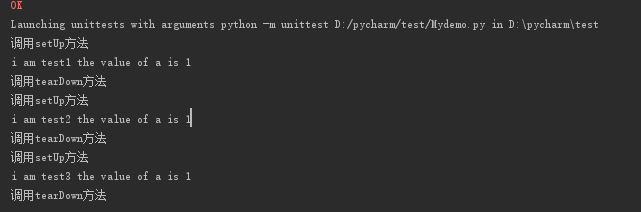
第二点: setUpClass和tearDownClass方法
l 如:
import unittest
class Mydemo(unittest.TestCase):
@classmethod
def setUpClass(cls):
print("调用setUpClass\n")
def test1(self):
print("i am test1")
def test2(self):
print("i am test2")
@classmethod
def tearDownClass(cls):
print("调用tearDownClass")
if __name__ == '__main__':
unittest.main()
l 结果:
第三点:定义全局的属性,可以放到setUpClass中testCase中均可去调用
l 如:
class NavigationTest(unittest.TestCase):
@classmethod
def setUpClass(cls):
cls.driver = webdriver.Chrome()
cls.driver.implicitly_wait(30)
cls.driver.maximize_window()
cls.driver.get('https://www.baidu.com/')
driver = cls.driver #定义在全局中
cls.search_field = driver.find_element_by_name('wd') #定义在全局中 def testBrowserNavigation(self):
self.search_field.clear()
print('执行test1') self.search_field.send_keys('圣女果')
self.search_field.submit()
time.sleep(1) self.assertEqual('圣女果_百度搜索',self.driver.title) self.driver.back()
self.assertTrue(WebDriverWait(self.driver,30).until(expected_conditions.title_contains('百度一下')))
def testBrowserNavigation2(self):
driver = self.driver
search_field = driver.find_element_by_name('wd')
search_field.clear()
print('执行test2') search_field.send_keys('璎珞')
search_field.submit()
time.sleep(1)
@classmethod
def tearDownClass(cls):
driver = cls.driver
time.sleep(10)
driver.quit() if __name__ == "__main__":
unittest.main()
第四点:testCase之间的执行顺序按照默认是以首字母排序的
l 执行顺序test1,test10,....test18,test2,..........test9
Unnitest总结
第一点,setUp和tearDown方法
l 每次执行test开头的用例都会执行setUp和tearDown方法
l 如:
l import unittest
class Mydemo(unittest.TestCase):
def setUp(self):
print('调用setUp方法')
self.a =
1
def test1(self):
print("i am test1 the value of a is {}".format(self.a))
def test2(self):
print("i am test2 the value of a is {}".format(self.a))
def test3(self):
print("i am test3 the value of a is {}".format(self.a))
def tearDown(self):
print("调用tearDown方法")
if __name__ == '__main__':
unittest.main()
n 结果:
第二点: setUpClass和tearDownClass方法
l 如:
l   import unittest

class Mydemo(unittest.TestCase):

    @classmethod

    def setUpClass(cls):

        print("调用setUpClass\n")

    def test1(self):

        print("i am test1")

    def test2(self):

        print("i am test2")

    @classmethod

    def tearDownClass(cls):

        print("调用tearDownClass")

if __name__ == '__main__':

    unittest.main()
l 结果:
n
第三点:定义全局的属性,可以放到setUpClass中testCase中均可去调用
l 如:
l   class NavigationTest(unittest.TestCase):

    @classmethod

    def setUpClass(cls):

        cls.driver = webdriver.Chrome()

        cls.driver.implicitly_wait(30)

        cls.driver.maximize_window()

        cls.driver.get('https://www.baidu.com/')

        driver = cls.driver #定义在全局中

        cls.search_field = driver.find_element_by_name('wd') #定义在全局中

    def testBrowserNavigation(self):

        self.search_field.clear()

        print('执行test1')

        self.search_field.send_keys('圣女果')

        self.search_field.submit()

        time.sleep(1)

        self.assertEqual('圣女果_百度搜索',self.driver.title)

        self.driver.back()

        self.assertTrue(WebDriverWait(self.driver,30).until(expected_conditions.title_contains('百度一下')))

    def testBrowserNavigation2(self):

        driver = self.driver

        search_field = driver.find_element_by_name('wd')

        search_field.clear()

        print('执行test2')

        search_field.send_keys('璎珞')

        search_field.submit()

        time.sleep(1)

    @classmethod

    def tearDownClass(cls):

        driver = cls.driver

        time.sleep(10)

        driver.quit()

if __name__ == "__main__":

    unittest.main()
n
第四点:testCase之间的执行顺序按照默认是以首字母排序的
l 执行顺序test1,test10,....test18,test2,..........test9
Unnitest测试框架总结的更多相关文章
- phpunit 测试框架安装
PHPUnit是一个轻量级的PHP测试框架.它是在PHP5下面对JUnit3系列版本的完整移植,是xUnit测试框架家族的一员(它们都基于模式先锋Kent Beck的设计).来自百度百科 一.下载wg ...
- 某互联网后台自动化组合测试框架RF+Sikuli+Python脚本
某互联网后台自动化组合测试框架RF+Sikuli+Python脚本 http://www.jianshu.com/p/b3e204c8651a 字数949 阅读323 评论1 喜欢0 一.**Robo ...
- selenium测试框架使用xml作为对象库
之前已经写过一篇: selenium测试框架篇,页面对象和元素对象的管理 上次使用的excel作为Locator对象管理,由于excel处理不够方便,有以下缺点: 不能实现分page 加载Locato ...
- selenium 测试框架中使用grid
之前的测试框架:http://www.cnblogs.com/tobecrazy/p/4553444.html 配合Jenkins可持续集成:http://www.cnblogs.com/tobecr ...
- selenium测试框架篇,页面对象和元素对象的管理
前期已经做好使用Jenkins做buildhttp://www.cnblogs.com/tobecrazy/p/4529399.html 做自动化框架,不可避免的就是对象库. 有一个好的对象库,可以让 ...
- Junit测试框架 Tips
关于Junit测试框架使用的几点总结: 1.Junit中的测试注解: @Test →每个测试方法前都需要添加该注解,这样才能使你的测试方法交给Junit去执行. @Before →在每个测试方法执行前 ...
- Python几种常用的测试框架
一.测试的常用规则 一个测试单元必须关注一个很小的功能函数,证明它是正确的: 每个测试单元必须是完全独立的,必须能单独运行.这样意味着每一个测试方法必须重新加载数据,执行完毕后做一些清理工作.通常通过 ...
- 测试框架Mocha与断言expect
测试框架Mocha与断言expect在浏览器和Node环境都可以使用除了Mocha以外,类似的测试框架还有Jasmine.Karma.Tape等,也很值得学习. 整个项目源代码: 为什么学习测试代码? ...
- 在测试框架中使用Log4J 2
之前的测试框架:http://www.cnblogs.com/tobecrazy/p/4553444.html 配合Jenkins可持续集成:http://www.cnblogs.com/tobecr ...
随机推荐
- for 循环 以及基本的数据类型
for 循环: for 关键字 i 变量(此处可以更改 更改规则参考变量命名规则) in 关键字 可迭代对象 (想要循环谁就放谁,注意:数字除外 因为数字不可迭代) for 循环内可以进行任意操作,可 ...
- python四:函数练习--小白博客
为什么要有函数?函数式编程定义一次,多出调用函数在一定程度上可以理解为变量函数的内存地址加上()就是调用函数本身也可以当做参数去传参 不用函数:组织结构不清晰代码的重复性 def test():#te ...
- 学习用Node.js和Elasticsearch构建搜索引擎(1):了解并运行Elasticsearch
1.学习Elasticsearch概述. 了解Elasticsearch是什么?能做什么?可以查一下elasticsearch.lucene等的相关介绍,另外也可以查查资料比较一下其它的搜索引擎sph ...
- H5 68-伪元素选择器
<!DOCTYPE html> <html lang="en"> <head> <meta charset="UTF-8&quo ...
- struts2的基本使用
struts2在web中当作前端控制器,接收来自页面的请求,使用过滤器拦截模式对请求进行拦截并交给相应配置的action类处理. 所以在web中使用最重要的是struts2的核心过滤器StrutsPr ...
- Springboot通过cors解决跨域问题(解决spring security oath2的/oauth/token跨域问题)
@Bean public CorsFilter corsFilter() { final UrlBasedCorsConfigurationSource source = new UrlBasedCo ...
- PS制作动感酷炫水人街舞照
一.打开原图素材,用钢笔工具把人物从图中扣取出来,新建一个812 * 1024像素的文档,把抠出的人物拖进来,过程如下图. 二.用你习惯的修图工具把人物的手.脸部.腰部.袜子通通修掉.再补回衣服在透视 ...
- iOS开发之线程组解决请求多个接口数据,完成后,再刷新界面
1.多任务请求接口,完成后,在刷新数据,常用方法 2018年07月18日 16:34:38 hbblzjy 阅读数:1382 版权声明:本文为博主原创文章,未经博主允许不得转载. https://bl ...
- ElasticSearch(简称ES)
Windows下安装ElasticSearch ElasticSearch(简称ES)是一个基于Lucene的分布式全文搜索服务器,和SQL Server的全文索引(Fulltext Index) ...
- stark组件的增删改(新)
1.效果图 2.详细步骤解析 3.总结.代码 1.效果图 增 删除 改 2.详细步骤解析 1.构造增删改查url,反向解析 2.ModelForm定制add.edit页面 3.starak中的 ...