
postgresql安装概览
先从官网下载解压包:https://www.enterprisedb.com/download-postgresql-binaries
这种是解压后,进行配置就可以使用。
另外一种是要用./configure编译安装的:https://www.postgresql.org/ftp/source/v9.5.6/
解压后得到以下文件:
tar -zvxf postgresql-9.5.14-1.tar.gz
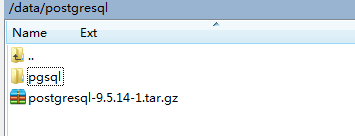
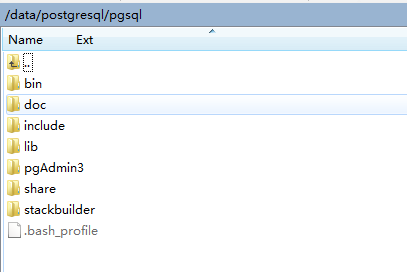
其中.bash_profile是没有的,是自己配置的。
# Get the aliases and functions
if [ -f ~/.bashrc ]; then
        . ~/.bashrc
fi

# User specific environment and startup programs

PGHOME=/data/postgresql/pgsql
export PGHOME

export PGDATA=$PGHOME/data_hjf

PATH=$PATH:$HOME/bin:$PGHOME/bin

export PATH
首先在root用户的时候创建数据库文件存放位置:
mkdir data_hjf
创建postgres用户,并设置权限:
groupadd postgres
useradd -g postgres postgres
sudo chown -R postgres:postgres /data/postgresql/
sudo chmod 700 /data/postgresql/
然后切换到postgres进行操作:
su postgres
先使得.bash_profile添加环境变量:
source ./.bash_profile
可通过env命令来查看linux的环境变量
由于是用户配置,需要每次登陆linux的时候都执行这条命令,可以设置自动执行,详情另百度。
去到bin目录,初始化数据库并设定数据库编码:
initdb -E UTF-8 -D data7 --locale=zh_CN.UTF-8
查看版本,注意是大写V:
psql -V
然后启动停止重启:
pg_ctl start
pg_ctl stop
pg_ctl restart
然后就可以用psql命令访问了:
[postgres@dev49 /data/postgresql/pgsql/bin]$ psql
注意:
1.如果是在root下面执行source ./.bash_profile可能导致数据库默认安装位置为bin目录下的data7,所以要切换到postgres用户下执行。(错误提示:data_hjf不是一个数据库等等)
2.如果要用navicat链接,要修改配置文件:
postgresql.conf
# -----------------------------
# PostgreSQL configuration file
# -----------------------------
#
# This file consists of lines of the form:
#
#   name = value
#
# (The "=" is optional.)  Whitespace may be used.  Comments are introduced with
# "#" anywhere on a line.  The complete list of parameter names and allowed
# values can be found in the PostgreSQL documentation.
#
# The commented-out settings shown in this file represent the default values.
# Re-commenting a setting is NOT sufficient to revert it to the default value;
# you need to reload the server.
#
# This file is read on server startup and when the server receives a SIGHUP
# signal.  If you edit the file on a running system, you have to SIGHUP the
# server for the changes to take effect, or use "pg_ctl reload".  Some
# parameters, which are marked below, require a server shutdown and restart to
# take effect.
#
# Any parameter can also be given as a command-line option to the server, e.g.,
# "postgres -c log_connections=on".  Some parameters can be changed at run time
# with the "SET" SQL command.
#
# Memory units:  kB = kilobytes        Time units:  ms  = milliseconds
#                MB = megabytes                     s   = seconds
#                GB = gigabytes                     min = minutes
#                TB = terabytes                     h   = hours
#                                                   d   = days

#------------------------------------------------------------------------------
# FILE LOCATIONS
#------------------------------------------------------------------------------

# The default values of these variables are driven from the -D command-line
# option or PGDATA environment variable, represented here as ConfigDir.

#data_directory = 'ConfigDir'        # use data in another directory
                    # (change requires restart)
#hba_file = 'ConfigDir/pg_hba.conf'    # host-based authentication file
                    # (change requires restart)
#ident_file = 'ConfigDir/pg_ident.conf'    # ident configuration file
                    # (change requires restart)

# If external_pid_file is not explicitly set, no extra PID file is written.
#external_pid_file = ''            # write an extra PID file
                    # (change requires restart)

#------------------------------------------------------------------------------
# CONNECTIONS AND AUTHENTICATION
#------------------------------------------------------------------------------

# - Connection Settings -

listen_addresses = '*'        # what IP address(es) to listen on;
                    # comma-separated list of addresses;
                    # defaults to 'localhost'; use '*' for all
                    # (change requires restart)
port = 5432            # (change requires restart)
max_connections = 100            # (change requires restart)
#superuser_reserved_connections = 3    # (change requires restart)
#unix_socket_directories = '/tmp'    # comma-separated list of directories
                    # (change requires restart)
#unix_socket_group = ''            # (change requires restart)
#unix_socket_permissions = 0777        # begin with 0 to use octal notation
                    # (change requires restart)
#bonjour = off                # advertise server via Bonjour
                    # (change requires restart)
#bonjour_name = ''            # defaults to the computer name
                    # (change requires restart)

# - Security and Authentication -

#authentication_timeout = 1min        # 1s-600s
#ssl = off                # (change requires restart)
#ssl_ciphers = 'HIGH:MEDIUM:+3DES:!aNULL' # allowed SSL ciphers
                    # (change requires restart)
#ssl_prefer_server_ciphers = on        # (change requires restart)
#ssl_ecdh_curve = 'prime256v1'        # (change requires restart)
#ssl_cert_file = 'server.crt'        # (change requires restart)
#ssl_key_file = 'server.key'        # (change requires restart)
#ssl_ca_file = ''            # (change requires restart)
#ssl_crl_file = ''            # (change requires restart)
#password_encryption = on
#db_user_namespace = off
#row_security = on

# GSSAPI using Kerberos
#krb_server_keyfile = ''
#krb_caseins_users = off

# - TCP Keepalives -
# see "man 7 tcp" for details

#tcp_keepalives_idle = 0        # TCP_KEEPIDLE, in seconds;
                    # 0 selects the system default
#tcp_keepalives_interval = 0        # TCP_KEEPINTVL, in seconds;
                    # 0 selects the system default
#tcp_keepalives_count = 0        # TCP_KEEPCNT;
                    # 0 selects the system default

#------------------------------------------------------------------------------
# RESOURCE USAGE (except WAL)
#------------------------------------------------------------------------------

# - Memory -

shared_buffers = 128MB            # min 128kB
                    # (change requires restart)
#huge_pages = try            # on, off, or try
                    # (change requires restart)
#temp_buffers = 8MB            # min 800kB
#max_prepared_transactions = 0        # zero disables the feature
                    # (change requires restart)
# Caution: it is not advisable to set max_prepared_transactions nonzero unless
# you actively intend to use prepared transactions.
#work_mem = 4MB                # min 64kB
#maintenance_work_mem = 64MB        # min 1MB
#autovacuum_work_mem = -1        # min 1MB, or -1 to use maintenance_work_mem
#max_stack_depth = 2MB            # min 100kB
dynamic_shared_memory_type = posix    # the default is the first option
                    # supported by the operating system:
                    #   posix
                    #   sysv
                    #   windows
                    #   mmap
                    # use none to disable dynamic shared memory
                    # (change requires restart)

# - Disk -

#temp_file_limit = -1            # limits per-session temp file space
                    # in kB, or -1 for no limit

# - Kernel Resource Usage -

#max_files_per_process = 1000        # min 25
                    # (change requires restart)
#shared_preload_libraries = ''        # (change requires restart)

# - Cost-Based Vacuum Delay -

#vacuum_cost_delay = 0            # 0-100 milliseconds
#vacuum_cost_page_hit = 1        # 0-10000 credits
#vacuum_cost_page_miss = 10        # 0-10000 credits
#vacuum_cost_page_dirty = 20        # 0-10000 credits
#vacuum_cost_limit = 200        # 1-10000 credits

# - Background Writer -

#bgwriter_delay = 200ms            # 10-10000ms between rounds
#bgwriter_lru_maxpages = 100        # 0-1000 max buffers written/round
#bgwriter_lru_multiplier = 2.0        # 0-10.0 multipler on buffers scanned/round

# - Asynchronous Behavior -

#effective_io_concurrency = 1        # 1-1000; 0 disables prefetching
#max_worker_processes = 8

#------------------------------------------------------------------------------
# WRITE AHEAD LOG
#------------------------------------------------------------------------------

# - Settings -

#wal_level = minimal            # minimal, archive, hot_standby, or logical
                    # (change requires restart)
#fsync = on                # turns forced synchronization on or off
#synchronous_commit = on        # synchronization level;
                    # off, local, remote_write, or on
#wal_sync_method = fsync        # the default is the first option
                    # supported by the operating system:
                    #   open_datasync
                    #   fdatasync (default on Linux)
                    #   fsync
                    #   fsync_writethrough
                    #   open_sync
#full_page_writes = on            # recover from partial page writes
#wal_compression = off            # enable compression of full-page writes
#wal_log_hints = off            # also do full page writes of non-critical updates
                    # (change requires restart)
#wal_buffers = -1            # min 32kB, -1 sets based on shared_buffers
                    # (change requires restart)
#wal_writer_delay = 200ms        # 1-10000 milliseconds

#commit_delay = 0            # range 0-100000, in microseconds
#commit_siblings = 5            # range 1-1000

# - Checkpoints -

#checkpoint_timeout = 5min        # range 30s-1h
#max_wal_size = 1GB
#min_wal_size = 80MB
#checkpoint_completion_target = 0.5    # checkpoint target duration, 0.0 - 1.0
#checkpoint_warning = 30s        # 0 disables

# - Archiving -

#archive_mode = off        # enables archiving; off, on, or always
                # (change requires restart)
#archive_command = ''        # command to use to archive a logfile segment
                # placeholders: %p = path of file to archive
                #               %f = file name only
                # e.g. 'test ! -f /mnt/server/archivedir/%f && cp %p /mnt/server/archivedir/%f'
#archive_timeout = 0        # force a logfile segment switch after this
                # number of seconds; 0 disables

#------------------------------------------------------------------------------
# REPLICATION
#------------------------------------------------------------------------------

# - Sending Server(s) -

# Set these on the master and on any standby that will send replication data.

#max_wal_senders = 0        # max number of walsender processes
                # (change requires restart)
#wal_keep_segments = 0        # in logfile segments, 16MB each; 0 disables
#wal_sender_timeout = 60s    # in milliseconds; 0 disables

#max_replication_slots = 0    # max number of replication slots
                # (change requires restart)
#track_commit_timestamp = off    # collect timestamp of transaction commit
                # (change requires restart)

# - Master Server -

# These settings are ignored on a standby server.

#synchronous_standby_names = ''    # standby servers that provide sync rep
                # comma-separated list of application_name
                # from standby(s); '*' = all
#vacuum_defer_cleanup_age = 0    # number of xacts by which cleanup is delayed

# - Standby Servers -

# These settings are ignored on a master server.

#hot_standby = off            # "on" allows queries during recovery
                    # (change requires restart)
#max_standby_archive_delay = 30s    # max delay before canceling queries
                    # when reading WAL from archive;
                    # -1 allows indefinite delay
#max_standby_streaming_delay = 30s    # max delay before canceling queries
                    # when reading streaming WAL;
                    # -1 allows indefinite delay
#wal_receiver_status_interval = 10s    # send replies at least this often
                    # 0 disables
#hot_standby_feedback = off        # send info from standby to prevent
                    # query conflicts
#wal_receiver_timeout = 60s        # time that receiver waits for
                    # communication from master
                    # in milliseconds; 0 disables
#wal_retrieve_retry_interval = 5s    # time to wait before retrying to
                    # retrieve WAL after a failed attempt

#------------------------------------------------------------------------------
# QUERY TUNING
#------------------------------------------------------------------------------

# - Planner Method Configuration -

#enable_bitmapscan = on
#enable_hashagg = on
#enable_hashjoin = on
#enable_indexscan = on
#enable_indexonlyscan = on
#enable_material = on
#enable_mergejoin = on
#enable_nestloop = on
#enable_seqscan = on
#enable_sort = on
#enable_tidscan = on

# - Planner Cost Constants -

#seq_page_cost = 1.0            # measured on an arbitrary scale
#random_page_cost = 4.0            # same scale as above
#cpu_tuple_cost = 0.01            # same scale as above
#cpu_index_tuple_cost = 0.005        # same scale as above
#cpu_operator_cost = 0.0025        # same scale as above
#effective_cache_size = 4GB

# - Genetic Query Optimizer -

#geqo = on
#geqo_threshold = 12
#geqo_effort = 5            # range 1-10
#geqo_pool_size = 0            # selects default based on effort
#geqo_generations = 0            # selects default based on effort
#geqo_selection_bias = 2.0        # range 1.5-2.0
#geqo_seed = 0.0            # range 0.0-1.0

# - Other Planner Options -

#default_statistics_target = 100    # range 1-10000
#constraint_exclusion = partition    # on, off, or partition
#cursor_tuple_fraction = 0.1        # range 0.0-1.0
#from_collapse_limit = 8
#join_collapse_limit = 8        # 1 disables collapsing of explicit
                    # JOIN clauses

#------------------------------------------------------------------------------
# ERROR REPORTING AND LOGGING
#------------------------------------------------------------------------------

# - Where to Log -

log_destination = 'csvlog'        # Valid values are combinations of
                    # stderr, csvlog, syslog, and eventlog,
                    # depending on platform.  csvlog
                    # requires logging_collector to be on.

# This is used when logging to stderr:
logging_collector = on        # Enable capturing of stderr and csvlog
                    # into log files. Required to be on for
                    # csvlogs.
                    # (change requires restart)

# These are only used if logging_collector is on:
log_directory = 'pg_log'        # directory where log files are written,
                    # can be absolute or relative to PGDATA
log_filename = 'postgresql-%Y-%m-%d.log'    # log file name pattern,
                    # can include strftime() escapes
log_file_mode = 0600            # creation mode for log files,
                    # begin with 0 to use octal notation
log_truncate_on_rotation = on        # If on, an existing log file with the
                    # same name as the new log file will be
                    # truncated rather than appended to.
                    # But such truncation only occurs on
                    # time-driven rotation, not on restarts
                    # or size-driven rotation.  Default is
                    # off, meaning append to existing files
                    # in all cases.
log_rotation_age = 1d            # Automatic rotation of logfiles will
                    # happen after that time.  0 disables.
#log_rotation_size = 10MB        # Automatic rotation of logfiles will
                    # happen after that much log output.
                    # 0 disables.

# These are relevant when logging to syslog:
#syslog_facility = 'LOCAL0'
#syslog_ident = 'postgres'

# This is only relevant when logging to eventlog (win32):
# (change requires restart)
#event_source = 'PostgreSQL'

# - When to Log -

#client_min_messages = notice        # values in order of decreasing detail:
                    #   debug5
                    #   debug4
                    #   debug3
                    #   debug2
                    #   debug1
                    #   log
                    #   notice
                    #   warning
                    #   error

log_min_messages = warning        # values in order of decreasing detail:
                    #   debug5
                    #   debug4
                    #   debug3
                    #   debug2
                    #   debug1
                    #   info
                    #   notice
                    #   warning
                    #   error
                    #   log
                    #   fatal
                    #   panic

log_min_error_statement = error    # values in order of decreasing detail:
                    #   debug5
                    #   debug4
                    #   debug3
                    #   debug2
                    #   debug1
                    #   info
                    #   notice
                    #   warning
                    #   error
                    #   log
                    #   fatal
                    #   panic (effectively off)

log_min_duration_statement = -1    # -1 is disabled, 0 logs all statements
                    # and their durations, > 0 logs only
                    # statements running at least this number
                    # of milliseconds

# - What to Log -

#debug_print_parse = off
#debug_print_rewritten = off
#debug_print_plan = off
#debug_pretty_print = on
log_checkpoints = on
log_connections = on
#log_disconnections = off
#log_duration = off
#log_error_verbosity = default        # terse, default, or verbose messages
#log_hostname = off
log_line_prefix = '%a%d%u%h%t'            # special values:
                    #   %a = application name
                    #   %u = user name
                    #   %d = database name
                    #   %r = remote host and port
                    #   %h = remote host
                    #   %p = process ID
                    #   %t = timestamp without milliseconds
                    #   %m = timestamp with milliseconds
                    #   %i = command tag
                    #   %e = SQL state
                    #   %c = session ID
                    #   %l = session line number
                    #   %s = session start timestamp
                    #   %v = virtual transaction ID
                    #   %x = transaction ID (0 if none)
                    #   %q = stop here in non-session
                    #        processes
                    #   %% = '%'
                    # e.g. '<%u%%%d> '
#log_lock_waits = off            # log lock waits >= deadlock_timeout
log_statement = 'ddl'            # none, ddl, mod, all
#log_replication_commands = off
#log_temp_files = -1            # log temporary files equal or larger
                    # than the specified size in kilobytes;
                    # -1 disables, 0 logs all temp files
log_timezone = 'PRC'

# - Process Title -

#cluster_name = ''            # added to process titles if nonempty
                    # (change requires restart)
#update_process_title = on

#------------------------------------------------------------------------------
# RUNTIME STATISTICS
#------------------------------------------------------------------------------

# - Query/Index Statistics Collector -

#track_activities = on
#track_counts = on
#track_io_timing = off
#track_functions = none            # none, pl, all
#track_activity_query_size = 1024    # (change requires restart)
#stats_temp_directory = 'pg_stat_tmp'

# - Statistics Monitoring -

#log_parser_stats = off
#log_planner_stats = off
#log_executor_stats = off
#log_statement_stats = off

#------------------------------------------------------------------------------
# AUTOVACUUM PARAMETERS
#------------------------------------------------------------------------------

#autovacuum = on            # Enable autovacuum subprocess?  'on'
                    # requires track_counts to also be on.
#log_autovacuum_min_duration = -1    # -1 disables, 0 logs all actions and
                    # their durations, > 0 logs only
                    # actions running at least this number
                    # of milliseconds.
#autovacuum_max_workers = 3        # max number of autovacuum subprocesses
                    # (change requires restart)
#autovacuum_naptime = 1min        # time between autovacuum runs
#autovacuum_vacuum_threshold = 50    # min number of row updates before
                    # vacuum
#autovacuum_analyze_threshold = 50    # min number of row updates before
                    # analyze
#autovacuum_vacuum_scale_factor = 0.2    # fraction of table size before vacuum
#autovacuum_analyze_scale_factor = 0.1    # fraction of table size before analyze
#autovacuum_freeze_max_age = 200000000    # maximum XID age before forced vacuum
                    # (change requires restart)
#autovacuum_multixact_freeze_max_age = 400000000    # maximum multixact age
                    # before forced vacuum
                    # (change requires restart)
#autovacuum_vacuum_cost_delay = 20ms    # default vacuum cost delay for
                    # autovacuum, in milliseconds;
                    # -1 means use vacuum_cost_delay
#autovacuum_vacuum_cost_limit = -1    # default vacuum cost limit for
                    # autovacuum, -1 means use
                    # vacuum_cost_limit

#------------------------------------------------------------------------------
# CLIENT CONNECTION DEFAULTS
#------------------------------------------------------------------------------

# - Statement Behavior -

#search_path = '"$user", public'    # schema names
#default_tablespace = ''        # a tablespace name, '' uses the default
#temp_tablespaces = ''            # a list of tablespace names, '' uses
                    # only default tablespace
#check_function_bodies = on
#default_transaction_isolation = 'read committed'
#default_transaction_read_only = off
#default_transaction_deferrable = off
#session_replication_role = 'origin'
#statement_timeout = 0            # in milliseconds, 0 is disabled
#lock_timeout = 0            # in milliseconds, 0 is disabled
#vacuum_freeze_min_age = 50000000
#vacuum_freeze_table_age = 150000000
#vacuum_multixact_freeze_min_age = 5000000
#vacuum_multixact_freeze_table_age = 150000000
#bytea_output = 'hex'            # hex, escape
#xmlbinary = 'base64'
#xmloption = 'content'
#gin_fuzzy_search_limit = 0
#gin_pending_list_limit = 4MB

# - Locale and Formatting -

datestyle = 'iso, mdy'
#intervalstyle = 'postgres'
timezone = 'PRC'
#timezone_abbreviations = 'Default'     # Select the set of available time zone
                    # abbreviations.  Currently, there are
                    #   Default
                    #   Australia (historical usage)
                    #   India
                    # You can create your own file in
                    # share/timezonesets/.
#extra_float_digits = 0            # min -15, max 3
#client_encoding = sql_ascii        # actually, defaults to database
                    # encoding

# These settings are initialized by initdb, but they can be changed.
lc_messages = 'C'            # locale for system error message
                    # strings
lc_monetary = 'C'            # locale for monetary formatting
lc_numeric = 'C'            # locale for number formatting
lc_time = 'C'                # locale for time formatting

# default configuration for text search
default_text_search_config = 'pg_catalog.english'

# - Other Defaults -

#dynamic_library_path = '$libdir'
#local_preload_libraries = ''
#session_preload_libraries = ''

#------------------------------------------------------------------------------
# LOCK MANAGEMENT
#------------------------------------------------------------------------------

#deadlock_timeout = 1s
#max_locks_per_transaction = 64        # min 10
                    # (change requires restart)
#max_pred_locks_per_transaction = 64    # min 10
                    # (change requires restart)

#------------------------------------------------------------------------------
# VERSION/PLATFORM COMPATIBILITY
#------------------------------------------------------------------------------

# - Previous PostgreSQL Versions -

#array_nulls = on
#backslash_quote = safe_encoding    # on, off, or safe_encoding
#default_with_oids = off
#escape_string_warning = on
#lo_compat_privileges = off
#operator_precedence_warning = off
#quote_all_identifiers = off
#sql_inheritance = on
#standard_conforming_strings = on
#synchronize_seqscans = on

# - Other Platforms and Clients -

#transform_null_equals = off

#------------------------------------------------------------------------------
# ERROR HANDLING
#------------------------------------------------------------------------------

#exit_on_error = off            # terminate session on any error?
#restart_after_crash = on        # reinitialize after backend crash?

#------------------------------------------------------------------------------
# CONFIG FILE INCLUDES
#------------------------------------------------------------------------------

# These options allow settings to be loaded from files other than the
# default postgresql.conf.

#include_dir = 'conf.d'            # include files ending in '.conf' from
                    # directory 'conf.d'
#include_if_exists = 'exists.conf'    # include file only if it exists
#include = 'special.conf'        # include file

#------------------------------------------------------------------------------
# CUSTOMIZED OPTIONS
#------------------------------------------------------------------------------

# Add settings for extensions here
pg_hba.conf
# PostgreSQL Client Authentication Configuration File
# ===================================================
#
# Refer to the "Client Authentication" section in the PostgreSQL
# documentation for a complete description of this file.  A short
# synopsis follows.
#
# This file controls: which hosts are allowed to connect, how clients
# are authenticated, which PostgreSQL user names they can use, which
# databases they can access.  Records take one of these forms:
#
# local      DATABASE  USER  METHOD  [OPTIONS]
# host       DATABASE  USER  ADDRESS  METHOD  [OPTIONS]
# hostssl    DATABASE  USER  ADDRESS  METHOD  [OPTIONS]
# hostnossl  DATABASE  USER  ADDRESS  METHOD  [OPTIONS]
#
# (The uppercase items must be replaced by actual values.)
#
# The first field is the connection type: "local" is a Unix-domain
# socket, "host" is either a plain or SSL-encrypted TCP/IP socket,
# "hostssl" is an SSL-encrypted TCP/IP socket, and "hostnossl" is a
# plain TCP/IP socket.
#
# DATABASE can be "all", "sameuser", "samerole", "replication", a
# database name, or a comma-separated list thereof. The "all"
# keyword does not match "replication". Access to replication
# must be enabled in a separate record (see example below).
#
# USER can be "all", a user name, a group name prefixed with "+", or a
# comma-separated list thereof.  In both the DATABASE and USER fields
# you can also write a file name prefixed with "@" to include names
# from a separate file.
#
# ADDRESS specifies the set of hosts the record matches.  It can be a
# host name, or it is made up of an IP address and a CIDR mask that is
# an integer (between 0 and 32 (IPv4) or 128 (IPv6) inclusive) that
# specifies the number of significant bits in the mask.  A host name
# that starts with a dot (.) matches a suffix of the actual host name.
# Alternatively, you can write an IP address and netmask in separate
# columns to specify the set of hosts.  Instead of a CIDR-address, you
# can write "samehost" to match any of the server's own IP addresses,
# or "samenet" to match any address in any subnet that the server is
# directly connected to.
#
# METHOD can be "trust", "reject", "md5", "password", "gss", "sspi",
# "ident", "peer", "pam", "ldap", "radius" or "cert".  Note that
# "password" sends passwords in clear text; "md5" is preferred since
# it sends encrypted passwords.
#
# OPTIONS are a set of options for the authentication in the format
# NAME=VALUE.  The available options depend on the different
# authentication methods -- refer to the "Client Authentication"
# section in the documentation for a list of which options are
# available for which authentication methods.
#
# Database and user names containing spaces, commas, quotes and other
# special characters must be quoted.  Quoting one of the keywords
# "all", "sameuser", "samerole" or "replication" makes the name lose
# its special character, and just match a database or username with
# that name.
#
# This file is read on server startup and when the postmaster receives
# a SIGHUP signal.  If you edit the file on a running system, you have
# to SIGHUP the postmaster for the changes to take effect.  You can
# use "pg_ctl reload" to do that.

# Put your actual configuration here
# ----------------------------------
#
# If you want to allow non-local connections, you need to add more
# "host" records.  In that case you will also need to make PostgreSQL
# listen on a non-local interface via the listen_addresses
# configuration parameter, or via the -i or -h command line switches.

# CAUTION: Configuring the system for local "trust" authentication
# allows any local user to connect as any PostgreSQL user, including
# the database superuser.  If you do not trust all your local users,
# use another authentication method.

# TYPE  DATABASE        USER            ADDRESS                 METHOD

# "local" is for Unix domain socket connections only
local   all             all                                     trust
# IPv4 local connections:
host    all             all             127.0.0.1/32            trust
# IPv6 local connections:
host    all             all             ::1/128                 trust
host    all             all             0.0.0.0/0               trust
# Allow replication connections from localhost, by a user with the
# replication privilege.
#local   replication     postgres                                trust
#host    replication     postgres        127.0.0.1/32            trust
#host    replication     postgres        ::1/128                 trust
postgresql安装概览的更多相关文章
- Linux下apache+phppgadmin+postgresql安装配置
Linux下apache+phppgadmin+postgresql安装配置 操作系统:CentOS 安装包:httpd(首选yum), php(包括php以及php-pgsql,php-mbstri ...
- CentOS7 PostgreSQL安装
CentOS7 PostgreSQL安装 CentOS7 PostgreSQL安装 Install 安装 使用yum安装 yum install http://yum.postgresql.org/9 ...
- Ubuntu PostgreSQL安装和配置
一.安装 1.安装 使用如下命令,会自动安装最新版,这里为9.5 sudo apt-get install postgresql 安装完成后,默认会: (1)创建名为"postgres&qu ...
- PostgreSQL安装详细步骤(windows)
原文地址:http://blog.chinaunix.net/uid-354915-id-3498734.html PostgreSQL安装:一.windows下安装过程安装介质:postgresql ...
- CentOS7 PostgreSQL 安装
PostgreSQL安装 安装使用yum安装 (找源 http://yum.postgresql.org/) yum install https://download.postgresql.org/p ...
- windows下postgresql安装失败解决方法:无法运行getlocales.exe
今天要安装postgresql但是安装的时候出现错误 Unknown error while running C:\Users\jinjin\AppData\Local\Temp\postgresql ...
- PostgreSQL安装详细步骤windows
PostgreSQL安装:一.windows下安装过程安装介质:postgresql-9.1.3-1-windows.exe(46M),安装过程非常简单,过程如下:1.开始安装: 2.选择程序安装目录 ...
- windows下postgreSQL安装与启动
转:https://www.yiibai.com/postgresql/install-postgresql.html https://blog.csdn.net/irainreally/articl ...
- 【CentOS】PostgreSQL安装与设定
本教程适合Centos6.7或者RedHat. PostgreSQL安装 1.Postgresql安装包确认 yum list postgresql* postgresql-server.x86_64 ...
随机推荐
- 一、zipkin
zipkin是Twitter基于google的分布式监控系统Dapper(论文)的开发源实现,zipkin用于跟踪分布式服务之间的应用数据链路(具体就是收集微服务之间的调用情况,然后处理调用之间数据延 ...
- mybatis查询修改同时操作
update dic_purchase set state =0 where purchase_number in (select tmp.* from (select purchase_number ...
- P1130 红牌
题目描述 某地临时居民想获得长期居住权就必须申请拿到红牌.获得红牌的过程是相当复杂 ,一共包括NN个步骤.每一步骤都由政府的某个工作人员负责检查你所提交的材料是否符合条件.为了加快进程,每一步政府都派 ...
- POJ 1017 最少包裹
参考自:https://www.cnblogs.com/ECJTUACM-873284962/p/6414760.html Packets Time Limit: 1000MS Memory Li ...
- Java json转model
前面有一篇关于 json的转换类的工具:http://blog.csdn.net/hanjun0612/article/details/77891569 但是有一个情况. 由于java需要属性小写开 ...
- BZOJ5210 最大连通子块和 【树链剖分】【堆】【动态DP】
题目分析: 解决了上次提到的<切树游戏>后,这道题就是一道模板题. 注意我们需要用堆维护子重链的最大值.这样不会使得复杂度变坏,因为每个重链我们只考虑一个点. 时间复杂度$O(nlog^2 ...
- HBase 清空表数据
public int clearTableByTableName(String tableName) throws Exception { logger.debug("======InitH ...
- Codeforces Round #541 (Div. 2) D(并查集+拓扑排序) F (并查集)
D. Gourmet choice 链接:http://codeforces.com/contest/1131/problem/D 思路: = 的情况我们用并查集把他们扔到一个集合,然后根据 > ...
- Nagios 使用 NSClient++ 监控Windows Server
在被监控的Windows server 主机上安装NSClinet++下载地址:https://www.nsclient.org/download/32bit:http://files.nsclien ...
- RequestContextHolder 很方便的获取 request
在 Spring boot web 中我们可以通过 RequestContextHolder 很方便的获取 request. ServletRequestAttributes requestAttri ...