
springboot中使用freemarker生成word文档并打包成zip下载(简历)
一、设计出的简历模板图以及给的简历小图标切图

二、按照简历模板图新建简历word文件 :${字段名},同时将图片插入到word中,并将建好的word文件另存为xml文件;

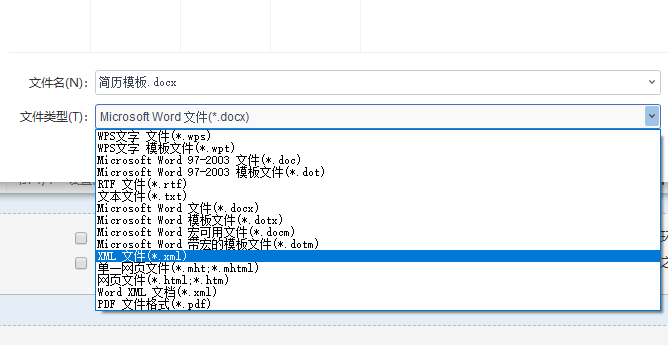
三、直接将该xml文件重命名为.ftl文件,并用编辑器(EditPlus)打开并修改
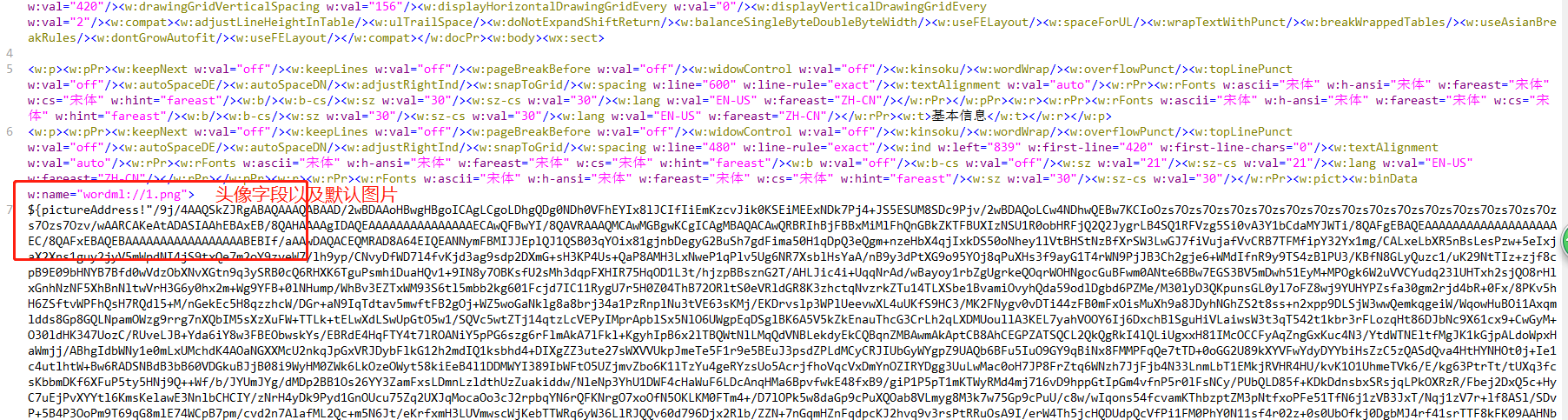
说明:字段取值用Map来存取;
${pictureAddrees!"...."} pictureAddress中存的是图片转换后的64位码,!(感叹号)表示当字段值为空时取后面的默认图片的64位码;
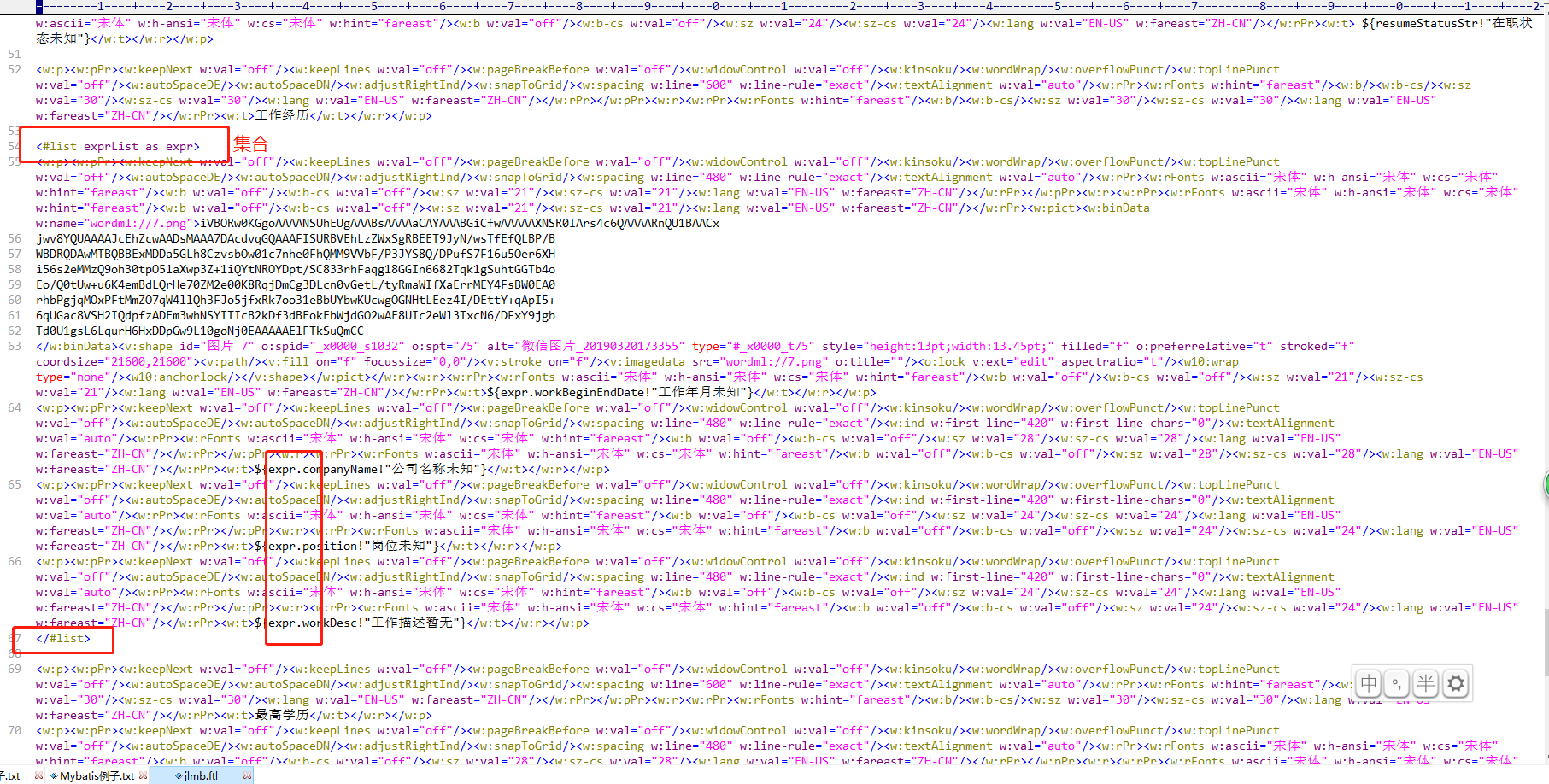
集合数据循环取值形式如图所示。
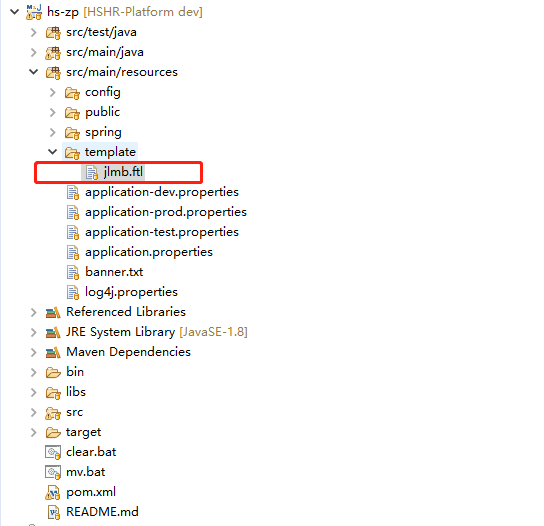
四、项目pom文件中加入freemarker的依赖,将ftl文件放到resource目录下
		<!--添加freeMarker-->

             <!-- https://mvnrepository.com/artifact/org.freemarker/freemarker -->

		<dependency>

		    <groupId>org.freemarker</groupId>

		    <artifactId>freemarker</artifactId>

		    <version>2.3.23</version>

		 </dependency>
五、工具类代码如下:
1、createWord(Map dataMap, String templateName, String fileFullPath) ==> 根据传入的数据、模板文件名、生成文件全路径名(带.doc)来创建word文件到磁盘;
2、createZip(String zipfullPath,String[] fileFullPaths) ==> 用流的方式根据生成的文件路径名(带.zip)、要打包的word文件全路径名数组(带.doc)来打包zip文件到磁盘;
3、createZip(String zipfullPath,String fileFullPath,boolean isKeepDirStr) ==> 用流的方式生成zip文件,调用compressZip()方法
compressZip(InputStream inputStream,ZipOutputStream zip, File sourceFile, String fileName,boolean isKeepDirStr) ==> 递归压缩文件夹,被调用
注意:当生成的zip文件为带文件夹目录级别时,调用3方法;
当生成的zip文件为纯文件时,调用2方法。
4、downLoadFile(String fullPath, HttpServletResponse response) ==> 用流的方式下载生成的word文件、zip文件或其他文件;
5、createFromUrl(String urlAddress,String fileFullPath) ==> 从网络地址下载文件到磁盘;
如插入简历的图片需要从网络地址下载到磁盘,再生成base64位码,否则会失败;
个人的一些视频信息地址、附件地址也需要从网络地址下载到磁盘,保存后再一起和简历word打包成zip文件下载。
6、getImageBase(String urlAddress,String pathAddress) ==> 生成图片的Base64位码。

 package com.hs.zp.common.utils;

 import freemarker.template.Configuration;

 import freemarker.template.Template;

 import freemarker.template.TemplateExceptionHandler;

 import java.io.*;

 import java.net.URL;

 import java.util.Map;

 import javax.servlet.http.HttpServletResponse;

 import javax.xml.soap.Text;

 import org.apache.commons.codec.binary.Base64;

 import org.apache.log4j.Logger;

 import org.apache.tools.zip.ZipEntry;

 import org.apache.tools.zip.ZipOutputStream;

 import com.google.common.io.Files;

 /**

  *

  * @Descript TODO (利用freemark生成word及zip)

  * @author yeting

  * @date 2019年3月19日

  *

  */

 public class WordUtil {

     public static Logger logger = Logger.getLogger(WordUtil.class);

     /**

      * 生成word文件(全局可用)

      * @param dataMap word中需要展示的动态数据,用map集合来保存

      * @param templateName word模板名称,例如:test.ftl

      * @param fileFullPath 要生成的文件全路径

      */

     @SuppressWarnings("unchecked")

     public static void createWord(Map dataMap, String templateName, String fileFullPath) {

         logger.info("【createWord】:==>方法进入");

         logger.info("【fileFullPath】:==>" + fileFullPath);

         logger.info("【templateName】:==>" + templateName);

         try {

             // 创建配置实例

             Configuration configuration = new Configuration();

             logger.info("【创建配置实例】:==>");

             // 设置编码

             configuration.setDefaultEncoding("UTF-8");

             logger.info("【设置编码】:==>");

             // 设置处理空值

             configuration.setClassicCompatible(true);

             // 设置错误控制器

 //            configuration.setTemplateExceptionHandler(TemplateExceptionHandler.RETHROW_HANDLER);

 //            String pathName = Text.class.getResource("/template").getFile();

 //            File templateFile = new File(pathName);

 //            logger.info("【pathName】:==>" + pathName);

 //            logger.info("【templateFile】:==>" + templateFile.getName());

 //            configuration.setDirectoryForTemplateLoading(templateFile);

             // 设置ftl模板文件加载方式

             configuration.setClassForTemplateLoading(WordUtil.class,"/template");

             //创建文件

             File file = new File(fileFullPath);

             // 如果输出目标文件夹不存在,则创建

             if (!file.getParentFile().exists()) {

                 file.getParentFile().mkdirs();

             }

             // 将模板和数据模型合并生成文件

             Writer out = new BufferedWriter(new OutputStreamWriter(new FileOutputStream(file), "UTF-8"));

             // 获取模板

             Template template = configuration.getTemplate(templateName);

             // 生成文件

             template.process(dataMap, out);

             // 清空缓存

             out.flush();

             // 关闭流

             out.close();

         } catch (Exception e) {

             logger.info("【生成word文件出错】:==>" + e.getMessage());

             e.printStackTrace();

         }

     }

     /**

      * 生成zip文件,根据文件路径不带子文件夹(全局可用)

      * @param zipfullPath 压缩后的zip文件全路径

      * @param fileFullPaths 压缩前的文件全路径数组

      */

     public static void createZip(String zipfullPath,String[] fileFullPaths) {

         InputStream inputStream = null;

         ZipOutputStream zip = null;

         try {

             zip = new ZipOutputStream(new FileOutputStream(zipfullPath));

             zip.setEncoding("gbk");

             for(String fullPath:fileFullPaths) {

                 logger.info("【createZip:fullPath】:==>" + fullPath);

                 if(StringUtil.isNullOrEmpty(fullPath)) {

                     continue;

                 }

                 //创建文件

                 File file = new File(fullPath);

                 String fileName = file.getName();

                 //读文件流

                 inputStream = new BufferedInputStream(new FileInputStream(file));

                 byte[] buffer = new byte[inputStream.available()];

                 inputStream.read(buffer);

                 inputStream.close();

                 //将读取的文件输出到zip中

                 zip.putNextEntry(new ZipEntry(fileName));

                 zip.write(buffer);

                 zip.closeEntry();

             }

         } catch (Exception e) {

             e.printStackTrace();

         } finally {

             try {

                 if (inputStream != null) {

                     inputStream.close();

                 }

             } catch (Exception e) {

                 e.printStackTrace();

             }

             try {

                 if (zip != null) {

                     zip.close();

                 }

             } catch (Exception e) {

                 e.printStackTrace();

             }

         }

     }

     /**

      * 生成的zip文件带子文件夹(全局可用)

      * @param zipfullPath 压缩后的zip文件全路径

      * @param fileFullPath 压缩前的文件全路径

      * @param isKeepDirStr 是否保留原来的目录结构,true:保留目录结构; false:所有文件跑到压缩包根目录下(注意:不保留目录结构可能会出现同名文件,会压缩失败)

      */

     public static void createZip(String zipfullPath,String fileFullPath,boolean isKeepDirStr) {

         InputStream inputStream = null;

         ZipOutputStream zip = null;

         try {

             zip = new ZipOutputStream(new FileOutputStream(zipfullPath));

             zip.setEncoding("gbk");

             File file = new File(fileFullPath);

             compressZip(inputStream,zip,file, file.getName(), isKeepDirStr);//递归压缩

         } catch (Exception e) {

             e.printStackTrace();

         } finally {

             try {

                 if (inputStream != null) {

                     inputStream.close();

                 }

             } catch (Exception e) {

                 e.printStackTrace();

             }

             try {

                 if (zip != null) {

                     zip.close();

                 }

             } catch (Exception e) {

                 e.printStackTrace();

             }

         }

     }

     /**

      * 递归压缩方法(仅限于此类中用于压缩zip文件)

      * @param inputStream 输入流

      * @param zip zip输出流

      * @param sourceFile 源文件

      * @param fileName 文件夹名或文件名

      * @param isKeepDirStr 是否保留原来的目录结构,true:保留目录结构; false:所有文件跑到压缩包根目录下(注意:不保留目录结构可能会出现同名文件,会压缩失败)

      * @throws Exception

      */

     private static void compressZip(InputStream inputStream,ZipOutputStream zip, File sourceFile, String fileName,boolean isKeepDirStr) throws Exception{

         logger.info("【compressZip:sourceFile】:==>" + sourceFile.getPath());

         logger.info("【compressZip:fileName】:==>" + fileName);

         if(sourceFile.isFile()){

             //读文件流

             inputStream = new BufferedInputStream(new FileInputStream(sourceFile));

             byte[] buffer = new byte[inputStream.available()];

             inputStream.read(buffer);

             inputStream.close();

             //将读取的文件输出到zip中

             zip.putNextEntry(new ZipEntry(fileName));

             zip.write(buffer);

             zip.closeEntry();

         } else {

             File[] listFiles = sourceFile.listFiles();

             if(listFiles == null || listFiles.length == 0){

                 // 需要保留原来的文件结构时,需要对空文件夹进行处理

                 if(isKeepDirStr){

                     zip.putNextEntry(new ZipEntry(fileName + "/"));//空文件夹的处理

                     zip.closeEntry();// 没有文件,不需要文件的copy

                 }

             }else {

                 for (File file : listFiles) {

                     // 判断是否需要保留原来的文件结构,注意:file.getName()前面需要带上父文件夹的名字加一斜杠,不然最后压缩包中就不能保留原来的文件结构,即:所有文件都跑到压缩包根目录下了

                     if (isKeepDirStr) {

                         compressZip(inputStream,zip,file,  fileName + "/" + file.getName(),isKeepDirStr);

                     } else {

                         compressZip(inputStream,zip, file, file.getName(),isKeepDirStr);

                     }

                 }

             }

         }

     }

     /**

      * 下载生成的文件(全局可用)

      * @param fullPath 全路径

      * @param response

      */

     public static void downLoadFile(String fullPath, HttpServletResponse response) {

         logger.info("【downLoadFile:fullPath】:==>" + fullPath);

         InputStream inputStream = null;

         OutputStream outputStream = null;

         try {

             //创建文件

             File file = new File(fullPath);

             String fileName = file.getName();

             //读文件流

             inputStream = new BufferedInputStream(new FileInputStream(file));

             byte[] buffer = new byte[inputStream.available()];

             inputStream.read(buffer);

             //清空响应

             response.reset();

             response.setCharacterEncoding("UTF-8");

             response.setContentType("application/octet-stream; charset=utf-8");

             // response.setContentType("application/msword");

             response.setHeader("Content-Disposition","attachment; filename=" + new String(fileName.getBytes(), "ISO8859-1"));

             response.setHeader("Content-Length", "" + file.length());

             //写文件流

             outputStream = new BufferedOutputStream(response.getOutputStream());

             outputStream.write(buffer);

             outputStream.flush();

         } catch (Exception e) {

             e.printStackTrace();

         } finally {

             try {

                 if (outputStream != null) {

                     outputStream.close();

                 }

             } catch (Exception e) {

                 e.printStackTrace();

             }

             try {

                 if (inputStream != null) {

                     inputStream.close();

                 }

             } catch (Exception e) {

                 e.printStackTrace();

             }

         }

     }

     /**

      * 下载网络文件到本地(主要用于下载简历附件)

      * @param urlAddress 网络url地址,为空时直接返回

      * @param fileFullPath 文件全路径

      */

     public static void createFromUrl(String urlAddress,String fileFullPath) {

         logger.info("【service:开始下载网络文件】:==> 网上文件地址:" + urlAddress + "文件保存路径:" + fileFullPath);

         if(StringUtil.isNullOrEmpty(urlAddress)) {

             return ;

         }

         DataInputStream dataInputStream = null;

         FileOutputStream fileOutputStream =null;

         try {

             URL url = new URL(urlAddress);

             dataInputStream = new DataInputStream(url.openStream());//打开网络输入流

             //创建文件

             File file = new File(fileFullPath);

             // 如果输出目标文件夹不存在,则创建

             if (!file.getParentFile().exists()) {

                 file.getParentFile().mkdirs();

             }

             fileOutputStream = new FileOutputStream(file);//建立一个新的文件

             byte[] buffer = new byte[1024];

             int length;

             while((length = dataInputStream.read(buffer))>0){//开始填充数据

                 fileOutputStream.write(buffer,0,length);

             }

             fileOutputStream.flush();

         } catch (Exception e) {

             e.printStackTrace();

         } finally {

             try {

                 if(dataInputStream!=null) {

                     dataInputStream.close();

                 }

             } catch (IOException e) {

                 e.printStackTrace();

             }

             try {

                 if(fileOutputStream!=null) {

                     fileOutputStream.close();

                 }

             } catch (IOException e) {

                 e.printStackTrace();

             }

         }

     }

     /**

      * 从网上或本地获得图片的base64码(主要用于插入生成word中的图片)

      * @param urlAddress 网络路径,二选一,目前有问题

      * @param pathAddress 本地路径,二选一

      * @return 返回base64码或null

      */

     public static String getImageBase(String urlAddress,String pathAddress) {

         byte[] buffer = null;

         InputStream inputStream = null;

         String imageCodeBase64 = null;

         try {

             if(!StringUtil.isNullOrEmpty(urlAddress)){

                 URL url = new URL(urlAddress);

                 inputStream = new DataInputStream(url.openStream());//打开网络输入流

                 buffer = new byte[inputStream.available()];

                 inputStream.read(buffer);

             }else if(!StringUtil.isNullOrEmpty(pathAddress)){

                 inputStream = new BufferedInputStream(new FileInputStream(new File(pathAddress)));//读文件流

                 buffer = new byte[inputStream.available()];

                 inputStream.read(buffer);

             }else {

                 return null;

             }

             imageCodeBase64 = Base64.encodeBase64String(buffer);

 //            System.out.println(imageCodeBase64);

         }catch (Exception e) {

             e.printStackTrace();

         }finally {

             try {

                 if(inputStream!=null) {

                     inputStream.close();

                 }

             } catch (IOException e) {

                 e.printStackTrace();

             }

         }

         return imageCodeBase64;

     }

 }
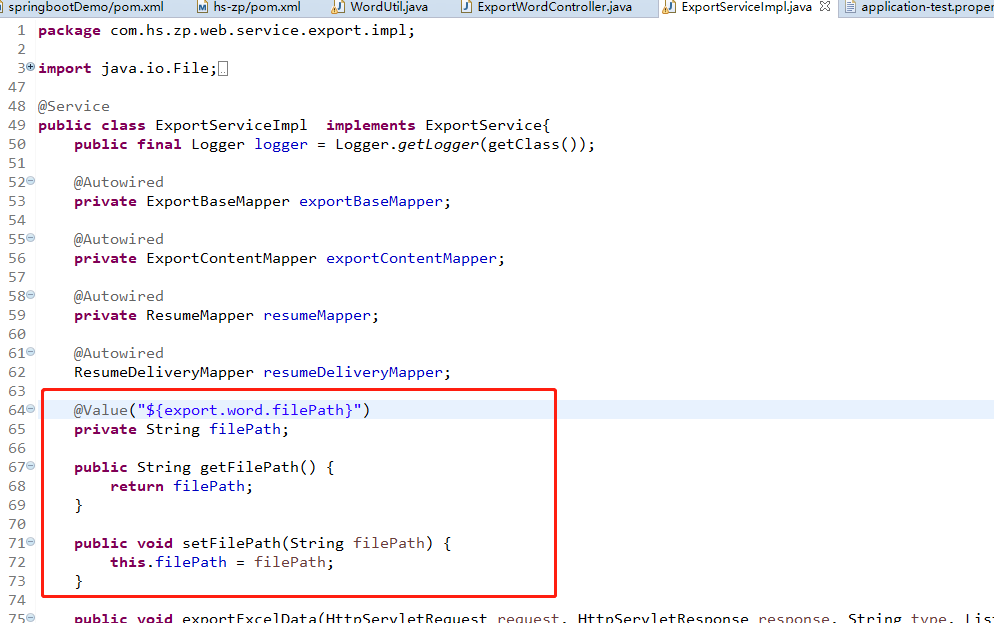
六、调用处代码如下
逻辑:循环开始 ==>
取出简历数据封装到Map中 ==> 生成word文件到磁盘 ==> 下载附件等到磁盘 ==> 将word文件、下载好的文件 的全路径名放入到路径数组中
==> 循环中....
循环结束 ==>
根据路径数组打包生成zip到磁盘 ==>
下载zip文件 ==>
删除原文件和zip文件,下载完毕 ==>

  1     @Transactional(rollbackFor=Exception.class)

     @Override

     public void exportWordResume(List<ResumeDelivery> resumeDeliveryList,int userId, HttpServletResponse response) throws Exception {

         logger.info("【service:exportWordResume】:==> 服务层请求开始");

         String[] fileFullPaths = new String[resumeDeliveryList.size()];//文件全路径数组

         String[] folderFullPaths = new String[resumeDeliveryList.size()];//文件夹全路径数组

         String[] addUrls = new String[resumeDeliveryList.size()];//附件全路径数组

         String[] videoFullPaths = new String[resumeDeliveryList.size()];//视频全路径数组

         boolean flag = false;//该批文件是否存在附件

         String templateName = "jlmb.ftl";//模板名称

         Resume resume = null;//简历

         Map<String, Object> map = null;//获取数据信息

         String fileName = null;//文件名称:应聘者姓名+应聘职位名称+简历唯一标识号+下载人ID

         String zipFullPath = filePath + File.separator + "小马HR_求职者简历下载_" +userId;////要压缩的文件夹路径

         String folderFullPath = null;//子文件夹全路径

         String fileFullPath = null;//文件全路径

         String addFullPath = null;//附件全路径

         String addSuffix = null;//附件后缀

         String videoFullPath = null;//视频全路径

         String videoSuffix = null;//视频后缀

         String headImagePath = null;//头像全路径

         String validString = null;

         Map<Integer,String> validMap = new HashMap<>();//简历字串 key:resumeId,value:resumeId+positionName

         int index = 1;//简历下载数

         int count = 0;//循环次数

         for(ResumeDelivery resumeDeliveryBean:resumeDeliveryList) {

             count++;

             logger.info("【service:循环投递记录】:==> " + count);

             //判断是否重复的简历不予下载

             validString = resumeDeliveryBean.getResumeId() + resumeDeliveryBean.getPositionName();

             if(validString.equals(validMap.get(resumeDeliveryBean.getResumeId()))){

                 logger.info("【重复简历】:==> " + validString);

                 continue;

             }else {

                 validMap.put(resumeDeliveryBean.getResumeId(), validString);

             }

             Assert.notNull(resumeDeliveryBean.getResumeId(), "第" + count +"份简历投递记录不存在!投递ID:" + resumeDeliveryBean.getId());

             resume =  resumeMapper.selectByPrimaryKey(resumeDeliveryBean.getResumeId());

             Assert.notNull(resume, "第" + count +"份简历不存在!投递ID:" + resumeDeliveryBean.getId());

             //隐藏手机号

             if(resumeDeliveryBean.getStatus() != null

                     && (resumeDeliveryBean.getStatus() == 0

                     || resumeDeliveryBean.getStatus() == 2

                     || resumeDeliveryBean.getStatus() == 3)) {    //    已投递、已过期、已淘汰 ==>隐藏手机号

                 if(!StringUtil.isNullOrEmpty(resumeDeliveryBean.getMobile())) {

                     resume.setMobile(resume.getMobile().substring(0, 3) + "****" + resume.getMobile().substring(resume.getMobile().length() - 4));

                 }

             }else if(resumeDeliveryBean.getEmployStatus() != null

                     && (resumeDeliveryBean.getEmployStatus() == 2

                     || resumeDeliveryBean.getEmployStatus() == 4

                     || resumeDeliveryBean.getEmployStatus() == 10)) {            //    不合适、申诉中、已终止

                 if(!StringUtil.isNullOrEmpty(resumeDeliveryBean.getMobile())) {

                     resume.setMobile(resume.getMobile().substring(0, 3) + "****" + resume.getMobile().substring(resume.getMobile().length() - 4));

                 }

             }

             fileName = resume.getHunterName() + "_" + resumeDeliveryBean.getPositionName() + "_" + resume.getId()+"_" + userId;

             folderFullPath = zipFullPath + File.separator + fileName;

             fileFullPath = folderFullPath + File.separator + fileName + ".doc";

             addSuffix = StringUtil.isNullOrEmpty(resume.getEnclosureAddress()) ? "" : resume.getEnclosureAddress().substring(resume.getEnclosureAddress().lastIndexOf("."));

             addFullPath = folderFullPath + File.separator + fileName + "_附件"+ addSuffix;

             videoSuffix = StringUtil.isNullOrEmpty(resume.getVideoAddress()) ? "" : resume.getVideoAddress().substring(resume.getVideoAddress().lastIndexOf("."));

             videoFullPath = folderFullPath + File.separator + fileName + "_个人视频"+ videoSuffix;

             headImagePath = folderFullPath + File.separator + fileName + "_头像.jpg";

             WordUtil.createFromUrl(resume.getPictureAddress(), headImagePath);//先下载头像到本地,再插入到word中

             map = this.getResumeData(resume,headImagePath);

             logger.info("【service:开始生成word文件】:==> 文件名:" + fileFullPath);

             WordUtil.createWord(map, templateName, fileFullPath);//生成word文件

             logger.info("【service:生成word文件 完毕】:==>");

             FileUtil.deleteFile(headImagePath);//删除头像图片

             WordUtil.createFromUrl(resume.getEnclosureAddress(), addFullPath);//下载附件

             WordUtil.createFromUrl(resume.getVideoAddress(), videoFullPath);//下载视频

             //赋值

             fileFullPaths[index - 1] = fileFullPath;

             folderFullPaths[index - 1] = folderFullPath;

             if(!StringUtil.isNullOrEmpty(addSuffix)) {

                 addUrls[index - 1] = addFullPath;

                 flag = true;

             }

             if(!StringUtil.isNullOrEmpty(videoSuffix)) {

                 videoFullPaths[index - 1] = videoFullPath;

                 flag = true;

             }

             index++;

             if(index == 20) {//设置最多一次下载10份简历

                 break;

             }

         }

         if(!flag) {

             if(resumeDeliveryList.size()==1) {

                 logger.info("【打包下载一】:==>");

                 WordUtil.downLoadFile(fileFullPaths[0], response);//下载单个word文件

                 FileUtil.deleteFile(fileFullPaths[0]);

             }else {

                 logger.info("【打包下载二】:==>");

                 String zipFileFullPath = zipFullPath + ".zip";//压缩后的文件名

                 WordUtil.createZip(zipFileFullPath, fileFullPaths);//生成zip不带附件不带子文件夹

                 WordUtil.downLoadFile(zipFileFullPath, response);//下载zip文件

                 FileUtil.deleteFile(zipFileFullPath);

             }

         }else {

             if(resumeDeliveryList.size()==1) {

                 logger.info("【打包下载三】:==>");

                 String zipFileFullPath = folderFullPaths[0] + ".zip";//压缩后的文件名

                 String[] newfileFullPaths = new String[]{fileFullPaths[0],addUrls[0],videoFullPaths[0]};//需要下载的文件

                 WordUtil.createZip(zipFileFullPath, newfileFullPaths);//生成zip带附件不带子文件夹

                 WordUtil.downLoadFile(zipFileFullPath, response);//下载zip文件

             }else {

                 logger.info("【打包下载四】:==>");

                 String zipFileFullPath = zipFullPath + ".zip";;//压缩后的文件名

                 WordUtil.createZip(zipFileFullPath, zipFullPath , true);//生成zip带附件

                 WordUtil.downLoadFile(zipFileFullPath, response);//下载zip文件

                 FileUtil.deleteFile(zipFileFullPath);

             }

         }

         FileUtil.deleteFileDir(zipFullPath);

     }

     /**

      * 简历信息转Map

      * @param resume 简历对象

      * @param headImagePath 头像全路径

      * @return 返回map集合

      * @throws Exception 出生日期转年龄可能会抛出异常

      */

     public Map<String, Object> getResumeData(Resume resume,String headImagePath) throws Exception{

         Map<String, Object> map = new HashMap<>();

         map.put(Resume.EXPORT_HUNTER_NAME, resume.getHunterName());

         map.put(Resume.EXPORT_SEX_STR, resume.getSexStr());

         map.put(Resume.EXPORT_AGE, AgeUtil.getAgeByBirth(resume.getDateOfBirth()) + "岁");

         map.put(Resume.EXPORT_WORHING_LENGTH_STR, resume.getWorkingLengthStr()==null ? "" : resume.getWorkingLengthStr());

         map.put(Resume.EXPORT_MOBILE, resume.getMobile());

         map.put(Resume.EXPORT_CREDENTIALS, resume.getCredentials());

         map.put(Resume.EXPORT_INTRODUCE, resume.getIntroduce());

         map.put(Resume.EXPORT_PICTURE_ADDRESS, StringUtil.isNullOrEmpty(resume.getPictureAddress()) ? null : WordUtil.getImageBase(null, headImagePath));//头像

         map.put(Resume.EXPORT_INTENTION_POSITION, resume.getIntentionPosition());

         map.put(Resume.EXPORT_INTENTION_LOCALE_STR, resume.getIntentionLocaleStr());

         map.put(Resume.EXPORT_SALARY_UNIT_STR, resume.getSalaryExpectation());

         map.put(Resume.EXPORT_RESUME_STATUS_STR, resume.getResumeStatusStr());

         map.put(Resume.EXPORT_STUDY_BEGIN_END_DATE, null);

         map.put(Resume.EXPORT_GRADUATE_SCHOOL, resume.getGraduateSchool());

         map.put(Resume.EXPORT_PROFESSION, resume.getProfession());

         map.put(Resume.EXPORT_EDUCATIONAL_BACKGROUND_STR, resume.getEducationalBackgroundStr());

         map.put(Resume.EXPORT_HONORS, resume.getHonors());

         if(resume.getResumeExperience()!=null && resume.getResumeExperience().size()>0) {

             List<Map<String,Object>> list = new ArrayList<>();

             Map<String, Object> exprMap = null;

             for(ResumeExperience re:resume.getResumeExperience()) {

                 exprMap = new HashMap<>();

                 exprMap.put(ResumeExperience.EXPORT_COMPANY_NAME, re.getCompanyName());

                 exprMap.put(ResumeExperience.EXPORT_POSITION, re.getPosition());

                 exprMap.put(ResumeExperience.EXPORT_WORD_DESC, re.getWorkDesc());

                 exprMap.put(ResumeExperience.EXPORT_WORK_BEGIN_END_DATE, (re.getStartDate().replace("-", "/") + "-" + re.getEndDate().replace("-", "/")));

                 list.add(exprMap);

             }

             map.put(Resume.EXPORT_EXPERIENCE, list);

         }

         return map;

     }
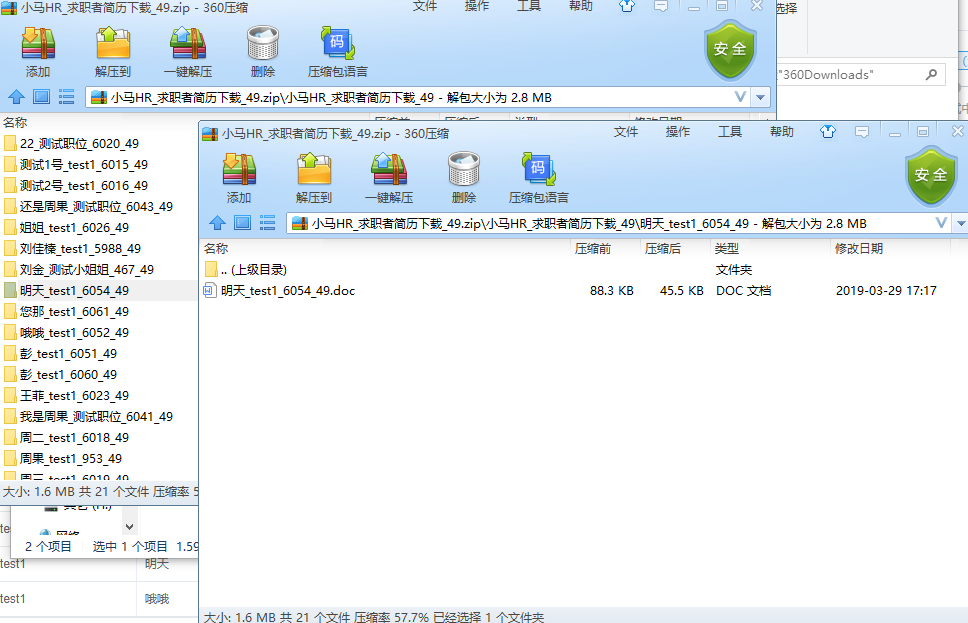
七、从测试环境下载后的简历如下

八、过程中出现的问题:
1、模板文件路径找不到 ==> 相对路径问题,检查后解决;
2、空值字段报错或显示错误 ==> 工具类代码中已解决;或修改.ftl文件中,字段接受时设置默认值;
3、多个工作经历只显示一个 ==> 数据传值有误,检查后解决;
4、头像不显示 ==> 生成的图片的base64位码有误,工具类代码中已解决;
5、doc文件不生成 ==> 模板文件字段值有问题,检查后解决;
6、下载速度问题 ==> 目前限制只能一次下载20个。
springboot中使用freemarker生成word文档并打包成zip下载(简历)的更多相关文章
- Java Web项目中使用Freemarker生成Word文档遇到的问题
这段时间项目中使用了freemarker生成word文档.在项目中遇到了几个问题,在这里记录一下.首先就是关于遍历遇到的坑.整行整行的遍历是很简单的,只需要在整行的<w:tr></w ...
- Java Web项目中使用Freemarker生成Word文档
Web项目中生成Word文档的操作屡见不鲜.基于Java的解决方式也是非常多的,包含使用Jacob.Apache POI.Java2Word.iText等各种方式,事实上在从Office 2003開始 ...
- FreeMarker生成Word文档
FreeMarker简介: FreeMarker是一款模板引擎:即一种基于模板和要改变的数据,并用来生成输出文本(HTML网页.电子邮件.配置文件.源代码等)的通用工具,它不是面向最终用户的,而是一个 ...
- java使用freemarker 生成word文档
java 生成word文档 最近需要做一个导出word的功能, 在网上搜了下, 有用POI,JXL,iText等jar生成一个word文件然后将数据写到该文件中,API非常繁琐而且拼出来的 ...
- 使用FreeMarker生成word文档
生成word文档的框架比较多,比如poi,java2word,itext和freemarker. 调研之后,freemarker来实现挺简单的,具体步骤如下: 1. 新建word文档,占位符用${}, ...
- java使用freemarker生成word文档
1.原料 开源jar包freemarker.eclipse.一份模板word文档 2.首先设计模板word文档 一般,通过程序输出的word文档的格式是固定的,例如建立一个表格,将表格的标题写好,表格 ...
- 用 Freemarker 生成 word 文档(包含图片)
1. 用word写一个需要导出的word模板,然后存为xml格式. 2. 将xml中需要动态修改内容的地方,换成freemarker的标识符,例如: <w:p wsp:rsidR="0 ...
- 用 Freemarker 生成 word 文档
阅读目录 添加图片 自定义载入模板 1. 用word写一个需要导出的word模板,然后存为xml格式. 2. 将xml中需要动态修改内容的地方,换成freemarker的 ...
- Freemarker生成word文档的时的一些&,>,<报错
替换模板ftl中的内容的时候,一些特殊的字符需要转移,例如: &,<,> value为字符串 value.replace("&","& ...
随机推荐
- JS使用cookie实现只出现一次的广告代码效果
我们上网经常会遇到第一次需要登录而之后不用再登录的网站的情况,其实是运用了Cookie 存储 web 页面的用户信息,Cookie 以名/值对形式存储,当浏览器从服务器上请求 web 页面时, 属于该 ...
- vue从入门到进阶:指令与事件(二)
一.插值 v-once 通过使用 v-once 指令,你也能执行一次性地插值,当数据改变时,插值处的内容不会更新.但请留心这会影响到该节点上所有的数据绑定: span v-once>这个将不会改 ...
- web自动化 基于python+Selenium+PHP+Ftp实现的轻量级web自动化测试框架
基于python+Selenium+PHP+Ftp实现的轻量级web自动化测试框架 by:授客 QQ:1033553122 博客:http://blog.sina.com.cn/ishou ...
- Html5 和 CSS的简单应用
本文是利用几个简单的小例子,来实现html+css的简单应用. 菱形链接菜单 本例是采用html5+css3.0设置的菜单链接.其中主要用到了以下几个方面: CSS3.0中的2D变换,如:旋转tran ...
- C# 使用System.Data.OleDb;避免oracle中文乱码问题
首先,需要保证oracle客户端服务器的字符集是一样的,并且保证该字符集支持中文.你可以使用plsql查看是否乱码. 代码: using System; using System.Collection ...
- Wu反走样算法绘制直线段
Wu反走样算法 原理:在我看来,Wu反走样算法是在Bresenham算法基础上改进了一番,它给最靠近理想直线/曲线的两个点以不同的亮度值,以达到模糊锯齿的效果.因为人眼看到的是线附近亮度的平均值. M ...
- Flutter 布局详解
本文主要介绍了Flutter布局相关的内容,对相关知识点进行了梳理,并从实际例子触发,进一步讲解该如何去进行布局. 1. 简介 在介绍Flutter布局之前,我们得先了解Flutter中的一些布局相关 ...
- DAY3(PYTHON)字符串切片
字符串调整: capitalize() #首字母大写 upper() #全大写 lower() #全小写 swapcase() #大小写翻转 字符串切片: 顾头不顾尾!!! ...
- Linux中安装硬盘后对硬盘的分区以及挂载
我将使用VM来进行模拟 先使用df看下我的电脑硬盘信息: df -h 可以看到只有一个sda1分区装载/boot,还有一个扩展分区 查看dev下的硬盘: 只有一个硬盘(两个分区) 注意: 如果你是ID ...
- Android 加了自定义Application后报错 Unable to instantiate activity ComponentInfo ClassNotFoundException
在Android自定义一个类继承集成Application后,并在AndroidManifest.xml里面配置了application的name属性为该类名称后报错: Unable to insta ...