
[UWP]为附加属性和依赖属性自定义代码段(兼容UWP和WPF)
1. 前言
之前介绍过依赖属性和附加属性的代码段,这两个代码段我用了很多年,一直都帮了我很多。不过这两个代码段我也多年没修改过,Resharper老是提示我生成的代码可以修改,它这么有诚意,这次就只好从了它,顺便简单介绍下怎么自定义代码段。
2. VisualStudio自带代码段的问题
以依赖属性为例,一个完整的依赖属性应该包含以下部分:
注册依赖属性并生成依赖属性标识符。依赖属性标识符为一个public static readonly DependencyProperty字段。依赖属性标识符的名称必须为“属性名+Property”。在PropertyMetadata中指定属性默认值。
实现属性包装器。为属性提供 get 和 set 访问器,在Getter和Setter中分别调用GetValue和SetValue。Getter和Setter中不应该有其它任何自定义代码。
如果需要监视属性值变更,可以在PropertyMetadata中定义一个PropertyChangedCallback方法。因为这个方法是静态的,可以再实现一个同名的实例方法(可以参考ContentControl的OnContentChanged方法)。
更详尽的规范可以参考《Framework Design Gidelines》。
public int MyProperty

{

    get { return (int)GetValue(MyPropertyProperty); }

    set { SetValue(MyPropertyProperty, value); }

}

// Using a DependencyProperty as the backing store for MyProperty.  This enables animation, styling, binding, etc...

public static readonly DependencyProperty MyPropertyProperty =

    DependencyProperty.Register("MyProperty", typeof(int), typeof(ownerclass), new PropertyMetadata(0));
如上面代码所示,VisualStudio自带的依赖属性的代码段propdp只实现了最基本的功能,PropertyChangedCallback等函数还得自己实现,而这部分也挺麻烦的。另外,ownerclass基本都是当前类的名字,没有理由不使用当前类的名字作为默认值。
/// <summary>

/// 获取或设置MyProperty的值

/// </summary>

public int MyProperty

{

    get => (int)GetValue(MyPropertyProperty);

    set => SetValue(MyPropertyProperty, value);

}

/// <summary>

/// 标识 MyProperty 依赖属性。

/// </summary>

public static readonly DependencyProperty MyPropertyProperty =

    DependencyProperty.Register(nameof(MyProperty), typeof(int), typeof(MainPage), new PropertyMetadata(default(int), OnMyPropertyChanged));

private static void OnMyPropertyChanged(DependencyObject obj, DependencyPropertyChangedEventArgs args)

{

    var oldValue = (int)args.OldValue;

    var newValue = (int)args.NewValue;

    if (oldValue == newValue)

        return;

    var target = obj as MainPage;

    target?.OnMyPropertyChanged(oldValue, newValue);

}

/// <summary>

/// MyProperty 属性更改时调用此方法。

/// </summary>

/// <param name="oldValue">MyProperty 属性的旧值。</param>

/// <param name="newValue">MyProperty 属性的新值。</param>

protected virtual void OnMyPropertyChanged(int oldValue, int newValue)

{

}
上面是我自定义的代码段,改进了这些地方:
- getter和setter使用了表达式主体;
- DependencyProperty.Register的第一个参数使用了
nameof()关键字代替了字符串; - typeof(MainPage)这里使用了代码段函数
ClassName()直接获取当前类的名称; - 依赖属性的默认值使用了
default()关键字,因为绝大部分情况下依赖属性的默认值就是数据类型的默认值,修改默认值的工作交给DefaultStyle的Setter; - 添加了相对完成的PropertyChangedCallback函数;
3. 如何自定义代码段
基本上,一个代码段就是一个XML文件,
3.1 代码段的结构
<?xml version="1.0" encoding="utf-8"?>

<CodeSnippets xmlns="http://schemas.microsoft.com/VisualStudio/2005/CodeSnippet">

    <CodeSnippet Format="1.0.0">

        <Header>

            <Keywords>

                <Keyword>dp</Keyword>

            </Keywords>

            <SnippetTypes>

                <SnippetType>SurroundsWith</SnippetType>

            </SnippetTypes>

            <Title>Dependency Property</Title>

            <Author>dino.c</Author>

            <Description>For Dependency Property</Description>

            <HelpUrl>

            </HelpUrl>

            <Shortcut>dp</Shortcut>

        </Header>

        <Snippet>

            <References>

                <Reference>

                    <Assembly>

                    </Assembly>

                </Reference>

            </References>

            <Declarations>

                <Literal Editable="true">

                    <ID>PropertyType</ID>

                    <ToolTip>属性类型</ToolTip>

                    <Default>int</Default>

                    <Function>

                    </Function>

                </Literal>

                ...

            </Declarations>

            <Code Language="csharp" Kind="method body">

                <![CDATA[     ...        ]]>

            </Code>

        </Snippet>

    </CodeSnippet>

</CodeSnippets>
如上所示,代码段定义XML中主要分成以下几个部分:
- Header:包括Keyword、Shortcut等信息。Author和Description等可有可无;
- Declarations:代码段中的变量;
- Code:代码段的代码;
3.2 代码段中的变量
在我定义的依赖属性代码段中包含了三个变量:
<Literal Editable="true">

    <ID>PropertyType</ID>

    <ToolTip>属性类型</ToolTip>

    <Default>int</Default>

    <Function>

    </Function>

</Literal>

<Literal Editable="true">

    <ID>MyProperty</ID>

    <ToolTip>属性名</ToolTip>

    <Default>MyProperty</Default>

    <Function>

    </Function>

</Literal>

<Literal Editable="false">

    <ID>classname</ID>

    <ToolTip>类名</ToolTip>

    <Function>ClassName()</Function>

    <Default>ClassNamePlaceholder</Default>

</Literal>
其中classname不可编辑,它使用了ClassName()这个代码段函数,返回包含已插入代码段的类的名称。其它可用的代码段函数可以参考这个页面:代码段函数 。
引用变量的语法是$变量名$,如下所示:
public static readonly DependencyProperty $MyProperty$Property =

    DependencyProperty.Register(nameof($MyProperty$), typeof($PropertyType$), typeof($classname$), new PropertyMetadata(default($PropertyType$), On$MyProperty$Changed));
3.3 导入代码段
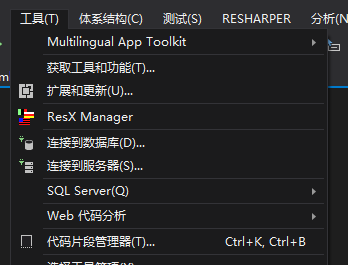
在菜单上选择“工具->代码片段管理器”:
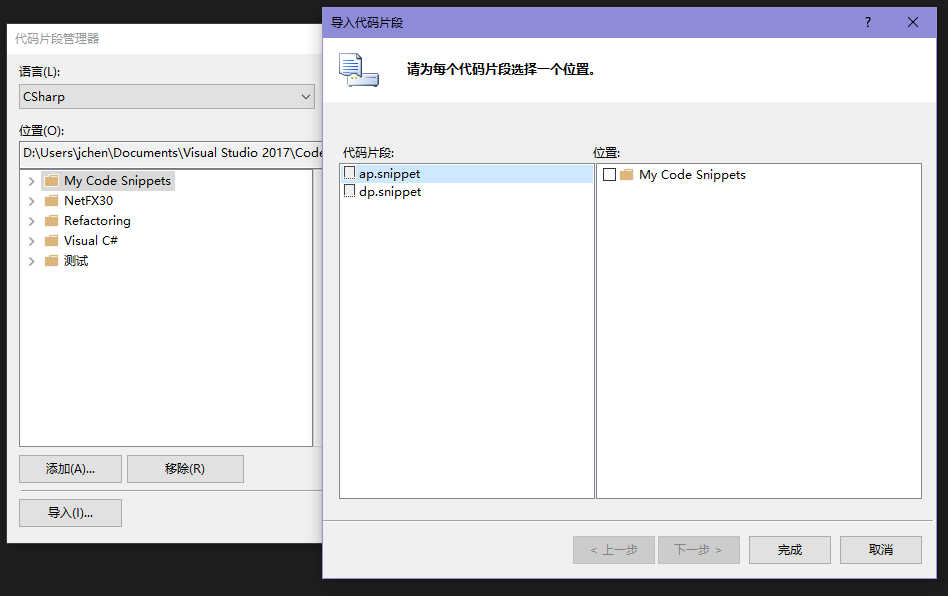
在“代码片段管理器”窗口中点击“导入”,选中需要导入的文件后打开“导入代码片段”,选择位置后点击“完成”即可完成代码段导入:
3.4 最终成果
依赖属性的代码段:
<?xml version="1.0" encoding="utf-8"?>

<CodeSnippets xmlns="http://schemas.microsoft.com/VisualStudio/2005/CodeSnippet">

    <CodeSnippet Format="1.0.0">

        <Header>

            <Keywords>

                <Keyword>dp</Keyword>

            </Keywords>

            <SnippetTypes>

                <SnippetType>SurroundsWith</SnippetType>

            </SnippetTypes>

            <Title>Dependency Property</Title>

            <Author>dino.c</Author>

            <Description>For Dependency Property</Description>

            <HelpUrl>

            </HelpUrl>

            <Shortcut>dp</Shortcut>

        </Header>

        <Snippet>

            <References>

                <Reference>

                    <Assembly>

                    </Assembly>

                </Reference>

            </References>

            <Declarations>

                <Literal Editable="true">

                    <ID>PropertyType</ID>

                    <ToolTip>属性类型</ToolTip>

                    <Default>int</Default>

                    <Function>

                    </Function>

                </Literal>

                <Literal Editable="true">

                    <ID>MyProperty</ID>

                    <ToolTip>属性名</ToolTip>

                    <Default>MyProperty</Default>

                    <Function>

                    </Function>

                </Literal>

                <Literal Editable="false">

                    <ID>classname</ID>

                    <ToolTip>类名</ToolTip>

                    <Function>ClassName()</Function>

                    <Default>ClassNamePlaceholder</Default>

                </Literal>

            </Declarations>

            <Code Language="csharp" Kind="method body">

                <![CDATA[

        /// <summary>

        /// 获取或设置$MyProperty$的值

        /// </summary>

        public $PropertyType$ $MyProperty$

        {

            get => ($PropertyType$)GetValue($MyProperty$Property);

            set => SetValue($MyProperty$Property, value);

        }

        /// <summary>

        /// 标识 $MyProperty$ 依赖属性。

        /// </summary>

        public static readonly DependencyProperty $MyProperty$Property =

            DependencyProperty.Register(nameof($MyProperty$), typeof($PropertyType$), typeof($classname$), new PropertyMetadata(default($PropertyType$), On$MyProperty$Changed));

        private static void On$MyProperty$Changed(DependencyObject obj,DependencyPropertyChangedEventArgs args)

        {

            var oldValue = ($PropertyType$)args.OldValue;

            var newValue = ($PropertyType$)args.NewValue;

            if (oldValue == newValue)

              return;

            var target= obj as $classname$;

            target?.On$MyProperty$Changed(oldValue, newValue);

        }

        /// <summary>

        /// $MyProperty$ 属性更改时调用此方法。

        /// </summary>

        /// <param name="oldValue">$MyProperty$ 属性的旧值。</param>

        /// <param name="newValue">$MyProperty$ 属性的新值。</param>

        protected virtual void On$MyProperty$Changed($PropertyType$ oldValue,$PropertyType$ newValue)

        {

        }]]>

            </Code>

        </Snippet>

    </CodeSnippet>

</CodeSnippets>
附加属性的代码段:
<?xml version="1.0" encoding="utf-8"?>

<CodeSnippets xmlns="http://schemas.microsoft.com/VisualStudio/2005/CodeSnippet">

    <CodeSnippet Format="1.0.0">

        <Header>

            <Keywords>

                <Keyword>ap</Keyword>

            </Keywords>

            <SnippetTypes>

                <SnippetType>Expansion</SnippetType>

            </SnippetTypes>

            <Title>Attached Property</Title>

            <Author>dino.c</Author>

            <Description>For Attached Property</Description>

            <HelpUrl>

            </HelpUrl>

            <Shortcut>ap</Shortcut>

        </Header>

        <Snippet>

            <References>

                <Reference>

                    <Assembly>

                    </Assembly>

                </Reference>

            </References>

            <Declarations>

                <Literal Editable="true">

                    <ID>PropertyType</ID>

                    <ToolTip>属性类型</ToolTip>

                    <Default>int</Default>

                    <Function>

                    </Function>

                </Literal>

                <Literal Editable="true">

                    <ID>MyProperty</ID>

                    <ToolTip>属性名</ToolTip>

                    <Default>MyProperty</Default>

                    <Function>

                    </Function>

                </Literal>

                <Literal Editable="false">

                    <ID>classname</ID>

                    <ToolTip>类名</ToolTip>

                    <Function>ClassName()</Function>

                    <Default>ClassNamePlaceholder</Default>

                </Literal>

            </Declarations>

            <Code Language="csharp">

                <![CDATA[

        /// <summary>

        /// 从指定元素获取 $MyProperty$ 依赖项属性的值。

        /// </summary>

        /// <param name="obj">从中读取属性值的元素。</param>

        /// <returns>从属性存储获取的属性值。</returns>

        public static $PropertyType$ Get$MyProperty$(DependencyObject obj) => ($PropertyType$)obj.GetValue($MyProperty$Property);

        /// <summary>

        /// 将 $MyProperty$ 依赖项属性的值设置为指定元素。

        /// </summary>

        /// <param name="obj">对其设置属性值的元素。</param>

        /// <param name="value">要设置的值。</param>

        public static void Set$MyProperty$(DependencyObject obj, $PropertyType$ value) => obj.SetValue($MyProperty$Property, value);

        /// <summary>

        /// 标识 $MyProperty$ 依赖项属性。

        /// </summary>

        public static readonly DependencyProperty $MyProperty$Property =

            DependencyProperty.RegisterAttached("$MyProperty$", typeof($PropertyType$), typeof($classname$), new PropertyMetadata(default($PropertyType$), On$MyProperty$Changed));

        private static void On$MyProperty$Changed(DependencyObject obj, DependencyPropertyChangedEventArgs args)

        {

            var oldValue = ($PropertyType$)args.OldValue;

            var newValue = ($PropertyType$)args.NewValue;

            if (oldValue == newValue)

              return;

            var target = obj as $classname$;

        }

        ]]>

            </Code>

        </Snippet>

    </CodeSnippet>

</CodeSnippets>
4. 结语
虽然这两个代码段比较复杂,并不是每次创建依赖属性都需要这么完整,但删除代码总比增加代码简单得多,所以我多年来每次创建依赖属性和附加属性都是使用这两个代码段。
WPF的依赖属性可以十分复杂,但平时用不到这么多功能,所以和UWP使用相同的代码段就够了。
完整的代码段已上传到 Github 。
5. 参考
[UWP]为附加属性和依赖属性自定义代码段(兼容UWP和WPF)的更多相关文章
- Visual Studio中自定义代码段!
Visual Studio中自定义代码段! 第一步:在编辑器中进行快捷键的输入[ctrl + shift + p] 或者 点击 查看 第一个选项就是!请看下图 第二步:选择你要配置代码段的语言, 这里 ...
- PyCharm创建自定义代码段(JetBrains系列通用)
创建自定义代码段或者修改代码段:(用习惯了VSCode的main格式,固而改下)
- VSCode创建自定义代码段
上一篇:PyCharm创建自定义代码段(JetBrains系列通用) 设置方法 很简单,快速过一下,F1,然后输入snippets 然后选择对应语言 Python案例 内容和使用: { // pref ...
- VS中自定义代码段
如果数据属性的数量比较多,那么输入总是要花费较多的时间,这里有个小技巧,就是使用快捷的输入方法,但是VS自身提供的代码段是有限的,幸运的是我们可以通过:工具> 代码段管理器>添加来添加自定 ...
- [UIKit学习]06.懒加载,模型,自定义代码段,重写构造方法
懒加载 在get中加载,且只加载一次 - (NSArray *)shops { if (_shops == nil) { NSString *file = [[NSBundle mainBundle] ...
- sublime自定义代码段
打开tools>developer>new snippet 默认代码 <snippet> <content><![CDATA[ Hello, ${1:this ...
- pycharm自定义代码段
PyCharm使用技巧:Live Templates(快速输入自定义代码片段):链接
- 在VS中自定义代码段
这个功能不怎么实用,但毕竟是VS存在的一个功能点嘛,知道一点也好!说它不怎么实用是有原因的,因为现在强大的VS编辑器拥有不计其数的插件,而且这些插件也有很多很强大的!比如Resharper,Code ...
- Xcode 自定义代码段
看见老师敲程序时,快捷键一打,所需要的一整行代码都出来了,着实感觉到效率太高了. 看了几天,才反应过来为什么自己没有get这个方法呢,现在就整理一番,记录一下. 此处以@property(nonato ...
随机推荐
- 2016-04-25-信息系统实践手记5-CACHE设计一例
layout: post title: 2016-04-25-信息系统实践手记5-CACHE设计一例 key: 20160425 tags: 业务 场景 CACHE 系统分析 系统设计 缓存 modi ...
- MySQL 如何查看表的存储引擎
MySQL 如何查看表的存储引擎 在MySQL中如何查看单个表的存储引擎? 如何查看整个数据库有那些表是某个特殊存储引擎,例如MyISAM存储引擎呢?下面简单的整理一下这方面的知识点. 如果要查看 ...
- BurpSuit添加CA证书拦截HTTPS通信
问题 BurpSuit 安装成功后可以直接使用代理对使用 HTTP 协议通信的会话进行拦截,但是对于使用 HTTPS 协议通信的会话进行代理使用时就会出现如下画面 例如访问百度主页: 原因 HTTPS ...
- web前端(2)—— 前端技术介绍
前端技术 前文了解了什么是前端,那么前端技术到底有哪些呢?最核心的就这三个: html/html5 css/css3 javascript 什么是HTML HyperText Markup Langu ...
- python第一百一十八天---ajax--图片验证码 + Session
原生AJAX Ajax主要就是使用 [XmlHttpRequest]对象来完成请求的操作,该对象在主流浏览器中均存在(除早起的IE),Ajax首次出现IE5.5中存在(ActiveX控件). 1.Xm ...
- Zabbix Agent安装与卸载
cmd /c "C:\zabbix\bin\win64\zabbix_agentd.exe -c c:\zabbix\conf\zabbix_agentd.win.conf -i" ...
- 【算法】LeetCode算法题-Maximum Subarray
这是悦乐书的第154次更新,第156篇原创 01 看题和准备 今天介绍的是LeetCode算法题中Easy级别的第13题(顺位题号是53).给定一个整数数组nums,找出一个最大和,此和是由数组中索引 ...
- puppet使用 apache passsenger 作为前端 (centos)
目录 1. 概要 2. nginx + passenger 配置 2.1. package 安装 2.2. 配置文件设置 2.3. rack 目录生成 概要 使用 nginx + passenger ...
- js获取请求地址后面带的参数
浏览器输入页面地址的时候在后面带有请求参数, 页面加载后需要获取携带的参数, 可以使用js, 在页面加载js的时候获取参数 http://localhost:8080/demo/index.html? ...
- 序列对象(bytearray, bytes,list, str, tuple)
列表: L.append(x) # x追加到L尾部 L.count(x) # 返回x在L中出现的次数 L.extend(m) # Iterable m的项追加到L末尾 L += m # 功能同L.ex ...