
springmvc基础使用配置
前言
本案例是在idea编辑器下,maven管理项目的前提下。
步骤
1.新建maven项目
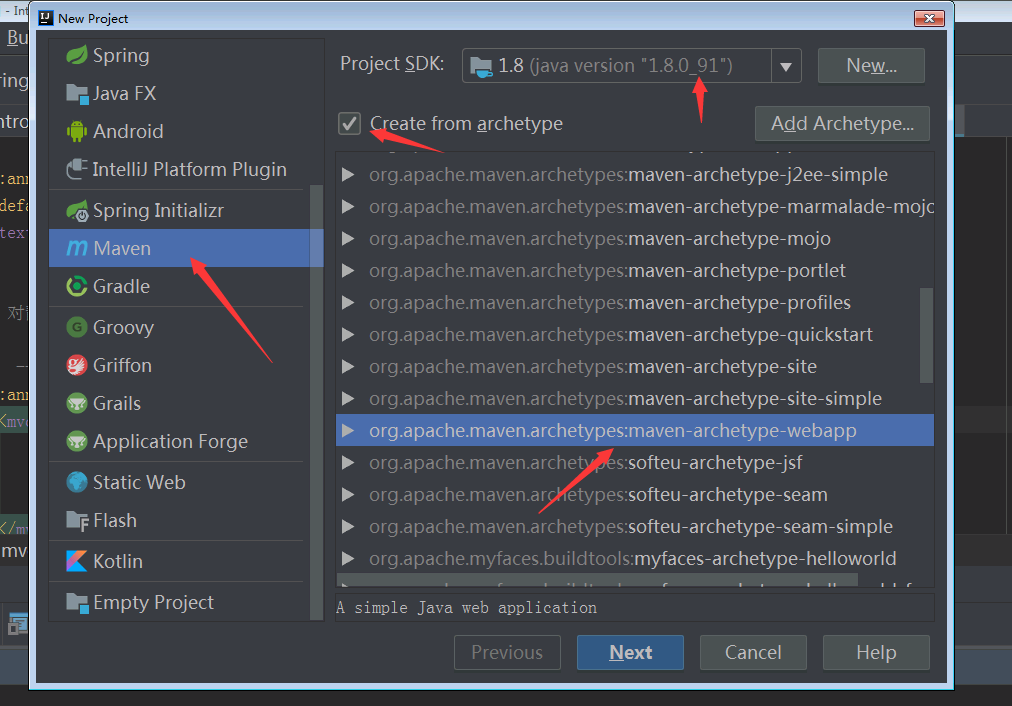
2.配置web.xml
<?xml version="1.0" encoding="UTF-8"?>
<web-app xmlns:xsi="http://www.w3.org/2001/XMLSchema-instance" xmlns="http://java.sun.com/xml/ns/javaee" xsi:schemaLocation="http://java.sun.com/xml/ns/javaee http://java.sun.com/xml/ns/javaee/web-app_2_5.xsd" version="2.5"> <!-- //前端控制器;springmvc的入口,*.do所有以.do结尾的请求都会被拦截-->
<servlet>
<servlet-name>springDispatcherServlet</servlet-name>
<servlet-class>org.springframework.web.servlet.DispatcherServlet</servlet-class>
<init-param>
<param-name>contextConfigLocation</param-name>
<param-value>classpath:spring-mvc.xml</param-value>
</init-param>
<load-on-startup>1</load-on-startup>
</servlet> <!-- <!– Map all requests to the DispatcherServlet for handling –>-->
<servlet-mapping>
<servlet-name>springDispatcherServlet</servlet-name>
<url-pattern>/</url-pattern>
</servlet-mapping> <servlet>
<servlet-name>Myservlet</servlet-name>
<servlet-class>com.test01.Dome01</servlet-class>
</servlet> <servlet-mapping>
<servlet-name>Myservlet</servlet-name>
<url-pattern>/test.do</url-pattern>
</servlet-mapping> </web-app>
3.配置spring-mvc.xml
这里有一点小小的说明,<mvc:default-servlet-handler/>这个标签是springmvc 3.0以后用来访问静态资源的;
<context:component-scan base-package="com" />这个注解就是扫描包了;所有扫描的类都可以交由spring管理
<?xml version="1.0" encoding="UTF-8"?>

<beans xmlns="http://www.springframework.org/schema/beans"

       xmlns:xsi="http://www.w3.org/2001/XMLSchema-instance"

       xmlns:mvc="http://www.springframework.org/schema/mvc"

       xmlns:context="http://www.springframework.org/schema/context"

       xsi:schemaLocation="http://www.springframework.org/schema/beans http://www.springframework.org/schema/beans/spring-beans.xsd

        http://www.springframework.org/schema/mvc http://www.springframework.org/schema/mvc/spring-mvc.xsd

        http://www.springframework.org/schema/context http://www.springframework.org/schema/context/spring-context.xsd">

    <mvc:annotation-driven/>

   <mvc:default-servlet-handler/>

    <context:component-scan base-package="com.controller" />

    <!-- 对静态资源文件的访问  restful-->

    <!--  -->

    <mvc:annotation-driven>

        <mvc:message-converters register-defaults="true">

            <bean class="org.springframework.http.converter.StringHttpMessageConverter">

                <property name="supportedMediaTypes" value="text/html;charset=UTF-8"></property>

            </bean>

        </mvc:message-converters>

    </mvc:annotation-driven>

    <!-- 配置SpringMVC的视图解析器 -->

    <bean class="org.springframework.web.servlet.view.InternalResourceViewResolver">

        <property name="prefix" value="/WEB-INF/"/>

        <property name="suffix" value=".jsp"/>

    </bean>

</beans>
4.添加springmvc的maven依赖;只需要一个即可
   <dependency>

      <groupId>org.springframework</groupId>

      <artifactId>spring-webmvc</artifactId>

      <version>5.0.9.RELEASE</version>

    </dependency>
5.需要将tomcat里的jar包添加进来
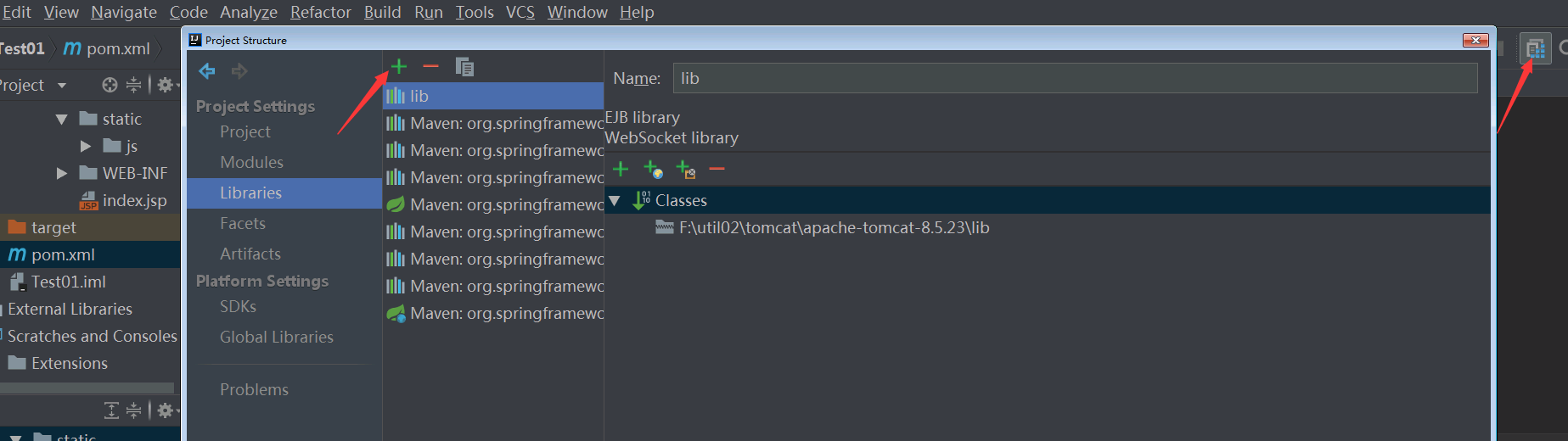
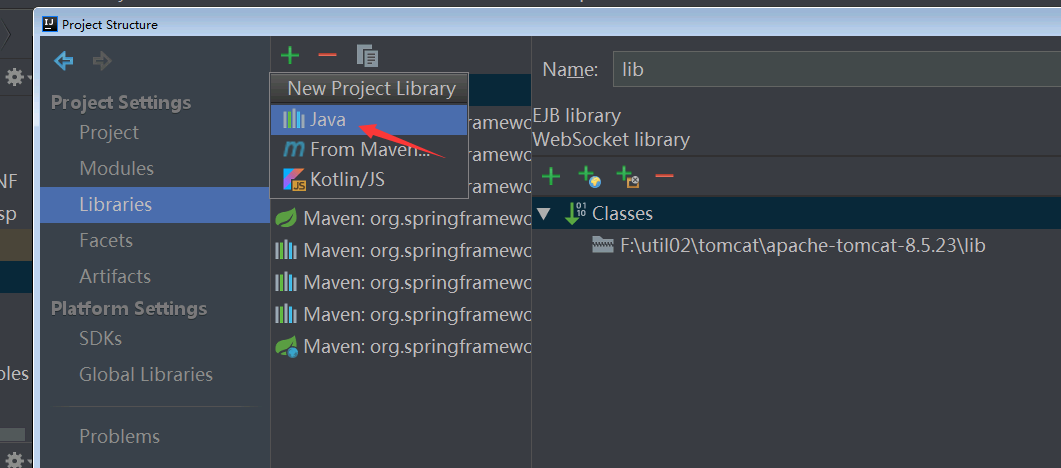
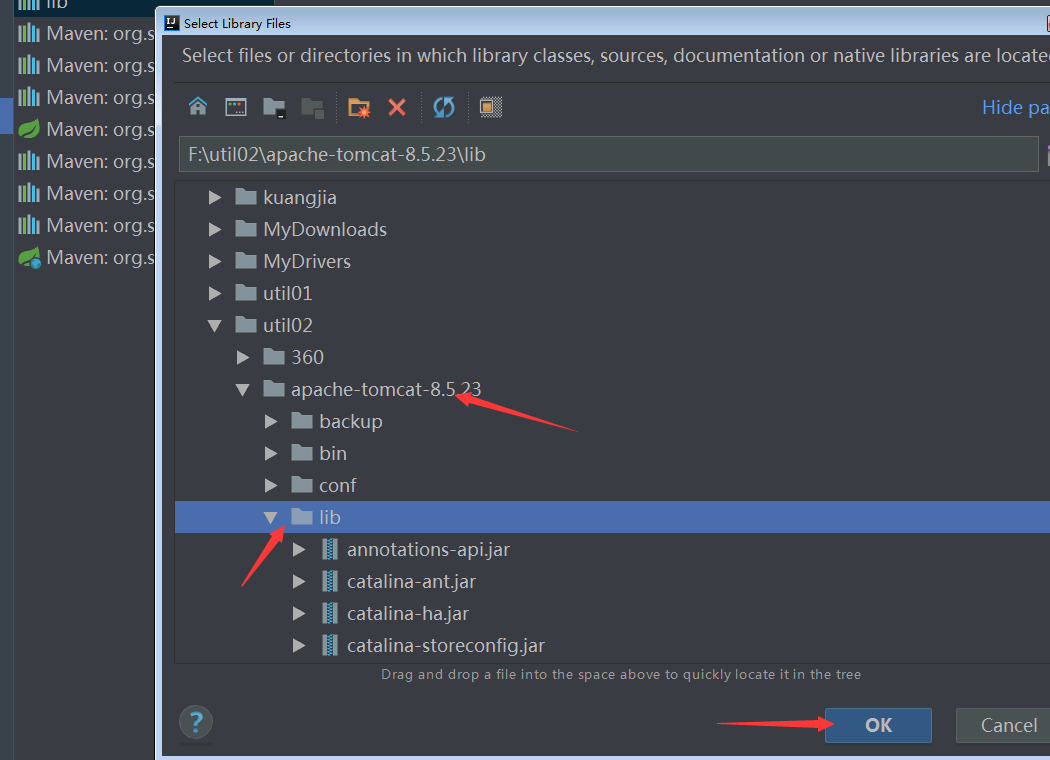
点击ok即可
6.编写测试类
下面是目录结构和测试类的代码

7.如果只是需要依赖注入和页面跳转的功能,其实以上的配置就足够了;需要扫描管理的包,可以直接在spring-mvc.xml中配置
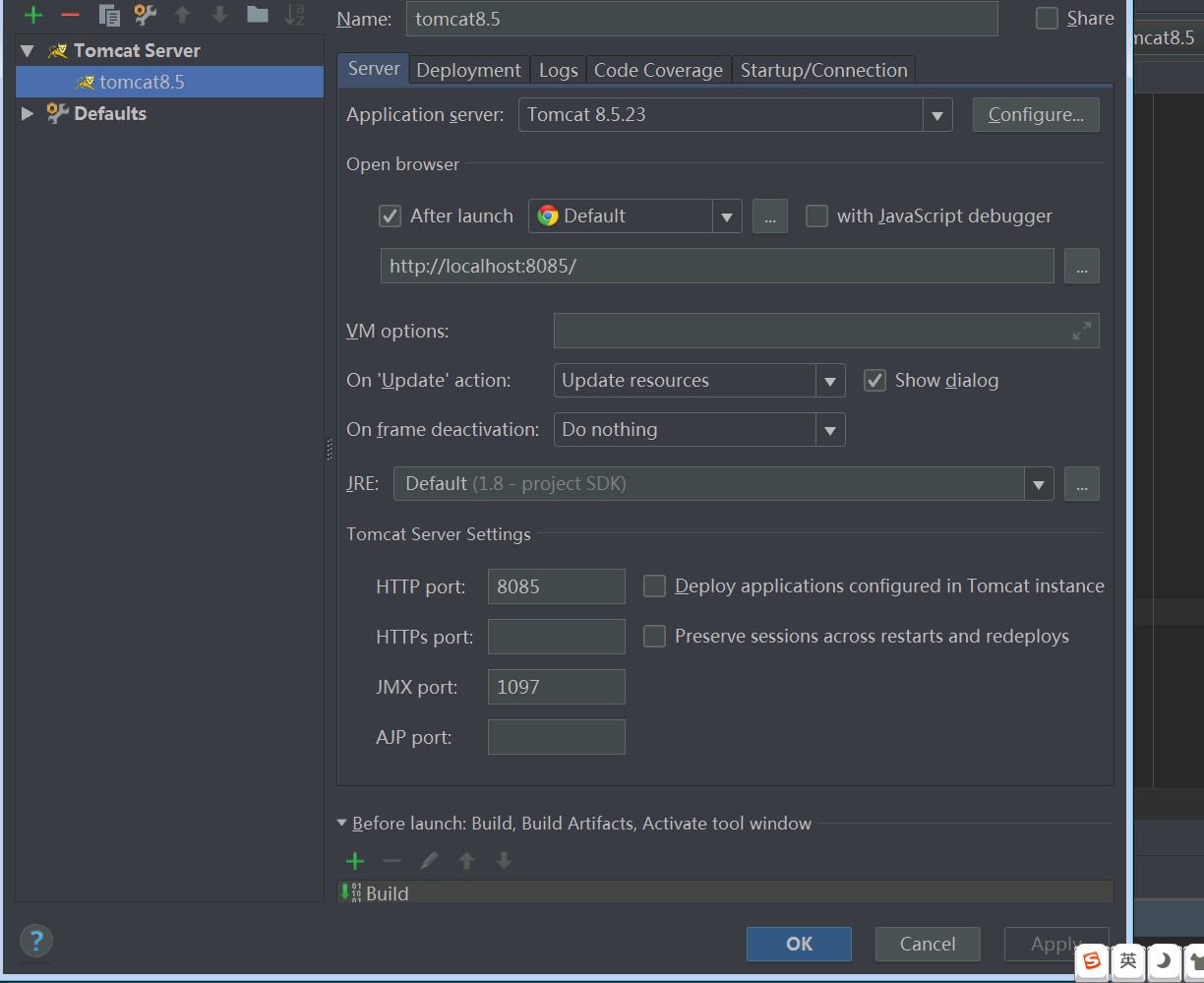
下面附上tomcat配置启动图;如果运行报错的时候可以参考一下
o(* ̄︶ ̄*)oo(* ̄︶ ̄*)oo(* ̄︶ ̄*)o 不能多写了。需求任务下来了。要去敲代码了。忙完了再接着写下一篇接着整合。。。
springmvc基础使用配置的更多相关文章
- spring 5.x 系列第2篇 —— springmvc基础 (代码配置方式)
文章目录 一.搭建hello spring工程 1.1 项目搭建 1.2 相关注解说明 二.配置自定义拦截器 三.全局异常处理 四.参数绑定 4.1 参数绑定 4.2 关于日期格式转换的三种方法 五. ...
- spring 5.x 系列第1篇 —— springmvc基础 (xml配置方式)
文章目录 一.搭建hello spring工程 1.1 项目搭建 1.2 相关配置讲解 二.配置自定义拦截器 三.全局异常处理 四.参数绑定 4.1 参数绑定 4.2 关于日期格式转换的三种方法 五. ...
- SpringMVC基础配置及使用
SpringMVC基础配置及使用 SpringMVC:1.SpringMVC和Spring的关系: 软件开发的三层架构: web层[表示层.表现层]---->Service层----> ...
- SpringMVC基础入门
一.SpringMVC基础入门,创建一个HelloWorld程序 1.首先,导入SpringMVC需要的jar包. 2.添加Web.xml配置文件中关于SpringMVC的配置 1 2 3 4 5 6 ...
- SpringMVC框架入门配置 IDEA下搭建Maven项目
初衷:本人初学SpringMVC的时候遇到各种稀奇古怪的问题,网上各种技术论坛上的帖子又参差不齐,难以一步到位达到配置好的效果,这里我将我配置的总结写到这里供大家初学SpringMVC的同僚们共同学习 ...
- SpringMVC基础入门,创建一个HelloWorld程序
ref:http://www.admin10000.com/document/6436.html 一.SpringMVC基础入门,创建一个HelloWorld程序 1.首先,导入SpringMVC需要 ...
- 关于什么是SpringMVC,和SpringMVC基于xml配置、注解配置、纯注解配置
首先我们先要了解一下,什么是SpringMVC? SpringMVC是Spring框架内置的MVC的实现.SpringMVC就是一个Spring内置的MVC子框架,也就是说SpringMVC的相关包都 ...
- java框架之SpringBoot(5)-SpringMVC的自动配置
本篇文章内容详细可参考官方文档第 29 节. SpringMVC介绍 SpringBoot 非常适合 Web 应用程序开发.可以使用嵌入式 Tomcat,Jetty,Undertow 或 Netty ...
- SpringMVC基础01——SpringMVC的知识结构体系
1.前言 目前在各大互联网公司使用最热门的技术莫过于SpringBoot以及在其基础之上的SpringCloud,然而学习这些技术的基础在于学好Spring和SpringMVC,准确来说SpringM ...
随机推荐
- 百度echarts插件x轴坐标显示不全决解方法
X轴显示不全: xAxis.axisLabel.interval number, Function [ default: 'auto' ] 坐标轴刻度标签的显示间隔,在类目轴中有效. 默认会采用标签不 ...
- hive学习03-求一年中的最大温度
知识点: substr.concat函数的使用: row_number() over(distribute by year sort by temp desc) #按照年分组,按照tmp去排序 需 ...
- dict-test
#! -*- coding:utf-8 -*-"""键必须是唯一的,但值则不必len(dict) 计算字典元素个数,即键的总数str(dict) 输出字典,以可打印的字符 ...
- Oracle从入门到精通(详细) 明日科技
- 对Swoole、Workerman和php自带的socket的理解
为什么php自带的socket不怎么听说,基本都是用swoole,workerman去实现? 1.PHP的socket扩展是一套socket api,仅此而已. swoole,用C实现,它的socke ...
- Netty多人聊天室
在简单聊天室的代码中修改ChatServerHandler类,就可以模拟多人聊天的功能 package com.cppdy.server; import io.netty.channel.Channe ...
- django-admin的源码流程
一.admin的源码流程 首先可以确定的是:路由关系一定对应一个视图函数 a.当点击运行的时候,会先找到每一个app中的admin.py文件,并执行 b.执行urls.py admin.site是什么 ...
- Java并发编程基础-ReentrantLock的机制
同步锁: 我们知道,锁是用来控制多个线程访问共享资源的方式,一般来说,一个锁能够防止多个线程同时访问共享资源,在Lock接口出现之前,Java应用程序只能依靠synchronized关键字来实现同步锁 ...
- Axure-----三级下拉菜单的具体实现过程
********三级下拉菜单的动画效果:********** 1.选中三级菜单将其转换为动态面板,命名为treePanel,并隐藏. 2.选中二级菜单添加交互效果:[切换可见性],勾选treePane ...
- 步步為營-96-MyMVC2
說明:地址欄中的URL還存在一些不足之處 地址欄中最好能是http"www.sss.com/asdf/aaa 1.1 模擬路由的原理:創建Routing文件夾,并添加URLRoutingMo ...