
关于vagrant一个虚拟机搭建多个项目配置(总结)
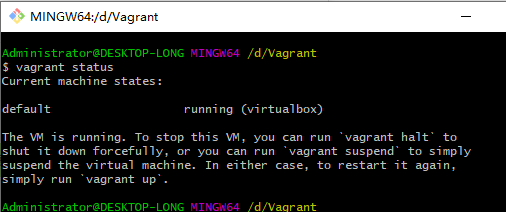
问题1:执行vagrant status命令,报错,没有找到命令,翻译;“vargrant bash命令没有找到。”
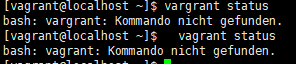
解答:因为在/home目录中,所有无法执行该命令,需要切换到外部进行执行
问题2:在一个虚拟机中,添加多个项目
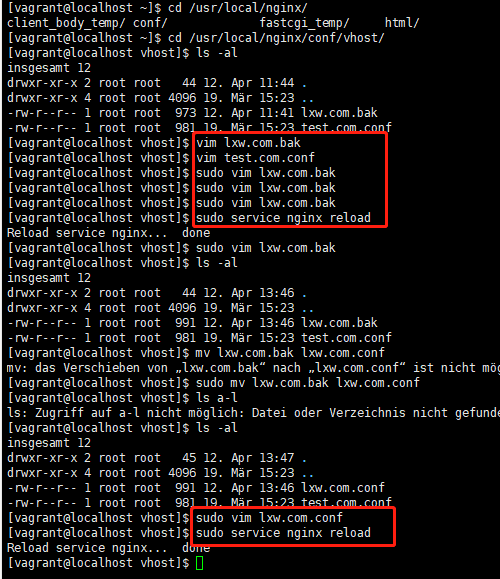
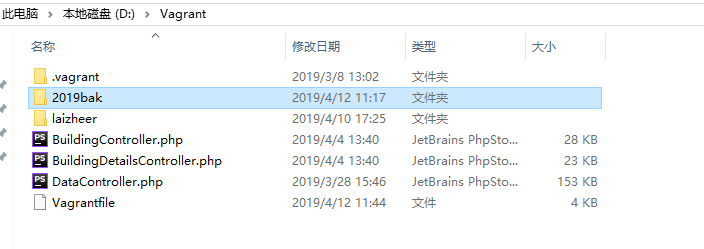
lxw.com.conf配置
server

    {

        listen 80;

        #listen [::]:80;

        server_name lxw.com www.lxw.com;

        index index.html index.htm index.php default.html default.htm default.php;

        root  /vagrant/2019bak;

        include rewrite/none.conf;

        #error_page   404   /404.html;

        # Deny access to PHP files in specific directory

        #location ~ /(wp-content|uploads|wp-includes|images)/.*\.php$ { deny all; }

        include enable-php.conf;

        location /nginx_status

        {

            stub_status on;

            access_log   off;

        }

        location / {

           try_files $uri $uri/ /index.php?$query_string;

        }

        location ~ .*\.(gif|jpg|jpeg|png|bmp|swf)$

        {

            expires      30d;

        }

        location ~ .*\.(js|css)?$

        {

            expires      12h;

        }

        location ~ /.well-known {

            allow all;

        }

        location ~ /\.

        {

            deny all;

        }

        access_log off;

    }
test.com.conf配置文件
server

    {

        listen 80;

        #listen [::]:80;

        #server_name _;

        server_name 192.168.10.250 test.com www.test.com

        index index.html index.htm index.php default.html default.htm default.php;

        root  /vagrant/laizheer/public;

        include rewrite/none.conf;

        #error_page   404   /404.html;

        # Deny access to PHP files in specific directory

        #location ~ /(wp-content|uploads|wp-includes|images)/.*\.php$ { deny all; }

        include enable-php.conf;

        location /nginx_status

        {

            stub_status on;

            access_log   off;

        }

        location / {

           try_files $uri $uri/ /index.php?$query_string;

        }

        location ~ .*\.(gif|jpg|jpeg|png|bmp|swf)$

        {

            expires      30d;

        }

        location ~ .*\.(js|css)?$

        {

            expires      12h;

        }

        location ~ /.well-known {

            allow all;

        }

        location ~ /\.

        {

            deny all;

        }

        access_log off;

    }
本地host文件配置,“192.168.10.250”需要与Vagrantfile文件中配置的public_network,IP一致,192.168.10.250等同于远程服务器的IP,


Vagrantfile配置
# -*- mode: ruby -*-

# vi: set ft=ruby :

# All Vagrant configuration is done below. The "2" in Vagrant.configure

# configures the configuration version (we support older styles for

# backwards compatibility). Please don't change it unless you know what

# you're doing.

Vagrant.configure("2") do |config|

  # The most common configuration options are documented and commented below.

  # For a complete reference, please see the online documentation at

  # https://docs.vagrantup.com.

  # Every Vagrant development environment requires a box. You can search for

  # boxes at https://vagrantcloud.com/search.

  config.vm.box = "Centos-7"

  # Disable automatic box update checking. If you disable this, then

  # boxes will only be checked for updates when the user runs

  # `vagrant box outdated`. This is not recommended.

  # config.vm.box_check_update = false

  # Create a forwarded port mapping which allows access to a specific port

  # within the machine from a port on the host machine. In the example below,

  # accessing "localhost:8080" will access port 80 on the guest machine.

  # NOTE: This will enable public access to the opened port

  # config.vm.network "forwarded_port", guest: 80, host: 8080

  # Create a forwarded port mapping which allows access to a specific port

  # within the machine from a port on the host machine and only allow access

  # via 127.0.0.1 to disable public access

  # config.vm.network "forwarded_port", guest: 80, host: 8080, host_ip: "127.0.0.1"

  # Create a private network, which allows host-only access to the machine

  # using a specific IP.

# config.vm.network "private_network", ip: "192.168.33.10"

config.vm.network "public_network", ip: "192.168.10.250"

  # Create a public network, which generally matched to bridged network.

  # Bridged networks make the machine appear as another physical device on

  # your network.

  # config.vm.network "public_network"

  # Share an additional folder to the guest VM. The first argument is

  # the path on the host to the actual folder. The second argument is

  # the path on the guest to mount the folder. And the optional third

  # argument is a set of non-required options.

#config.vm.synced_folder "../www/laizheer", "/home/wwwroot/defalut"

  # Provider-specific configuration so you can fine-tune various

  # backing providers for Vagrant. These expose provider-specific options.

  # Example for VirtualBox:

  #

config.vm.provider "virtualbox" do |vb|

  #   # Display the VirtualBox GUI when booting the machine

 vb.gui = false

  #

  #   # Customize the amount of memory on the VM:

vb.memory = "4096"

vb.cpus = "2"

end

  #

  # View the documentation for the provider you are using for more

  # information on available options.

  # Enable provisioning with a shell script. Additional provisioners such as

  # Puppet, Chef, Ansible, Salt, and Docker are also available. Please see the

  # documentation for more information about their specific syntax and use.

  # config.vm.provision "shell", inline: <<-SHELL

  #   apt-get update

  #   apt-get install -y apache2

  # SHELL

end
补充:当lxw.com.conf监听端口改变为8080后,访问时对应改变端口 http://lxw.com:8080/
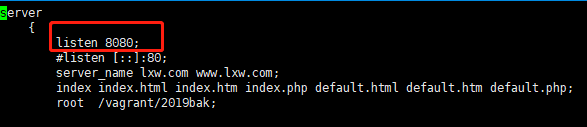
命令:
sudo vi lxw.com.conf 不用切换到root用户直接使用root的权限
sudo service nginx reload 重启nginx 服务
关于vagrant一个虚拟机搭建多个项目配置(总结)的更多相关文章
- webpack入门级 - 从0开始搭建单页项目配置
前言 webpack 作为前端最知名的打包工具,能够把散落的模块打包成一个完整的应用,大多数的知名框架 cli 都是基于 webpack 来编写.这些 cli 为使用者预设好各种处理配置,使用多了就会 ...
- [转]Java Web笔记:搭建环境和项目配置(MyEclipse 2014 + Maven + Tomcat)
来源:http://www.jianshu.com/p/56caa738506a 0. 绪言 Java Web开发中,除了基础知识外,开发环境搭建,也是一项基本功.开发环境包括了IDE.项目管理.项目 ...
- 一个jetty部署多个项目配置之方法一
https://my.oschina.net/wangyongqing/blog/115647 Jetty用户经常想配置他们的web应用到不同的虚拟主机. 通常情况下,一个单一的IP地址的机器有不同的 ...
- VMware如何克隆一个虚拟机
如何在Vmware克隆一个虚拟机,并修改哪些配置. 克隆虚拟机步骤 其中模板虚拟机的安装部署可参见:「VMware安装Linux CentOS 7.7系统」 找到克隆的模板机,并选择克隆. 进入克隆虚 ...
- 第一章 搭建一个通用的.net core项目框架
项目目标部署环境:CentOS 7+ 项目技术点:.netcore2.0 + Autofac +webAPI + NHibernate5.1 + mysql5.6 + nginx 开源地址:https ...
- 一起来学Spring Cloud | 第一章 :如何搭建一个多模块的springcloud项目
在spring cloud系列章节中,本来已经写了几个章节了,但是自己看起来有些东西写得比较杂,所以重构了一下springcloud的章节内容,新写了本章节,先教大家在工作中如何搭建一个多模块的spr ...
- 用Vagrant和Ansible搭建持续交付平台
这是一个关于Vagrant的学习系列,包含如下文章: Vagrant入门 创建自己的Vagrant box 用Vagrant搭建Jenkins构建环境 用Vagrant和Ansible搭建持续交付平台 ...
- Kafka1 利用虚拟机搭建自己的Kafka集群
前言: 上周末自己学习了一下Kafka,参考网上的文章,学习过程中还是比较顺利的,遇到的一些问题最终也都解决了,现在将学习的过程记录与此,供以后自己查阅,如果能帮助到其他人,自然是更好的. ...
- Linux vagrant+virtualbox环境搭建步骤
Linux vagrant+virtualbox环境搭建步骤 Vagrant 是一款用来构建虚拟开发环境的工具,非常适合 php/python/ruby/java 这类语言开发 web 应用. 我们可 ...
随机推荐
- B - Moo Volume
Farmer John has received a noise complaint from his neighbor, Farmer Bob, stating that his cows are ...
- Java之word导出下载
访问我的博客 前言 最近遇到项目需求需要将数据库中的部分数据导出到 word 中,具体是在一个新闻列表中将选中的新闻导出到一个 word 中.参考了网上一些教程,实现了该功能,在此记录下来. 导出结果 ...
- linux普通用户提权操作
[root@test1 ~]# vim /etc/sudoers ## Allow root to run any commands anywhere root ALL=(ALL) ALLzhouyu ...
- angularjs处理/n转<br/>时候 <br/>不会解析的问题
$scope.name=$sce.trustAsHtml($scope.name); <p ng-bind-html="name"></p>
- 在Ubuntu上快速搭建基于Beego的RESTful API
最近在研究Go,打算基于Go做点Web API,于是经过初步调研,打算用Beego这个框架,然后再结合其中提供的ORM以及Swagger的集成,可以快速搭建一个RESTful API的网站. 下面是具 ...
- macOS下appstore提示未能完成该操作的解决办法
macOS下App Store下载软件,提示:未能完成该操作.(com.apple.commerce.client 错误 500.) 解决办法: 在终端输入 defaults write com.ap ...
- Jmeter+ant+jenkins集成
已有jmeter.*.jmx脚本 一.jmeter+ant 1.下载安装ant(检查是否安装成功) 2.将 JMeter 所在目录下 extras 子目录里的 ant-JMeter-1.1.1.jar ...
- 解决IsEditable="True"的ComboBox在DataGrid中点击一次不能选中行的问题
原文:解决IsEditable="True"的ComboBox在DataGrid中点击一次不能选中行的问题 此方法很笨拙,并不推荐使用!!! 此方法很笨拙,并不推荐使用!!! 此方 ...
- 【原创】JAVA8之妙用Optional解决NPE问题
引言 在文章的开头,先说下NPE问题,NPE问题就是,我们在开发中经常碰到的NullPointerException.假设我们有两个类,他们的UML类图如下图所示 在这种情况下,有如下代码 user. ...
- .NET(C#)主流ORM总揽
前言 在以前的一篇文章中,为大家分享了<什么是ORM?为什么用ORM?浅析ORM的使用及利弊>.那么,在目前的.NET(C#)的世界里,有哪些主流的ORM,SqlSugar,Dapper, ...