
安装好ubuntu 18.10之后,屏幕一直在自动旋转,怎么办?
sudo apt-get install okular dia gimp Gparted
sudo add-apt-repository universe
sudo apt install gnome-tweak-tool
安装好ubuntu 18.10之后,屏幕一直在自动旋转,使用xrandr -o normal命令,过个几分钟屏幕又会自动旋转,请问怎么处理?
https://askubuntu.com/questions/968169/screen-randomly-rotates-on-ubuntu-17-10
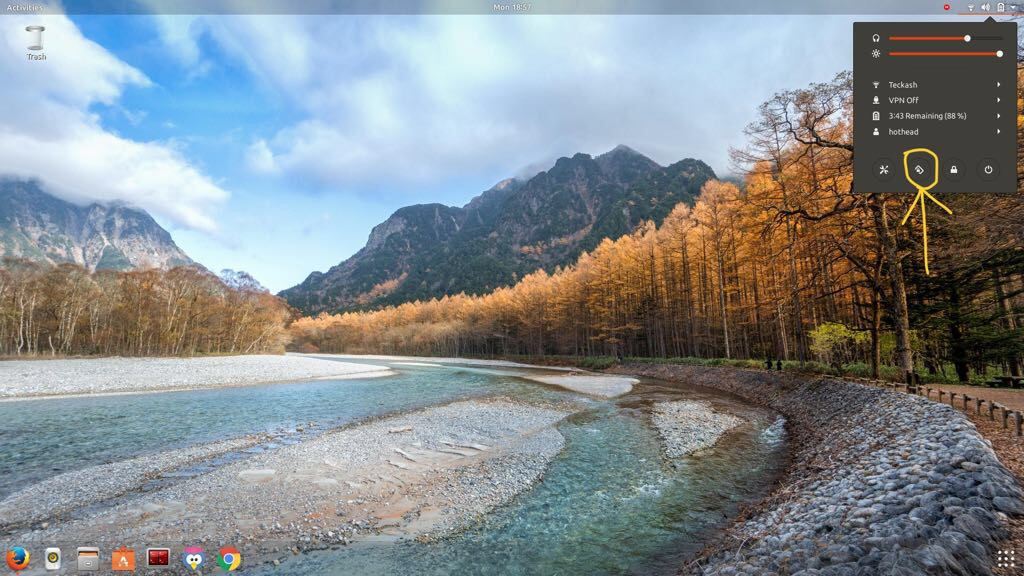
Had the same issue. Seems like a bug. I disabled the screen rotation from task bar(top right) and it went to landscape mode. Just check if this works for you. Also, xrandr does not work on Wayland.
gsettings set org.gnome.settings-daemon.peripherals.touchscreen orientation-lock true
Additionally, the below command ought to disable the orientation plugin completely.
gsettings set org.gnome.settings-daemon.plugins.orientation active false
Also, gnome provides an option to rotate the screen fromSettings->Devices->Displays->Orientationsetting (search fordisplaysinActivities)
gsettings set org.gnome.settings-daemon.plugins.orientation active false
gsettings set org.gnome.settings-daemon.peripherals.touchscreen orientation-lock true
xrandr -o left- $ xrandr -o left 向左旋转90度
- $ xrandr -o right 向右旋转90度
- $ xrandr -o inverted 上下翻转
- $ xrandr -o normal 回到正常角度
Type below command to switch to normal screen
$ xrandr -o normal
Try this command to stop and disable
$ sudo systemctl stop iio-sensor-proxy.service
$ sudo systemctl disable iio-sensor-proxy.service
Try this command to remove
$ sudo apt-get remove iio-sensor-proxy
win + o screen lock
sudo systemctl stop iio-sensor-proxy.service
sudo systemctl disable iio-sensor-proxy.service
sudo apt-get remove iio-sensor-proxy
安装好ubuntu 18.10之后,屏幕一直在自动旋转,怎么办?的更多相关文章
- Ubuntu 18.10 安装PDF阅读器
======================================== 软件开发转移到了 Linux上,使用Ubuntu 18.10作为桌面开发环境 下面介绍 安装PDF阅读器 1.下载 福 ...
- 解决 Ubuntu 18.10 使用较新的独立显卡输出无法初始化图形界面并配置深度学习开发环境
原文地址:解决 Ubuntu 18.10 使用较新的独立显卡输出无法初始化图形界面并配置深度学习开发环境 0x00 配置 硬件 OS: Ubuntu 18.10 Base Board: ASUS WS ...
- Ubuntu 18.10 版本发布
Ubuntu 是一个基于 Debian 的以桌面为主的 Linux 发行版,以其应用性而闻名.Ubuntu 提供三种官方版本:用于个人计算机的 Ubuntu 桌面,用于服务器和云的 Ubuntu 服务 ...
- Debian 9 / Debian 10 / Ubuntu 18.04 / Ubuntu 18.10快速开启BBR加速 或 关闭BBR加速
如果使用的是Debian 9.Debian 10.Ubuntu 18.04.Ubuntu 18.10等内核高于4.9版本的系统,均可以使用此方法开启BBR加速,若你使用了Ubuntu 19.04的系统 ...
- 从Ubuntu 18.04 LTS升级到Ubuntu 18.10版本的方法
从Ubuntu 18.04 LTS升级到Ubuntu 18.10版本的方法 2018-10-18 21:08:39作者:ywnz稿源:云网牛站 本文提供从Ubuntu 18.04 LTS(Bionic ...
- 一看就懂的 安装完ubuntu 18.04后要做的事情和使用教程
一看就懂的 安装完ubuntu 18.04后要做的事情和使用教程原创CrownP 最后发布于2019-02-05 00:48:30 阅读数 2982 收藏展开1.更改为阿里云的源点击软件和更新 点击其 ...
- Ubuntu 18.10 安装之后做的一点事
sb_release -c //查看系统代号 #更新源/etc/apt/sources.list //打开更新目录 deb https://linux.xidian.edu.cn/mirrors/ub ...
- VMware Tools的简易安装---解决Ubuntu 14.10不能满屏显示问题
由于使用的VMware WorkStation是中文破解版,安装时又是简易安装,因此VMware Tools并没有安装上,导致Ubuntu 14.10在VMware中装上之后,并不能满屏显示,如图1所 ...
- TensorFlow安装教程(ubuntu 18.04)
此教程的硬件条件: 1.Nvidia GPU Geforce390及以上 2.Ubuntu 18.04操作系统 3.Anaconda工具包 如果python版本为3.7及以上,使用如下命令降级到3.6 ...
随机推荐
- 2018 Multi-University Training Contest 9 杭电多校第九场 (有坑待补)
咕咕咕了太久 多校博客直接从第三场跳到了第九场orz 见谅见谅(会补的!) 明明最后看下来是dp场 但是硬生生被我们做成了组合数专场…… 听说jls把我们用组合数做的题都用dp来了遍 这里只放了用组 ...
- HTTP笔记01-http相关的基础知识
这个系列文章是阅读<图解HTTP>后写下的笔记 当我们在浏览器输入url,点击回车后,浏览器显示我们需要的web页面,那么,这个界面是如何产生的? 根据浏览器地址中输入的url,浏览器从相 ...
- python3+requests库框架设计04-配置文件
python3配置文件的增删改查等操作可以使用内置的ConfigParser模块,可以自行百度学习,也可以看Python3学习笔记27-ConfigParser模块 配置文件一般存放着环境信息,比如u ...
- 增加一台web机注意事项
2017年4月18日 15:23:57 星期二 增加一台web机时, 先不要挂载进lb 1. 需要将此机器的ip加入到其它服务的白名单内: 数据库, 缓存, 第三方接口等 2. 绑定hosts, 点点 ...
- bootstrap Autocomplete
首先应用文件(已上传到文件,需要可自行下载) <link href="~/bower_components/select2/dist/css/select2.css" rel ...
- js混淆、eval解密
js中的eval()方法就是一个js语言的执行器,它能把其中的参数按照JavaScript语法进行解析并执行,简单来说就是把原本的js代码变成了eval的参数,变成参数后代码就成了字符串,其中的一些字 ...
- 改造 Android 官方架构组件 ViewModel
前言 Android 官方架构组件在今年 5 月份 Google I/O 大会上被公布, 直到 11 月份一直都是测试版, 由于工作比较繁忙, 期间我只是看过类似的文章, 但没有在实际项目中使用过, ...
- 软件测试作业 - fault error failure
给出的题目如下: 我的解答如下: For program 1:1. where i > 0 is the fault , it should be changed to i>= 0 to ...
- Ehcache
前言:设计一套缓存框架需要关注的要素 本文来源:RayChase 的<设计一套缓存框架需要关注的要素> 最近关注了一些缓存框架的特性和实现,包括OSCache.JCS.Ehcache.M ...
- Confluence 6 指定日志选项和已知问题
指定 Confluence 日志选项 这里是一些特定的日志配置,你可能在对问题进行调试的时候需要. 在日志中记录数据库使用的 SQL 查询请求 你可能希望增加日志的中的内容,记录 Confluence ...