
通过view实现rest api接口
Django rest framwork之view
基于Django的View实现Json数据的返回:
# _*_ encoding:utf-8 _*_

__author__ = 'LYQ'

__data__ = '2018/8/13 15:21'

import json

from django.views.generic.base import View

from django.http import HttpResponse,JsonResponse

from .models import *

class GoodsView(View):

    def get(self,request):

       good_list=Goods.objects.all()[:10]

       datas=[]

       # for good in good_list:

       #     json_dict = {}

       #     json_dict['name']=good.name

       #     json_dict['goods_desc']=good.goods_desc

       #     json_dict['category']=good.category.name

       #     json_dict['shop_price']=good.shop_price

       #     #时间不是json序列化的对象

       #     json_dict['time']=good.add_time

       #     datas.append(json_dict)

       #直接序列化

       from django.forms.models import model_to_dict

       #用来做序列化

       from django.core import serializers

       datas=[]

       for good in good_list:

           #image和datetime不能序列化

          data=model_to_dict(good)

          datas.append(data)

       datas=serializers.serialize('json',good_list)

       datas=json.loads(datas)

       # return HttpResponse(datas,content_type='application/json')

       return JsonResponse(datas,safe=False)
Django rest framwork的简单介绍及安装(可参考官方网站):
Django REST框架是用于构建Web API的强大而灵活的工具包。
您可能希望使用REST框架的一些原因:
- 该网站可浏览API是你的开发人员一个巨大的可用性胜利。
- 身份验证策略包括OAuth1a和OAuth2的程序包。
- 支持ORM和非ORM数据源的序列化。
- 可自定义 - 如果您不需要更强大的功能,只需使用常规的基于功能的视图。
- 丰富的文档和良好的社区支持。
- 受到国际知名公司的使用和信任,包括Mozilla,Red Hat,Heroku和Eventbrite。
要求
REST框架需要以下内容:
- Python(2.7,3.4,3.5,3.6,3.7)
- Django(1.11,2.0,2.1)
以下包是可选的:
- coreapi(1.32.0+) - 模式生成支持。
- Markdown(2.1.0+) - Markdown对可浏览API的支持。
- django-filter(1.0.1+) - 过滤支持。
- django-crispy-forms - 改进的HTML显示以进行过滤。
- django-guardian(1.1.1+) - 对象级权限支持。
安装
使用安装pip,包括您想要的任何可选包...
pip install djangorestframework

pip install markdown       # Markdown support for the browsable API.

pip install django-filter  # Filtering support
...或者从github克隆项目。
git clone git@github.com:encode/django-rest-framework.git添加'rest_framework'到您的INSTALLED_APPS设置。
INSTALLED_APPS = (

    ...

    'rest_framework',

)
如果您打算使用可浏览的API,您可能还需要添加REST框架的登录和注销视图。将以下内容添加到根urls.py文件中。
urlpatterns = [

    ...

    url(r'^api-auth/', include('rest_framework.urls'))

]
请注意,URL路径可以是您想要的任何内容。
例
让我们看一个使用REST框架构建一个简单的模型支持的API的快速示例。
我们将创建一个读写API,用于访问有关项目用户的信息。
REST框架API的任何全局设置都保存在名为的单个配置字典中REST_FRAMEWORK。首先将以下内容添加到settings.py模块中:
REST_FRAMEWORK = {

    # Use Django's standard `django.contrib.auth` permissions,

    # or allow read-only access for unauthenticated users.

    'DEFAULT_PERMISSION_CLASSES': [

        'rest_framework.permissions.DjangoModelPermissionsOrAnonReadOnly'

    ]

}
别忘了确保你也加入rest_framework了INSTALLED_APPS。我们现在准备创建我们的API了。
注:如果出现utf8 decode的错误,把虚拟环境中的\Lib\site-packages\pip\compat中的_init_.py的75行中的utf8改成gbk从新安装即可。
一.ApiView方式实现api
1.serializers:
#form对应:Serializer,modelform:ModelSerializer

from rest_framework import serializers

from .models import *

class GoodsSerializer(serializers.Serializer):

    name = serializers.CharField(required=True,max_length=100)

    click_num = serializers.IntegerField(default=0)

    goods_front_image=serializers.ImageField()

    add_time=serializers.DateTimeField()

    def create(self, validated_data):

        return Goods.objects.create(**validated_data)
2.views:
from rest_framework.views import APIView
#状态码
from rest_framework import status

from .models import *

from .serializers import GoodsSerializer
from rest_dramework.response import Reaponse

class GoodsListView(APIView):

    """

    List all snippets, or create a new snippet.

    """

    def get(self, request, format=None):

        goods = Goods.objects.all()
#many=True,goods是一个列表

        goods_serializer = GoodsSerializer(goods, many=True)

        return Response(goods_serializer.data)

    def post(self,request,format=None):

        serializer=GoodsSerializer(data=request.data)
#验证字段是否合法

        if serializer.is_valid():

           serializer.save()

           return Response(request.data,status=status.HTTP_201_CREATED)

        return Response(request.data,status=status.HTTP_400_BAD_REQUEST)
3.ModelSerializer:
class GoodsSerializer(serializers.ModelSerializer):

    # 替换默认的category

    category = GoodsCategorySerializer()

    # 可能有多条many=True

    images = GoodsImageSerializer(many=True)

    class Meta:

        model = Goods

        # fields=('name','click_num','market_price','add_time','goods_front_image')

        # 外键为id,想要完整信息,嵌套Serializer

        fields = ('__all__')
二.GenericView方式实现api接口
from rest_framework import mixins

from rest_framework import generics

#基于mixins,必须重载get函数

 class GoodsListView(mixins.ListModelMixin,generics.GenericAPIView):

     """

     商品详情页

     """

     queryset = Goods.objects.all()[:10]

     serializer_class = GoodsSerializer

     #必须重写,不然默认无法接受get请求

     def get(self, request, *args, **kwargs):

         return self.list(request, *args, **kwargs)
三.Viewset和router实现api接口和配置
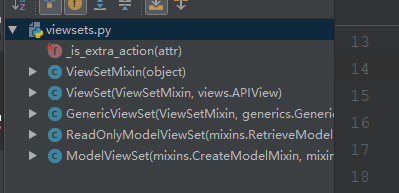
1.viewset中的view:
2.GenericViewset:
继承了ViewSetMixin和GenericAPIView,ViewSetMixin重写了as_view方法,initialize_request方法,initialize_request方法设置了很多action,在动态使用serializer时有很多的好处

class ViewSetMixin(object):

    """

    This is the magic.

    Overrides `.as_view()` so that it takes an `actions` keyword that performs

    the binding of HTTP methods to actions on the Resource.

    For example, to create a concrete view binding the 'GET' and 'POST' methods

    to the 'list' and 'create' actions...

    view = MyViewSet.as_view({'get': 'list', 'post': 'create'})

    """

    @classonlymethod

    def as_view(cls, actions=None, **initkwargs):

        """

        Because of the way class based views create a closure around the

        instantiated view, we need to totally reimplement `.as_view`,

        and slightly modify the view function that is created and returned.

        """

        # The suffix initkwarg is reserved for displaying the viewset type.

        # eg. 'List' or 'Instance'.

        cls.suffix = None

        # The detail initkwarg is reserved for introspecting the viewset type.

        cls.detail = None

        # Setting a basename allows a view to reverse its action urls. This

        # value is provided by the router through the initkwargs.

        cls.basename = None

        # actions must not be empty

        if not actions:

            raise TypeError("The `actions` argument must be provided when "

                            "calling `.as_view()` on a ViewSet. For example "

                            "`.as_view({'get': 'list'})`")

        # sanitize keyword arguments

        for key in initkwargs:

            if key in cls.http_method_names:

                raise TypeError("You tried to pass in the %s method name as a "

                                "keyword argument to %s(). Don't do that."

                                % (key, cls.__name__))

            if not hasattr(cls, key):

                raise TypeError("%s() received an invalid keyword %r" % (

                    cls.__name__, key))

        def view(request, *args, **kwargs):

            self = cls(**initkwargs)

            # We also store the mapping of request methods to actions,

            # so that we can later set the action attribute.

            # eg. `self.action = 'list'` on an incoming GET request.

            self.action_map = actions

            # Bind methods to actions

            # This is the bit that's different to a standard view

            for method, action in actions.items():

                handler = getattr(self, action)

                setattr(self, method, handler)

            if hasattr(self, 'get') and not hasattr(self, 'head'):

                self.head = self.get

            self.request = request

            self.args = args

            self.kwargs = kwargs

            # And continue as usual

            return self.dispatch(request, *args, **kwargs)

        # take name and docstring from class

        update_wrapper(view, cls, updated=())

        # and possible attributes set by decorators

        # like csrf_exempt from dispatch

        update_wrapper(view, cls.dispatch, assigned=())

        # We need to set these on the view function, so that breadcrumb

        # generation can pick out these bits of information from a

        # resolved URL.

        view.cls = cls

        view.initkwargs = initkwargs

        view.suffix = initkwargs.get('suffix', None)

        view.actions = actions

        return csrf_exempt(view)

    def initialize_request(self, request, *args, **kwargs):

        """

        Set the `.action` attribute on the view, depending on the request method.

        """

        request = super(ViewSetMixin, self).initialize_request(request, *args, **kwargs)

        method = request.method.lower()

        if method == 'options':

            # This is a special case as we always provide handling for the

            # options method in the base `View` class.

            # Unlike the other explicitly defined actions, 'metadata' is implicit.

            self.action = 'metadata'

        else:

            self.action = self.action_map.get(method)

        return request

    def reverse_action(self, url_name, *args, **kwargs):

        """

        Reverse the action for the given `url_name`.

        """

        url_name = '%s-%s' % (self.basename, url_name)

        kwargs.setdefault('request', self.request)

        return reverse(url_name, *args, **kwargs)

    @classmethod

    def get_extra_actions(cls):

        """

        Get the methods that are marked as an extra ViewSet `@action`.

        """

        return [method for _, method in getmembers(cls, _is_extra_action)]
3.继承genericviewset的view写法:
GenericViewSet继承于GnericAPIView,没有重写get,post等方法,因此还需要继承mixin
class GoodsListViewSet(mixins.ListModelMixin,mixins.RetrieveModelMixin,viewsets.GenericViewSet):

    """

    商品详情页,分页,搜索,过滤,排序

    """

    #配置ip限制访问次数

    throttle_classes = (UserRateThrottle,AnonRateThrottle)

    queryset = Goods.objects.all()

    serializer_class = GoodsSerializer

    #分页

    pagination_class = GoodsPagination

    #配置认证类,防止公开网页(未登录可查看)不能访问

    # authentication_classes = (TokenAuthentication,)

    filter_backends=(DjangoFilterBackend,filters.SearchFilter,filters.OrderingFilter)

    #字段过滤(DjangoFilterBackend)

    # filter_fields = ('name', 'shop_price')

    filter_class=GoodsFilter

    #搜索过滤(rest_framework.filters.SearchFilter)

    search_fields = ('name','goods_brief','goods_desc')

    #排序过滤(rest_frameworkfilters.OrderingFilter)

    ordering_fields = ('sold_num', 'shop_price')

    def retrieve(self, request, *args, **kwargs):

        instance = self.get_object()

        instance.click_num+=1

        instance.save()

        serializer = self.get_serializer(instance)

        return Response(serializer.data)
viewset和router配套使用:
第一种:配置url:
 #在url.py文件中

 #配置GoodsListViewSet

  good_list=GoodsListViewSet.as_view({

 #把get请求绑定到list方法上

          'get':'list',

      })

 urlpatterns = [

 #把good_list放入url中

  url('^goods/$',good_list,name='good_list'),

 ]
第二种:(使用router)
from rest_framework.routers import DefaultRouter

router = DefaultRouter()

# 配置goods的url

router.register(r'goods', GoodsListViewSet, base_name='goods')

#在调用router.urls时会自动把router中转换为url配置

urlpatterns = [

url('^', include(router.urls)),

]
四.View继承关系
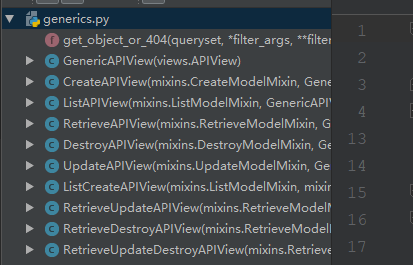
1.View继承关系(差异就是不同的mixin):
GnericViewSet(drf)【比GnericAPIView继承增加了一个ViewSetMixin,在url中绑定了,router可以使用,还有实现了initialize_request方法设置了很多action方便不同serializer的使用】———>GnericAPIView(drf)【增加了筛选过滤分页,serializer等】———>APIView(drf)———>View(django)
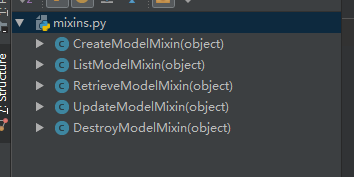
2.mixin:
CreateModelMixin
ListModelMixin
RetrieveModelMixin
UpdateModelMixin
DestroyModelMIxin
意境定制好了的view组合(继承GericAPIView不同的mixin实现不同的功能):
通过view实现rest api接口的更多相关文章
- 干货来袭-整套完整安全的API接口解决方案
在各种手机APP泛滥的现在,背后都有同样泛滥的API接口在支撑,其中鱼龙混杂,直接裸奔的WEB API大量存在,安全性令人堪优 在以前WEB API概念没有很普及的时候,都采用自已定义的接口和结构,对 ...
- Yii2 基于RESTful架构的 advanced版API接口开发 配置、实现、测试 (转)
环境配置: 开启服务器伪静态 本处以apache为例,查看apache的conf目录下httpd.conf,找到下面的代码 LoadModule rewrite_module modules/mod_ ...
- 不使用jQuery对Web API接口POST,PUT,DELETE数据
前些天,Insus.NET有演示Web API接口的操作: <怎样操作WebAPI接口(显示数据)>http://www.cnblogs.com/insus/p/5670401.html ...
- 总结的一些微信API接口
本文给大家介绍的是个人总结的一些微信API接口,包括微信支付.微信红包.微信卡券.微信小店等,十分的全面,有需要的小伙伴可以参考下. 1. [代码]index.php <?php include ...
- Yii2 基于RESTful架构的 advanced版API接口开发 配置、实现、测试
环境配置: 开启服务器伪静态 本处以apache为例,查看apache的conf目录下httpd.conf,找到下面的代码 LoadModule rewrite_module modules/mod_ ...
- Yii2 基于RESTful架构的 advanced版API接口开发 配置、实现、测试【转】
环境配置: 开启服务器伪静态 本处以apache为例,查看apache的conf目录下httpd.conf,找到下面的代码 LoadModule rewrite_module modules/mod_ ...
- K/3 Cloud Web API接口说明文
K/3 Cloud Web API接口说明文 目的 三方集成,提供第三方系统与Cloud集成调用接口. 技术实现 HTTP + Json 提供标准接口 编号 名称 说明 1 Kingdee.BOS.W ...
- API接口认证
restful API接口可以很方便的让其他系统调用,为了让指定的用户/系统可以调用开放的接口,一般需要对接口做认证; 接口认证有两种方式: 1.认证的token当做post/get的参数,serve ...
- 微信小程序通过api接口将json数据展现到小程序示例
这篇文章主要介绍了微信小程序通过api接口将json数据展现到小程序示例,小编觉得挺不错的,现在分享给大家,也给大家做个参考.一起跟随小编过来看看吧实现知乎客户端的一个重要知识前提就是,要知道怎么通过 ...
随机推荐
- 【css】3d导航效果
<!doctype html> <html lang="en"> <head> <meta charset="UTF-8&quo ...
- 深入理解Redis Cluster
Redis Cluster采用虚拟槽分区,所有的key根据哈希函数映射到0~16383槽内,计算公式: slot = CRC16(key) & 16383 每个节点负责维护一部分槽以及槽所映射 ...
- js、jquery实现放大镜效果
在一些电商网站的商品详情页面,都会有放大镜效果,实现起来并不是很困难,今天用了两个小时,写了一个放大镜效果的实例,来分享给大家! 实现的效果大概是这个样子的 预览 先来看一下效果吧,点击下面的链接预览 ...
- 重装mysql后导致Navicat连接失败
今天重装了mysql数据库,然后再使用navicat去连接数据库的时候,一直报错 1251 Client does not support authentication protocol reques ...
- Cat8 八类网线是什么?与Cat5、Cat6、Cat7网线的区别?
若您身处于网络通信行业,相信您应该了解一些以太网线缆,比如说超五类网线.六类网线和七类网线等等.但是您知道Cat8 八类网线 是什么吗?它与五类网线.六类/超六类网线及七类/超七类网线有着怎么样的区别 ...
- C#中委托,匿名函数,lamda表达式复习
一.委托 1.就给类比较,类用class声明,委托用delegate声明. 2.委托要指向一个真正的方法. 3.委托的签名,要和指向的方法一样. //1.声明一个委托 public delegate ...
- 一些leetcode算法题
DFS算法 思想:一直往深处走,直到找到解或者走不下去为止 DFS(dep,...) // dep代表目前DFS的深度 { if (找到解或者走不下去了){ return; } 枚举下种情况,DFS( ...
- H5 34-背景图片
<!DOCTYPE html> <html lang="en"> <head> <meta charset="UTF-8&quo ...
- vue组件化开发组件拆分原则是什么
原则:可复用.可组合: 两大类:页面组件.功能组件: 除了公共头导航.侧导航.脚部内容,还有:
- hdu 4135 a到b的范围中多少数与n互质(容斥)
Co-prime 题目链接:http://acm.hdu.edu.cn/showproblem.php?pid=4135 input The first line on input contains ...