
QThread
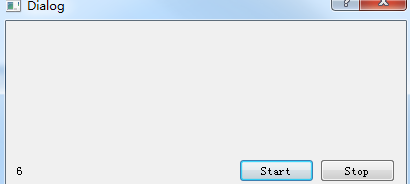
#ifndef MYTHREAD_H
#define MYTHREAD_H
#include<QThread>
class MyThread : public QThread
{
Q_OBJECT
public:
explicit MyThread(QObject *parent = 0);
void run();
bool Stop;
signals:
void NumberChanged(int);
public slots:
};
#endif // MYTHREAD_H
#ifndef DIALOG_H

#define DIALOG_H

#include "mythread.h"

#include <QDialog>

#include<QLabel>

namespace Ui {

class Dialog;

}

class Dialog : public QDialog

{

    Q_OBJECT

public:

    explicit Dialog(QWidget *parent = 0);

    ~Dialog();

    MyThread *mThread;

private:

    Ui::Dialog *ui;

public slots:

    void  onNumberChanged(int);

private slots:

    void on_pushButton_clicked();

    void on_pushButton_2_clicked();

};

#endif // DIALOG_H
#include "dialog.h"

#include "ui_dialog.h"

#include<QLabel>

Dialog::Dialog(QWidget *parent) :

    QDialog(parent),

    ui(new Ui::Dialog)

{

    ui->setupUi(this);

    mThread = new MyThread(this);

    connect(mThread,SIGNAL(NumberChanged(int)),this, SLOT(onNumberChanged(int)));

}

Dialog::~Dialog()

{

    delete ui;

}

void Dialog::onNumberChanged(int Number)

{

    ui->label->setText(QString::number(Number));

}

void Dialog::on_pushButton_clicked()

{

    //started

    mThread->start();

}

void Dialog::on_pushButton_2_clicked()

{

    mThread->Stop = true;

}
#include "dialog.h"

#include <QApplication>

int main(int argc, char *argv[])

{

    QApplication a(argc, argv);

    Dialog w;

    w.show();

    return a.exec();

}
#include "mythread.h"

#include <QThread>

MyThread::MyThread(QObject *parent) : QThread(parent)

{

}

void MyThread::run()

{

    this->Stop = false;

    for(int i = 0; i < 10000;i++)

    {

        QMutex mutex;

        mutex.lock();

        if(this->Stop) break;

        mutex.unlock();

        emit NumberChanged(i);

        this->msleep(1000);

    }

}
QThread的更多相关文章
- Qt - QThread(翻译帮助文档)
QThread Class 详细描述 QThread 类提供一个平台无关的方法来管理线程. 一个QThread对象管理一个程序中的控制线程.QThread在run()中开始执行任务.默认地,run() ...
- pyqt4:在线程Qthread中使用定时器Qtimer
GUI main 部分,主app类中的__init__初始化方法中添加 实例化线程 self.s2_thread=Worker2() 初始化一个定时器 self.log_get=QtCore.QTim ...
- Qt QThread 多线程使用
一.继承QThread 使用方法 1.创建个继承QThread的类. #ifndef MYTHREAD_H #define MYTHREAD_H #include <QObject> #i ...
- Pyqt Smtplib实现Qthread多线程发送邮件
一. smtplib 的介绍 smtplib.SMTP([host[, port[, local_hostname[, timeout]]]]) SMTP类构造函数,表示与SMTP服务器之间的连接 ...
- Qt线程(2) QThread中使用WorkObject
一般继承QThread的WorkThread都会在重载的run()中创建临时的WorkObject,这样能确定这个WorkObject在该thread中使用 那如果这个WorkObject是个Sing ...
- [转] - QThread应用探讨
QThread 似乎是很难的一个东西,特别是信号和槽,有非常多的人(尽管使用者本人往往不知道)在用不恰当(甚至错误)的方式在使用 QThread,随便用google一搜,就能搜出大量结果出来.无怪乎Q ...
- Qt之QThread(深入理解)
简述 为了让程序尽快响应用户操作,在开发应用程序时经常会使用到线程.对于耗时操作如果不使用线程,UI界面将会长时间处于停滞状态,这种情况是用户非常不愿意看到的,我们可以用线程来解决这个问题. 前面,已 ...
- 【转】Qt多线程操作界面---在QThread更新QProgressBar
#include <QApplication> #include <QThread> #include <QMainWindow> #include <QPr ...
- QThread与QWidget使用
本文主要内容: 在任务一中,用 四 种方式实现:点击界面按钮,开线程运行一段程序,结果显示在一个Label上.1. 用不正确的方式得到看似正确的结果2. 用Qt Manual 和 例子中使用的方法3. ...
随机推荐
- [R]R的工作流
最近处理数据时,一直在纠结程序的结构该如何构建,以减少很多简单又很耗时的工作. 刚好把Rob J Hyndman的blog给浏览了一遍,发现一篇2009年的文章,很有启发. 原文: Workflow ...
- XCOJ 1103 (LCA+树链最大子段和)
题目链接: http://xcacm.hfut.edu.cn/problem.php?id=1103 题目大意:链更新.链查询,求树链的最大子段和.(子段可以为空) 解题思路: 将所有Query离线存 ...
- ACM zb的生日
zb的生日 时间限制:3000 ms | 内存限制:65535 KB 难度:2 描述 今天是阴历七月初五,acm队员zb的生日.zb正在和C小加.never在武汉集训.他想给这两位兄弟买点什么 ...
- 转:Web页面通过URL地址传递参数常见问题及检测方法
Web页面即我们在浏览器中所看到的网页,在Web应用程序中,其页面往往需要进行动态切换和数据交互,页面间的数据常规传递方法有多种,本文主要介绍Web页面处理程序中常见的URL地址参数传递方法,包括概述 ...
- 【BZOJ1270】1270: [BeijingWc2008]雷涛的小猫 DP
Description Input Output Sample Input Sample Output 8 HINT Source 唉这么蠢的Dp没一下子看出来,Dp真是太弱了啦. #includ ...
- 【JAVA】JAVA 反射
在Java反射机制中,需要掌握的知识有: (1)掌握反射机制的概述. (2)能够使用Class类并结合java.lang.reflect包取得一个类的完整结构. ...
- FMS直播流发布时 Microphone Speex 编码设置注意事项
1.为何要用 Speex?FP的默认音频编码是 NellyMoser,而FP10之后加入了 Speex.实际应用中,用默认的 NellyMoser 编码音频,会有个很大的问题,就是无法控制流码率浮动. ...
- nodejs入门(一)
1.nodejs简介 Nodejs不是一个js应用.而是一个js运行平台. Node.js 使用事件驱动, 非阻塞I/O 模型而得以轻量和高效 2. 1).Nodejs内置了一个HTTP模块 var ...
- 常见MVC框架比较
常见MVC框架比较 运行性能上: Jsp+servlet>struts1>spring mvc>struts2+freemarker>>struts2,ognl,值栈. ...
- c++ 符号执行顺序小例子
if ( a[i] == b[i] && ++i < 0) 这个表达式的执行顺序 1. ; )// 输出 True cout<<"True"&l ...