
C/C++与Matlab混合编程
Matlab 拥有丰富的功能,编程简单。不过,有些情况下,Matlab程序的执行速度比较慢。C/C++编译执行的程序速度比较快,编程难度上比Matlab要高一些。因此存在一种方案,就是使用Matlab实现我们的实验程序,用C/C++来实现Matlab程序中比较耗时的部分,从Matlab程序中调用C/C++的程序以实现加速。
Visual C++ 2015
1:配置环境
1.1:在vc++目录中
包含目录:(1):生成的mydll.h所在目录。
(2):matlab 内的include目录。
Include files
D:\Program Files\MATLAB\R2012a\extern\include
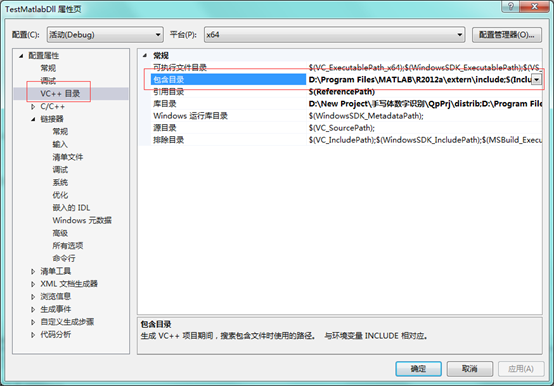
库目录:(1):mydll.lib所在目录。
(2):matlab的lib目录。
Library files
D:\New Project\手写体数字识别\QpPrj\distrib
D:\Program Files\MATLAB\R2012a\extern\lib\win64\microsoft

1.2:在连接器-》输入-》附加依赖项
mclmcrrt.lib
libmx.lib
libmat.lib
mclmcr.lib
QpPrj.lib
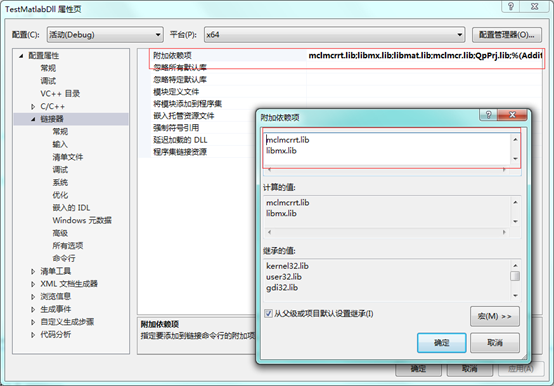
将编译好的dll复制到VC工程的Debug或者Release目录下,以使得dll可以被找到。还要把编译生成的QpPrj.h文件拷贝到VC工程里
代码实现:
#include <iostream>

#pragma comment(lib,"QpPrj.lib")

#include "QpPrj.h"

#include "mclmcr.h"

#include "matrix.h"

#include "mclcppclass.h"

using namespace std;

int main(int argc, char* argv[])

{

	// 初始化

	if (!QpPrjInitialize())

	{

		printf("Could not initialize !");

		return -1;

	}

	// 1.调用MyAdd

	double a = 6;

	double b = 9;

	double c;

	// 为变量分配内存空间

	mwArray mwA(1, 1, mxDOUBLE_CLASS); // 1,1表示矩阵的大小(所有maltab只有一种变量,就是矩阵,为了和Cpp变量接轨,设置成1*1的矩阵,mxDOUBLE_CLASS表示变量的精度)

	mwArray mwB(1, 1, mxDOUBLE_CLASS);

	mwArray mwC(1, 1, mxDOUBLE_CLASS);

	// set data,调用类里面的SetData函数给类赋值

	mwA.SetData(&a, 1);

	mwB.SetData(&b, 1);

	// using my add,掉我自己写的函数

	// 调用示例: extern LIB_QpPrj_CPP_API void MW_CALL_CONV MyAdd(int nargout, mwArray& c, const mwArray& a, const mwArray& b);

	MyAdd(1, mwC, mwA, mwB);

	// get data,调用类里面的Get函数获取取函数返回值

	c = mwC.Get(1, 1);

	printf("c is %f\n", c);

	// 2.调用TestChar

	// extern LIB_QpPrj_CPP_API void MW_CALL_CONV TestChar(int nargout, mwArray& result, const mwArray& char0)

	double d = 4;

	double e;

	// 为变量分配内存空间

	mwArray mwInput(1, 1, mxDOUBLE_CLASS);

	mwArray mwOutput(1, 1, mxDOUBLE_CLASS);

	mwInput.SetData(&d, 1);

	TestChar(1, mwOutput, mwInput);

	e = mwOutput.Get(1, 1);

	printf("e is %f\n", e);

	char training_result_path[] = "D:\\New Project\\手写体数字识别";

	char digital_img_path[] = "D:\\hh\\t_4.jpg";

	char training_result_file[] = "training_result_200_trees";

	double f;

	cout << training_result_path << endl;

	cout << digital_img_path << endl;

	cout << training_result_file << endl;

	// 为变量分配内存空间

	mwArray recognition_result(1, 1, mxDOUBLE_CLASS);

	// 调用示例:extern LIB_QpPrj_CPP_API void MW_CALL_CONV digital_recogn_9(int nargout, mwArray& recognition_result, const mwArray& training_result_path, const mwArray& digital_img_path, const mwArray& training_result_file);

	digital_recogn_9(1, recognition_result, training_result_path, digital_img_path, training_result_file);

	f = recognition_result.Get(1, 1);

	// 终止调用的程序

	QpPrjTerminate();

	// terminate MCR

	mclTerminateApplication();

	return 0;

}
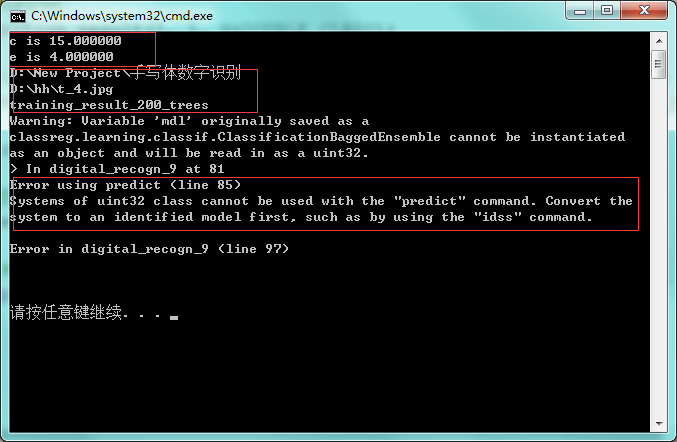
... MWMCR::EvaluateFunction error ...
Error using predict (line 85)
Systems of uint32 class cannot be used with the "predict" command. Convert the system to an identified model first, such as by using the "idss" command.
 \
\
matlab代码
digital_recogn_9.m
function [recognition_result]
= digital_recogn_9( training_result_path , digital_img_path , training_result_file )
1 training_result_path
训练库路径 ' D:\New Project\手写体数字识别'
2 digital_img_path
传入的图片路径 ' D:\hh\t_4.jpg '
3 training_result_file
训练库文件名 ' training_result_200_trees '
调用示例:
digital_recogn_9('D:\New Project\手写体数字识别','D:\hh\t_4.jpg','training_result_200_trees')
|
function [recognition_result] = digital_recogn_9( training_result_path , digital_img_path , training_result_file )
input_number = imread(digital_img_path) ;
%%%%%%%%%%%% image trsformation input_number = 255 - rgb2gray(input_number) ; threshold_noise = 35 ;
for ii = 1:size(input_number,1) for jj = 1:size(input_number,2) if input_number( ii , jj ) < threshold_noise input_number( ii , jj ) = 0; end end end
%%%%%%%%%%%%%%%%%%%%%%%% projecting_width = sum(input_number, 1); projecting_height = sum(input_number, 2);
%%%%%%% cut off the boundary boundary_width = zeros( size( projecting_width ) ); boundary_height = zeros( size( projecting_height ) ); offset_width = 3; offset_height = 3;
aa = size( boundary_width , 2) - offset_width + 1 ; boundary_width ( 1 , offset_width : aa ) = 1 ;
bb = size( boundary_height , 1) - offset_height + 1 ; boundary_height ( offset_height : bb , 1 ) = 1 ;
projecting_width = projecting_width .* boundary_width ; projecting_height = projecting_height .* boundary_height ;
%%%%%%%%%%%%%%%%%%%%%%%%%%%%%%%%%% threshold_width = max ( projecting_width ) / size(projecting_width , 2 ) ; threshold_height = max ( projecting_height ) / size(projecting_height , 1 ) ;
s1 = ( projecting_width > threshold_width ) ; new_width = sum(s1) ;
s2 = ( projecting_height > threshold_height ) ; new_height = sum(s2) ;
trimming_img = zeros( new_height , new_width ); trimming_img = uint8(trimming_img) ; counter_height =1 ; for ii=1 : (size( input_number , 1 ) - 1) %%%%%%% select qualified rows if s2( ii , 1 )==true counter_height = counter_height +1 ; end
%%%%%%% select qualified columns counter_width =1 ; for jj=1 : (size( input_number , 2 ) - 1) if s1( 1 , jj )==true counter_width = counter_width +1 ; end
%%%%% copy pixels to new image if s2( ii , 1 ) == true || s1( 1 , jj ) == true s3 = input_number( ii , jj ); trimming_img( counter_height , counter_width ) = s3; end end end
%%%%%%%%%% flatten the image edge_length =16 ; %% 16*16=256 trimming_img = imresize( trimming_img , [edge_length , edge_length] ) ; %% 暂时注释 掉 %%imshow( trimming_img ) ;
flatten_img = reshape( trimming_img , 1 , 256 ) ;
%%%%%%%%%%%%%%%%%%%%% cd( training_result_path ) %% 加上分号,训练库文件名 ' training_result_200_trees ' training_result = load( training_result_file ); Xtest = training_result.Xtest ; mdl = training_result.mdl ;
%%%%%%%%%%%%%%%%%%%%% image_set = zeros( size(Xtest) ) ; image_set = uint8( image_set );
for ii=1:size(Xtest, 1) image_set( ii , : ) = flatten_img(: , :); end
%%%% Train and Predict Using a Single Classification Tree
Xtest = double( image_set ); %%ypred = predict(mdl, Xtest); ypred = predict(mdl, Xtest);
% % Confmat_bag = confusionmat(Ytest,ypred);
%% recognition_result = ypred(1,1);
recognition_result = ypred(1,1);
end |
MyAdd.m
|
function [c] = MyAdd(a, b) %UNTITLED Summary of this function goes here % Detailed explanation goes here c = a + b;
end
|
MyChar.m
|
function [result] = MyChar(str) %UNTITLED2 Summary of this function goes here % Detailed explanation goes here result = str;
end
|
C/C++与Matlab混合编程的更多相关文章
- C++和MATLAB混合编程-DLL
先小话一下DLL,DLL是动态链接库,是源代码编译后的二进制库文件和程序接口,和静态链接库不同的是,程序在编译时并不链接动态链接库的执行体,而是在文件中保留一个调用标记,在程序运行时才将动态链接库文件 ...
- java matlab混合编程之返回值Struct类型
java matlab混合编程的时候当返回值是Struct类型(matlab中的返回类型)如何来取得(java中)其值? 上网找,看到这个网页:http://www.mathworks.cn/cn/h ...
- WPF(C#)与MATLAB混合编程
WPF(C#)与MATLAB混合编程 WPF可以为开发者提供便捷地构建用户交互界面的解决方法,而matlab则在科学计算方面有着无与伦比的优势,因此在一些需要将科学算法转换为应用软件的项目中,需要应用 ...
- VC 与Matlab混合编程之引擎操作详解
Visual C++ 是当前主流的应用程序开发环境之一,开发环境强大,开发的程序执行速度快.但在科学计算方面函数库显得不够丰富.读取.显示数据图形不方便. Matlab 是一款将数值分析.矩阵计算.信 ...
- VS/Qt C++和Matlab混合编程
最近两天在搞C++和Matlab混合编程,这个中间过程真是让人心酸啊,最后还是搞定成功!现在把这个过程记录一下. 首先自己的电脑本来就安装着matlab2013b,按着网上的说法首先需要输入!mcc, ...
- C++和MATLAB混合编程求解多项式系数(矩阵相除)
摘要:MATLAB对于矩阵处理是非常高效的,而C++对于矩阵操作是非常麻烦的,因而可以采用C++与MATLAB混合编程求解矩阵问题. 主要思路就是,在MATLAB中编写函数脚本并使用C++编译为dll ...
- matlab混合编程向导(vc,vb,.net...)
一.matlab与vc混编 1.通过mcc将matlab的m文件转化为cpp,c文件或dll供vc调用: 这方面的实现推荐精华区Zosco和ljw总结的方法(x-6-1-4-3-1和2) ...
- Matlab混合编程
Matlab混合编程 混合编程目的 在Matlab中采用混合编程目的主要包括 利用已有的函数库,避免重复工作 加速计算,特别是减少循环所用时间 利用GPU等进行异构编程 混合编程方法-mex函数 目前 ...
- C#Matlab混合编程类 初始化问题解决方法
************** 异常文本 ************** System.TypeInitializationException: “myPlus.matClass”的类型初始值设定项引发异 ...
- 国内第一部C#.Net调用Matlab混合编程视频教程
本博客所有文章分类的总目录:[总目录]本博客博文总目录-实时更新 Matlab和C#混合编程文章目录:[目录]Matlab和C#混合编程文章目录 一.视频说明 2014年的5.1,我将这套视频教 ...
随机推荐
- Apache Spark技术实战之3 -- Spark Cassandra Connector的安装和使用
欢迎转载,转载请注明出处,徽沪一郎. 概要 前提 假设当前已经安装好如下软件 jdk sbt git scala 安装cassandra 以archlinux为例,使用如下指令来安装cassandra ...
- Day2(2016/1/22)——Testing
Activity Button,Toast,Finish 显式intent 隐式明天再看…… 感觉要先补一补java……
- chomre常用快捷键
Ctrl+T 打开新标签页. 按住 Ctrl 键的同时点击链接.或用鼠标中键(或鼠标滚轮)点击链接. 从后台在新标签页中打开链接. ...
- CSS水平居中
三种情况:1.行内元素(文本.图片等) 给父元素设置text-align:center;来实现 2.定宽块状元素 <style> div{ border:1px solid blue; w ...
- Git reset 常见用法
Git reset 1. 文件从暂存区回退到工作区 2. 版本回退 1.1 git reset HEAD filename :回退文件,将文件从暂存区回退到工作区 //也可以使用 git reset ...
- Leetcode: Assign Cookies
Assume you are an awesome parent and want to give your children some cookies. But, you should give e ...
- c# 中get和post的方法
用GET发送数据则用REQUEST.QUERYSTRING[''ID'']接收 一.request.aspx 二.request.aspx.cs 三运行效果: 以下是数据发送的途径http://loc ...
- 夺命雷公狗-----React---3--标签的规则
<!DOCTYPE html> <html lang="en"> <head> <meta charset="UTF-8&quo ...
- AJAX-----04XMLHttpRequest对象的ajax
<!DOCTYPE html> <html lang="en"> <head> <meta charset="UTF-8&quo ...
- Android开发新手学习总结(一)——使用Android Studio搭建Android集成开发环境
[新手连载]一:使用Android Studio搭建Android集成开发环境http://bbs.itcast.cn/forum.php?mod=viewthread&tid=87055&a ...