
旅图——UI测试
测试目标
- 保证代码质量,确保基础功能的实现,可以有效地保证代码的可靠性,让模块在与别的模块整合时出现更少的错误,减少最终测试时查找困难无方向。
UI测试
登录过程
- 模拟登录过程,密码正确与密码错误的情况
测试代码
package com.example.asdf.test;

import android.support.test.rule.ActivityTestRule;

import android.support.test.runner.AndroidJUnit4;

import android.test.suitebuilder.annotation.LargeTest;

import org.junit.Rule;

import org.junit.Test;

import org.junit.runner.RunWith;

import static android.support.test.espresso.Espresso.onView;

import static android.support.test.espresso.action.ViewActions.click;

import static android.support.test.espresso.action.ViewActions.closeSoftKeyboard;

import static android.support.test.espresso.action.ViewActions.typeText;

import static android.support.test.espresso.matcher.ViewMatchers.withId;

@RunWith(AndroidJUnit4.class)

@LargeTest

public class loginTest {

@Rule

public ActivityTestRule<login> mActivityRule = new ActivityTestRule<>(

        login.class);

@Test

public void sayHello(){

    onView(withId(R.id.account)).perform(typeText("1234567890"), closeSoftKeyboard());

    onView(withId(R.id.password)).perform(typeText("1234567890"),closeSoftKeyboard());

    onView(withId(R.id.login)).perform(click());

}

}
测试结果
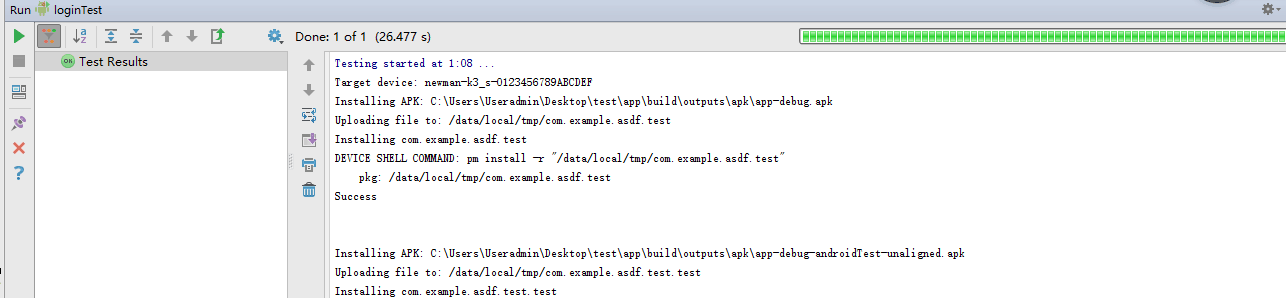
密码错误

密码正确

用户信息修改
- 模拟用户信息修改过程,修改成功
测试代码
public class modifyInformation {

@Rule

public ActivityTestRule<modifyinformation> mActivityRule = new ActivityTestRule<>(

        modifyinformation.class);

@Test

public void modify(){

    onView(withId(R.id.newusername)).perform(typeText("fire"), closeSoftKeyboard());

    onView(withId(R.id.newintroduce)).perform(typeText("233"),closeSoftKeyboard());

    onView(withId(R.id.newsubmit)).perform(click());

}

}
测试结果


测试总结
- 测试通过。由于app含有涉及到从服务器获取图片信息的功能模块与获取验证码功能,无法通过espresso进行UI自动化测试,只能进行登录过程测试展示。
旅图——UI测试的更多相关文章
- 旅图beta版 asp.net web api 单元测试
旅图 beta版 asp.net web api 单元测试 测试接口:http://120.27.7.115:1010/Help 测试目的 对每个接口单元进行测试,保证每个接口的可靠性. 单元描述 注 ...
- 使用Visual Studio 2013对windows应用商店应用进行编码的UI测试
之前进行了一次实验,实验内容是对windows应用商店应用进行编码的UI测试,下面对实验步骤进行详细说明: 1.为 Windows 应用商店应用创建新编码的 UI 测试项目,选择Visual C##→ ...
- H5测试点总结-UI测试、功能测试、兼容性测试、体验相关(弱网、资源、手机操作等)、安全性测试、性能测试
一.概述 1.1 什么是H5 H5 即 HTML5,是最新的 Web 端开发语言版本,现如今,大多数手机 APP 页面会用 H5 实现,包括 PC Web 站点也会用它开发实现.所以 Web 的通用测 ...
- Google+ 团队的 Android UI 测试
https://github.com/bboyfeiyu/android-tech-frontier/tree/master/android-blog/Google%2B%20%E5%9B%A2%E9 ...
- 《软件测试自动化之道》读书笔记 之 基于反射的UI测试
<软件测试自动化之道>读书笔记 之 基于反射的UI测试 2014-09-24 测试自动化程序的任务待测程序测试程序 启动待测程序 设置窗体的属性 获取窗体的属性 设置控件的属性 ...
- 《软件测试自动化之道》读书笔记 之 基于Windows的UI测试
<软件测试自动化之道>读书笔记 之 基于Windows的UI测试 2014-09-25 测试自动化程序的任务待测程序测试程序 启动待测程序 获得待测程序主窗体的句柄 获得有名字控件的 ...
- 《软件测试自动化之道》读书笔记 之 底层的Web UI 测试
<软件测试自动化之道>读书笔记 之 底层的Web UI 测试 2014-09-28 测试自动化程序的任务待测程序测试程序 启动IE并连接到这个实例 如何判断待测web程序完全加载到浏览 ...
- 一种新的自动化 UI 测试解决方案 Airtest Project
今天分享一个自动化UI测试工具airtest——一款网易出品的基于图像识别面向游UI测试的工具,也支持原生Android App基于元素识别的UI自动化测试.主要包含了三部分:Airtest IDE. ...
- iOS 单元测试和UI测试教程
原文:iOS Unit Testing and UI Testing Tutorial 作者:Audrey Tam 译者:kmyhy 编写测试不是为了追求刺激,测试是为了避免你崭新的 App 变成了充 ...
随机推荐
- Orchard搜索与索引
Orchard提供了索引与搜索的功能.开启Indexing属性可实现索引功能,伴随着一个特定的索引执行(默认包含基础搜索引擎).除了Indexing和Search提供查询索引的功能外(通过关键字或使用 ...
- js的日期控件
jeDate使用的时候,如果不是直接放在html中而是通过Js加载进去的,那么最好来个延迟. http://www.sucaijiayuan.com/Js/DateTime/ http://www.c ...
- GBPR: Group Preference Based Bayesian Personalized Ranking for One-Class Collaborative Filtering-IJACA 2013_20160421
1.Information publication:IJACA 2013 2.What 基于BPR模型的改进:改变BPR模型中,a,用户对商品喜好偏序对之间相互独立;b,用户之间相互独立的假设 原因: ...
- jni的使用方法
我们可以通过jni来调用c/c++程序,C/C++一般会被作为动态库的形式来供java程序调用 环境 操作系统:Centos6.7 java: openjdk7 依赖包:java7-devel(yum ...
- 【JavaScript】 闭包 我战战兢兢的接触了它
源:http://www.liaoxuefeng.com 1. 注意这里用了一个“创建一个匿名函数并立刻执行”的语法: (function (x) { return x * x; })(3); 理论上 ...
- Jquery Mobile中pageinit等函数执行两次的问题【终极解决】
当禁用了jqueryMobile的ajax后,初始化函数如pageinit和pageshow等函数,都会执行两次.document.ready函数也会执行两次. 当然我们可以用一个变量记录是否已经执行 ...
- jq 修改input 标签的值
<input type="number" id="output" placeholder="0" /> jq使用方法 $('#o ...
- overlay-1
.overlay-shadowbox{ visibility:hidden; position:absolute; display:block; margin:0; padding:0; top:0; ...
- java 枚举的常见使用方法
JDK1.5引入了新的类型-枚举,枚举的出现在日常开发中带来了极大的方便. 常用方法一:常量 JDK1.5之前我们平时定义系统常量,基本都是用public static final ... 出现枚举以 ...
- mybatis中使用使用模块化sql
主要使用到mybatis中的标签 <sql id="tempId"> select * from student <sql> 使用的标签如下: <in ...