
如何允许你的应用移动到SD卡?(转至http://blog.csdn.net/feng88724/article/details/6946670)
我们在使用Android手机时发现,有的程序允许被移动到SD卡,而有的不行?这是为什么呢?
因为在Android 2.2版之后, Android应用才被允许移动到SD卡中。而在此之前开发的应用,全部没有这个功能。
那么究竟如何允许你的应用移动到SD卡呢?答案其实很简单,只要给Manifest设置一个installLocation属性即可。
这个属性设置的是默认安装位置, 共有三个有效值,auto、internalOnly、preferExternal。
auto 表示自动,由系统决定安装位置
internalOnly 安装在手机内存
preferExternal 安装在外部存储中
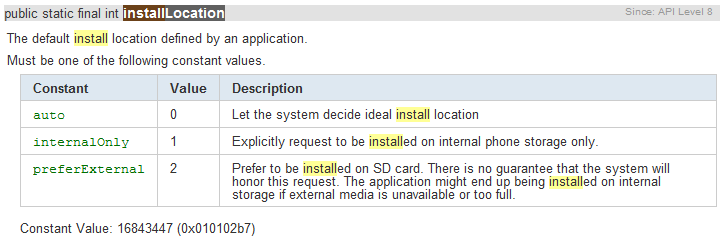
看一下修改后的AndroidManifest.xml。
- <manifest xmlns:android="http://schemas.android.com/apk/res/android"
- package="com.yfz"
- android:installLocation="auto"
- android:versionCode="1"
- android:versionName="1.0">
是不是很简单?
可能有人会问,如果我的还要支持2.1怎么办呢? 其实不用管啦,你只要设置 <uses-sdk android:minSdkVersion="7" /> 然后安装到2.1的设备上时,Android会忽略这个属性,直接给你安装到手机内存。
需要额外注意的是,并不是所有程序都适合移到SD卡上。下面就看一下,在哪些条件下,不建议允许程序移动到SD卡上。
- Applications That Should NOT Install on External Storage
- When the user enables USB mass storage to share files with their computer (or otherwise unmounts or removes the external storage), any application installed on the external storage and currently running is killed. The system effectively becomes unaware of the application until mass storage is disabled and the external storage is remounted on the device. Besides killing the application and making it unavailable to the user, this can break some types of applications in a more serious way. In order for your application to consistently behave as expected, you should not allow your application to be installed on the external storage if it uses any of the following features, due to the cited consequences when the external storage is unmounted:
- Services
- Your running Service will be killed and will not be restarted when external storage is remounted. You can, however, register for the ACTION_EXTERNAL_APPLICATIONS_AVAILABLE broadcast Intent, which will notify your application when applications installed on external storage have become available to the system again. At which time, you can restart your Service.
- Alarm Services
- Your alarms registered with AlarmManager will be cancelled. You must manually re-register any alarms when external storage is remounted.
- Input Method Engines
- Your IME will be replaced by the default IME. When external storage is remounted, the user can open system settings to enable your IME again.
- Live Wallpapers
- Your running Live Wallpaper will be replaced by the default Live Wallpaper. When external storage is remounted, the user can select your Live Wallpaper again.
- Live Folders
- Your Live Folder will be removed from the home screen. When external storage is remounted, the user can add your Live Folder to the home screen again.
- App Widgets
- Your App Widget will be removed from the home screen. When external storage is remounted, your App Widget will not be available for the user to select until the system resets the home application (usually not until a system reboot).
- Account Managers
- Your accounts created with AccountManager will disappear until external storage is remounted.
- Sync Adapters
- Your AbstractThreadedSyncAdapter and all its sync functionality will not work until external storage is remounted.
- Device Administrators
- Your DeviceAdminReceiver and all its admin capabilities will be disabled, which can have unforeseeable consequences for the device functionality, which may persist after external storage is remounted.
- Broadcast Receivers listening for "boot completed"
- The system delivers the ACTION_BOOT_COMPLETED broadcast before the external storage is mounted to the device. If your application is installed on the external storage, it can never receive this broadcast.
- Copy Protection
- Your application cannot be installed to a device's SD card if it uses Android Market's Copy Protection feature. However, if you use Android Market's Application Licensing instead, your application can be installed to internal or external storage, including SD cards.
- If your application uses any of the features listed above, you should not allow your application to install on external storage. By default, the system will not allow your application to install on the external storage, so you don't need to worry about your existing applications. However, if you're certain that your application should never be installed on the external storage, then you should make this clear by declaring android:installLocation with a value of "internalOnly". Though this does not change the default behavior, it explicitly states that your application should only be installed on the internal storage and serves as a reminder to you and other developers that this decision has been made
上面这段一定要看,很重要。 比如你的程序如果想开机自启动,那就一定不能允许移动到SD卡了。 因为开机启动的广播消息BOOT_COMPLETE在 SD 卡被装载之前就发出来了,程序根本没法收到。
好了,就写这么多了。
更多内容可以看这里: http://www.cnblogs.com/over140/archive/2011/03/21/1989891.html
如何允许你的应用移动到SD卡?(转至http://blog.csdn.net/feng88724/article/details/6946670)的更多相关文章
- 菜鸟在ubuntu 16.04下制作am335x的SD卡启动盘反思
以前只在消费电子平台android和rtos上做软件,每次都是公司的环境现成的,根本不用去想启动加载那部分 的事情,最近在做一个工控机的项目时,接触到了TI的arm335x系列的平台,才发现在嵌入式的 ...
- 模拟器下的虚拟sd卡添加文件
1.若出现mkdir failed for myData Read-only file system,在执行 adb shell 命令后,执行mount -o remount ,rw / (去除文件的 ...
- SD卡驱动学习
https://blog.csdn.net/zqixiao_09/article/category/6163492 sd 协议解析: https://blog.csdn.net/g_salamande ...
- Android将应用调试log信息保存在SD卡
转载:http://blog.csdn.net/way_ping_li/article/details/8487866 把自己应用的调试信息写入到SD卡中. package com.sdmc.hote ...
- 监听SD卡状态
最近在做项目时遇到需要处理SD卡拔出时的监听,在网上找了很多资料.总结了一下, 用接收广播处理最有效率 sd卡拔插时会发送广播,具体如下(摘自一位大虾的博客 来自:http://blog. ...
- Android入门开发之SD卡读写操作(转)
SD卡的读写是我们在开发android 应用程序过程中最常见的操作.下面介绍SD卡的读写操作方式: 1. 获取SD卡的根目录 String sdCardRoot = Environment.getE ...
- sd 卡驱动--基于高通平台
点击打开链接 内容来自以下博客: http://blog.csdn.net/qianjin0703/article/details/5918041 Linux设备驱动子系统第二弹 - SD卡 (有介绍 ...
- SD卡中FAT32文件格式快速入门(图文详细介绍)【转】
本文转自:http://blog.csdn.net/mjx91282041/article/details/8904705 说明: MBR :Master Boot Record ( 主引导记录) D ...
- Android 异步加载图片,使用LruCache和SD卡或手机缓存,效果非常的流畅
Android 高手进阶(21) 版权声明:本文为博主原创文章,未经博主允许不得转载. 转载请注明出处http://blog.csdn.net/xiaanming/article/details ...
随机推荐
- Specular Aliasing与Specular Leaking
最近做高质量实时HDR PBR渲染中碰到了2个关键问题,若干思考如下: 问题1: 极高的动态范围HDR+高级BRDF+相对较低的采样率(比方说不考虑子像素的原始分辨率),在这3项因素的综合作用下,Sp ...
- DIOCP开源项目-Delphi高性能无锁队列(lock-free)
最近想在DIOCP中加入任务调度线程,DIOCP的工作线程作为生产者(producer)将接受到的数据对象,投递到任务调度线程中,然后统一进行分配.然而这一切都需要一个队列, 这几天都在关注无锁队列. ...
- django中使用POST方法 获取POST数据
在django中获取post数据,首先要规定post发送的数据类型是什么. 1.获取POST中表单键值数据 如果要在django的POST方法中获取表单数据,则在客户端使用JavaScript发送PO ...
- VMware的快照和克隆总结
原文:https://www.cnblogs.com/zxz1987/p/6480833.html 多重快照功能简介: 快照的含义:对某一个特定文件系统在某一个特定时间内的一个具有只读属性的镜像.当 ...
- nohup 后台启动程序,并输出到指定日志
1.启动程序并输入到指定日志 nohup python manage.py runserver 0.0.0.0:9090 > /data/zyj/xadstat/xadstat.log 2&am ...
- ipconfig 命令有什么作用
ipconfig /all:显示本机TCP/IP配置的详细信息:ipconfig /release:DHCP客户端手工释放IP地址:ipconfig /renew:DHCP客户端手工向服务器刷新请求: ...
- c++之五谷杂粮---1
1. 位运算符,如果运算对象是带符号的且它的值为负,那么位运算符如何处理运算对象的“符号位”依赖于机器.此时左移操作可能会改变符号位的值,因此是一种UB. Best Practices: 关于符号位 ...
- python 下载虾米音乐
#!/usr/bin/env python2 # coding:utf-8 import urllib import re import sys import urllib2 # xml => ...
- ARKit从入门到精通(8)-ARKit捕捉平地
转载:http://blog.csdn.net/hdfqq188816190/article/details/73360287 1.1-ARKit捕捉平地实现流程介绍 1.2-完整代码 1.3-代码下 ...
- 轻量级Modal模态框插件cta.js
今天给大家分享一款轻量级Modal模态框插件cta.js.这是一款无需使用jQuery插件,纯js编写的模态框弹出特效.效果图如下: 在线预览 源码下载 实现的代码. html代码: <se ...