
SpringBoot WebSocket实现
1.添加依赖
<dependency>

            <groupId>org.springframework.boot</groupId>

            <artifactId>spring-boot-starter-websocket</artifactId>

</dependency>
2.前端代码
<!DOCTYPE html>

<html lang="en">

<head>

    <meta charset="UTF-8">

    <title>webscoket</title>

</head>

<body>

    <script>

        var websocket = null;

        if('WebSocket' in window){

            websocket = new WebSocket("ws://localhost:8080/webSocket")

        }else{

            alert("该浏览器不支持websocket")

        }

        websocket.onopen = function(event){

            console.log('建立连接')

        }

        websocket.onclose = function(event){

            console.log('连接关闭')

        }

        websocket.onmessage = function(event){

            console.log('收到消息:'+event.data)

            document.body.innerHTML=event.data

        }

        websocket.onerror = function(){

            alert("websocket发生通信错误")

        }

        websocket.onbeforeunload = function(event){

            websocket.close()

        }

    </script>

</body>

</html>
3.后台代码
WebSocketConfig.java
package com.example.demo;

import org.springframework.context.annotation.Bean;

import org.springframework.stereotype.Component;

import org.springframework.web.socket.server.standard.ServerEndpointExporter;

@Component

public class WebSocketConfig {

    @Bean

    public ServerEndpointExporter serverEndpointExporter() {

        return new ServerEndpointExporter();

    }

}
WebSocket.java
package com.example.demo;

import java.util.concurrent.CopyOnWriteArraySet;

import javax.websocket.OnClose;

import javax.websocket.OnMessage;

import javax.websocket.OnOpen;

import javax.websocket.Session;

import javax.websocket.server.ServerEndpoint;

import org.springframework.stereotype.Component;

@Component

@ServerEndpoint("/webSocket")

public class WebSocket {

    private Session session;

    private static CopyOnWriteArraySet<WebSocket> webSocketSet = new CopyOnWriteArraySet<>();

    @OnOpen

    public void onOpen(Session session) {

        this.session = session;

        webSocketSet.add(this);

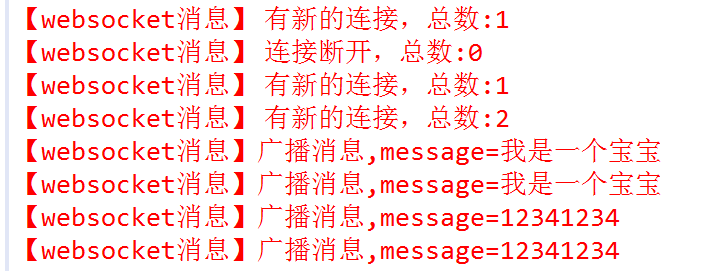
        System.err.println("【websocket消息】 有新的连接,总数:"+webSocketSet.size());

    }

    @OnClose

    public void onClose() {

        webSocketSet.remove(this);

        System.err.println("【websocket消息】 连接断开,总数:"+webSocketSet.size());

    }

    @OnMessage

    public void onMessage(String message) {

        System.err.println("【websocket消息】收到客户端发来的消息"+message);

    }

    public void sendMessage(String message) {

        for(WebSocket webSocket:webSocketSet) {

            System.err.println("【websocket消息】广播消息,message="+message);

            try {

                webSocket.session.getBasicRemote().sendText(message);

            }catch(Exception e) {

                e.printStackTrace();

            }

        }

    }

}
Controller.java
package com.example.demo;

import org.springframework.beans.factory.annotation.Autowired;

import org.springframework.web.bind.annotation.RequestMapping;

import org.springframework.web.bind.annotation.RestController;

@RestController

public class Controller {

    @Autowired

    WebSocket websocket;

    @RequestMapping("/send")

    public String send(String message) {

        websocket.sendMessage(message);

        return "测试成功";

    }

}
SpringBoot WebSocket实现的更多相关文章
- SpringBoot+WebSocket
SpringBoot+WebSocket 只需三个步骤 导入依赖 <dependency> <groupId>org.springframework.boot</grou ...
- springboot+websocket+sockjs进行消息推送【基于STOMP协议】
springboot+websocket+sockjs进行消息推送[基于STOMP协议] WebSocket是在HTML5基础上单个TCP连接上进行全双工通讯的协议,只要浏览器和服务器进行一次握手,就 ...
- SpringBoot WebSocket STOMP 广播配置
目录 1. 前言 2. STOMP协议 3. SpringBoot WebSocket集成 3.1 导入websocket包 3.2 配置WebSocket 3.3 对外暴露接口 4. 前端对接测试 ...
- Java Springboot webSocket简单实现,调接口推送消息到客户端socket
Java Springboot webSocket简单实现,调接口推送消息到客户端socket 后台一般作为webSocket服务器,前台作为client.真实场景可能是后台程序在运行时(满足一定条件 ...
- Springboot+Websocket+JWT实现的即时通讯模块
场景 目前做了一个接口:邀请用户成为某课程的管理员,于是我感觉有能在用户被邀请之后能有个立马通知他本人的机(类似微博.朋友圈被点赞后就有立马能收到通知一样),于是就闲来没事搞了一套. 涉及技术栈 ...
- Springboot+websocket+定时器实现消息推送
由于最近有个需求,产品即将到期(不同时间段到期)时给后台用户按角色推送,功能完成之后在此做个小结 1. 在启动类中添加注解@EnableScheduling package com.hsfw.back ...
- springboot+websocket 归纳收集
websocket是h5后的技术,主要实现是一个长连接跟tomcat的comet技术差不多,但websocket是基于web协议的,有更广泛的支持.当然,在处理高并发的情况下,可以结合tomcat的a ...
- springboot websocket 一篇足够了
什么是WebSocket WebSocket是一种在单个TCP连接上进行全双工通信的协议 … 为什么要实现握手监控管理 如果说,连接随意创建,不管的话,会存在错误,broken pipe 表面看单纯报 ...
- SpringBoot + WebSocket 开发笔记
1. 服务端的实现,我尝试了两种方式: 第一种是用“@ServerEndPoint”注解来实现,实现简单: 第二种稍显麻烦,但是可以添加拦截器在WebSocket连接建立和断开前进行一些额外操作. 不 ...
- springBoot -webSocket 基于STOMP协议交互
浅谈WebSocket WebSocket是在HTML5基础上单个TCP连接上进行全双工通讯的协议,只要浏览器和服务器进行一次握手,就可以建立一条快速通道,两者就可以实现数据互传了.说白了,就是打破了 ...
随机推荐
- Eclipse中tomcat设置
首先在Eclipse中新建一个tomcat的server,这里就不多说了. 新建完成后,双击新建的server,如下: 设置1:在Server Locations里,选择Use Tomcat inst ...
- CoreThink主题开发(九)使用H-ui开发博客主题之用户个人主页
感谢H-ui.感谢CoreThink! 效果图: 这里使用table布局 /Theme/Blog/User/Index/home.html <extend name="$_home_ ...
- LeetCode-11-6
1. Two Sum Given an array of integers, return indices of the two numbers such that they add up to a ...
- asp.net mvc webform和razor的page基类区别
接触过asp.net mvc的都知道,在传统的webform的模式下,page页面的基类是这样声明的: <%@ Page Language="C#" MasterPageFi ...
- Polar 投影c#版本移植
from:http://hi.baidu.com/sungaoyong/item/0c4584d25873f131e3108f05 ///刘泽军java版本的极坐标投影c#版本的移植 using Sy ...
- PAT 天梯赛 L1-009. N个数求和 【模拟】
题目链接 https://www.patest.cn/contests/gplt/L1-009 思路 每一步每一步 往上加,但是要考虑 溢出,所以用 LONG LONG 而且 每一步 都要约分 才能保 ...
- javascript;Jquery;获取JSON对象,无刷新分页,异步加载,异步删除,实例。
AjaxNewsList: <!DOCTYPE html> <html xmlns="http://www.w3.org/1999/xhtml"> < ...
- $《第一行代码:Android》读书笔记——第8章 通知和手机多媒体
本章主要介绍了通知.短信.调用摄像头和相册.播放多媒体文件等内容. (一)通知的用法 1.通知的基本用法 见如下代码(详细操作步骤在代码注释中): (1)先创建一个布局文件,其中只有一个名为“发送通知 ...
- 【HackerRank】Find the Median(Partition找到数组中位数)
In the Quicksort challenges, you sorted an entire array. Sometimes, you just need specific informati ...
- HISAT2的运用
功能: 用于有参考基因组存在的比对工具(适用于whole-genome, transcriptome, and exome sequencing data) 用法: hisat2-build [opt ...